


What is a Mind Map?
At its core, a mind map is a graphical way to represent ideas and concepts. It is a visual thinking tool that helps structure information, helping you to better analyze, comprehend, synthesize, recall, and generate new ideas. Unlike traditional note-taking or linear text, a mind map resembles the structure of a neuron, with a central concept branching out into related sub-topics.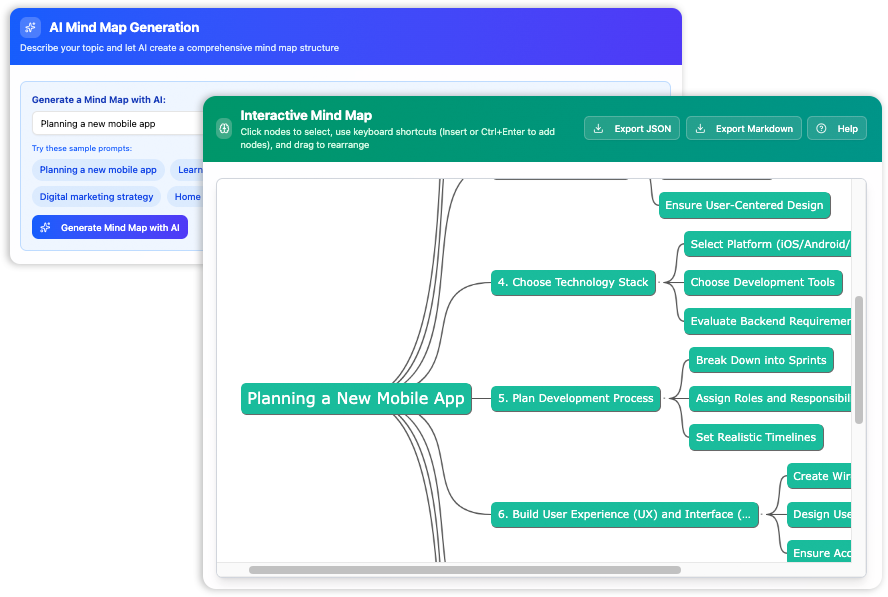
In a mind map, information is structured in a way that mirrors exactly how the brain functions—radiant rather than linear. It literally maps out your thoughts, using lines, symbols, words, color, and images according to simple, brain-friendly concepts.
Why Use Mind Mapping?
The human brain is not designed to process information in long, monotonous lists. Mind mapping is effective because it leverages the brain’s natural aptitude for visual processing. Here is why you should adopt this technique:
- Enhanced Memory Retention: The combination of words and imagery helps imprint information faster and deeper into memory.
- Improved Creativity: By breaking free from linear restrictions, your brain is free to make unique associations between seemingly unrelated concepts.
- Structural Clarity: It provides a bird’s-eye view of a vast topic, allowing you to see the hierarchy and relationships between individual pieces of data.
- Efficiency: It significantly reduces the time spent analyzing complex problems by breaking them down into manageable nodes.
When Should You Use a Mind Map?
Mind maps are versatile tools applicable in professional, educational, and personal contexts. The “When” is almost as important as the “How.”
- Project Planning: Organizing tasks, resources, and timelines in a single view.
- Brainstorming Sessions: Capturing a rapid flow of ideas during meetings without losing structure.
- Problem Solving: Deconstructing complex issues to identify root causes and potential solutions.
- Studying and Research: Summarizing books, articles, or lecture notes into a cohesive visual format.
How to Create a Mind Map: Traditional vs. AI-Assisted
Traditionally, mind mapping required a large sheet of paper and colored markers. While effective, this method lacks flexibility—moving a branch requires redrawing the entire map. In the digital age, we have transitioned to software solutions, and now, to AI-driven generation.
Comparison: Manual vs. AI Mind Mapping
| Feature | Manual / Paper | Visual Paradigm AI Tool |
|---|---|---|
| Speed | Slow, manual writing | Instant generation via AI |
| Flexibility | Static; cannot easily rearrange | Drag & drop editing |
| Clarity | Dependent on handwriting | Clean, professional layout |
| Collaboration | Difficult to share | Exportable and digital |
Revolutionize Brainstorming with Visual Paradigm AI
To truly unlock your next big idea, modern professionals are turning to AI-powered solutions. Visual Paradigm offers a free AI-assisted tool designed to transform your thoughts into structured, interactive mind maps instantly. This tool helps you brainstorm faster, organize clearer, and innovate better.
A Simple Path to Brilliant Ideas
The process of creating a comprehensive plan has been simplified into three intuitive steps:
- Enter Your Concept: You no longer need to draw nodes manually. Simply enter a prompt or a core concept. With just a few steps, you transform a spark of inspiration into a comprehensive plan.
- AI-Driven Generation: Press a button to create a detailed, interconnected mind map filled with insightful concepts. The AI analyzes your topic and suggests logical branches and sub-nodes automatically.
- Refine & Export: Polish your map using an intuitive editor. You can drag, drop, and tweak nodes to fit your specific vision, then save the output in various formats for presentation or sharing.
Inline Editing and Real-Time Adjustments
The power of the Visual Paradigm AI tool lies not just in generation, but in its robust editing capabilities suitable for fast-paced brainstorming environments.
- Intuitive Drag & Drop: Effortlessly rearrange nodes and entire branches. If a sub-topic fits better under a different category, simply move it without breaking the structure.
- Keyboard Shortcuts: Power through your edits with familiar commands, allowing you to keep up with your train of thought without navigating clunky menus.
- Instant Updates: See your changes reflected immediately with no lag. This real-time responsiveness is crucial when organizing complex thoughts quickly.
Case Study: From Mind Map to Market:
How a Structured Mobile App Planning Process Led to a Successful Fitness Community App Launch
Project Name: FitTribe – Social Fitness & Accountability App
Industry: Health & Fitness / Social Networking
Timeline: Q1 2025 – Q4 2025 (12 months from idea to first 50k downloads)
Team size: 2 founders + 5-person outsourced dev team + 1 part-time designer & marketing specialist
Result: 47 000 organic downloads in first 3 months, 4.7★ rating, sustainable 28% month-over-month retention after 90 days
Background & Problem
In early 2025, two former CrossFit gym owners noticed a recurring pattern among their members:
-
People were highly motivated in the gym but quickly lost momentum when training alone
-
Existing fitness apps were either too gamified (superficial streaks), too solitary (workout trackers), or too complex (nutrition + training + social all-in-one monsters)
-
Accountability buddy systems existed mostly in WhatsApp groups that quickly died
They decided to create a focused mobile app solving one clear problem:
“Help people stay consistent with workouts through lightweight social accountability and real human connection”
The Planning Foundation – The Mind Map (January 2025)
Instead of jumping straight into design or development, the founders spent three intense weeks creating and refining a comprehensive mobile app planning mind map. This single document became the project’s constitution.

Here are the key phases they defined and followed almost exactly as planned:
-
Define App Purpose
→ Target audience: 22–38 y.o. people who already exercise 2–5×/week but struggle with consistency
→ Core promise: “Never skip a workout again because someone is waiting for you”
→ One-sentence objective: “The lightest, most human accountability partner in your pocket” -
Market Research (very disciplined scoping)
-
Studied 14 competitors (Strava, Fitbod, Hevy, Sweatcoin, Aaptiv, MyFitnessPal communities, etc.)
-
Discovered massive gap: almost no app focused purely on pre-workout accountability (not post-workout bragging)
-
Conducted 38 user interviews → strongest pain: “I need someone to text me ‘are you going today?’ at 6:15am”
-
-
User Experience Design
Extremely simple 4-screen core flow:-
Home → Today’s plan & buddy status
-
Buddy list (max 8 people)
-
Quick check-in (“I’m going”/”Postponing 30min”/”Done!”)
-
Chat (heavily rate-limited – only 3 messages/day/person to prevent spam)
Wireframes → high-fidelity prototype → 3 rounds of user testing (n=41) → reduced onboarding from 7 to 3 screens
-
-
Technical Architecture Choices (pragmatic & cost-conscious)
-
Cross-platform: Flutter (great UI consistency, faster iteration)
-
Backend: Firebase (Auth, Firestore, Cloud Functions, FCM push)
-
Analytics: Mixpanel + Firebase Analytics
-
Future scalability path: planned migration to Supabase + dedicated backend after 100k users
-
-
MVP Scope (ruthless prioritization)
Must-have for MVP (launched with exactly these):-
User auth (phone + Apple/Google)
-
Create/find buddies (search by username or QR code)
-
Daily workout commitment + 3-state check-in
-
Very basic chat (text only, 3 msg/day limit)
-
Push notifications (reminders + buddy activity)
-
Simple streak visualization per buddy pair
Nice-to-have features explicitly postponed: group chats, workout logging, progress photos, premium themes, leaderboards
-
-
Testing & Iteration
-
Closed beta: 280 users (mostly friends & ex-gym members)
-
Most valuable insight: people wanted to be able to “snooze” buddy notifications for 1–3 days instead of removing buddy
-
Implemented “pause reminders” feature before public launch
-
-
Launch Strategy
-
Soft launch: Canada + Australia (similar market size, English, cheaper ads)
-
Main channels:
• Instagram Reels & TikTok (real user stories – “the app that makes me get up at 6am”)
• CrossFit/OrangeTheory/Run clubs outreach (free 3-month premium for whole team)
• Reddit (r/crossfit, r/xxfitness, r/weightroom) -
Day 1 PR: ProductHunt launch + small influencer seeding (8 micro-influencers, 15–60k followers)
-
-
Post-Launch Reality
-
Week 1–4: heavy feature requests for workout templates → resisted
-
Month 2: added “pause reminders” & “quick emoji reactions” – retention +11%
-
Month 3: introduced very limited “Pro” tier ($3.99/mo) – streak freeze + custom themes
-
Biggest post-launch learning: notification timing matters enormously – best performing: 30 min before usual workout time
-
Key Results & Metrics (first 90 days after global launch)
| Metric | Value | Comment |
|---|---|---|
| Downloads | 47 000 | 62% organic |
| Day-1 Retention | 48% | Very strong for social/fitness category |
| Day-30 Retention | 31% | Excellent |
| Average buddies per active user | 3.8 | Sweet spot: 3–5 works best |
| % of users who sent ≥1 message/day | 41% | Much higher than expected |
| App Store Rating (after 3 months) | 4.7 ★ (2.1k reviews) | Very positive feedback on simplicity |
| Monthly Recurring Revenue (end of Q3) | ~$8 400 | Mostly from early adopters |
 Figure – Visual Paradigm AI Mindmap Generator
The Generated Mindmap JSON:
Lessons Learned – What the Mind Map Got Right
-
The very first node (“Define App Purpose”) was the most important decision point
-
Ruthless MVP scoping prevented 6–9 months of feature creep
-
Early user validation loops (research → testing → beta → post-launch) created product-market fit before spending big on marketing
-
Choosing technology that allows fast iteration (Flutter + Firebase) was more important than choosing “the best” stack
-
Simplicity and focus on one core emotion (accountability + light social pressure) won against feature-rich competitors
Conclusion
Stop staring at a blank page waiting for inspiration to strike. Understanding the what, why, and when of mind mapping provides the foundation for better thinking, but the “how” has evolved. By utilizing Visual Paradigm’s AI-assisted brainstorming tool, you can start building brilliant ideas immediately. Whether you are planning a project or studying for an exam, leverage the power of AI to structure your success.
The disciplined, structured approach captured in the “Mobile App Planning” mind map turned what could have been another failed fitness app into a focused, emotionally resonant product with strong early traction.
As one of the founders later commented in an indie dev podcast:
“We didn’t build the best fitness app. We built the simplest thing that actually solved the real reason people quit – and the mind map kept reminding us every day what that one thing was.”
The original mind map – now framed in the small home office – still hangs above the desk as the team plans version 2.0 in 2026.