
In the complex landscape of software architecture, clarity is currency. Package diagrams serve as the high-level blueprints that allow teams to visualize the organization of system components without getting lost in the minutiae of class-level implementation. Within these diagrams, two critical concepts dictate the health and maintainability of a system: dependencies and visibility. Understanding how these elements interact is fundamental to designing robust, scalable, and modular software systems.
This guide explores the mechanics of package relationships, the nuances of access control, and the strategic decisions required to maintain architectural integrity. We will move beyond simple definitions to examine practical applications, common pitfalls, and the long-term impact of design choices on software evolution.
The Foundation of Package Diagrams 🏗️
Before dissecting relationships, it is essential to define the container itself. A package in the Unified Modeling Language (UML) is a general-purpose mechanism for organizing elements into groups. It acts as a namespace, reducing name conflicts and providing a hierarchical structure for the system.
Why Packages Matter
- Organization: Large systems contain thousands of classes. Packages group these logically, such as by business domain or technical layer.
- Abstraction: They allow developers to work at a higher level of abstraction, focusing on module interactions rather than individual method signatures.
- Encapsulation: Packages hide internal implementation details from other parts of the system, exposing only necessary interfaces.
Components of a Package
A package diagram typically consists of the following elements:
- Package Nodes: Represented by a folder icon, these define the scope.
- Dependencies: Lines with open arrowheads showing usage relationships.
- Visibility Modifiers: Indicators specifying what is accessible outside the package boundary.
- Interfaces: Contracts defined by one package and implemented by another.
Decoding Dependencies 🔄
A dependency represents a usage relationship where a change in the specification of one element (the supplier) may affect another element (the client). In package diagrams, this is the primary mechanism for defining coupling.
The Nature of Coupling
Dependencies create coupling. Tight coupling makes systems brittle; loose coupling makes them resilient. The goal is not to eliminate dependencies entirely, as that is impossible, but to manage them intentionally.
- Implicit Dependencies: Occur when a package uses another without explicit declaration, often leading to hidden maintenance costs.
- Explicit Dependencies: Declared clearly in the diagram, making the architecture transparent to all stakeholders.
Types of Dependencies
Not all dependencies are created equal. Distinguishing between them helps in assessing risk and impact.
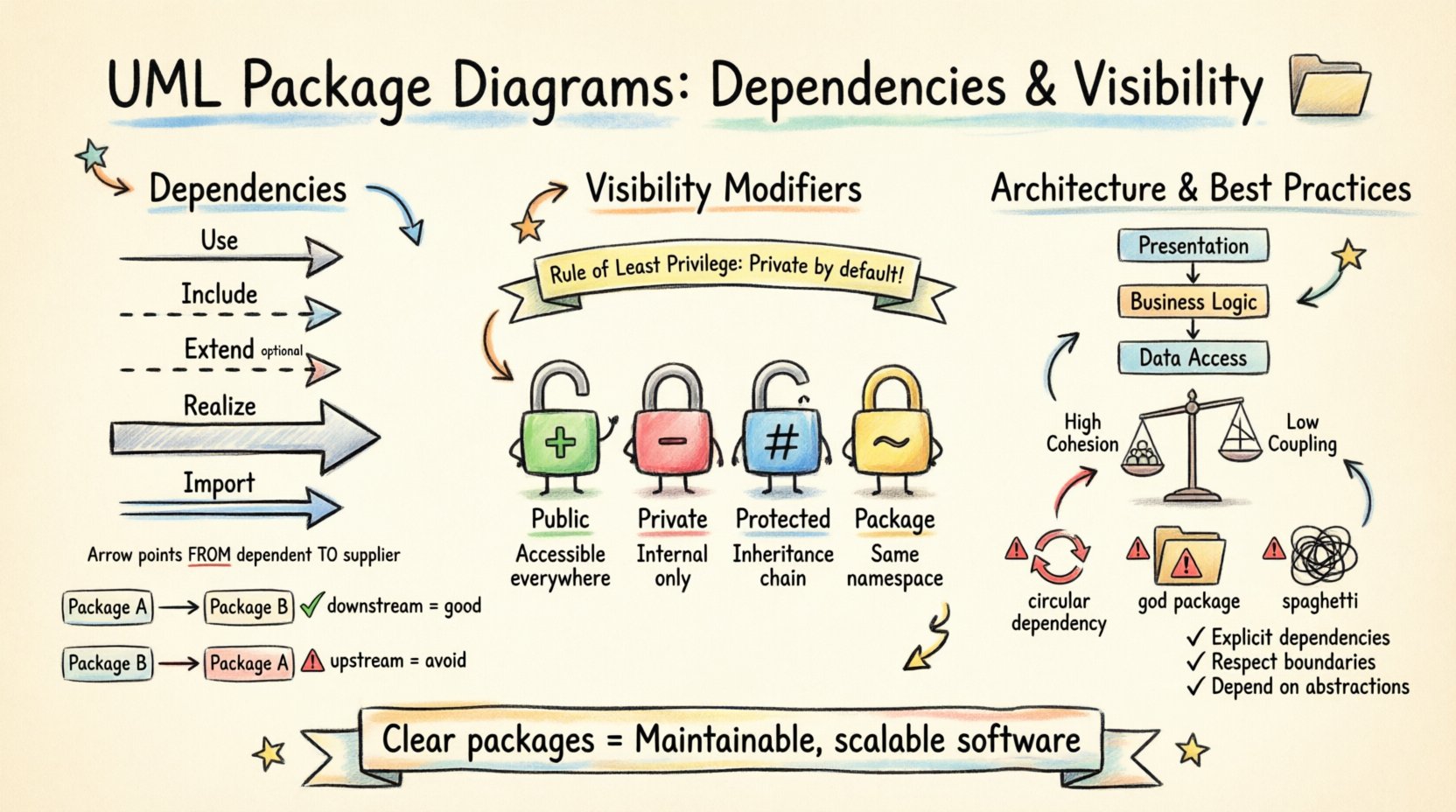
| Dependency Type | Symbol | Description | Use Case |
|---|---|---|---|
| Use | Open Arrow | Client uses the service of Supplier. | Calling a utility function or method. |
| Include | Dashed Arrow | Client includes the behavior of Supplier. | Refactoring common behavior into a shared package. |
| Extend | Dashed Arrow | Supplier extends the behavior of Client. | Adding optional functionality to a core package. |
| Realize | Large Hollow Arrow | Client realizes the contract of Supplier. | Implementing an interface defined in another package. |
| Import | Double Arrow | Client imports elements from Supplier. | Bringing specific types into the namespace. |
Analyzing Dependency Direction
The direction of the arrow matters. An arrow points from the dependent element to the depended-upon element. This orientation dictates the flow of information and control.
- Downstream Dependencies: When a lower-level package is used by a higher-level one, this is generally acceptable and aligns with layering principles.
- Upstream Dependencies: When a higher-level package depends on a lower-level one, it violates the Dependency Inversion Principle and creates rigidity.
Visibility Modifiers 🔒
Visibility controls what elements within a package are accessible to elements outside that package. It is the gatekeeper of encapsulation.
The Visibility Spectrum
UML defines several visibility levels that determine the scope of access:
- Public (+): Elements are accessible from anywhere. This is the default for interfaces but should be minimized for internal implementation details.
- Private (-): Elements are accessible only within the package itself. This protects internal state and logic.
- Protected (#): Elements are accessible within the package and by derived elements in other packages. Useful for inheritance hierarchies.
- Package (~): Elements are accessible only by other elements within the same package. This is often used for internal collaboration without external exposure.
| Modifier | Symbol | Scope | Impact on Coupling |
|---|---|---|---|
| Public | + | Global | High Exposure |
| Private | – | Internal Only | Low Exposure |
| Protected | # | Inheritance Chain | Medium Exposure |
| Package | ~ | Same Namespace | Controlled Exposure |
Interplay Between Dependencies and Visibility 🧩
Visibility and dependencies are not isolated concepts. The visibility of a package member determines whether a dependency can be formed.
- Public Dependency: If Package A depends on a public member of Package B, the dependency is stable and explicit.
- Hidden Dependency: If Package A accesses a private member of Package B through a public API, the dependency exists but is not visible in the package diagram. This creates technical debt.
When designing package structures, it is crucial to ensure that dependencies align with visibility rules. A package should not depend on internal details of another package, even if those details are temporarily accessible.
Rule of Least Privilege
Apply the principle of least privilege to visibility. Make elements private by default and expose only what is absolutely necessary. This reduces the surface area for potential errors and unintended dependencies.
Managing Coupling and Cohesion 🛡️
The ultimate goal of managing dependencies and visibility is to achieve high cohesion and low coupling.
High Cohesion
A package has high cohesion when its elements are closely related and serve a single, well-defined purpose.
- Single Responsibility: Each package should have one reason to change.
- Logical Grouping: Classes within a package should be related by domain, function, or technology layer.
Low Coupling
A package has low coupling when it has minimal dependencies on other packages.
- Dependency Rule: Dependencies should always point to more stable, abstract packages.
- Interface Segregation: Packages should depend on interfaces rather than concrete implementations.
Common Architectural Patterns 🏛️
Several patterns emerge when organizing packages and their dependencies effectively.
Layered Architecture
This is the most common pattern. Packages are arranged in layers, such as Presentation, Business Logic, and Data Access.
- Flow: Dependencies flow downward (Presentation -> Logic -> Data).
- Benefit: Clear separation of concerns.
- Constraint: Upper layers cannot depend on lower layers directly without an interface.
Modular Architecture
Systems are divided into modules, each with its own internal dependencies and limited external interactions.
- Flow: Modules communicate via well-defined interfaces.
- Benefit: High testability and replaceability.
- Constraint: Requires strict visibility management to prevent cross-module leakage.
Plugin Architecture
A core system provides an interface that external packages can implement to extend functionality.
- Flow: The core package depends on the plugin interfaces, not the implementations.
- Benefit: Extensibility without recompiling the core.
- Constraint: Needs a robust registry or discovery mechanism.
Refactoring and Maintenance 🔧
Software is never static. As requirements change, package structures must evolve. Refactoring is the process of restructuring existing code without changing its external behavior.
Identifying Smells
Before refactoring, identify signs of poor package organization:
- Circular Dependencies: Package A depends on B, and B depends on A. This creates a deadlock during compilation or loading.
- God Package: A package that depends on everything and is depended upon by everything. This indicates a lack of separation.
- Spaghetti Dependencies: A tangled web of connections with no clear hierarchy or pattern.
Refactoring Strategies
- Extract Package: Move a set of related classes into a new package to reduce coupling.
- Move Class: Relocate a class to a package where it belongs logically.
- Introduce Interface: Replace concrete dependencies with interfaces to decouple implementation details.
- Consolidate Visibility: Change private visibility to package visibility where appropriate to reduce external exposure.
Pitfalls to Avoid ⚠️
Even experienced architects make mistakes. Being aware of common errors helps maintain system health.
- Over-Exposure: Making too many elements public creates a tight coupling. If an internal implementation changes, external packages break.
- Under-Exposure: Making everything private prevents necessary integration. Balance is key.
- Ignoring Transitive Dependencies: If A depends on B, and B depends on C, A implicitly depends on C. This can cause version conflicts.
- Violation of Layering: Allowing lower-level packages to depend on higher-level packages violates the Dependency Inversion Principle.
Implementation Strategies 🛠️
How do you apply these concepts in a real project?
Step 1: Define Boundaries
Start by identifying the core domains of the system. Each domain becomes a package. Ensure that domains do not share data structures directly unless absolutely necessary.
Step 2: Define Interfaces
Create interfaces for each package that define the contract of interaction. These interfaces should be public, while the implementation classes remain private.
Step 3: Map Dependencies
Draw the package diagram. Mark all dependencies. Review the diagram for cycles or violations of layering rules. Visual inspection is a powerful tool.
Step 4: Enforce Visibility
Configure the build environment to enforce visibility rules. If a package tries to access a private member of another package, the build should fail.
Step 5: Iterate
Review the architecture regularly. As the system grows, packages may need to split or merge. Treat the diagram as a living document.
Summary of Best Practices ✅
To summarize the key takeaways for managing UML package diagrams:
- Keep it Simple: Avoid unnecessary complexity in dependency chains.
- Be Explicit: Declare all dependencies clearly in the diagram.
- Respect Boundaries: Do not cross package visibility boundaries without permission.
- Focus on Stability: Depend on stable abstractions, not volatile implementations.
- Document Intent: Use comments to explain why a dependency exists, not just that it exists.
By adhering to these principles, teams can create software architectures that are not only functional today but adaptable to the challenges of tomorrow. The investment in clear package structures pays dividends in reduced maintenance costs and faster feature delivery.