
Software architecture relies heavily on clear documentation to maintain integrity across development cycles. The Unified Modeling Language (UML) provides a standardized way to visualize system design. Among the various diagram types, the Package Diagram holds a unique position. It serves as the high-level organizational map for your system, defining namespaces and structural boundaries. Ensuring your diagrams align with industry standards is not merely about aesthetics; it is about communication, maintainability, and scalability.
This guide provides a detailed checklist for validating your UML Package Diagrams. We will cover naming conventions, dependency management, visibility rules, and documentation practices. Following these guidelines ensures that stakeholders, developers, and architects share a common understanding of the system structure without ambiguity.
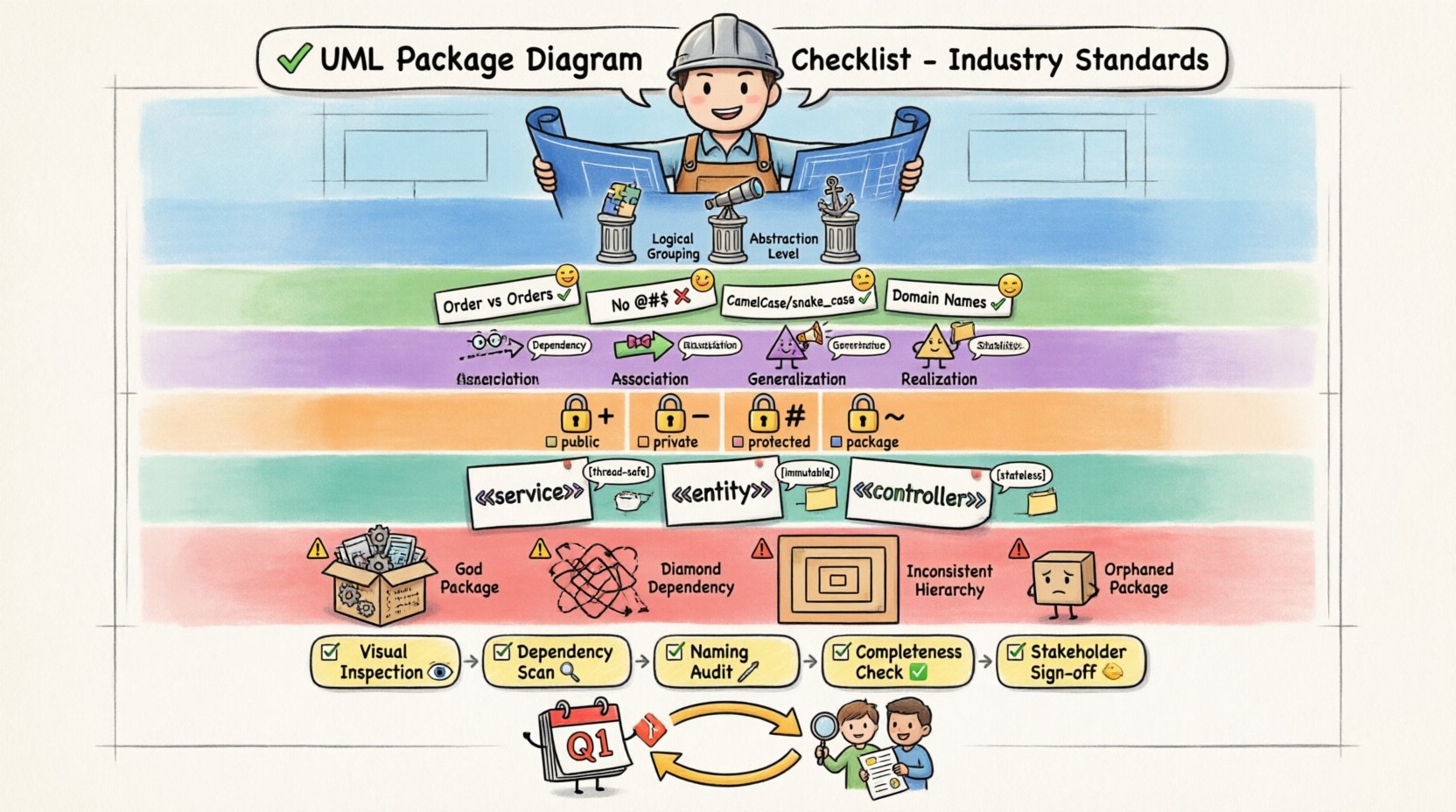
🏗️ Core Principles of Package Modeling
Before diving into specific checklist items, it is essential to understand the foundational role of packages. In UML, a package is a mechanism for organizing elements into groups. It functions as a namespace, preventing naming conflicts between different components of the system.
When creating a package diagram, you are essentially defining the hierarchy of your software. The following principles should guide your initial design:
- Logical Grouping: Packages should represent logical modules, not necessarily physical files. A package named
Paymentmight contain several classes related to billing, but it should not split classes across different physical directories unless necessary for visibility. - Abstraction Level: Keep the diagram high-level. Avoid cluttering the package diagram with individual class details. If a package contains too much complexity, consider creating sub-packages to maintain clarity.
- Stability: Packages should be stable. Changing the name or structure of a package frequently can disrupt dependencies across the entire system. Design packages with long-term maintenance in mind.
Adhering to these principles creates a solid foundation for the specific standards outlined in the subsequent checklist sections.
🔤 Naming Conventions & Namespace Management
Naming is the most visible aspect of your diagram. Inconsistent naming leads to confusion and increases the cognitive load for anyone reviewing the architecture. Industry standards suggest specific patterns to ensure clarity.
1. Package Naming Rules
- Use Singular or Plural Consistently: Do not mix
OrderandOrdersin the same hierarchy. Choose one style and apply it throughout the project. - Avoid Special Characters: Do not use spaces, hyphens, or symbols like
@or#in package names unless your specific tool requires them. Stick to alphanumeric characters and underscores. - Case Sensitivity: Adopt a standard case convention.
CamelCase(e.g.,PaymentGateway) orsnake_case(e.g.,payment_gateway) are common. Ensure the tool you use respects the case you define. - Domain-Driven Names: Name packages based on business domains rather than technical implementation. Instead of
UI, useCustomerPortal. Instead ofDB, useDataAccess.
2. Namespace Qualification
When referencing elements across packages, full qualification is often necessary to avoid ambiguity. Ensure your diagram clearly indicates the namespace path for external references.
- Prefixes: Use prefixes for external packages if the tool supports it. For example,
ExternalLib::AuthModuleclearly distinguishes internal logic from third-party libraries. - Import Statements: If the diagram implies import relationships, ensure the package names in the diagram match the import paths in the codebase exactly. Mismatches here cause build failures.
🔗 Relationship Integrity & Dependency Rules
The relationships between packages define how they interact. Poorly managed relationships lead to tight coupling, making the system rigid and difficult to refactor. A robust package diagram minimizes unnecessary dependencies.
Dependency Types
Not all connections are created equal. Understanding the specific relationship types is crucial for accurate modeling.
| Relationship Type | Symbol | Usage Context | Standard Compliance |
|---|---|---|---|
| Dependency | Dashed Arrow | One package uses another (e.g., calls a method) | Required for all usage links |
| Association | Solid Line | Structural relationship between packages | Use only for persistent links |
| Generalization | Empty Triangle | Inheritance between package structures | Use for hierarchical grouping |
| Realization | Empty Triangle (Dashed) | Interface implementation | Required for interface contracts |
Dependency Analysis Checklist
Review your diagram against the following criteria to ensure dependency integrity:
- No Circular Dependencies: Package A should not depend on Package B if Package B depends on Package A. Cycles create infinite loops in compilation and make testing impossible. Break cycles by introducing an interface package.
- Minimal Coupling: Only connect packages that must interact. If Package A does not need to know about Package B, remove the dependency line. Loose coupling improves modularity.
- Directionality: Ensure arrows point from the client to the supplier. The arrow head indicates the direction of the dependency. An arrow from A to B means A uses B.
- Dependency Levels: Avoid deep dependency chains. If Package A depends on B, which depends on C, which depends on D, consider refactoring to reduce the depth. Direct access is preferred over indirect access.
👁️ Visibility & Scope Control
Visibility determines which elements within a package are accessible to other packages. Managing scope prevents accidental exposure of internal logic.
Visibility Markers
While package diagrams focus on the package level, the internal visibility of contained elements influences how the package is treated. Ensure the following markers are applied correctly:
- Public (+): Elements marked as public are accessible from any package. Limit the number of public elements in a package. If everything is public, the package offers no encapsulation.
- Private (-): Internal implementation details should be private. This ensures that other packages cannot rely on methods that might change in future versions.
- Protected (#): Used when elements are intended for subclasses within the same package hierarchy. Use this sparingly in package diagrams unless dealing with inheritance trees.
- Package (~): Some modeling standards allow package-private visibility. Ensure your documentation reflects whether this visibility is enforced in the target platform.
Encapsulation Verification
Verify that your packages enforce encapsulation standards:
- Interface Segregation: Do not expose the full implementation of a package. Create an interface package that exposes only the necessary contracts to other packages.
- Dependency Inversion: High-level packages should depend on abstractions, not low-level details. Ensure the diagram reflects dependencies on interfaces rather than concrete classes where possible.
- Hidden Implementation: Internal classes that support the package functionality should not be visible in the diagram unless their relationship is critical to the system architecture.
📝 Documentation & Stereotypes
A diagram without context is often misunderstood. Documentation within the diagram provides the necessary background for developers and stakeholders.
Stereotypes
Stereotypes allow you to extend the UML notation to fit your specific domain. They add semantic meaning without changing the visual structure.
- Use Standard Stereotypes: Common stereotypes include
<<service>>,<<entity>>, or<<controller>>. Avoid creating custom stereotypes unless your organization has a defined modeling standard. - Consistency: If you use a stereotype for a specific type of package, apply it consistently across the entire diagram. Do not mix
<<api>>and<<interface>>for the same concept. - Metadata: Use stereotypes to convey architectural patterns. For example, marking a package as
<<singleton>>warns developers about instantiation constraints.
Notes and Annotations
Text notes provide clarification on complex relationships or constraints.
- Constraints: Use notes to specify constraints. For example, a note on a dependency might state
[must be thread-safe]or[async only]. - Versioning: Indicate version numbers in the package name or via a note if the package undergoes frequent updates. This helps in tracking technical debt.
- Ownership: Clearly identify the owning team or group for a package. This aids in governance and accountability during code reviews.
🚫 Common Violations & Anti-Patterns
Even experienced modelers can fall into traps. Identifying common anti-patterns helps you avoid them proactively.
1. The God Package
A package that contains too many unrelated classes is a violation of the Single Responsibility Principle. If a package is used by everyone, it is likely doing too much.
- Sign: The package name is generic (e.g.,
Common,Utils) and contains hundreds of elements. - Fix: Split the package into smaller, domain-specific packages.
2. The Diamond Dependency
This occurs when a package depends on two other packages that both depend on a common third package. This creates redundant loading and potential conflict.
- Sign: Multiple paths converge on a single package.
- Fix: Refactor to ensure a single source of truth for shared dependencies.
3. Inconsistent Hierarchy
Mixing different levels of abstraction in the same view confuses the reader.
- Sign: Some packages are high-level modules, while others are detailed implementation folders.
- Fix: Standardize the granularity. All packages in the diagram should represent the same level of architectural abstraction.
4. Orphaned Packages
Packages that have no incoming or outgoing dependencies are often dead code or misconfigured.
- Sign: Isolated nodes in the diagram.
- Fix: Verify if the package is used. If not, remove it from the diagram or mark it as deprecated.
🔍 Review & Validation Workflow
Creating the diagram is only half the work. A rigorous review process ensures compliance with standards.
Step-by-Step Validation
- Visual Inspection: Check for overlapping labels and confusing line crossings. Use orthogonal routing for lines to improve readability.
- Dependency Scan: Run a tool or manual check to identify circular dependencies. Ensure no package depends on itself directly or indirectly.
- Naming Audit: Review all package names against the naming convention guide. Check for typos and case consistency.
- Completeness Check: Ensure all major system modules are represented. Missing packages can lead to integration errors.
- Stakeholder Sign-off: Have architects and lead developers review the diagram. Get their approval on the structure before implementation begins.
Automated Checks
Where possible, automate parts of the validation:
- Linting: Use modeling linters to check for naming violations or structural errors.
- Sync: Ensure the diagram stays in sync with the codebase. If the code changes, the diagram should be updated immediately.
- Metrics: Track metrics like coupling and cohesion. High coupling values should trigger a review of the package structure.
🔄 Maintaining Standards Over Time
Standards degrade if not maintained. A checklist is only useful if it is applied continuously.
Regular Audits
Schedule periodic reviews of your diagrams. A quarterly audit can catch drift in naming conventions or accumulating technical debt.
- Version Control: Store diagram files in version control. Track changes to the structure over time.
- Change Logs: Document major structural changes. If a package is merged or split, record the reason for the change.
- Training: Ensure new team members understand the modeling standards. Knowledge transfer prevents the introduction of non-compliant diagrams.
Feedback Loops
Encourage feedback from developers who use the diagrams. If a diagram is confusing, it fails its purpose.
- Developer Surveys: Ask developers if the diagrams help them understand the system.
- Refactoring Requests: If developers request changes to the diagram due to confusion, treat it as a bug in the documentation.
- Iterative Improvement: Update the checklist based on feedback. If a rule is consistently violated, investigate why and adjust the standard.
Final Considerations
Maintaining high-quality UML Package Diagrams is an ongoing commitment. It requires discipline, consistent application of standards, and a willingness to refactor both code and documentation. By following this checklist, you ensure that your architecture remains clear, maintainable, and aligned with industry best practices.
Remember that the goal is not perfection in a single pass, but continuous improvement. Regular validation, adherence to naming conventions, and careful management of dependencies will result in a robust system architecture. Focus on clarity and consistency, and your documentation will serve as a valuable asset throughout the software lifecycle.