
Software architecture relies heavily on communication. When developers, architects, and stakeholders discuss system design, visual aids play a critical role in bridging the gap between abstract logic and concrete implementation. Among the Unified Modeling Language (UML) diagram types, the Package Diagram stands out as a fundamental tool for organizing code structure. It provides a high-level view of how different modules, libraries, and namespaces interact within a system.
However, despite its simplicity on the surface, many technical teams struggle with creating effective package diagrams. Errors in these diagrams often lead to confusion during development, hidden dependencies, and increased technical debt. Understanding the common pitfalls is the first step toward building robust, maintainable software architectures. This guide explores the specific reasons why developers frequently mess up package diagrams and provides actionable corrections to improve system organization.
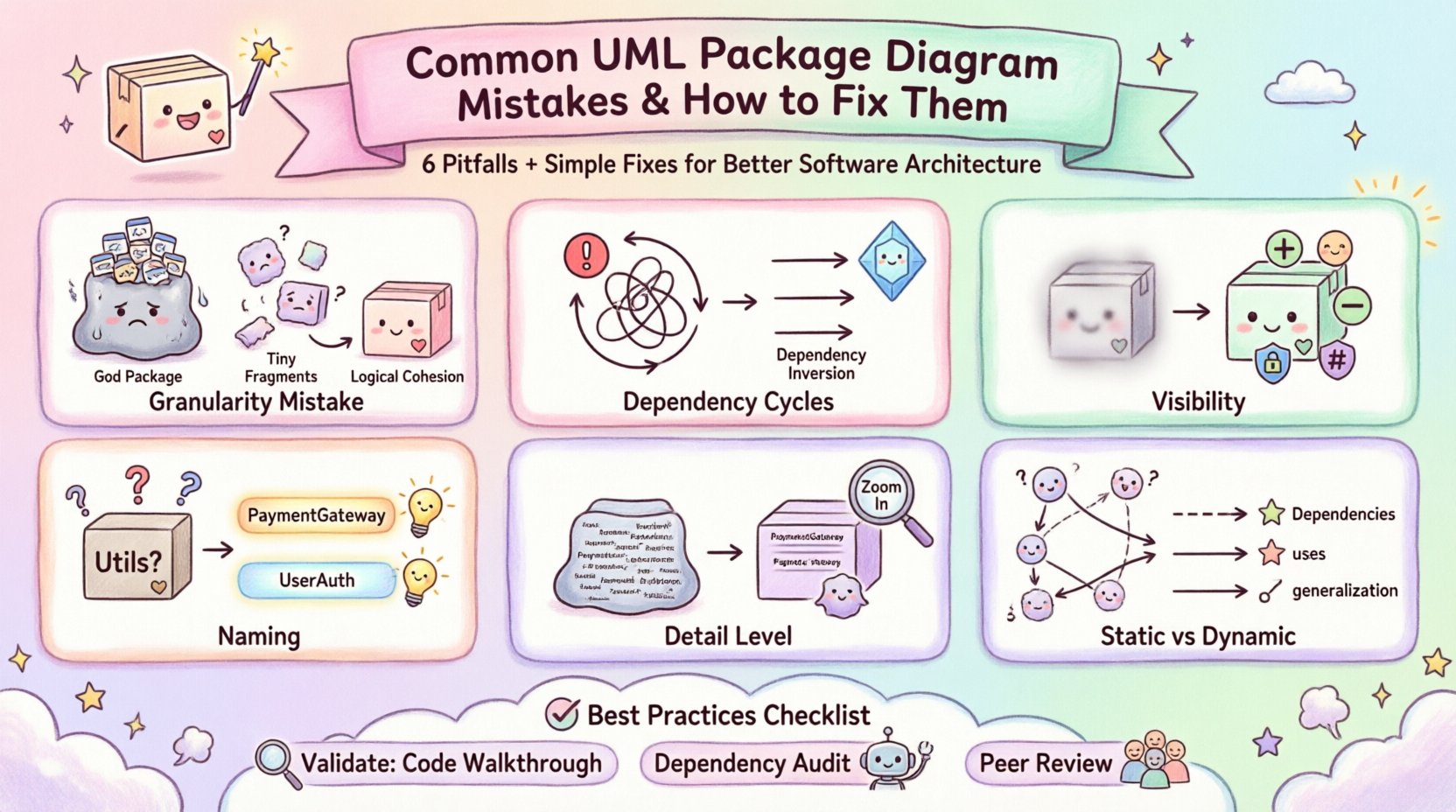
What Is a UML Package Diagram? 📦
A package diagram is a static structure diagram that shows the organization and dependencies between packages. In software engineering, a package is a grouping of related elements, such as classes, interfaces, and use cases. It acts as a namespace to prevent naming conflicts and to organize code logically.
Unlike a class diagram, which details the internal structure of objects, a package diagram zooms out to show the system’s skeleton. It is essential for:
- Visualizing Module Boundaries: Defining where one subsystem ends and another begins.
- Managing Dependencies: Showing which components rely on others.
- Facilitating Team Collaboration: Allowing different teams to work on specific packages without stepping on each other’s toes.
- Documentation: Providing a map for new developers entering the codebase.
When constructed correctly, this diagram serves as a contract for the system’s modularity. When constructed poorly, it becomes a source of ambiguity that hinders progress.
Mistake 1: Improper Granularity 📏
The most frequent error involves the size of the packages. Developers often struggle to find the right balance between too much detail and too little abstraction. This is known as the granularity issue.
The Problem: Too Large Packages
When a package is too large, it becomes a “God Package” or a catch-all container. It often contains unrelated classes and functions that do not belong together. For example, a package named Core might contain database logic, user interface code, and business rules. This violates the Single Responsibility Principle.
The consequences include:
- High Coupling: Changes in one area affect unrelated areas.
- Difficulty in Navigation: Finding specific code becomes a needle-in-a-haystack scenario.
- Build Bottlenecks: Compiling the entire package takes longer because many unrelated files are grouped together.
The Problem: Too Small Packages
Conversely, creating thousands of tiny packages for every single class or function leads to fragmentation. While this might seem organized, it creates excessive overhead.
The consequences include:
- Complex Import Paths: Developers must navigate deep directory structures to find dependencies.
- Excessive Imports: Source files become cluttered with import statements, reducing readability.
- Maintainability Issues: Moving a class requires updating the package definition rather than just the file.
The Correction: Logical Cohesion
To fix this, apply the principle of high cohesion and low coupling. A package should contain elements that are strongly related to a specific functionality or domain concept. Ask yourself: “If this feature changes, do all elements in this package need to change?” If yes, the package is likely appropriately sized. If no, consider splitting it.
Mistake 2: Dependency Cycles and Confusion 🔗
Dependencies define the flow of data and control between packages. They are the lifelines of the architecture. However, managing these relationships is where many diagrams fail.
The Problem: Circular Dependencies
A circular dependency occurs when Package A depends on Package B, and Package B depends on Package A. In a package diagram, this looks like a closed loop. While some languages handle this technically, conceptually it creates a tight coupling that is difficult to test or refactor.
When developers draw these loops without acknowledging the risk, they create a system where modules cannot be separated. This makes unit testing nearly impossible because you must instantiate the entire dependency chain to test a single component.
The Problem: Implicit Dependencies
Sometimes, developers omit dependency arrows to keep the diagram clean. They assume the code structure speaks for itself. This is a dangerous assumption. A package diagram must explicitly show usage, import, and extension relationships.
Missing dependencies hide the true complexity of the system. During code review, a developer might import a class they think is isolated, only to discover it pulls in a massive library unexpectedly. This leads to bloated application sizes and slow performance.
The Correction: Dependency Inversion
Correct the diagram by enforcing clear dependency directions. Dependencies should flow from high-level abstractions to low-level implementations. Use dependency inversion principles to decouple the layers.
Ensure that:
- Dependencies are one-way: Package A points to Package B, but not vice versa.
- Interfaces are used: Packages should depend on abstract interfaces rather than concrete implementations.
- Loops are broken: Introduce intermediate abstraction layers to break cycles if they cannot be avoided.
Mistake 3: Ignoring Visibility and Access Control 🚫
Code has visibility rules. Some classes are public, accessible by anyone. Others are private, meant only for internal use. Package diagrams often ignore these distinctions, treating all elements as if they are equally accessible.
The Problem: Blurring Boundaries
When a package diagram does not indicate visibility, it becomes unclear which parts of the system are public APIs and which are internal implementation details. A developer looking at the diagram might assume they can use a specific package from another part of the system, leading to runtime errors or architectural violations.
The Correction: Explicit Markers
Use standard UML notations to indicate visibility. While package diagrams typically focus on relationships, adding visibility indicators to the elements within the package is crucial for clarity.
- Public (+): Clearly mark classes or packages intended for external use.
- Private (-): Indicate internal implementation details that should not be touched.
- Protected (#): Show elements accessible to subclasses.
This distinction helps teams understand the contract of the package. It tells developers what they are allowed to consume and what they should ignore.
Mistake 4: Poor Naming Conventions 🏷️
Names are the primary interface of a package diagram. If the names are ambiguous, the diagram fails to communicate. Developers often use vague names like Utils, Helpers, or Main.
The Problem: Generic Labels
A package named Utils is a classic example of poor naming. It suggests a dumping ground for miscellaneous code. Over time, this package becomes a “junk drawer” where unrelated logic accumulates. This makes the diagram useless for understanding system flow.
Similarly, naming a package after a technology stack, like JDBC or HTML, is often a mistake unless the package strictly encapsulates that technology. Architecture should be driven by business domains, not implementation details.
The Correction: Domain-Driven Names
Adopt a naming convention based on the domain or responsibility of the code. Use nouns that describe what the package does, not how it does it.
- Instead of: WebUtils
- Use: HttpHandlers or RequestProcessors
Consistent naming reduces cognitive load. When a developer sees the name PaymentGateway, they immediately understand the scope of the package without needing to inspect the internal classes. This clarity extends from the diagram to the actual file structure.
Mistake 5: Confusing Package Diagrams with Class Diagrams 🔄
There is a tendency to overcomplicate package diagrams by including too much detail. Developers often try to show every relationship and attribute within a package, turning a high-level map into a detailed blueprint.
The Problem: Loss of Abstraction
When a package diagram contains too many internal class relationships, it loses its purpose. The goal of a package diagram is to show the system’s macro structure, not its micro details. If you need to see class attributes and methods, use a class diagram.
Overloading the package diagram makes it unreadable. It defeats the purpose of having different diagram types in the UML suite. A package diagram should be the entry point for understanding the architecture, not the final word.
The Correction: Keep it High-Level
Reserve the package diagram for the top level of the hierarchy. Only show the package names and the relationships between them. If a package is complex, create a sub-diagram for it. This nesting approach keeps the main diagram clean while allowing for detailed exploration when necessary.
Mistake 6: Static Representation of Dynamic Behavior ⏳
UML is versatile, but diagrams have specific purposes. A package diagram represents static structure. It does not show flow, logic, or runtime behavior. Some developers try to use it to depict processes, which leads to confusion.
The Problem: Showing Logic in Structure
Attempting to show control flow or data flow within a package diagram creates clutter. Arrows should represent dependencies, not execution paths. If you draw arrows that imply “run this first, then run that,” you are mixing concepts.
This confusion leads to maintenance nightmares. If the logic changes, the developer might update the diagram thinking it represents behavior, when it actually represents structure. The disconnect between the diagram and the code grows.
The Correction: Stick to Dependencies
Ensure all arrows in the diagram represent structural relationships. Use specific arrowheads to denote different types of dependencies:
- Dependency (Dashed Arrow): Indicates that one package requires another to function.
- Association (Solid Line): Indicates a structural link between packages.
- Generalization (Solid Arrow): Indicates an inheritance or extension relationship.
Keep behavior modeling to Sequence Diagrams or Activity Diagrams. This separation of concerns ensures that the package diagram remains a reliable structural map.
Best Practices Checklist for Package Diagrams 📋
To ensure your package diagrams are accurate and useful, refer to this checklist. It summarizes the corrections discussed above into actionable steps.
| Mistake Category | Warning Sign | Corrective Action |
|---|---|---|
| Granularity | Package contains unrelated classes | Split packages by domain or function |
| Dependencies | Circular arrows between packages | Introduce interfaces or abstract layers |
| Visibility | All elements look accessible | Mark public (+) and private (-) elements |
| Naming | Vague names like Utils or Main | Use descriptive, domain-driven names |
| Detail Level | Shows class attributes inside packages | Keep diagrams high-level; use class diagrams for detail |
| Relationships | Arrows imply execution order | Use arrows only for structural dependencies |
Validation Techniques 🧐
Once the diagram is drawn, how do you know it is correct? Validation is a critical step that is often skipped.
1. The Code Walkthrough
Compare the diagram against the actual source code. Does every package in the diagram exist in the file structure? Are there packages in the code that are not reflected in the diagram? Inconsistencies here indicate that the diagram is out of date. An outdated diagram is worse than no diagram at all, as it misleads the team.
2. The Dependency Audit
Run a static analysis tool to check for forbidden dependencies. If the diagram shows that UI depends on DataAccess, but the code does not, the diagram is misleading. Conversely, if the code has dependencies that are not shown, the diagram is incomplete. Regular audits ensure alignment between design and implementation.
3. The Peer Review
Have another architect or senior developer review the diagram. Ask them to trace the flow of data from one package to another. If they cannot follow the logic based on the diagram, it is too complex or unclear. Simplify the diagram until it can be understood at a glance.
Conclusion on Architecture Clarity 🏁
Building a UML package diagram is not about drawing boxes and arrows; it is about defining the boundaries of your software system. It requires discipline to resist the temptation to overcomplicate and the will to maintain consistency.
By avoiding common errors such as improper granularity, dependency cycles, and vague naming, developers can create diagrams that serve as true assets. These diagrams reduce onboarding time for new team members, clarify complex dependencies, and support long-term maintainability. The effort invested in creating a clean, accurate package diagram pays dividends throughout the lifecycle of the project.
Focus on clarity, consistency, and correctness. When the structure is sound, the code that fills it follows naturally. Use these guidelines to refine your architectural documentation and ensure your system remains scalable and understandable over time.