


In the world of software architecture, designing the right system isn’t just about code—it’s about where the system runs, how it connects, and how it scales.
That’s where UML Deployment Diagrams come in.
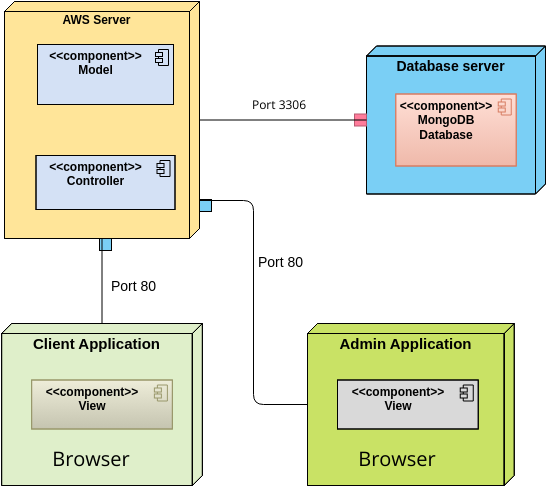
But when should you use one? Who benefits from it? What are the real-world use cases? And how can your team leverage Visual Paradigm’s AI Deployment Diagram Generator to cut design time, reduce errors, and accelerate delivery?
This comprehensive guide answers all those questions—complete with real-world examples, key concepts, and practical benefits—so you can make deployment diagrams not just useful, but strategic.
📌 When Should You Use a UML Deployment Diagram?
Use a UML Deployment Diagram when you need to answer critical infrastructure questions about your system’s physical (runtime) architecture.
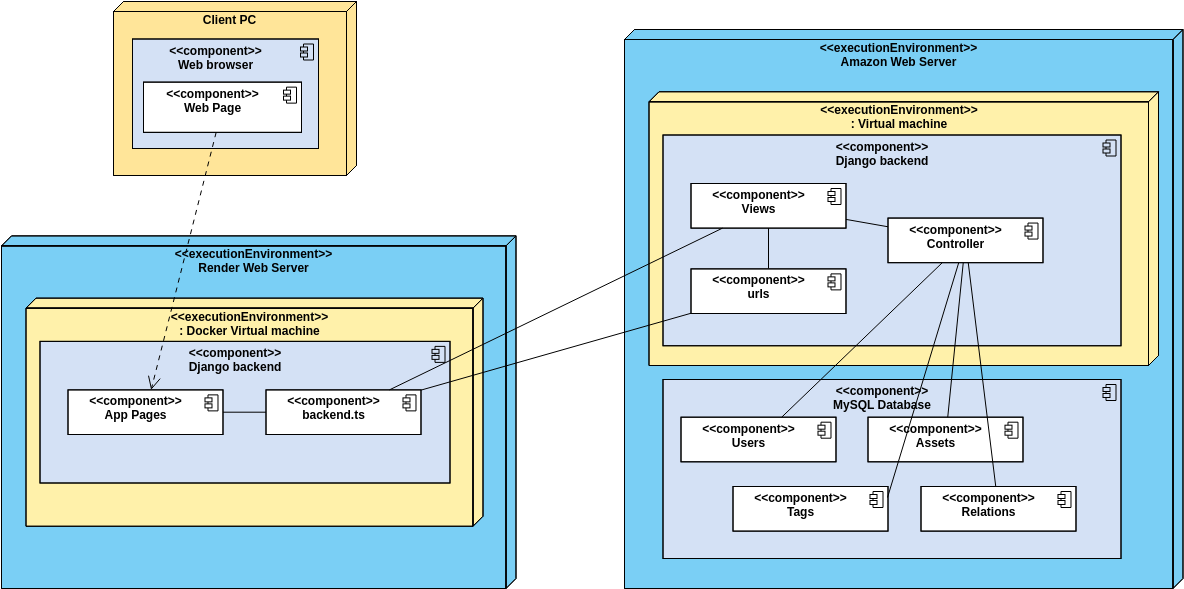
✅ Use Cases Where Deployment Diagrams Are Essential:
| Use Case | Why It Matters |
|---|---|
| Cloud-Native Systems (AWS, Azure, GCP) | Visualize how EC2, Lambda, S3, RDS, and load balancers connect |
| Microservices & Distributed Apps | Show how services run on containers, VMs, or Kubernetes clusters |
| Hybrid or Multi-Region Deployments | Model on-premise + cloud, or global failover (e.g., AWS regions) |
| IoT & Embedded Systems | Map devices, gateways, and edge nodes (e.g., smart sensors in factories) |
| High Availability & Disaster Recovery | Design redundancy, failover, and backup systems |
| Security & Compliance | Place firewalls, WAFs, and DMZs to isolate sensitive components |
| DevOps & CI/CD Planning | Define deployment environments (dev, staging, prod) and pipelines |
| System Migration | Compare old vs. new infrastructure (e.g., legacy mainframe → cloud) |
🔗 See full use cases: What is a Deployment Diagram? A Complete Guide to UML Deployment Diagrams
🧩 Key Concepts of UML Deployment Diagrams
Here’s what every team member should know—whether you’re a developer, architect, or product manager.
| Element | Purpose | Example |
|---|---|---|
| Node | A physical or logical computational resource. Use stereotypes like <<server>>, <<cloud>>, <<device>>, <<container>>. |
<<server>> (EC2), <<container>> (Docker), <<device>> (IoT sensor) |
| Artifact | A software component deployed on a node (e.g., .jar, .exe, .json, .dockerfile). |
<<artifact>> “OrderService.jar” |
| Deployment Relationship | Shows where an artifact runs. Dashed arrow with <<deploy>> stereotype. |
<<deploy>> from PaymentProcessor.jar to <<server>> |
| Communication Link | Physical or logical connection between nodes. Use protocol stereotypes. | <<HTTPS>>, <<TCP/IP>>, <<WebSocket>> |
| Nested Nodes | Hierarchical structure (e.g., container inside VM, VM inside physical server). | Kubernetes cluster inside AWS EC2 |
| Dependencies | Dashed arrow showing runtime reliance (e.g., app needs DB). | <<dependency>> from web service to database |
💡 Pro Tip: Always use stereotypes—they make diagrams instantly understandable across teams.
🔗 Learn best practices: How to Draw a Deployment Diagram in UML: Step-by-Step Tutorial
🎯 Real-World Example: E-Commerce Platform on AWS
Let’s walk through a real-world deployment diagram for a cloud-based e-commerce system.
📦 System Components:
-
Web & API Servers: AWS EC2 instances (
<<server>>) -
Load Balancer: Application Load Balancer (
<<server>>) -
Database: Amazon DynamoDB (
<<database>>) -
File Storage: AWS S3 (
<<storage>>) -
Processing: AWS Lambda (
<<function>>) -
Security: WAF firewall (
<<device>>) -
Future-Proofing: Kubernetes cluster (
<<container>>)
🔄 Deployment Relationships:
-
OrderService.jar→<<server>>(EC2) -
ProductImages→<<storage>>(S3) -
PaymentProcessor→<<function>>(Lambda)
🔗 Communication Links:
-
<<HTTPS>>from Load Balancer → EC2 -
<<TCP/IP>>from EC2 → DynamoDB -
<<HTTPS>>from Lambda → S3
🎨 Visual Paradigm AI generates this in seconds—just describe it in plain English.
🔗 See the full example: How to Create a UML Deployment Diagram for Cloud Apps with AI
🤖 How Your Team Can Use Visual Paradigm’s AI Deployment Diagram Generator
Forget spending hours dragging nodes and connecting lines.
With Visual Paradigm’s AI Deployment Diagram Generator, your team can design in conversation.

✅ Step-by-Step Workflow:
-
Open chat.visual-paradigm.com
→ No installation, no setup. -
Describe your system in plain English:
“Create a UML deployment diagram for a multi-region e-commerce app using AWS EC2, Lambda, DynamoDB, S3, WAF firewall, and Kubernetes cluster.”
-
AI instantly generates:
-
Correct node types (
<<server>>,<<cloud>>,<<container>>) -
Proper
<<deploy>>relationships -
Communication links with
<<HTTPS>>,<<TCP/IP>> -
Security boundaries (WAF in front of LB)
-
Nested structure (Kubernetes inside EC2)
-
-
Iterate with simple commands:
-
“Add multi-region DynamoDB for high availability.”
-
“Move the database to a private subnet.”
-
“Show the Kubernetes cluster running on EC2.”
-
✅ No redrawing. No alignment. Just instant updates.
🔗 Try it: Free Deployment Diagram Tool – Visual Paradigm Online
🌟 Benefits of Using Visual Paradigm’s AI Generator
| Benefit | How It Helps Your Team |
|---|---|
| ⏱️ Speed | Generate diagrams in under 30 seconds (vs. 2–5 hours manually) |
| 💰 Cost Savings | Reduce labor hours, avoid rework, lower project costs |
| 🛠️ Accuracy | AI ensures UML compliance, correct notation, and best practices |
| 🔄 Iterative Design | Refine architecture in real time via conversation |
| 🤝 Team Collaboration | Share diagrams and chat histories with developers, architects, and stakeholders |
| 🧠 Intelligent Suggestions | AI recommends security, scalability, and redundancy improvements |
| 🔗 Integration | Link to component diagrams, C4 models, ArchiMate, or PlantUML |
| 📤 Export & Share | Export to PDF, PNG, SVG, HTML for reports, documentation, or presentations |
🔗 See how it works: Comprehensive Tutorial on Deployment Diagrams with Visual Paradigm
🎯 Why This Is a Game-Changer for Teams
🔹 For Architects:
-
Rapidly prototype cloud, edge, or hybrid systems.
-
Explore multiple architecture options (e.g., “What if we moved to Azure?”).
-
Validate scalability and security early.
🔹 For DevOps Engineers:
-
Plan infrastructure, CI/CD pipelines, and deployment strategies.
-
Document environment differences (dev, staging, prod).
-
Ensure consistency across teams.
🔹 For Security Teams:
-
Identify attack surfaces.
-
Place firewalls, WAFs, and DMZs correctly.
-
Enforce network segmentation.
🔹 For Product Managers & Stakeholders:
-
Communicate complex system architecture in simple, visual terms.
-
Align teams on deployment goals and constraints.
✅ Everyone wins—from ideation to deployment.
📌 Summary: When, Why, and How to Use Deployment Diagrams
| Question | Answer |
|---|---|
| When to use? | During system design, cloud migration, security planning, or DevOps setup |
| Who benefits? | Architects, DevOps, security, developers, product managers |
| Key use cases? | Cloud systems, microservices, IoT, high availability, security |
| Key elements? | Nodes, artifacts, deployment relationships, communication links, stereotypes |
| Best tool? | Visual Paradigm’s AI Deployment Diagram Generator |
🔗 All Resources in This Guide (Embedded for Easy Access)
-
What is a Deployment Diagram? A Complete Guide to UML Deployment Diagrams
-
How to Create a UML Deployment Diagram for Cloud Apps with AI
-
How to Draw a Deployment Diagram in UML: Step-by-Step Tutorial
-
Comprehensive Tutorial on Deployment Diagrams with Visual Paradigm
-
PlantUML Deployment Diagram Builder – Visual Paradigm Integration
-
Beginner’s Guide to Deployment Diagrams Using Visual Paradigm Online
🚀 Ready to Transform Your Team’s Workflow?
💬 Stop drawing diagrams. Start designing systems.
👉 Start now at chat.visual-paradigm.com
👉 Try the free version: Free Deployment Diagram Tool – Visual Paradigm Online
With Visual Paradigm’s AI Deployment Diagram Generator, your team can:
-
Design faster,
-
Collaborate smarter,
-
Avoid costly mistakes,
-
And ship better systems—sooner.
✨ The future of system design isn’t manual—it’s intelligent, collaborative, and AI-powered.
Your deployment diagram isn’t just a picture—it’s a living blueprint of your system’s future.
🚀 Start building it today.