


The Evolution of System Modeling
In the fast-paced world of software development and system architecture, the Unified Modeling Language (UML) remains the gold standard for visualizing system behaviors. Among these visualizations, the Use Case Diagram is critical for defining interactions between users (actors) and the system. However, creating these diagrams manually has traditionally been a time-consuming bottleneck, often requiring hours of dragging and dropping shapes to accurately represent complex domains.
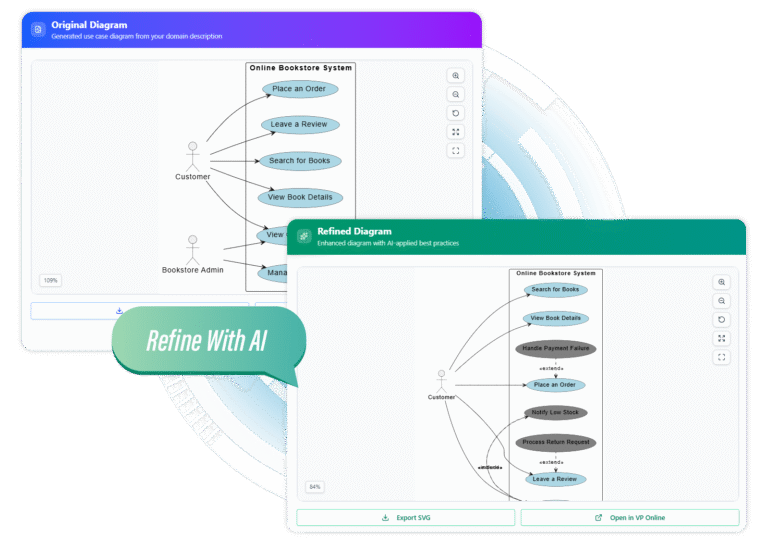
The landscape of diagramming is shifting with the introduction of AI-powered generation. By leveraging artificial intelligence, professionals can now transition from abstract ideas to professional, standard-compliant diagrams in seconds. This guide explores how AI is revolutionizing the workflow, allowing architects and developers to stop drawing and start describing.
From Text to Diagram: The Three-Step Workflow
Modern AI tools have simplified the diagramming process into an intuitive, three-step journey. This approach eliminates the learning curve associated with complex modeling software, focusing instead on the conceptual integrity of the system.
1. Describing Your System
The process begins with natural language. Users provide a description of the system’s domain. For the best results, this description should be specific, outlining key stakeholders, primary goals, and the core purpose of the application. The AI uses this text to understand the context and required actors.
2. Instant Generation
With a single click, the processing engine translates the text description into a structured visual model. This is not merely a keyword match; the AI interprets the relationships and hierarchies to generate a complete use case diagram. This allows for an immediate live preview, enabling users to see their ideas come to life instantly.
3. Intelligent Refinement
The true power of AI lies in iteration. Once the base model is generated, the AI analyzes the structure to suggest enhancements. It intelligently adds UML-specific relationships, such as <<extend>> and <<include>>, ensuring the diagram represents not just the basic flow but also optional behaviors and mandatory sub-processes.
Unlocking Deeper Insights with Iterative AI
One of the most compelling features of AI-assisted diagramming is the ability to explore alternative scenarios. A static tool gives one answer; an intelligent tool offers possibilities. By utilizing the Refine function, users can cycle through different structural suggestions.
This iterative process helps uncover alternative relationships and edge cases that a human architect might overlook during the initial drafting phase. It transforms the tool from a simple drawing utility into a partner in design, revealing the full potential of the system structure click by click.

Key Features for Professional Workflows
To meet the demands of professional environments, AI diagramming tools incorporate features that go beyond simple generation. These capabilities ensure that the output is not only fast but also usable in production environments.
- UML Best Practices: The AI is trained on established standards, ensuring that the diagrams are visually appealing and technically accurate.
- Seamless Integration: Generated diagrams can be opened in platforms like Visual Paradigm Online for advanced editing and team collaboration.
- High-Quality Export: Users can export diagrams as scalable SVG files, making them perfect for inclusion in high-resolution presentations, technical documentation, and printed reports.
- Live Preview: Real-time visualization removes the guesswork, allowing for immediate feedback as the system description is refined.
Comparing Manual vs. AI-Powered Diagramming
The shift to AI brings measurable benefits to the architectural workflow. The following comparison highlights the efficiency gains:
| Feature | Traditional Manual Diagramming | AI-Powered Generation |
|---|---|---|
| Time Investment | Hours of manual layout and formatting | Seconds to generate and refine |
| Input Method | Drag-and-drop shapes | Natural language description |
| Standard Compliance | Requires user knowledge of UML rules | Automatic adherence to UML best practices |
| Relationship Mapping | Manual linking of actors and cases | Intelligent detection of include/extend relationships |
Conclusion: Revolutionizing Your Diagramming Process
The ability to instantly translate natural language into structured use case diagrams represents a significant leap forward in technical documentation and system design. by automating the tedious aspects of drawing and layout, AI allows professionals to focus on what truly matters: the logic and architecture of the system.
Whether you are a business analyst looking to clarify requirements or a software engineer mapping out system behaviors, leveraging AI-powered tools streamlines the workflow. It is time to move beyond manual drafting and embrace a method where you can simply describe your system and let the technology handle the rest.
Related posts:
 Visual Paradigm: Seamlessly Share Your Flipbooks to OpenDocs
 A Review of Visual Paradigm AI Chatbot for Modern Teams: From Text to Diagram in Seconds
Mastering Modern Diagrams with Mermaid in VPasCode: A Beginner’s Guide to Ishikawa, Event Modeling, Venn, and Wardley Maps
A Review of Visual Paradigm AI Chatbot for Modern Teams: From Text to Diagram in Seconds
Mastering Modern Diagrams with Mermaid in VPasCode: A Beginner’s Guide to Ishikawa, Event Modeling, Venn, and Wardley Maps
 Diagram-as-Code vs. Drag-and-Drop vs. AI Diagramming: Which is Right for Your Team?