


In today’s fast-evolving digital landscape, visual modeling is no longer just for architects and engineers—it’s a strategic tool for product managers, business analysts, developers, and knowledge teams. Enter Visual Paradigm (VP) AI, a multi-platform AI ecosystem that transcends the limitations of basic AI diagram generators by delivering editable, traceable, and production-ready models—not just static images.
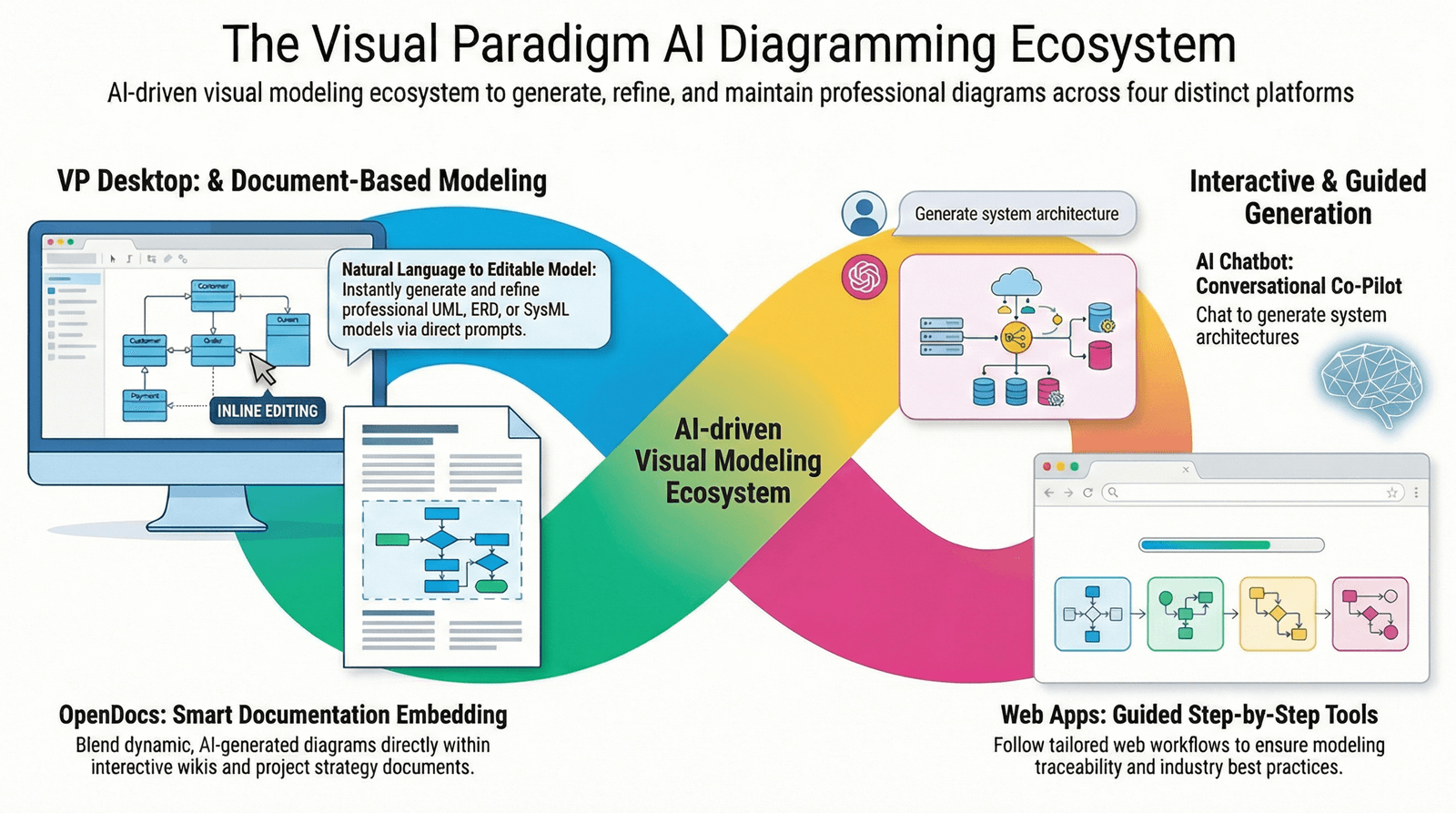
This comprehensive guide dives deep into the four core pillars of the Visual Paradigm AI ecosystem, explains key concepts, provides practical guidelines, and offers a decision-making framework to help you choose the right tool for your workflow—whether you’re brainstorming, documenting, engineering, or leading strategy.
🌐 Core Philosophy: From AI Generation to Intelligent Modeling
Visual Paradigm AI doesn’t just generate diagrams—it builds intelligent, interconnected models.
Unlike tools that produce one-off visuals (e.g., Mermaid, Lucidchart), Visual Paradigm ensures that:
-
Diagrams are editable and live.
-
Changes in one model (e.g., a Use Case) are automatically reflected in others (e.g., a Sequence or Activity diagram).
-
Models are traceable across levels of abstraction and linked to code, documentation, and requirements.
This transforms visual modeling from a design artifact into a dynamic engineering asset—ideal for agile teams, enterprise architecture, and collaborative knowledge management.
🧱 The Four Pillars of Visual Paradigm AI: A Deeper Look
1. VP Desktop (Visual Model AI Generator)
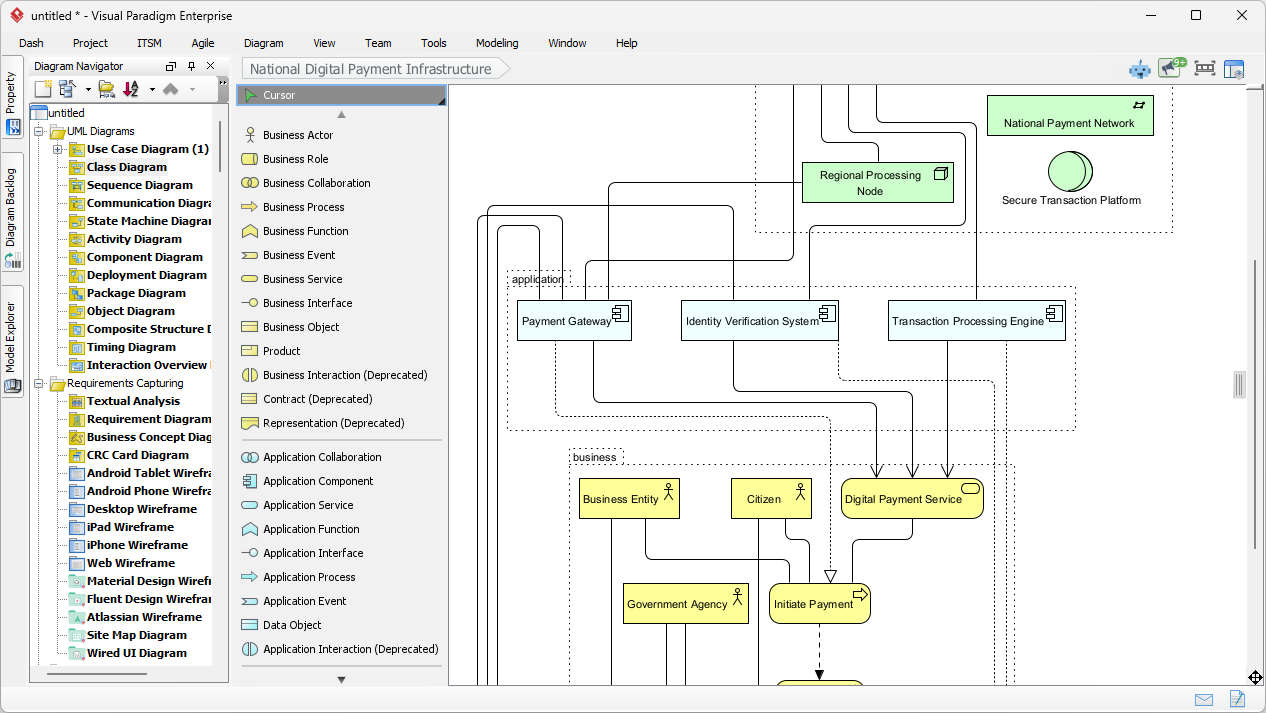
The Professional Modeling Engine
🔹 Key Concepts:
-
AI-Powered Modeling IDE: A full-featured environment for UML, SysML, ArchiMate, and more.
-
Model-Driven Development (MDD): Generate models that can be reverse-engineered into code (Java, C++, Python, etc.).
-
Traceability & Versioning: Maintain relationships between diagrams and integrate with Git, SVN, or Team Server.
🔧 Best Practices:
-
Use AI to generate a baseline model (e.g., “Create a class diagram for a user authentication system”).
-
Then refine it with advanced tools: add constraints, stereotypes, associations, and generate code.
-
Enable model validation rules to ensure compliance with design standards.
✅ Ideal For:
-
Enterprise software development teams.
-
Systems engineers working with SysML or ArchiMate.
-
Teams needing code generation, database schema mapping, or CI/CD integration.
💡 Pro Tip: Start with AI-generated models in the Chatbot, then open them in VP Desktop for engineering-grade refinement.
2. AI Visual Modeling Chatbot (The Co-Pilot)
Your Natural Language Design Assistant
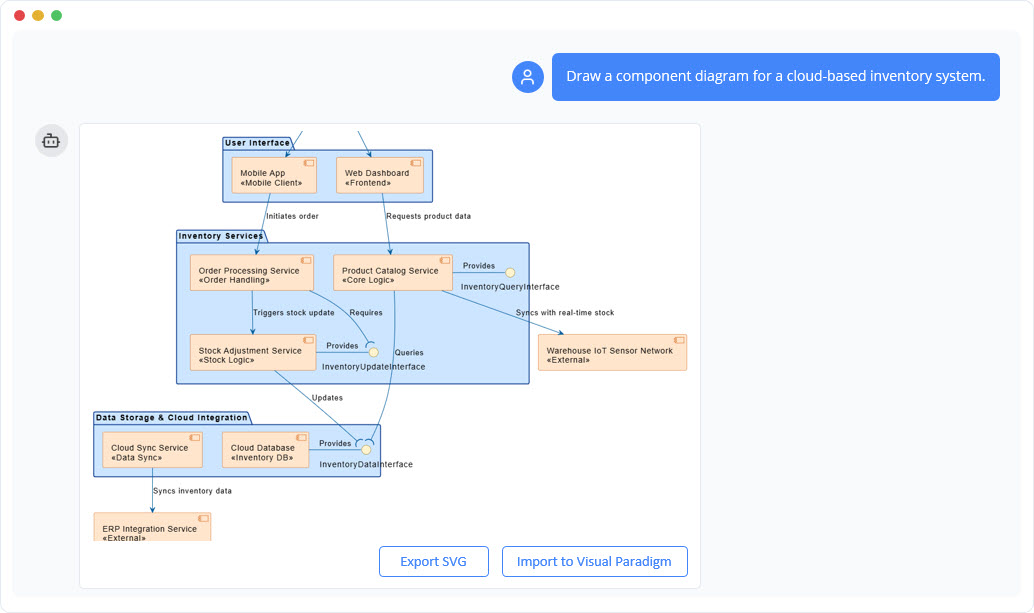
🔹 Key Concepts:
-
Conversational AI Interface: Describe your system in plain language.
-
Iterative Refinement: Ask follow-up questions like:
-
“Make the login process more secure.”
-
“Add a retry limit after 3 failed attempts.”
-
-
Multi-Model Generation: Can generate UML, C4, and even business strategy diagrams on demand.
✅ Best Practices:
-
Use for early-stage ideation, requirements clarification, and overcoming blank canvas syndrome.
-
Combine with prompt engineering:
-
“Create a sequence diagram for a payment processing system with error handling and retries.”
-
“Now show how the user dashboard updates in real time.”
-
-
Export to VP Desktop or OpenDocs for further collaboration.
✅ Ideal For:
-
Product managers, business analysts, and non-technical stakeholders.
-
Rapid prototyping during sprint planning or discovery phases.
-
Teams exploring multiple design alternatives quickly.
💡 Pro Tip: Use the Chatbot to validate assumptions before committing to a full model in VP Desktop.
3. OpenDocs (Collaborative Knowledge Hub)
Living Documentation for Teams
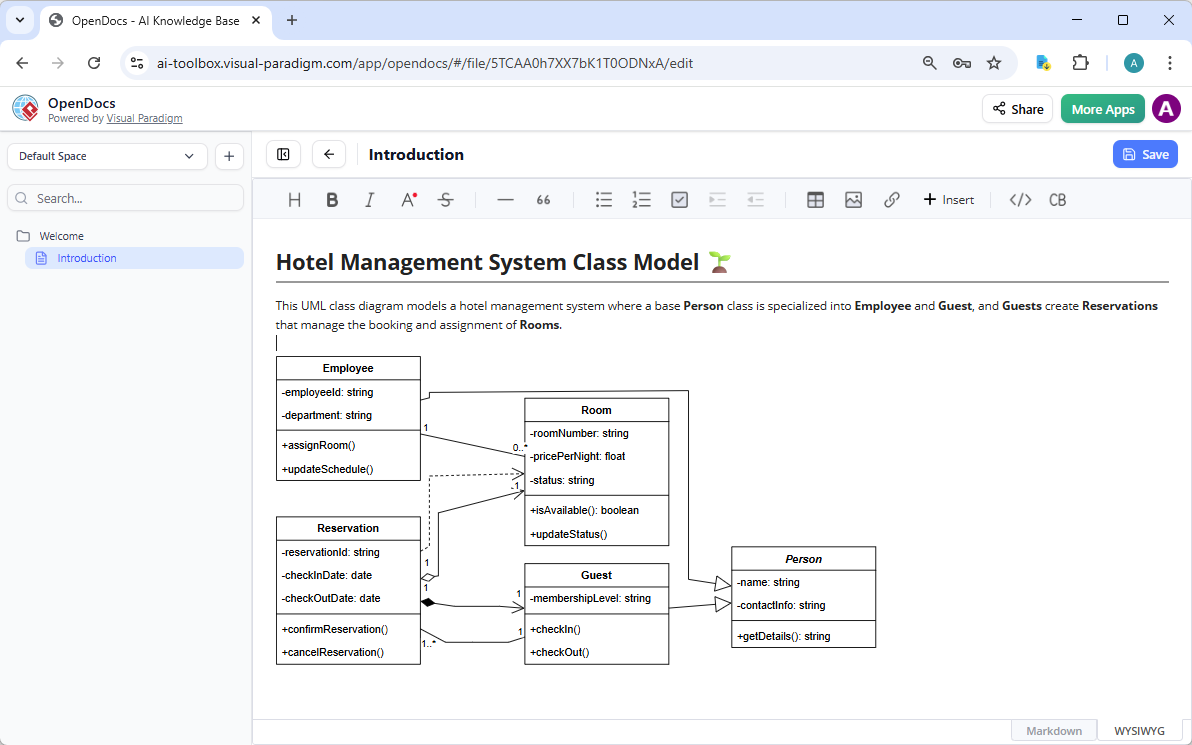
🔹 Key Concepts:
-
AI-Powered Wiki Platform: Combines rich text, tables, code blocks, and live AI-assisted diagrams.
-
Embedding Overlays: Diagrams are not images—they are interactive components that can be edited or re-generated via AI.
-
Real-Time Collaboration: Multiple users can edit text and diagrams simultaneously.
✅ Best Practices:
-
Structure documents with clear sections: Problem Statement → Diagram → Explanation → Next Steps.
-
Use AI to auto-generate diagrams from text: “Turn this process description into a flowchart.”
-
Enable version history and comment threads for accountability.
✅ Ideal For:
-
Internal company wikis (e.g., onboarding, product documentation).
-
Strategy guides, product roadmaps, and post-mortem reports.
-
Teams that value living, evolving documentation.
💡 Pro Tip: Use OpenDocs to centralize knowledge—where diagrams, text, and decisions evolve together.
4. Specialized Web Apps (AI Studios)
Guided Modeling for Methodology-Driven Workflows
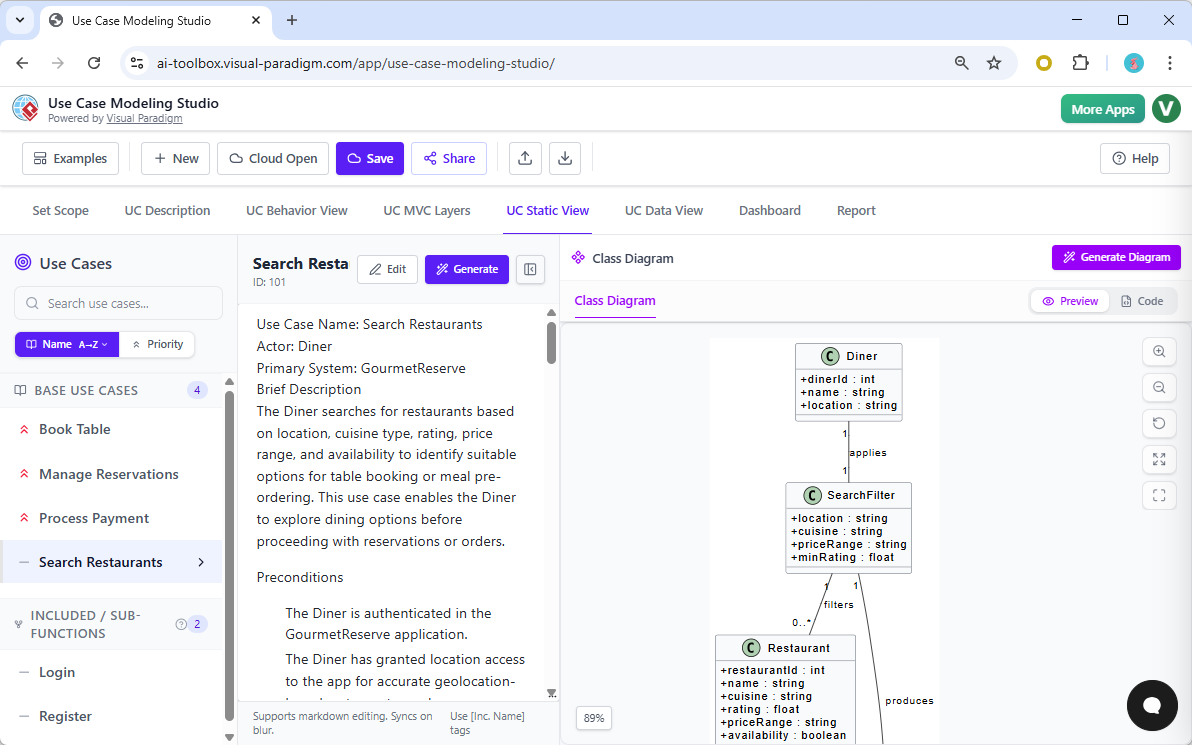
🔹 Key Concepts:
-
Step-by-Step AI Studios: Browser-based tools tailored for specific methodologies.
-
Enforced Best Practices: Ensures diagrams follow industry standards (C4, Use Case, SWOT, etc.).
-
Traceability Across Levels: e.g., C4 Context → Containers → Components → Code.
✅ Best Practices:
-
Use C4 PlantUML Studio to build architecture reports with minimal friction.
-
Use Use Case Modeling Studio to ensure complete actor-triggered scenarios and avoid missing use cases.
-
Use SWOT/PEST Analysis Studio to generate infographic-style diagrams with AI-generated insights.
✅ Ideal For:
-
Architecture teams building C4 model documentation.
-
Product teams creating comprehensive use case models.
-
Business strategy teams needing visual analysis frameworks.
💡 Pro Tip: Use Web App Studios when consistency, compliance, and traceability are more important than speed.
🧩 Key Concepts Every User Should Know
| Concept | Definition | Why It Matters |
|---|---|---|
| Traceability | The ability to link models (e.g., Use Case → Sequence → Class) so changes propagate automatically. | Ensures model integrity and reduces errors. |
| Model-Driven Engineering (MDE) | Generating code from models. VP Desktop supports code generation from UML/SysML. | Accelerates development and ensures consistency. |
| Living Diagrams | Diagrams embedded in documents (like OpenDocs) that can be edited or regenerated via AI. | Turns static docs into dynamic knowledge hubs. |
| Hybrid Workflow | Starting in one tool (e.g., Chatbot), then refining in another (e.g., VP Desktop). | Maximizes flexibility and efficiency. |
| Methodology Enforcement | Web Apps ensure diagrams follow C4, ArchiMate, or use case standards. | Reduces risk of flawed or inconsistent models. |
🛠️ Choosing the Right Tool: A Decision Framework
Use this step-by-step decision tree to pick the best Visual Paradigm AI tool for your stage and goal.
✅ Step 1: What’s Your Goal?
| Goal | Recommended Tool |
|---|---|
| Brainstorm system behavior or flows | ✅ AI Chatbot |
| Build a strategy doc with SWOT/PEST | ✅ OpenDocs or Web App Studio |
| Create a formal architecture report (C4) | ✅ C4 PlantUML Studio |
| Generate code from models | ✅ VP Desktop |
| Collaborate on a team wiki with editable diagrams | ✅ OpenDocs |
✅ Step 2: Who’s Involved?
| Team Member | Best Tool |
|---|---|
| Product Manager / Business Analyst | ✅ AI Chatbot or OpenDocs |
| Software Developer / Engineer | ✅ VP Desktop |
| Architect / Systems Engineer | ✅ VP Desktop or Web App Studio |
| Knowledge Team / Documentation Lead | ✅ OpenDocs |
✅ Step 3: What’s Your Workflow Stage?
| Stage | Recommended Tool |
|---|---|
| Discovery / Ideation | ✅ AI Chatbot |
| Design / Prototyping | ✅ AI Chatbot → OpenDocs |
| Engineering / Code Generation | ✅ VP Desktop |
| Documentation / Reporting | ✅ OpenDocs or Web App Studio |
🔁 Hybrid Workflow Example:
Chatbot → “Create a login flow” → OpenDocs → “Add error handling and security checks” → VP Desktop → “Generate Java code and database schema”
📊 Feature Comparison at a Glance
| Feature | VP Desktop | AI Chatbot | OpenDocs | Web App Studios |
|---|---|---|---|---|
| UML Support | ✅ Full | ✅ High | ✅ Embedded | ✅ Method-specific |
| SysML Support | ✅ Full | ✅ High | ⚠️ Moderate | ❌ Limited |
| C4 Model Support | ✅ Full | ✅ High | ⚠️ Low | ✅ Specialized Studio |
| Business Strategy (SWOT, PEST) | ✅ High | ✅ Best for Analysis | ⚠️ Moderate | ✅ High (Infographics) |
| Enterprise Architecture (ArchiMate) | ✅ Full | ✅ High | ⚠️ Moderate | ❌ Limited |
| Collaboration | 📌 Local/Team Server | 📌 Individual/Chat | ✅ Real-time Wiki | 📌 Individual |
| Code Generation | ✅ Yes | ❌ No | ❌ No | ❌ No |
| Traceability | ✅ Full | ✅ High | ✅ Yes | ✅ (via methodology) |
🚀 Why Visual Paradigm AI is a Game-Changer
✅ What Sets It Apart:
-
Not Just AI Drawing—AI Modeling: Models are not static. They are interactive, linked, and reusable.
-
From Idea to Code in One Ecosystem: No need to switch between tools.
-
AI That Understands Context: The Chatbot remembers previous steps and refines based on intent.
-
Built for Teams & Compliance: Supports versioning, collaboration, and audit trails.
⚠️ Challenges & How to Overcome Them:
| Challenge | Solution |
|---|---|
| Learning Curve (VP Desktop) | Start with the Chatbot or OpenDocs. Use guided tutorials. |
| Tool Fragmentation | Use a hybrid workflow: Chatbot → OpenDocs → VP Desktop. |
| Over-Reliance on AI | Always validate AI outputs with domain experts. Use model validation rules. |
📌 Final Recommendations: Your AI Modeling Roadmap
🔄 For Teams New to Visual Paradigm:
-
Start with the AI Chatbot to explore AI capabilities.
-
Use OpenDocs to build a simple team wiki or strategy guide.
-
Gradually introduce VP Desktop for complex modeling.
-
Use Web App Studios when following C4 or use case standards.
🏢 For Enterprise & Engineering Teams:
-
Use VP Desktop as the central hub for modeling, code generation, and version control.
-
Use Web App Studios for standardized architecture documentation.
-
Use OpenDocs for living product documentation.
📚 For Knowledge & Strategy Teams:
-
Use OpenDocs as your central knowledge base.
-
Use Web App Studios for professional SWOT, PEST, or C4 reports.
-
Use AI Chatbot to generate initial drafts.
🎯 Conclusion: The Future of Visual Modeling Is Intelligent, Integrated, and Collaborative
Visual Paradigm AI isn’t just another AI diagram tool. It’s a unified ecosystem that redefines what’s possible in visual modeling by combining:
-
Natural language input (Chatbot),
-
Living documentation (OpenDocs),
-
Methodology enforcement (Web Apps),
-
And engineering-grade precision (VP Desktop).
🌟 The future of modeling is not just AI-generated—it’s AI-guided, traceable, and team-enabled.
Whether you’re a product manager sketching flows, a developer generating code, or an architect building enterprise systems, Visual Paradigm AI gives you the tools to model with intelligence, collaborate with clarity, and deliver with confidence.
📚 Resources & Next Steps
-
Try the AI Chatbot for free: https://www.visual-paradigm.com
-
Explore OpenDocs Templates: https://www.visual-paradigm.com/open-docs
-
Download VP Desktop (Free Trial): https://www.visual-paradigm.com/download
-
Join the AI Modeling Webinar Series: https://www.visual-paradigm.com/webinars
Start small. Think big. Model with intelligence.
Visual Paradigm AI: Where Ideas Become Engineering Reality. 🛠️💡🚀
- AI Chatbot Feature – Intelligent Assistance for Visual Paradigm Users: This resource introduces the AI-powered chatbot functionality designed to provide users with instant guidance, task automation, and enhanced productivity.
- Visual Paradigm Chat – AI-Powered Interactive Design Assistant: An interactive AI interface that helps users generate diagrams, write code, and solve design challenges in real time through a conversational assistant.
- AI Chatbot for Diagramming: How It Works with Visual Paradigm: This article explains how the chatbot acts as an AI-powered modeling assistant that turns natural language directly into diagrams without requiring knowledge of specific syntax.
- Introducing Visual Paradigm AI Chatbot: A Smarter Way to Create Diagrams: This update highlights how the chatbot enables natural language diagram generation, smart editing, and contextual analysis for enterprise modeling.
- Visual Paradigm AI Chatbot: Turn Your Ideas into Diagrams Instantly: A guide highlighting the assistant’s ability to visualize concepts through conversational prompts, allowing designs to grow from raw text into full models.
- How to Turn Requirements into Diagrams with an AI Chatbot: This article explores the workflow of converting project requirements into clear visual models through a continuous conversational interface.
- How AI Chatbot Can Help You Learn UML Faster: A resource detailing how the chatbot provides an interactive learning environment where users can practice UML concepts and receive instant feedback.
- Case Study: Enhancing System Modeling Efficiency with Visual Paradigm’s AI-Powered Chatbot: This case study demonstrates how the chatbot improves productivity and accuracy in system modeling by enabling conversational diagram creation.
- Visual Paradigm AI Chatbot: The World’s First Purpose-Built AI Assistant for Visual Modeling: This article highlights the launch of a groundbreaking AI assistant tailored specifically for visual modeling with intelligent guidance.
- Mastering Sequence Diagrams with Visual Paradigm: AI Chatbot Tutorial: A beginner-friendly tutorial that uses a real-world e-commerce case study to demonstrate conversational diagramming with the AI assistant.