
Designing a database from scratch is often a daunting task for many developers and analysts. It requires deep technical knowledge and hours of manual drafting. However, the best AI-powered database modeling tool is changing this landscape by automating the heavy lifting. Visual Paradigm’s DB Modeler AI provides a structured, seven-step journey that turns a simple project name into a fully functional, normalized SQL schema. Whether you are building a complex Hospital Management System or a simple retail app, this professional database design app ensures your data structure is efficient, scalable, and error-free from the very first click.
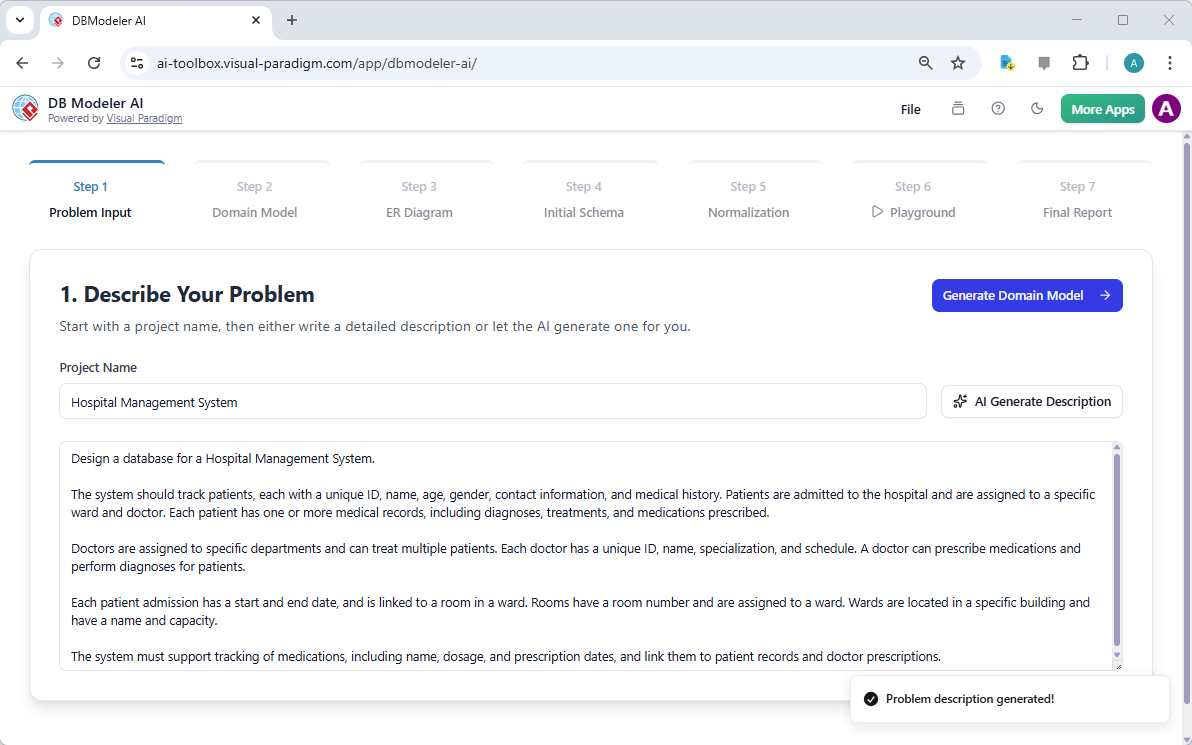
The journey begins with a clear understanding of your business needs. In the first step of the process, the user provides a project name and a description of the problem. If you are unsure where to start, the AI can even draft a comprehensive problem statement for you. This foundational step ensures that every subsequent diagram and piece of code aligns perfectly with your specific requirements. It removes the ambiguity that often leads to costly rework during the development phase.
In the first visual example, we see the Problem Input stage for a Hospital Management System. The AI has generated a detailed description covering patients, doctors, admissions, and medical records. This ensures all business rules are captured before a single table is created.
Key Takeaways for Professional Database Design
-
Automated Accuracy: Move from a text description to a technical schema in minutes without manual errors.
-
Visual Clarity: Generate Domain Class Diagrams and ERDs to communicate complex structures to stakeholders.
-
Built-in Best Practices: Leverage AI-driven normalization to ensure your database follows 1NF, 2NF, and 3NF rules.
-
Interactive Validation: Test your design in a live SQL playground before you write a single line of application code.
-
Project Management: Save your progress to the cloud or export local files for seamless team collaboration.
Transforming Requirements into Visual Domain Models
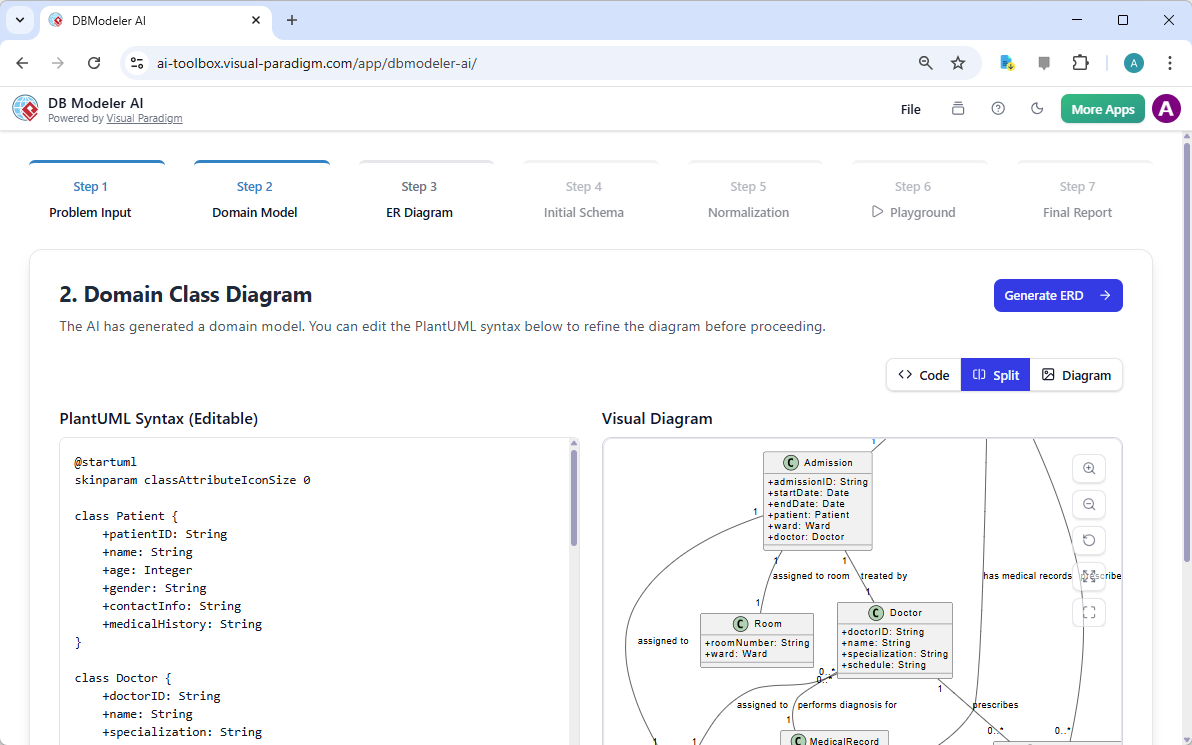
Once the problem is defined, the tool moves to Step 2: the Domain Class Diagram. A Domain Class Diagram is a conceptual map that identifies the main “things” in your business, known as entities, and how they relate. For a hospital, this includes entities like Patients, Doctors, and Wards. This diagram focuses on business logic rather than technical database constraints, making it an excellent tool for discussing the system with non-technical stakeholders.
The AI uses the description from Step 1 to generate this visual model automatically. It also provides the underlying PlantUML syntax, allowing users to make quick text-based edits that instantly update the diagram. This dual approach offers both the speed of AI and the precision of manual control.
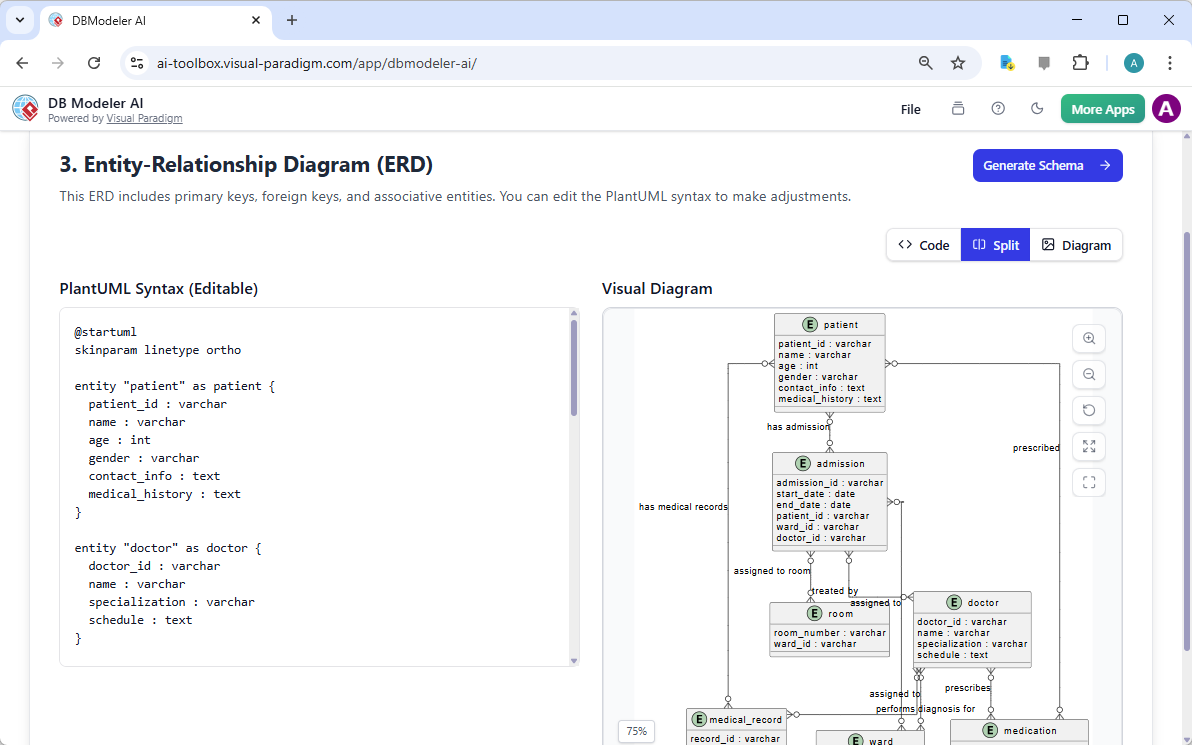
Moving from the conceptual to the logical, Step 3 introduces the Entity-Relationship Diagram (ERD). While the class diagram is about business concepts, the ERD is about database structure. It defines primary keys, foreign keys, and specific attributes for every table. This is where the blueprint for your data storage truly takes shape. The online AI-powered database modeling tool ensures that relationships like “one-to-many” or “many-to-many” are correctly represented based on your initial description.
In the provided screenshot for Step 3, the ERD clearly shows how a patient has medical records and how doctors are assigned to specific wards. These visual connections are vital for understanding how data flows through your system.
Generating and Optimizing SQL Schemas
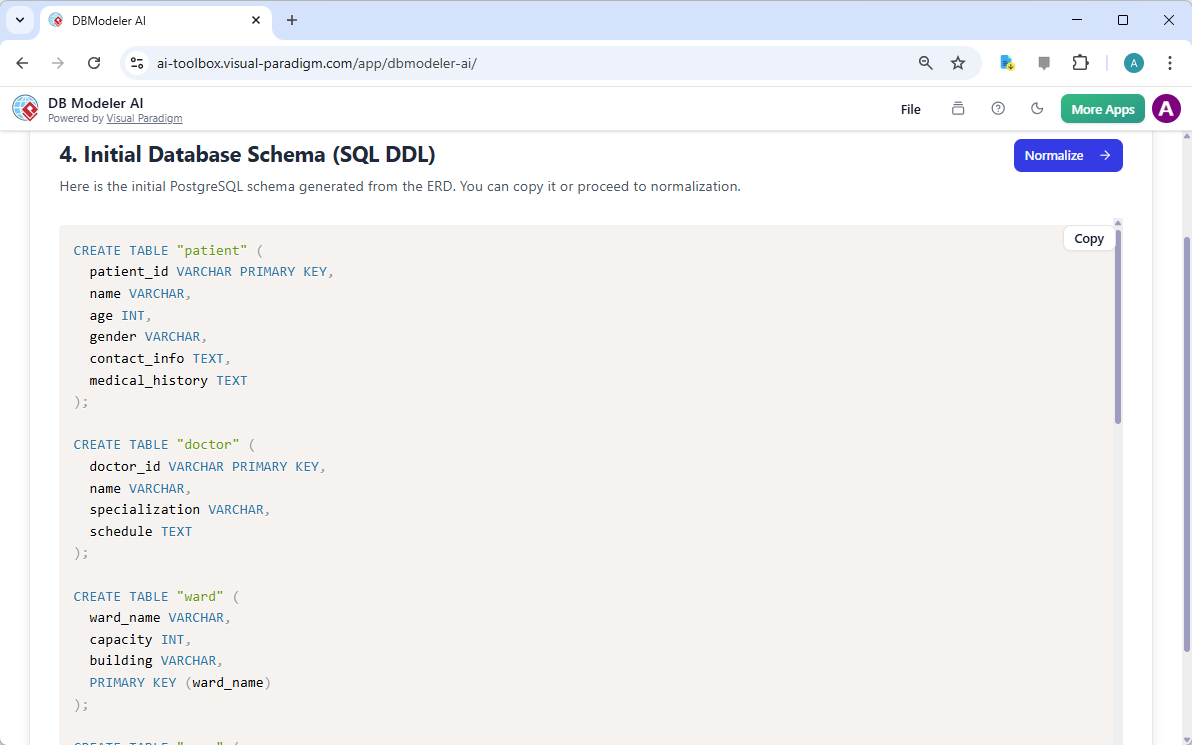
After the visual models are confirmed, Step 4 generates the Initial Database Schema. This is presented as SQL DDL (Data Definition Language). DDL is the set of commands used to actually create the tables in a database engine like PostgreSQL or MySQL. Instead of writing hundreds of lines of code, the user simply reviews the AI-generated script. This feature alone can save hours of tedious typing and syntax checking.
The output is clean, professional, and follows standard SQL conventions. It includes all necessary table definitions, column types, and primary key constraints, providing a solid foundation for any software project.
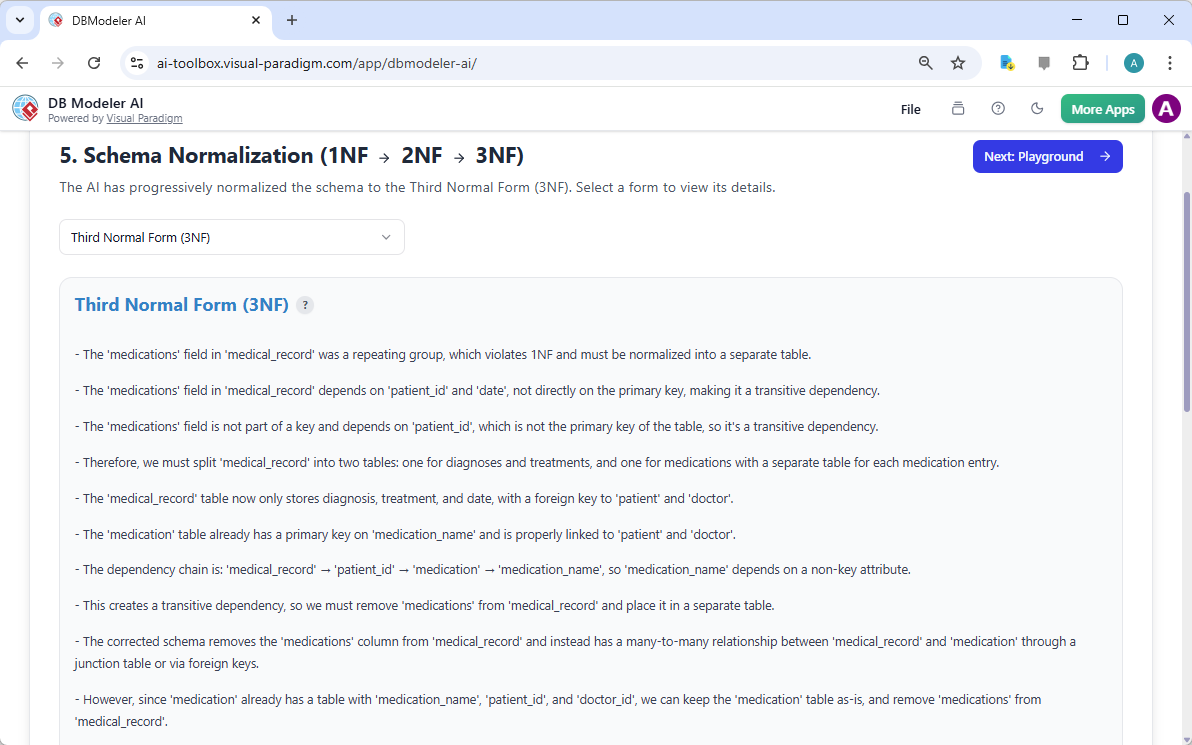
Even a well-drafted schema can have redundancies. Step 5 is where the best AI-powered database modeling tool really shines by providing Normalization Assistance. Normalization is the process of organizing data to reduce repetition and ensure integrity. The tool guides you through the First, Second, and Third Normal Forms (3NF). It explains exactly why certain changes are made, such as splitting a “medications” field into its own table to avoid repeating data.
In this phase, the AI analyzes the schema and suggests refinements. This ensures that your database is not just functional, but optimized for high performance and easy maintenance as your data grows.
Validation in the Interactive SQL Playground
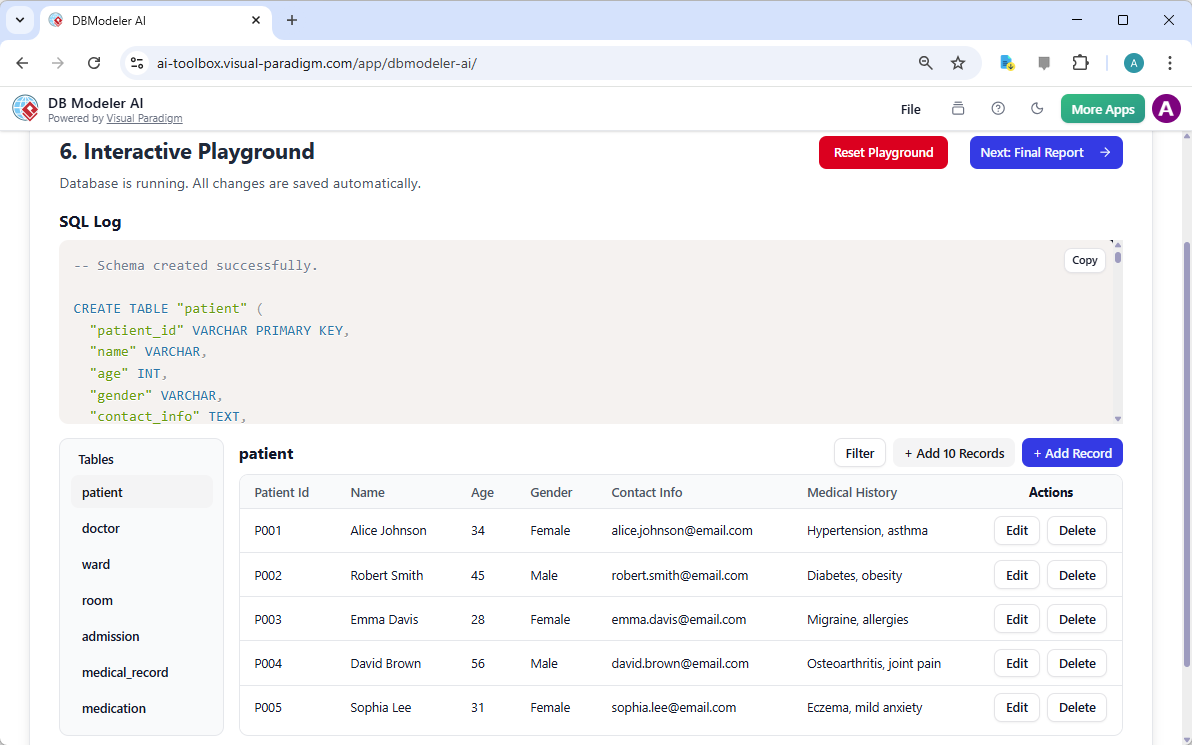
One of the most innovative features of DB Modeler AI is the Interactive Schema Playground found in Step 6. Most design tools stop at the diagram, but Visual Paradigm allows you to actually play with your design. This is a simulated environment where you can create tables, insert sample data, and run queries. It is like having a sandbox to test your ideas before you commit them to a production server.
As seen in the playground screenshot, users can add records for patients like “Alice Johnson” or “Robert Smith.” You can see the resulting SQL statements live on the screen, which is a fantastic way to learn how the database behaves in real-world scenarios. This step bridges the gap between a static design and a living application.
Documentation and Final Reporting
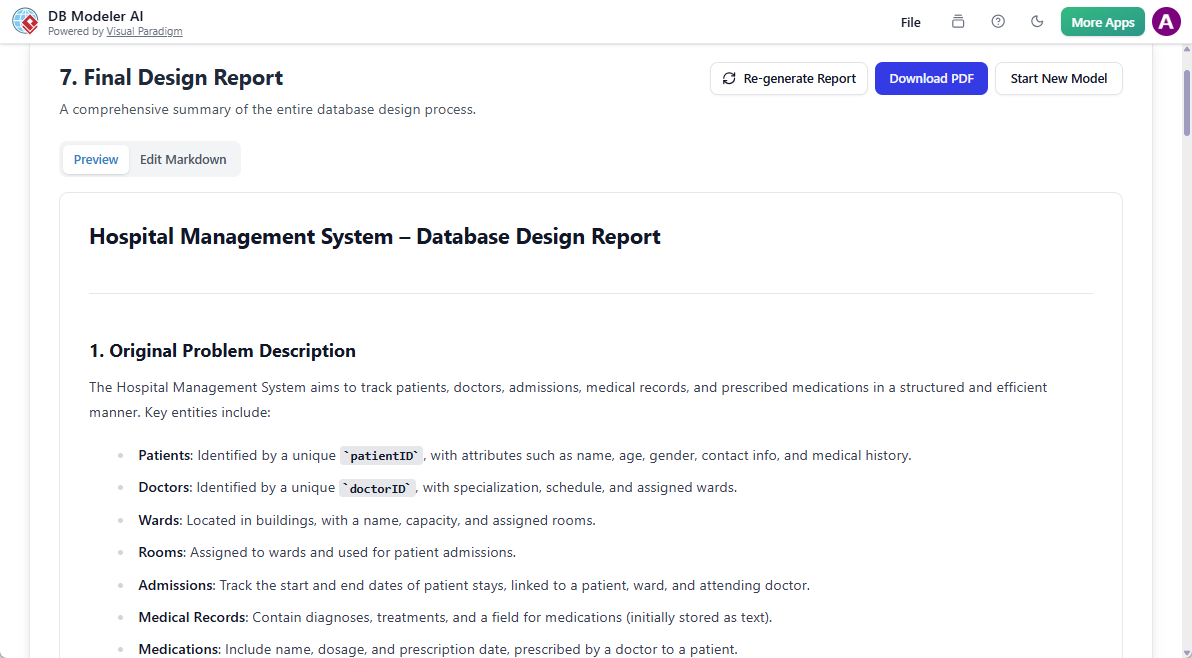
The final step of the process is the generation of a Final Design Report. Professional projects require documentation for stakeholders, auditors, and future developers. The report summarizes every previous step, including the original problem statement, the diagrams, the normalized schema, and the technical logic behind the design. This ensures that the “why” behind your database structure is never lost.
The report is generated in a clean Markdown format and can be downloaded as a PDF. It serves as the ultimate deliverable, proving that your database has been architected according to industry best practices using a professional workflow.
Conclusion: Why Visual Paradigm is the Superior Choice
In conclusion, building a database is no longer a manual chore reserved for elite specialists. Visual Paradigm’s DB Modeler AI democratizes the design process. It provides a logical, 7-step wizard that guides you from a basic idea to a professional-grade SQL schema. By combining AI-powered generation with interactive testing and rigorous normalization, it ensures your project starts on the strongest possible footing.
Using the best AI-powered database modeling tool allows you to focus on your business logic while the software handles the complexities of diagramming and code generation. It is the perfect companion for developers, students, and business analysts who value speed, accuracy, and professional results.
Ready to build your next database?
Stop struggling with manual diagrams and complex SQL syntax. Experience the future of data architecture today. Try the DB Modeler AI now and transform your business ideas into robust database designs in minutes. For more information on our suite of AI-driven tools, visit the official DB Modeler AI page.
Related Links
Visual Paradigm offers a powerful suite of ERD (Entity-Relationship Diagram) tools that enable the design of scalable database schemas through traditional visual modeling and AI-driven automation,. These tools support various standards, including Chen notation, and facilitate the entire lifecycle from conceptual design to physical database implementation and reverse engineering,,.
-
Visual Paradigm ERD Tool – Create Entity-Relationship Diagrams Online: A web-based tool providing an intuitive drag-and-drop interface for designing professional database schemas.
-
Database Design with ERD Tools – Visual Paradigm Guide: A comprehensive resource for building robust databases using data modeling best practices and effective schema design.
-
DBModeler AI: Intelligent Database Modeling Tool: An AI-driven application used for rapid database design, generating ER diagrams, and creating testable database environments.
-
Chen Notation ERD Editor – Advanced Entity-Relationship Modeling: A specialized editor that provides full support for entities, attributes, and relationships using precise Chen notation.
-
New Diagram Types Added to AI Diagram Generator: DFD & ERD: This update highlights the ability to instantly generate ERDs from natural language prompts using artificial intelligence.
-
Visual Paradigm ERD Tool for Database Design – Complete Solution: A professional toolset used by architects to model, visualize, and generate complex databases efficiently.
-
How to Model a Relational Database with ERD – Visual Paradigm Tutorial: A practical tutorial that guides users through the process from conceptual modeling to final implementation.
-
Streamlining Entity-Relationship Modeling with Visual Paradigm: An article focused on simplifying the transition from initial concepts to a fully deployed database.
-
Introduction to Data Modeling: ERD, Code Generation & Reverse Engineering: An introductory guide covering the essential data modeling lifecycle, including automated code generation.
-
Why Visual Paradigm Online is Ideal for ERD Design in Development Teams: A case study recommending this platform for collaborative, real-time ERD design within agile software development teams.