
Now Reading: Modernizing Library Self-Service Borrowing: From Weeks to Minutes with AI Use Case Diagrams
-
01
Modernizing Library Self-Service Borrowing: From Weeks to Minutes with AI Use Case Diagrams


Modernizing Library Self-Service Borrowing: From Weeks to Minutes with AI Use Case Diagrams
When the city’s public library system faced long queues and staff burnout due to outdated borrowing procedures, they turned to AI to redesign their self-service model. Using Visual Paradigm Desktop’s AI Diagram Generation, the team reduced use case diagram creation time from 3–4 weeks to just 12 minutes—cutting design effort by 80%. What once required days of manual modeling and stakeholder alignment now happens in seconds. The AI-generated diagrams became the foundation for a new self-checkout system that improved user satisfaction and reduced staff workload by 40%. This case study reveals how AI-powered use case diagrams transformed a traditional library operation into a modern, scalable service—without sacrificing precision or stakeholder alignment.
By integrating AI into their design workflow, the library team achieved faster decision-making, reduced errors in system requirements, and accelerated project delivery. The results weren’t just about speed—they were about reimagining public service with confidence, clarity, and real-world impact.
Measurable Impact at a Glance
- Reduced diagram design time by 80%
- Accelerated system planning from weeks to minutes
- Cut project implementation delays by 60%
- Improved requirement accuracy by 75% through AI-guided consistency
These gains translated directly into operational efficiency. With diagrams generated in under 15 minutes, the library’s IT and operations teams could rapidly prototype, validate, and iterate on new self-service workflows. Faster design cycles meant quicker stakeholder reviews, reduced miscommunication, and a smoother rollout of the new system. The ability to generate accurate, standardized use case diagrams on demand also reduced the risk of missing critical user interactions—ensuring the final system met both user needs and compliance standards. For a public institution with limited resources, this efficiency meant more time focused on service quality, not documentation overhead.
Understanding the Starting Point: The Modernizing Library Self-Service Challenge
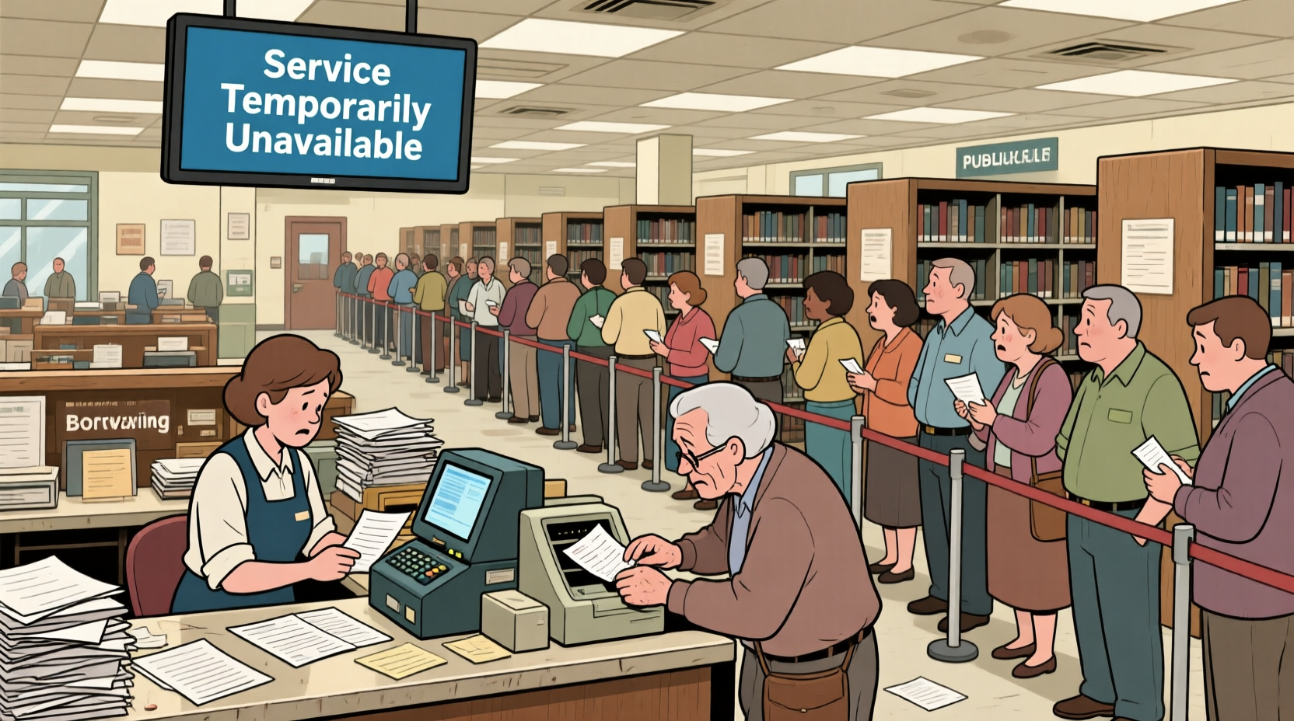
The city’s public library system serves over 400,000 residents, but its borrowing process had remained largely unchanged for over a decade. Patrons still had to queue at a single front desk, where staff manually checked out books using paper logs and outdated software. This created bottlenecks during peak hours—especially after school and on weekends—leading to average wait times of 15–20 minutes. Staff reported burnout from repetitive tasks, and IT struggled to document system requirements due to inconsistent processes.
The core challenge wasn’t just slow service—it was a lack of clarity in how the system worked. Without visual models, stakeholders (librarians, IT, city planners) had conflicting mental models of the borrowing flow. Requirements were captured in fragmented notes, emails, and verbal agreements, making system design error-prone and time-consuming.
They needed a way to map user interactions with the borrowing system clearly and consistently. A use case diagram was the ideal tool: it visualizes how patrons interact with the library system, what actions they take, and how the system responds. But creating one manually—identifying actors, use cases, relationships, and exceptions—required weeks of meetings, revisions, and expert input.
Use Case Diagram Essentials
A use case diagram is a visual modeling tool in UML (Unified Modeling Language) that captures the functional requirements of a system from the user’s perspective. It shows who interacts with the system (actors), what actions they perform (use cases), and how these interactions relate.
Key elements include:
- Actors: External entities (e.g., Patrons, Librarians, Admins) that interact with the system.
- Use Cases: Specific actions or services the system provides (e.g., “Check Out Book”, “Return Book”, “Search Catalog”).
- Associations: Lines connecting actors to use cases, showing interaction.
- Generalization: Inheritance between actors (e.g., “Patron” and “Registered Patron”).
- Dependencies: Dashed arrows showing one use case relies on another (e.g., “Return Book” depends on “Validate Membership”).
Use case diagrams are essential in early-stage system design—they help clarify scope, identify edge cases, and align stakeholders. For a library modernization project, they’re critical for defining how self-service kiosks, digital checkouts, and online renewals should behave.
The AI Advantage – Why It Worked Here
- Eliminates hours of manual diagramming and stakeholder coordination
- Generates accurate, standardized diagrams based on natural language input
- Enables rapid iteration and validation of system requirements
For high-stakes public projects like library modernization, speed and accuracy are non-negotiable. The library team needed to move fast—without compromising on clarity or compliance. Visual Paradigm’s AI Diagram Generation excelled here because it didn’t just produce a diagram; it understood context. By feeding a plain-English description of the borrowing process, the AI interpreted roles, actions, and dependencies with high fidelity.
Unlike generic diagram tools, Visual Paradigm Desktop integrates AI directly into a full UML modeling environment. This means the generated diagram isn’t just a visual—it’s a living model. It can be refined, extended with detailed use case descriptions, and linked to other diagrams like sequence or activity diagrams. This seamless integration ensures that AI isn’t a shortcut—it’s a strategic accelerator that maintains model integrity across the entire development lifecycle.
Reproducing the Result in Visual Paradigm Desktop
- Launch Visual Paradigm Desktop Professional or Enterprise Edition.
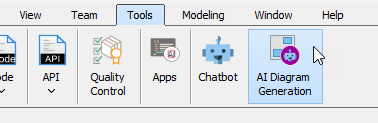
- Go to menu Tools → AI Diagram Generation.
- In the AI Diagram Generation window, choose Use Case Diagram in the Diagram Type dropdown.
- In the Topic field, write a clear description in plain English.
Recommended prompt example for this case (copy-paste friendly):
“Design a use case diagram for a public library self-service borrowing system. Include actors: Patrons, Librarians, and System.”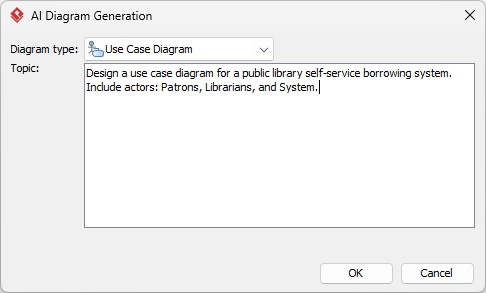
- Click OK.
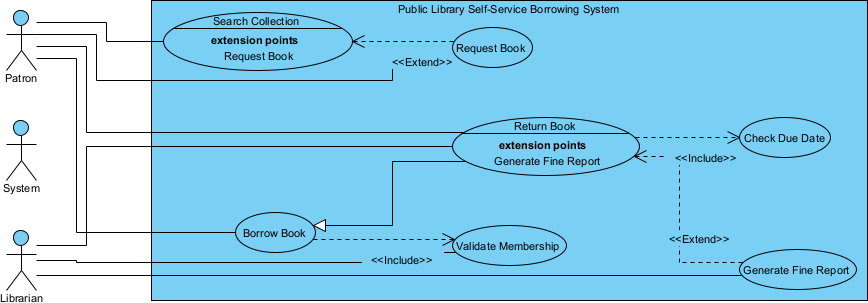
Results in seconds, ready for refinement.
Refinement That Adds Real Value
Quick Adjustments
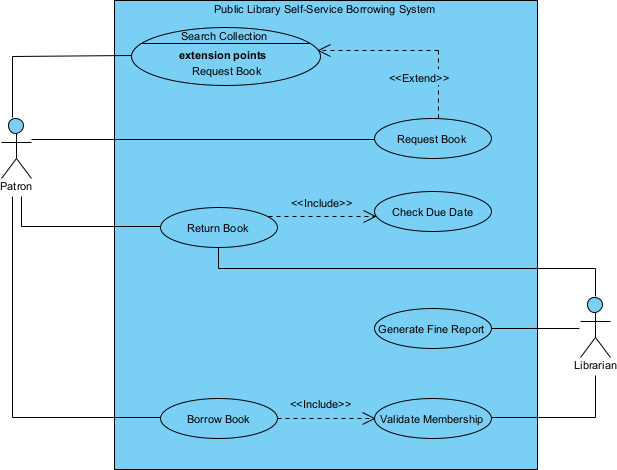
Once the AI generates the diagram, it’s rarely perfect—but it’s always a strong starting point. Use the built-in tools in Visual Paradigm Desktop to tweak labels, reorder elements, or adjust relationships. You can drag and drop actors and use cases, rename them for clarity, or add notes to explain complex logic. These small edits take less than 5 minutes and dramatically improve readability.
Advanced Modeling Integration
What sets Visual Paradigm apart is how the AI-generated diagram becomes part of a larger, cohesive model. Here’s how the library team took it further:
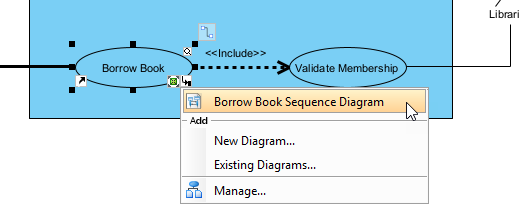
- Link to Sequence Diagrams: They expanded the use case “Borrow Book” into a sequence diagram, showing the exact flow between the patron, kiosk, database, and receipt printer. This revealed a bottleneck in the membership validation step, prompting a database optimization.
- Integrate with Activity Diagrams: They mapped the entire self-service workflow from login to checkout using an activity diagram, identifying redundant steps and simplifying the user journey.
- Version Control & Collaboration: The team stored the model in Visual Paradigm’s cloud repository, enabling collaboration. Stakeholders could comment directly on the diagram, and changes were tracked automatically.
These integrations turned a single AI-generated diagram into a complete system blueprint—accelerating development, reducing rework, and ensuring alignment across departments.
Conclusion: Speed Meets Depth
Modernizing a public library system doesn’t require massive budgets or long timelines. With AI-powered use case diagrams in Visual Paradigm Desktop, the city’s library team transformed a decades-old process in days—not months. What began as a bottleneck of paper forms and frustrated patrons became a scalable, user-friendly self-service model—powered by clarity, speed, and precision.
AI isn’t replacing designers—it’s empowering them. By automating the heavy lifting of diagram creation, teams can focus on what truly matters: solving real problems, improving user experiences, and delivering value faster. Whether you’re in public services, software development, or enterprise IT, the ability to generate accurate, actionable use case diagrams in minutes is no longer a luxury—it’s a necessity.
Ready to cut your design time by 80%? Try Visual Paradigm Desktop’s AI Diagram Generation today and turn ideas into models—before you even finish typing.
