


In modern software development, clear, modular, and maintainable system design is paramount. One of the most effective tools for achieving this is the UML (Unified Modeling Language) Component Diagram—a visual representation of a system’s modular structure, showing how components interact through interfaces and dependencies.
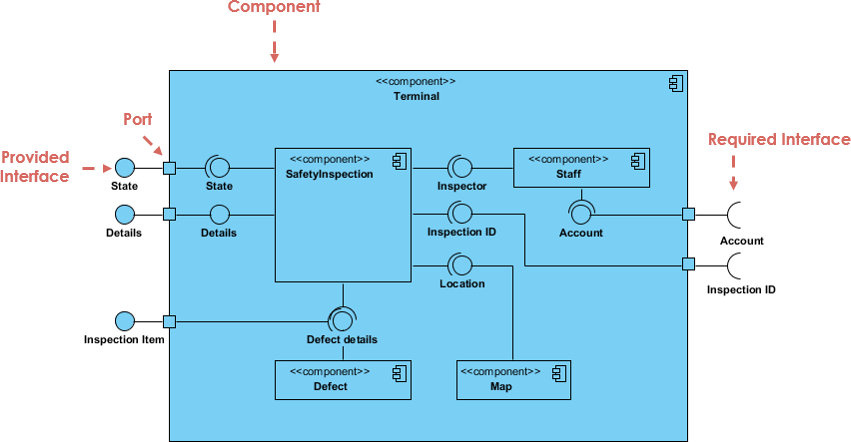
With the recent major upgrade to AI UML Component Diagram generation in Visual Paradigm’s AI Chatbot (see Major Upgrade to AI UML Component Diagram Generation in Visual Paradigm AI Chatbot), creating, refining, and sharing component diagrams has become faster, smarter, and more accessible than ever—especially for students, developers, and system architects.
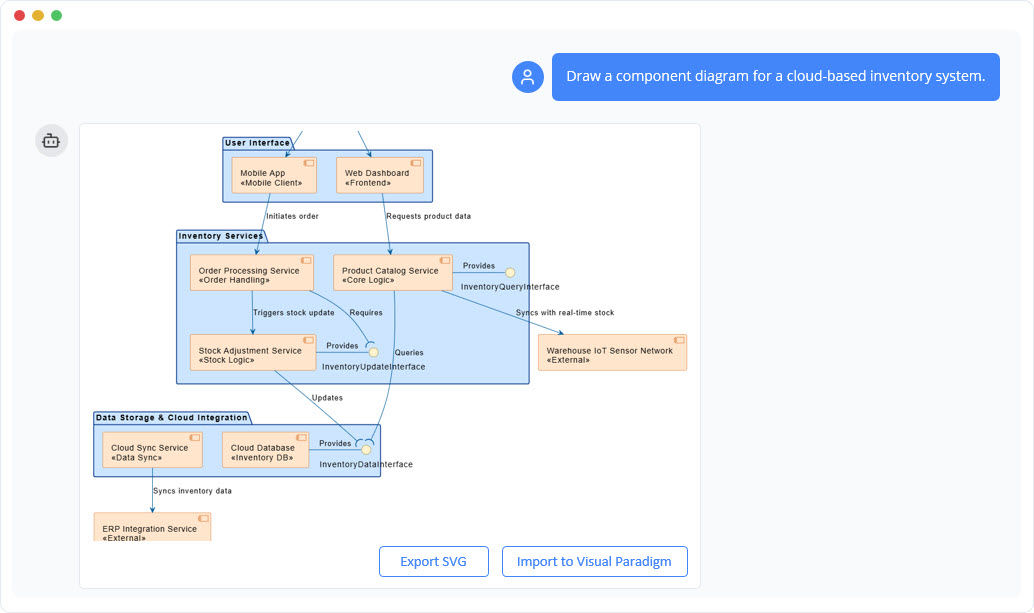
This comprehensive guide walks you through:
-
✅ Key concepts of UML Component Diagrams
-
✅ Step-by-step examples using real-world systems
-
✅ How Visual Paradigm’s AI UML Diagram Generator accelerates modeling
-
✅ Best practices and benefits of AI-assisted diagramming
-
✅ Embedded links to official resources and tutorials
🔹 What Is a UML Component Diagram?
A UML Component Diagram is a structural diagram that illustrates the modular architecture of a software system. It shows how components (self-contained units of functionality) are organized, interact, and depend on one another.
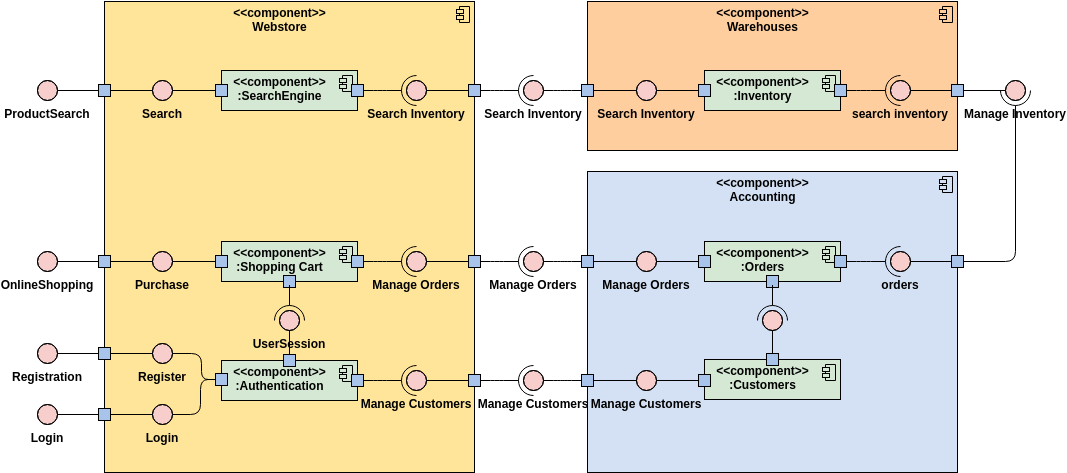
🧩 Key Elements of a Component Diagram:
| Element | Description | Visual Representation |
|---|---|---|
| Component | A modular unit (e.g., PaymentService, UserAuthModule) |
Rectangle with <<component>> stereotype |
| Interface | A contract defining how a component communicates (e.g., PaymentProcessor, UserRepository) |
Circle or small rectangle with <<interface>> |
| Dependency | A relationship indicating one component relies on another | Dashed arrow from dependent to supplier |
| Port | A point of interaction between a component and its environment | Small square on the component’s edge |
| Connector | A line linking ports to show communication | Solid line between ports |
📌 Use Case: Ideal for showing system modularity, defining APIs, supporting microservices, and documenting architectural decisions.
📘 Learn more: UML Component Diagram Tutorial: Building Modular Software Systems
🔹 Why Use Component Diagrams?
Component diagrams help teams:
-
Visualize system architecture clearly.
-
Enforce separation of concerns.
-
Support team collaboration and onboarding.
-
Serve as a foundation for C4 modeling and documentation.
-
Facilitate testing, deployment, and refactoring.
🚀 Accelerate project kickoff: Why Every Team Needs an AI Diagram Maker for Faster Project Kickoff
🔹 How Visual Paradigm’s AI UML Diagram Generator Works
Visual Paradigm’s AI-powered UML Diagram Generator (see AI Diagram Generator: Complete C4 Model Support) uses generative AI (GenAI) to convert natural language descriptions into accurate, standardized UML Component Diagrams.
🤖 How It Works:
-
User enters a prompt in plain English:
“Create a component diagram for a car park booking system with a web frontend, booking service, payment service, and database.”
-
AI analyzes the input and:
-
Identifies components and interfaces.
-
Determines dependencies.
-
Applies UML standards.
-
Generates a clean, visual diagram.
-
-
User can refine the diagram with follow-up prompts:
-
“Add a notification service that sends email confirmations.”
-
“Make the payment service use Stripe API.”
-
“Show the interface for the booking service.”
-
-
Diagram is automatically validated for consistency and best practices.
💡 Pro Tip: Use the AI to generate a first draft, then manually refine it for production documentation.
📘 Explore the AI chatbot: AI-Powered Component Diagrams with Visual Paradigm Chatbot
🔹 Real-World Example: Car Park Booking System (C4 Model Level)
The Comprehensive Tutorial: Generating and Modifying C4 Component Diagrams with AI provides a hands-on walkthrough of building a C4 component diagram using Visual Paradigm’s AI.
Step-by-Step Process:
✅ Step 1: Initial Prompt
“Generate a C4 component diagram for a car park booking system. Include: web UI, booking service, payment service, database, and notification service.”
✅ Step 2: AI Output
Visual Paradigm generates:
-
Components:
Web UI,Booking Service,Payment Service,Database,Notification Service -
Interfaces:
BookParking,ProcessPayment,SendEmail -
Dependencies:
Booking Service → Payment Service,Booking Service → Database,Notification Service → Email API
✅ Step 3: Refine with AI
“Make the payment service use Stripe API. Add a retry mechanism in case of failure.”
AI updates the diagram:
-
Adds
StripeAPIas a dependency. -
Adds a
RetryLogiccomponent or port. -
Updates interface descriptions.
✅ Step 4: Export & Share
-
Export as PNG, SVG, or PDF.
-
Embed in Confluence, Jira, or GitHub.
-
Use in architecture reviews or sprint planning.
📌 This is how AI transforms architecture from a static document into a living, interactive model.
🔹 Example 2: E-Commerce Platform
Prompt:
“Design a component diagram for an e-commerce platform with user management, product catalog, shopping cart, order processing, and payment gateway.”
AI Output Includes:
-
User Management Service(withRegisterUser,AuthenticateUserinterfaces) -
Product Catalog Service(exposesGetProducts,SearchProducts) -
Shopping Cart Component(usesAddItem,RemoveIteminterfaces) -
Order Processing Service(depends onPayment Gateway) -
Payment Gateway(integrates with Stripe or PayPal)
🔍 Benefit: AI ensures correct use of interfaces and avoids circular dependencies.
📘 Learn more: Mastering AI-Generated UML Component Diagrams: A Comprehensive Guide
🔹 Key Benefits of Using VP AI UML Diagram Generator
| Benefit | How AI Enhances It | Source |
|---|---|---|
| Speed | Generate diagrams in seconds from natural language. | Why Every Team Needs an AI Diagram Maker |
| Accuracy | AI applies UML 2.5+ standards and validates structure. | AI Diagram Generator: Complete C4 Model Support |
| Accessibility | No need to learn UML syntax—just describe your system. | AI-Powered Component Diagrams with Visual Paradigm Chatbot |
| Iterative Design | Refine diagrams through conversational prompts. | Comprehensive Tutorial: Generating and Modifying C4 Component Diagrams |
| C4 Model Integration | Full support for Context, Container, Component, and Code levels. | Visual Paradigm Full C4 Model Support Release |
| Team Collaboration | Share diagrams instantly and align on architecture. | AI-Powered System Design with Visual Paradigm |
🎯 Ideal for: Software architects, DevOps teams, students, and agile product owners.
🔹 Best Practices & Guidelines
Even with AI assistance, follow these best practices to ensure high-quality, maintainable diagrams:
✅ Do:
-
Keep components focused on a single responsibility (e.g.,
OrderService, notOrderAndPaymentService). -
Define clear interfaces using
<<interface>>stereotype. -
Use meaningful names (e.g.,
UserAuthenticationService, notAuthService1). -
Minimize dependencies—use abstraction layers when possible.
-
Validate with AI for consistency and missing elements.
❌ Avoid:
-
Overloading components with too many responsibilities.
-
Circular dependencies (e.g.,
A → B,B → A). -
Using vague names like
Module1,Service2.
📘 Learn best practices: Mastering AI-Generated UML Component Diagrams: A Comprehensive Guide
🔹 How to Get Started with Visual Paradigm’s AI UML Diagram Generator
-
Download Visual Paradigm (Free Community Edition or Professional).
-
Open the AI Chatbot from the toolbar.
-
Type a prompt like:
“Create a UML component diagram for a mobile banking app with login, account dashboard, transaction history, and fund transfer services.”
-
Review the AI-generated diagram.
-
Refine using follow-up prompts.
-
Export, share, or integrate into documentation.
🔗 Try it now: Major Upgrade to AI UML Component Diagram Generation in Visual Paradigm AI Chatbot
🔹 Conclusion: The Future of System Design Is AI-Powered
The Visual Paradigm AI UML Diagram Generator isn’t just a tool—it’s a paradigm shift in how we design, document, and communicate software architecture.
By combining natural language input, generative AI, UML standards, and C4 modeling support, it enables:
-
Faster project kickoffs.
-
Better collaboration.
-
Higher architectural quality.
-
Reduced learning curve.
Whether you’re a student learning software design, a developer building modular systems, or a system architect documenting complex systems, this AI-powered tool is a game-changer.
🎯 Start building smarter today:
Try the AI chatbot: AI-Powered Component Diagrams with Visual Paradigm Chatbot
Learn step-by-step: Comprehensive Tutorial: Generating and Modifying C4 Component Diagrams with AI
Explore the full suite: Visual Paradigm Full C4 Model Support Release
📚 Additional Resources & Links
🌟 Final Thought
“Great software starts with great design. With Visual Paradigm’s AI UML Diagram Generator, you don’t just design faster—you design smarter.”
Embrace the future of visual modeling. Start generating, refining, and sharing architectural diagrams in seconds—powered by AI.
✅ Your next project starts with a single sentence.
✅ Your team’s architecture just got clearer.
✅ Your documentation just got smarter.
👉 Begin your journey today at Visual Paradigm.