
Introduction to Visual Paradigm UML Tool
Visual Paradigm is an award-winning visual modeling platform that provides comprehensive support for UML (Unified Modeling Language) and various other modeling notations. It serves software design, business process modeling, enterprise architecture, and documentation needs with powerful AI integration.
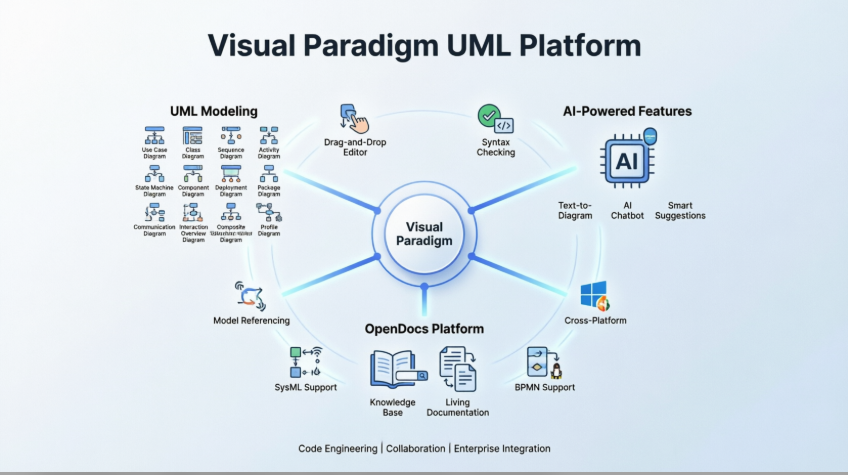

Complete UML Diagram Types
Use Case Diagram
Capture functional requirements with UML use case diagram tool. Each use case in a use case diagram represents a high level business goal that yields a measurable result of business values. (UML) Actors are connected with use cases to represent the roles that interact with the functions.

Class Diagram
The UML modeling tool lets you model the structure of system by modeling its classes, their attributes and operations in a UML class diagram. UML class diagram is a blueprint of the classes (code level) required to build a software system. Programmers implement a software system with the help of both the class diagram and the class specification.

Sequence Diagram
Visualize the interactions between users, systems and sub-systems over time through message passing between objects or roles. If class diagram represents the skeleton of classes by showing their attributes and methods, UML sequence diagram complete the classes by representing the programming logic to be filled in methods’ body.

Communication Diagram
Collaboration between objects in runtime can be modeled in the UML tool, with a UML communication diagram. In a communication diagram, objects, called lifelines, are connected to represent the need of communication during the execution of an interaction. Messages can be added on top of the connectors to list the calls made from and to those lifelines.

Activity Diagram
Use UML activity diagram, a flowchart-based diagram to model the flow of control. Partition actions according to the type of participant involved.

State Machine Diagram
State machine diagram is a critical design model for event-driven systems. Well-designed state machine shows accurately the essential states of objects as well as the triggers of state change, which facilitates the development of error-free state machine.

Component Diagram
Components diagrams are used to model the structure of systems by showing how little parts of the system gear up in forming a bigger part, or forming the entire software systems.

Deployment Diagram
Models the physical deployment of software components with UML deployment diagram. In deployment diagram, hardware components (e.g. web server, mail server, application server) are presented as nodes, with the software components that run inside the hardware components presented as artifacts.

Package Diagram
Arrange and organize model for large-scale project with package diagrams. Package diagram is also good in visualizing structure and dependency between sub-systems or modules.

Object Diagram
View a snapshot of instances of classifiers in UML class diagrams. Similar to class diagrams, object diagrams show the static design of a system from a prototypical perspective.

Composite Structure Diagram
Visualize the internal structure of a class or collaboration with UML composite structure diagram. Model a system from a micro point-of-view using UML composite structure diagram.

Timing Diagram
Timing diagrams model the behavior of objects throughout a given period of time. It is a commonly used UML tool for designing real-time and distributed systems. Just drag to move a time unit back and forth. Have a timing frame updated automatically according to your change.

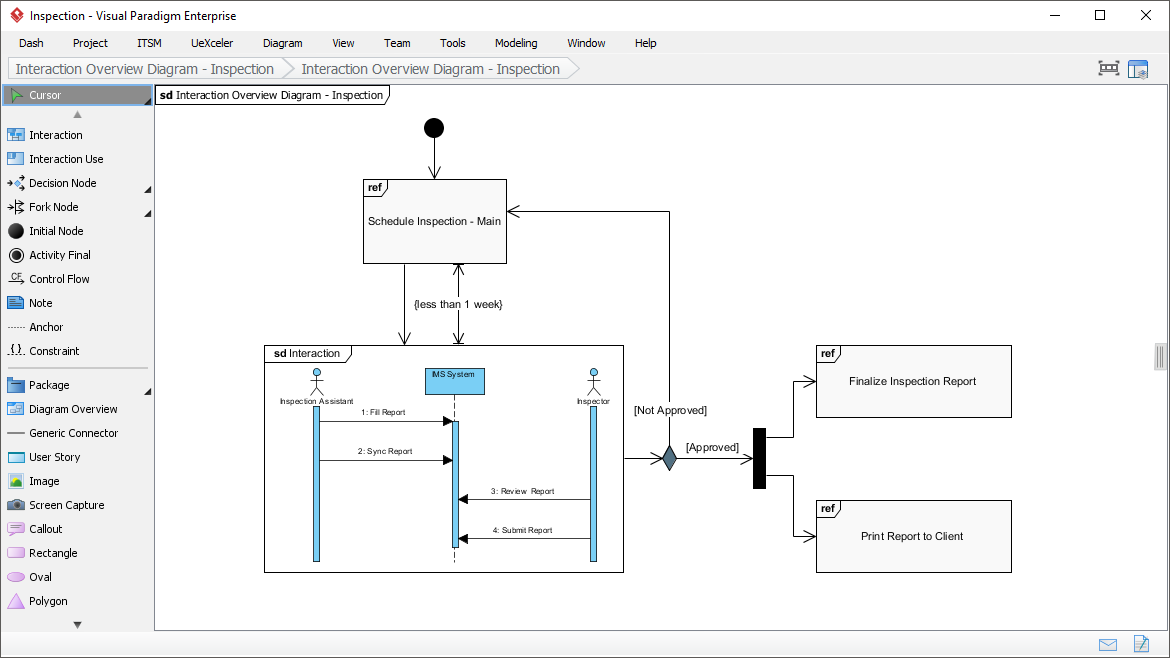
Interaction Overview Diagram
View the sequence of interactions with UML interaction overview diagram. Interaction overview diagram helps represent complex scenario that involve multiple interactions presented as multiple UML sequence diagrams.
Profile Diagram
A visual way to define stereotypes to use in your project. Draw stereotypes, define their tags and their inter-relationships like generalizations and associations. Specify formatting options like background color and icons.


Model Element Referencing
Add diagrams, shapes, model elements as internal references
Make internal links between different kinds of project artifacts. Those references work both in Visual Paradigm and in any document and Web contents generated from your design.
Add business documents as external references
Maintain reference between software design and the business documents to help find out why a design decision was made.
Mark in shape body when have reference added
Glance over a design. The tiny marker that appear in shapes’ body indicates that the shapes have references added.
Reference model element in description
Insert model element references to rich text description. The referenced model elements will be linked and highlighted.
Architecture Meets Intelligence: AI-Powered UML Modeling
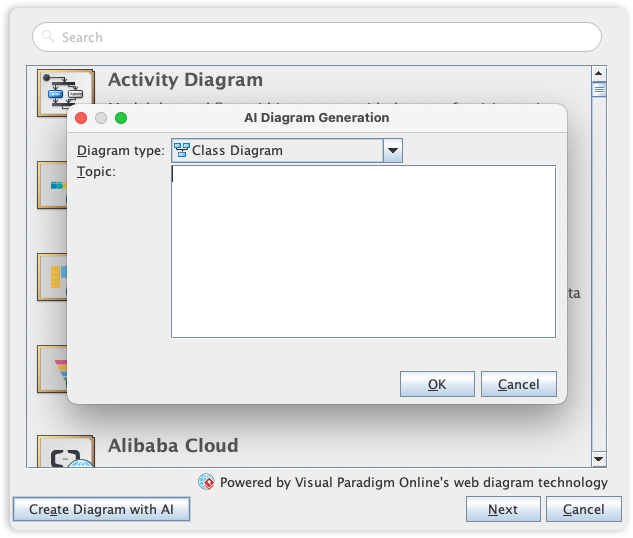
Visual Paradigm’s UML toolset is the industry standard for software modeling, offering the full range of diagrams needed to bridge the gap between requirements and implementation. We are now elevating the entire modeling experience by integrating comprehensive UML support into our AI Diagram Generator, enabling you to visualize system behavior and structure with unprecedented speed.
This capability allows you to instantly generate a wide array of UML diagrams-including Use Case, Class, Sequence, State Machine, Requirement, and Object Diagrams-from a simple textual description. By leveraging AI to interpret your system requirements, the tool automatically maps out the necessary entities, relationships, and interactions, allowing you to move directly to design validation and architectural refinement instead of starting from a blank canvas.
Visual Paradigm Platform Overview
Visual Paradigm is a comprehensive, award-winning visual modeling platform that offers strong support for UML (Unified Modeling Language), along with many other notations. It serves software design, business process modeling, enterprise architecture, and documentation needs.
UML Support in Visual Paradigm
Visual Paradigm fully supports the latest UML 2.x standards with all 14 official diagram types. It goes beyond basic drawing by providing real modeling capabilities such as syntax checking, element reusability, sub-diagrams, model referencing, and traceability.
Supported UML Diagrams include:
-
Use Case Diagram — For functional requirements and actor interactions.
-
Class Diagram — For structural modeling (classes, attributes, operations).
-
Sequence Diagram — For interactions and message flows over time.
-
Communication Diagram — For runtime object collaborations.
-
Activity Diagram — For control flows and workflows (flowchart-style).
-
State Machine Diagram — For event-driven behaviors and state transitions.
-
Component Diagram — For system structure and dependencies.
-
Deployment Diagram — For physical hardware/software deployment.
-
Package Diagram — For organizing large models and dependencies.
-
Object Diagram — For instance snapshots.
-
Composite Structure Diagram — For internal class/collaboration structures.
-
Timing Diagram — For real-time and distributed systems timing.
-
Interaction Overview Diagram — For high-level interaction sequences.
-
Profile Diagram — For defining custom stereotypes and extensions.
Key UML-related features:
-
Drag-and-drop editor with smart layout tools (sweeper, magnet, quick layout).
-
Code engineering (round-trip for Java, C++, etc.): Generate code from models or reverse-engineer code to UML.
-
Model element referencing and traceability to documents or other artifacts.
-
Integration with other notations (BPMN, ERD, DFD, SysML, ArchiMate).
-
Sub-diagrams, syntax validation, and reusability.
It is available in desktop, online, and Community Edition (free for non-commercial use with full UML 2.x + ERD support).
Core Features and Tools
Visual Paradigm offers much more than UML:
-
Intuitive diagramming — Supports BPMN, ArchiMate, DFD, ERD, CMMN, SoaML, SysML, mind maps, and more.
-
Code and database engineering — Round-trip engineering, ORM, Hibernate support, DDL generation.
-
Requirements and analysis tools — User story mapping, textual analysis, CRC cards.
-
Collaboration and documentation — Team modeling, version control, automatic HTML/PDF report generation, export to images (PNG, SVG, etc.).
-
Project management integration — With TOGAF, agile processes, and guide-through wizards.
-
Cross-platform — Works on Windows, macOS, Linux; online version available.
Newly Released AI Support (Visual Paradigm 18.0, 2026)
Visual Paradigm has deeply integrated generative AI across modeling and documentation in version 18.0 and updates:
AI Diagram Generator
Describe requirements in natural language (e.g., “Generate a class diagram for an online shopping system”) and the AI creates professional UML diagrams instantly. Supports many types including UML (class, sequence, state machine, activity, deployment, etc.), DFD, ERD, mind maps, SysML, and more. Improvements focus on better layout, colors, precision, and complexity handling.
AI Chatbot
Interactive assistant for diagram generation, refinements (edit/resubmit messages), and sending diagrams to documentation.
Specialized AI Tools
AI TOGAF assistant, AI Value Stream Mapping, AI infographic generator, and enhanced support for deployment, state machine, activity, and component diagrams.
Seamless Integration
AI features work in desktop and online editions (requires appropriate license and AI service access).
These tools significantly speed up modeling while maintaining standards compliance.
OpenDocs: AI-Powered Knowledge Management Platform
OpenDocs (introduced prominently in 18.0) is Visual Paradigm’s modern, web-based AI knowledge base and documentation hub. It combines rich Markdown editing with embedded professional diagramming in one workspace.
Key Features:
-
Hierarchical tree-structured pages for organizing knowledge.
-
Built-in powerful diagram editor (supports UML and other notations) directly in documents—no switching tools.
-
AI-Powered Diagram Generation — Type a description and get instant diagrams (flowcharts, UML, etc.) embedded in pages.
-
AI assistant for content creation, search, and interaction (turns static docs into dynamic knowledge bases).
-
Easy sharing via single links; export/import pipelines with Visual Paradigm Desktop (send AI-generated diagrams directly to OpenDocs).
-
Ideal for project docs, team wikis, requirements, architecture overviews, and living documentation.
OpenDocs integrates tightly with the rest of Visual Paradigm, making it easy to move from modeling → AI generation → documented knowledge base.
Summary
Visual Paradigm excels as a full-featured UML tool with enterprise-grade modeling, strong code integration, and now powerful AI assistance that accelerates diagram creation and knowledge management via OpenDocs. The Community Edition is great for learning/exploration, while paid editions unlock advanced collaboration, AI, and enterprise features.
Visual Paradigm has evolved into an AI-powered visual modeling platform that bridges the gap between natural language descriptions and professional software engineering. Its current ecosystem centers on three main pillars: comprehensive UML modeling, generative AI assistance, and the OpenDocs knowledge management platform.
1. Advanced UML & Visual Modeling Features
Visual Paradigm remains a robust modeling tool supporting a wide array of industry standards:
-
Standardized Notations: Full support for UML 2.x, SysML, BPMN 2.0, ArchiMate 3.2, DFD, ERD, and SoaML.
-
Code & Database Engineering: Generate source code (Java, C#, Python, etc.) from UML class models and vice-versa (round-trip engineering).
-
Professional Toolset: Includes element reusability, syntax validation, diagram transformation, and custom properties.
-
Interoperability: Capability to export diagrams to formats like SVG, PNG, and JSON for use in external documentation.
2. Generative AI Capabilities
The platform integrates AI directly into the modeling workflow to automate time-consuming tasks:
-
Text-to-Diagram Generation: Users can describe a system in plain English (e.g., “Generate a class diagram for an e-commerce system”), and the AI instantly produces a structured, editable model.
-
AI-Assisted UML Generators: Specialized wizards for Class, Sequence, Use Case, Activity, and Deployment diagrams.
-
Chat-Based Editing: Use an AI chatbot to modify existing diagrams—such as adding classes, renaming attributes, or connecting objects—through conversational commands.
-
Intelligent Analysis: AI can perform a “quality check” on models, suggest improvements, and generate detailed analysis reports or design rationales.
3. OpenDocs Knowledge Platform
OpenDocs is a web-based, AI-native knowledge base designed to unify technical documentation with visual modeling.
-
Unified Workspace: Combines a rich Markdown editor with a built-in diagram editor, allowing text and visuals to coexist on a single page.
-
Knowledge Tree Structure: Organizes documents and diagrams in a hierarchical tree with nested folders, similar to a local file system.
-
AI Content Assistant: Generates article drafts, summarizes long technical documents, and answers contextual questions based on the stored knowledge base.
-
The Pipeline Integration: A specialized feature that allows users of the Visual Paradigm Desktop Professional Edition to sync their professional models directly into OpenDocs, ensuring a “single source of truth” across the team.
- Reference List
- OpenDocs: AI-Powered Knowledge Management Platform: Visual Paradigm’s web-based AI knowledge base combining Markdown editing with embedded diagramming capabilities.
- Visual Paradigm Official Website: Main platform for visual modeling, UML tools, and enterprise architecture solutions.
- Guide to AI-Powered UML Diagram Generation: Comprehensive guide on using AI to generate UML diagrams from natural language descriptions.
- Comprehensive Guide to Visual Paradigm’s AI-Powered UML and Modeling Ecosystem 2025-2026: In-depth overview of Visual Paradigm’s AI-integrated modeling tools and features.
- Visual Paradigm OpenDocs: The Complete Guide to AI-Powered Knowledge Management and Diagram Generation: Complete guide covering OpenDocs platform capabilities and AI diagram generation.
- Visual Paradigm Platform Overview: Comprehensive visual modeling platform supporting UML, BPMN, ArchiMate, and business analysis tools.
- UML Modeling Software Process and Tool Guide: Guide covering effective UML modeling tools, element transformation, syntax validation, and custom properties.
- AI-Assisted UML Class Diagram Generator: AI-powered tool for generating professional class diagrams from text descriptions.
- Visual Modeling Tool Features: Overview of Visual Paradigm’s visual modeling capabilities and diagramming tools.
- Visual Paradigm Features Overview: Complete list of features including UML, BPMN, ERD, and enterprise architecture tools.
- Visual Paradigm Complete Feature Set: Detailed feature documentation for all modeling and diagramming capabilities.
- Visual Paradigm AI Platform: AI-powered diagram generation and intelligent modeling assistance platform.
- Object Diagram Guide with AI Integration: Guide on object diagrams with AI-enabled generation and specification documents.
- AI Diagram Generation Features: AI-powered diagram generation supporting multiple diagram types from natural language.
- AI Component Diagram Generator Update: Latest updates and improvements to AI-powered component diagram generation.
- AI Deployment Diagram Generator for OpenDocs: AI deployment diagram generation integrated with OpenDocs platform.
- Use Case to Activity Diagram Transformation: Tool for transforming use case diagrams into activity diagrams for workflow modeling.
- Visual Paradigm Tutorial Video: Video tutorial demonstrating Visual Paradigm features and capabilities.
- Visual Paradigm Feature Demonstration: Video showcasing Visual Paradigm modeling tools and AI features.
- AI-Assisted Class Diagram Generator: Advanced AI tool for automated class diagram creation from requirements.
- OpenDocs AI Tool: AI-powered knowledge management and documentation platform.
- OpenDocs AI-Powered Knowledge Platform Release: Official release announcement for OpenDocs knowledge management platform.
- Sync AI Diagram to OpenDocs Pipeline Guide: Guide for syncing AI-generated diagrams from desktop to OpenDocs platform.
- Mastering the Pipeline in Visual Paradigm OpenDocs: Complete guide to streamlined knowledge management using OpenDocs pipeline features.