
Now Reading: Deploying with Intelligence: A Modern Guide to AI-Powered Deployment Diagrams
-
01
Deploying with Intelligence: A Modern Guide to AI-Powered Deployment Diagrams


Deploying with Intelligence: A Modern Guide to AI-Powered Deployment Diagrams
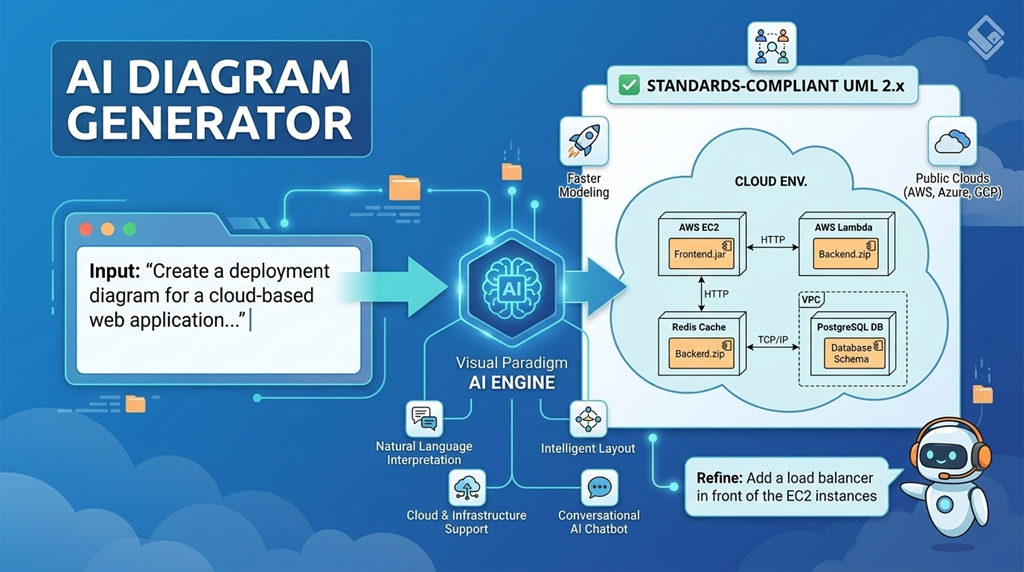
In today’s fast-paced software development landscape, visualizing how applications and systems are physically deployed is more critical than ever. A deployment diagram—a structural UML diagram—maps software artifacts (like executables, libraries, and databases) onto physical hardware nodes (such as servers, edge devices, or cloud environments). It provides a clear picture of the system’s infrastructure, including communication paths and dependencies.
Traditionally, creating these diagrams required significant time and expertise. But with the rise of AI-powered modeling tools, the process has become faster, more accurate, and accessible to teams of all skill levels.
What Is a Deployment Diagram?
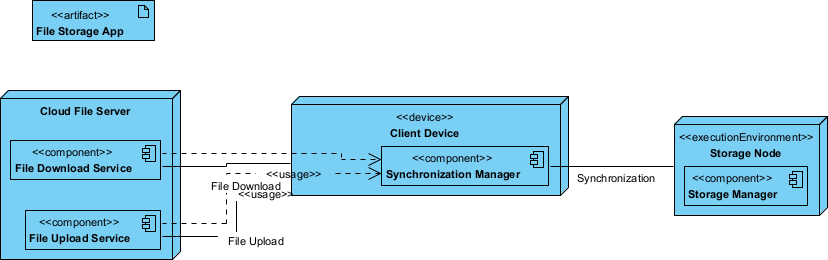
A deployment diagram in UML (Unified Modeling Language) illustrates the physical architecture of a system. It shows:
- Nodes: Physical or virtual hardware components (e.g., servers, containers, IoT devices, cloud instances).
- Artifacts: Deployable software components (e.g., .jar files, Docker images, databases).
- Communication paths: How nodes interact (e.g., via HTTP, TCP, or message queues).
These diagrams are essential for planning, documentation, and stakeholder alignment—especially in distributed systems, cloud-native apps, and microservices architectures.
Why AI Is Transforming Deployment Diagram Creation
Creating deployment diagrams manually can be time-consuming and error-prone. Tools like Visual Paradigm are changing the game by integrating AI into the modeling process. Instead of drawing every node and connection by hand, users can now describe their system in plain English and let AI generate accurate, UML-compliant diagrams.
This shift enables faster iteration, reduces the learning curve, and ensures consistency across architectural documentation.
Key AI Features for Deployment Diagrams
Visual Paradigm’s AI ecosystem, updated through early 2026, offers several capabilities that streamline deployment diagram creation:
VP Desktop UML Diagram Modeler (AI Ready!)
VP Desktop serves as the core of Visual Paradigm’s ecosystem for serious modeling work. This flagship application brings AI directly into a robust desktop environment built for complex projects.
AI Chatbot
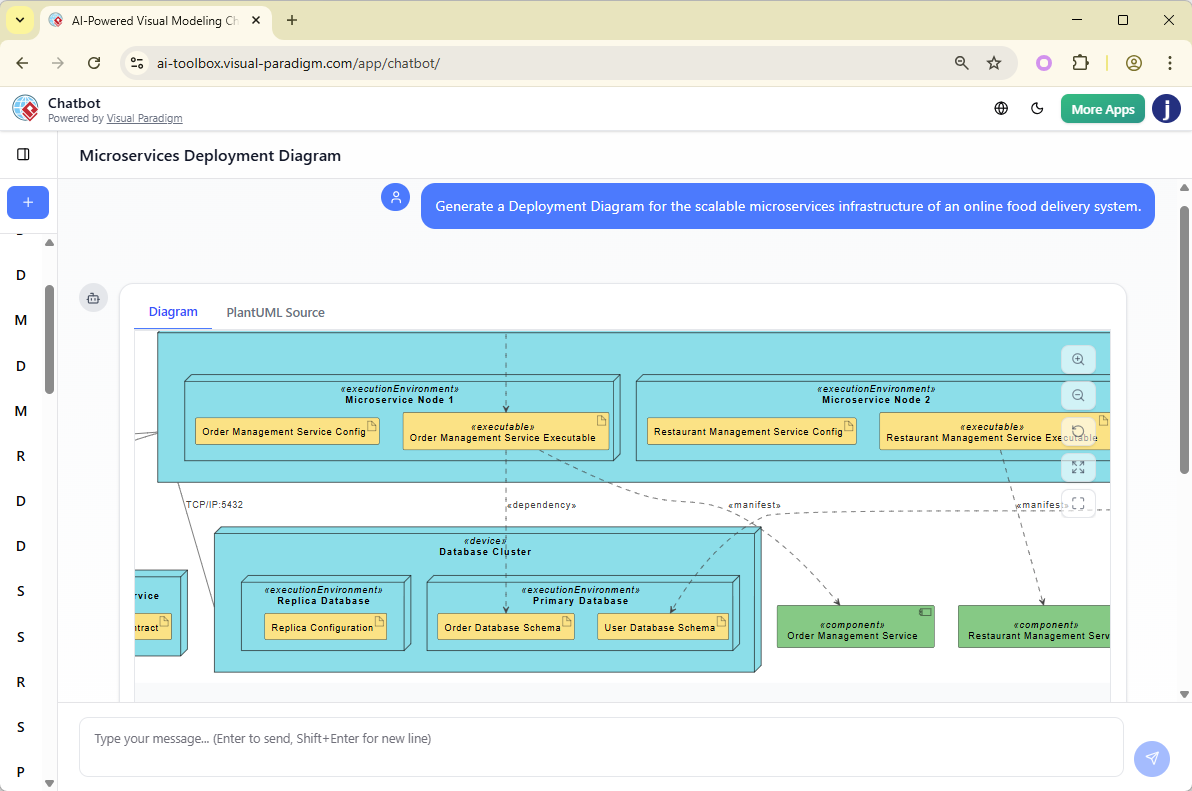
Need a deployment diagram fast? The AI Visual Modeling Chatbot turns natural language into visuals instantly. Just type: “Generate a deployment diagram for a microservices app running on Kubernetes with three nodes and a load balancer.”
OpenDocs for Knowledge Management
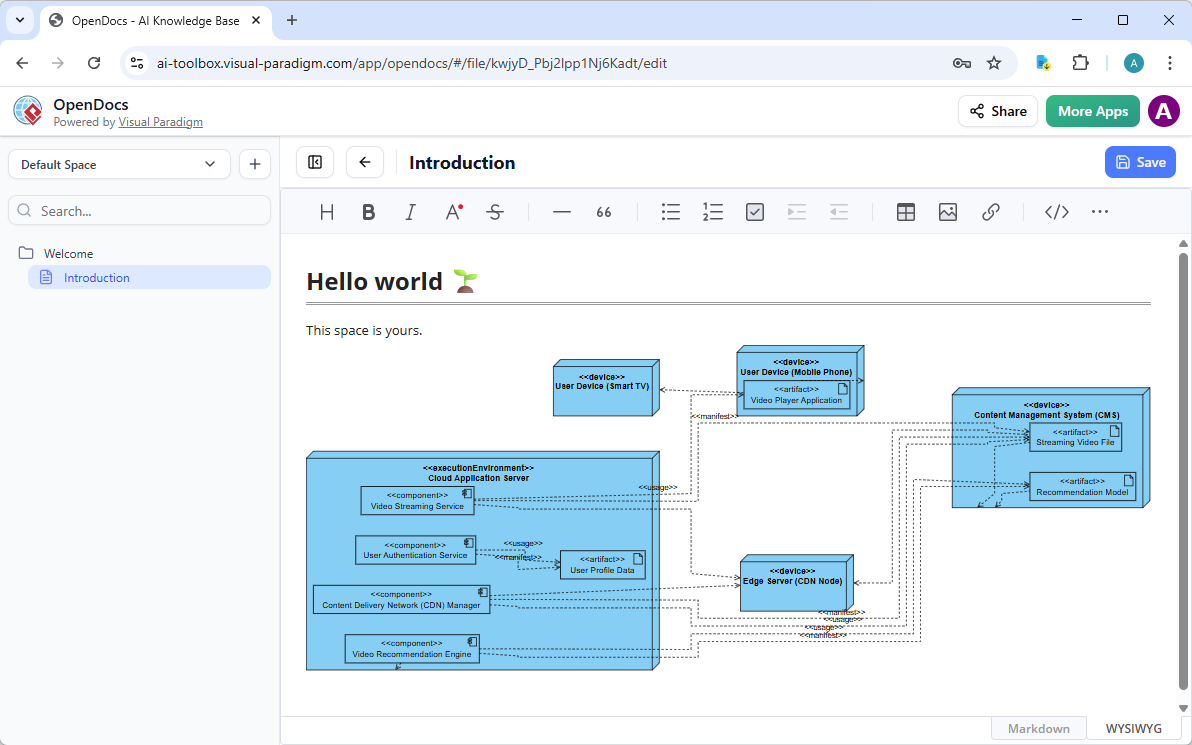
OpenDocs changes how teams handle documentation. Think of it as a smart wiki or knowledge base where diagrams live inside documents—not as static images, but as editable, updatable elements.
For deployment diagrams, embed them directly into architecture overviews, deployment guides, or incident response plans. Generate the initial diagram via AI, then insert it inline. Team members can click to refine nodes or connections without leaving the doc.
Benefits of AI-Powered Deployment Diagrams
⚡ Faster Modeling
AI reduces the time spent on manual diagramming by up to 70% during early-stage modeling. Teams can focus more on architecture decisions than on drawing tools.
✅ Standards Compliance
All generated diagrams follow UML 2.x specifications. This ensures consistency and prevents notation errors that could confuse developers or architects.
🧑💻 Lower Barrier to Entry
Even users without deep UML knowledge can create professional diagrams. The AI handles syntax and structure, allowing non-specialists to contribute to architectural documentation.
🤝 Better Communication
By enabling quick transitions from abstract requirements to detailed physical plans, AI helps bridge the gap between business stakeholders, architects, and developers. Diagrams become more accurate and easier to understand.
Practical Use Case: Cloud-Based Application
Imagine you’re designing a scalable e-commerce platform. You want to deploy:
- Frontend: React app hosted on AWS S3 and CloudFront
- Backend: Node.js API on AWS Elastic Beanstalk
- Database: Amazon RDS (PostgreSQL)
- Caching: Redis on ElastiCache
- Authentication: AWS Cognito
With Visual Paradigm’s AI, you can generate a complete deployment diagram by describing the setup in plain English. The AI will map each component to the correct node, define communication paths, and apply UML standards automatically.
This allows teams to visualize the architecture quickly, identify potential bottlenecks, and plan for scalability and security.
Getting Started with AI Diagramming
To begin using AI-powered deployment diagrams:
- Visit Visual Paradigm and download Visual Paradigm.
- Install and run it.
- Use the AI chat interface or diagram generation feature to describe your system.
- Generate the diagram.
- Export or share the diagram for documentation or stakeholder review.
Conclusion
Deployment diagrams are a vital part of software architecture, but they don’t have to be tedious to create. With AI-powered tools like those in Visual Paradigm, teams can generate accurate, standards-compliant diagrams quickly and efficiently—without needing deep UML expertise.
By embracing AI, organizations can move faster from concept to deployment, improve cross-team collaboration, and maintain high-quality architectural documentation across evolving systems.
References
- What is a Deployment Diagram? – Visual Paradigm UML Guide: Detailed explanation of UML deployment diagrams, which model the physical architecture of a system by showing hardware nodes (devices, servers, artifacts), communication links, deployment specifications, and allocation of software artifacts to nodes, with notation, examples (e.g., web application server setup), and their role in visualizing runtime topology and deployment constraints.
- Practical Guide to UML Modeling – Visual Paradigm: Hands-on UML tutorial covering core diagram types and best practices, with emphasis on how AI accelerates creation and refinement of deployment diagrams (alongside others) for precise, standards-compliant physical system modeling.
- Visual Paradigm AI Diagram Generator: Comprehensive Guide – Cybermedian: In-depth exploration of the AI text-to-diagram workflow, including deployment diagrams: input natural language system descriptions, generate node/artifact/link structures automatically, apply iterative refinements via chat, ensure UML compliance, and integrate with broader modeling for hardware-software mapping.
- Comprehensive Guide to Visual Paradigm’s AI-Powered UML & Modeling Ecosystem (2025–2026) – Cybermedian: Forward-looking overview of AI as a full modeling co-pilot, supporting deployment diagrams (node allocation, stereotypes, communication paths) alongside sequence, state machine, class, and others—featuring real-time assistance, validation, code generation, and ecosystem-wide enhancements for efficient system architecture design.
- AI State Machine Diagram Generator: Order Lifecycle Example – Visual Paradigm Guides: Practical demonstration of AI generating UML state machine diagrams from text (e.g., order processing states/transitions), with principles and techniques directly applicable to other behavioral/structural diagrams like deployment for consistent AI-assisted modeling.
- AI Diagram Generation: Timing Diagram Support – Visual Paradigm Updates: Release announcement expanding AI capabilities to timing diagrams (precise time-based interactions), with ongoing improvements to related UML types including deployment diagrams—highlighting better layout, element accuracy, and conversational refinement across the suite.
- AI-Assisted UML Class Diagram Generator – Visual Paradigm: Browser-based AI wizard for class diagrams (classes, attributes, relationships), with shared underlying technology and chatbot support that extends to deployment diagrams and other UML types for step-by-step, natural-language-driven modeling.
- UML Deployment Diagram – Visual Paradigm AI Chatbot: Dedicated conversational interface for instant deployment diagram creation: describe system architecture (nodes, devices, artifacts, connections) in plain text, generate editable UML models, refine elements/relationships via follow-up prompts, add stereotypes, and export to Visual Paradigm for advanced editing and integration.
- AI-Powered UML Diagram Generation Tutorial – Visual Paradigm YouTube: Video walkthrough demonstrating AI conversion of text descriptions into UML diagrams (with focus on distributed/system architecture examples relevant to deployment), showing prompt techniques, real-time generation, refinement, and import steps.
- Comprehensive Review: Visual Paradigm’s AI Diagram Generation Features – Fliplify: Third-party assessment of AI tools for UML/BPMN/SysML modeling (including deployment diagrams), covering speed, accuracy, standards adherence, conversational editing, accessibility, and productivity impact for system architects and developers.
