
Software architecture relies on clarity. When requirements are vague, the resulting code becomes brittle. One of the most critical artifacts in the early design phase is the use case model. It bridges the gap between stakeholder needs and technical implementation. However, these models are frequently constructed with errors that lead to confusion later in the development lifecycle. 📉
A flawed use case diagram does not just look messy; it creates ambiguity. Developers may build features that are not needed, while critical functionality gets overlooked. This guide provides a systematic approach to identifying and correcting these defects. We will examine the anatomy of the model, identify common pitfalls, and establish a protocol for validation. The goal is to ensure every interaction is defined with precision. ⚙️
🔍 Understanding the Anatomy of a Use Case
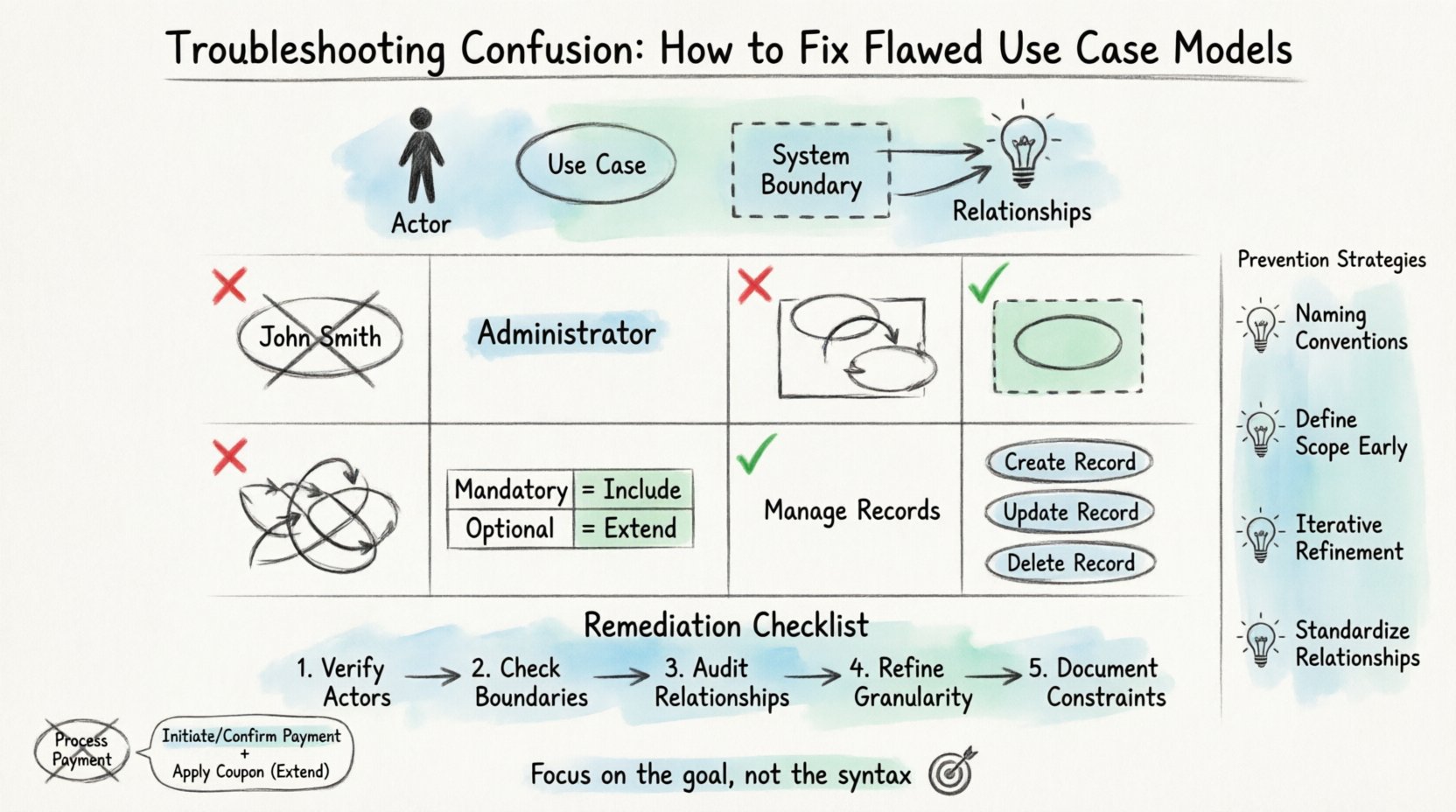
Before troubleshooting, one must understand the intended structure. A use case model represents the functional requirements of a system from the perspective of external entities. It is not a technical blueprint, but a behavioral one. The core components include:
- Actors: Entities that interact with the system. They can be human users or other systems.
- Use Cases: Specific goals or tasks that the system performs for an actor.
- System Boundary: A box that delineates what is inside the system and what is outside.
- Relationships: Lines connecting actors to use cases, and use cases to other use cases.
When any of these elements are misaligned, the model loses its utility. Errors often stem from conflating the who with the what, or misinterpreting the system’s responsibility. 🧩
⚠️ Common Flaw: Actor Ambiguity
The most frequent source of confusion involves actors. An actor represents a role, not a specific person or a piece of hardware. However, modelers often mistake specific job titles for roles, or they treat a system component as a user. This leads to scope creep and miscommunication.
❌ The Problem: Specific vs. Abstract
If a diagram lists John Smith as an actor, it is incorrect. John Smith is an instance. The role is Administrator. If John leaves the company, the requirement does not vanish. The system still needs an Administrator to perform the function. Creating models based on specific individuals ties the design to personnel rather than function.
❌ The Problem: System as Actor
Another error is drawing an actor that represents the system itself. A system cannot interact with itself in a use case context. It interacts with external entities. If the model shows the system interacting with a database, that is an internal implementation detail, not a use case. This detail belongs in a class diagram or sequence diagram, not here.
✅ The Fix: Define Roles Clearly
To correct this, review every stick figure. Ask the following questions:
- Does this entity exist outside the system boundary?
- Does this entity initiate a request or receive a result?
- Is this a specific person, or a category of people?
If the entity is a specific person, rename it to their role. If the entity is internal, remove it from the actor list. This ensures the diagram remains valid even if personnel change or internal architecture shifts. 🛡️
📏 Common Flaw: System Boundary Confusion
The system boundary defines the scope of the project. Everything inside the box is under your control. Everything outside is the environment. Flaws here result in scope creep or incomplete specifications. 📐
❌ The Problem: Leaking Responsibilities
A common error is placing a use case outside the boundary that actually belongs inside. For example, if a Generate Report use case is drawn outside the system box, it implies the system does not produce it. However, the system must generate the data for the report. This use case belongs inside. Conversely, if Send Email is inside, but the system only triggers an external email server, the action might be considered an interaction rather than an internal function.
❌ The Problem: Missing External Dependencies
Conversely, sometimes the model fails to show external actors that provide data. If the system relies on a third-party API for user authentication, that API should be represented as an actor or a system boundary interaction. Ignoring this dependency makes the model incomplete.
✅ The Fix: The Boundary Test
Apply the boundary test to every use case. Ask: Does the system perform this action, or does an external entity perform it?
- System Action: Inside the box. (e.g., Validate Password)
- External Action: Outside the box. (e.g., User Types Password)
Ensure all interactions cross the boundary line. An actor must connect to a use case. If a use case floats without a connection, it is orphaned and likely unnecessary.
🔗 Common Flaw: Relationship Mismanagement
Use cases rarely exist in isolation. They relate to one another. The primary relationships are Include, Extend, and Generalization. Misusing these connectors creates logic errors in the requirements.
❌ The Problem: Confusing Include and Extend
This is the most technical error in modeling. Both relationships connect use cases, but they serve different purposes.
- Include: Mandatory behavior. Use case A must do Use Case B to complete its goal. It is a subset. (e.g., Place Order includes Validate Payment).
- Extend: Optional behavior. Use case A may do Use Case B under specific conditions. It adds functionality. (e.g., Place Order extends Apply Discount).
If you use Include for optional steps, you force the system to always perform them, even when not needed. If you use Extend for mandatory steps, you risk the feature being skipped during development.
❌ The Problem: Circular Dependencies
Use cases should not depend on each other in a loop. If Use Case A includes Use Case B, and Use Case B includes Use Case A, the flow is undefined. This creates a logical paradox that halts development.
✅ The Fix: Relationship Validation Table
Use the following checklist to validate relationships before finalizing the diagram.
| Relationship Type | Mandatory or Optional? | Direction of Dependency | Example |
|---|---|---|---|
| Include | Mandatory | Base Case depends on Included Case | Login includes Verify Credentials |
| Extend | Optional | Extended Case depends on Base Case | Checkout extends Gift Wrap |
| Generalization | Inheritance | Child inherits Parent behavior | Guest User is a type of User |
Review every line connecting two use cases. If the connection is mandatory, it must be an Include. If it is conditional, it must be an Extend. Remove any circular arrows immediately. 🔀
📉 Common Flaw: Scope Drift
Scope drift occurs when use cases become too detailed or too abstract. A use case should represent a single, measurable goal. It should not be a process flow, nor should it be a vague concept.
❌ The Problem: Use Case as Process
A common mistake is naming a use case with a verb phrase that implies a long process. For example, Manage Employee Records is too broad. It implies creating, updating, deleting, and viewing. This is actually four different use cases.
When a use case is too broad, it becomes difficult to test. When it is too narrow (e.g., Click Button A), it is an interaction, not a goal.
❌ The Problem: Ignoring Non-Functional Needs
Use cases focus on functionality. However, performance, security, and reliability are constraints. While these do not appear as separate use cases, they affect the definition of the use case. For instance, Process Transaction must be defined with a constraint that it completes within 2 seconds. If the model ignores this, the technical implementation will fail.
✅ The Fix: The Single Goal Rule
Apply the Single Goal Rule to every use case. Can this use case be completed in one step from the actor’s perspective? If not, split it. 🧱
- Bad: Manage Inventory
- Good: Add Inventory Item
- Good: Update Inventory Item
- Good: Remove Inventory Item
This granularity ensures that developers can estimate effort accurately. It also makes testing easier. Each use case becomes a distinct test case.
🛡️ Validation and Review Processes
Creating a model is one thing; verifying it is another. A flawed model will inevitably surface during the coding phase, leading to rework. A structured review process mitigates this risk.
1. Stakeholder Walkthroughs
Present the diagram to the business stakeholders. Ask them to trace the flow. Does the story make sense to them? If they cannot explain what a use case does, it is not clear enough. They should not need technical jargon to understand the diagram.
2. Developer Feasibility Check
Have a senior developer review the model. They can identify technical constraints that the business analyst might miss. For example, if a use case requires real-time data synchronization, the model should reflect the latency implications.
3. Consistency Check
Ensure consistency with other diagrams. If a class diagram shows a User entity, the use case diagram must have a User actor. If the database schema changes, the use cases should not change unless the business goal changes. Keep the functional model stable.
📋 Remediation Checklist
When you identify flaws, follow this remediation sequence. Do not attempt to fix everything at once. Isolate the error.
- Step 1: Verify Actors. Are they roles? Are they external? Rename specific names to generic roles.
- Step 2: Check Boundaries. Move use cases inside or outside based on responsibility.
- Step 3: Audit Relationships. Replace incorrect Includes with Extends or vice versa. Break circular dependencies.
- Step 4: Refine Granularity. Split broad use cases into specific goals.
- Step 5: Document Constraints. Add notes regarding performance or security requirements attached to specific use cases.
🚀 Prevention Strategies
Once the model is fixed, how do you prevent future errors? Prevention requires discipline and standard operating procedures.
Establish Naming Conventions
Adopt a strict naming convention. All use cases should start with a verb and end with a noun (e.g., Retrieve Invoice). All actors should be nouns representing roles (e.g., Accountant). This consistency makes scanning the diagram easier.
Define Scope Early
Before drawing the first box, define the system boundary. List what is explicitly out of scope. If a requirement falls outside the boundary, document it as an external dependency, not a use case. This prevents scope creep during the design phase.
Iterative Refinement
Do not expect the first draft to be perfect. Use case modeling is iterative. Start with a high-level overview. Add detail in subsequent iterations. This allows you to catch scope errors before investing time in detailed relationships.
Standardize Relationships
Decide as a team what Include and Extend mean. Some teams treat Include as mandatory, others as common. Agree on a standard definition to avoid confusion between team members. Document this definition in the project glossary.
🧩 Real-World Scenario Analysis
Consider a scenario where an e-commerce system is being modeled. The initial draft shows a use case called Process Payment. It includes Validate Card and Charge Account. It also extends Apply Coupon.
Analysis:
- Process Payment is too broad. It should be split into Initiate Payment and Confirm Payment.
- Validate Card is a mandatory step. Keep as Include.
- Apply Coupon is optional. Keep as Extend.
- The actor should be Customer, not Buyer.
By refining this, the development team knows exactly what code to write. The Initiate Payment use case triggers the interface. The Confirm Payment use case handles the transaction. The Apply Coupon logic is optional and only runs if the condition is met.
📝 Final Thoughts on Model Integrity
A use case model is a communication tool. Its value lies in the clarity it brings to complex requirements. When the model is flawed, communication breaks down. Fixing these flaws is not just about drawing lines correctly; it is about ensuring the business logic is sound.
By adhering to strict boundaries, defining roles accurately, and validating relationships, you create a foundation for robust software development. The effort spent on troubleshooting the model now saves significant time during implementation. Focus on the goal, not the syntax. Ensure the diagram tells the truth about the system’s behavior. 🎯
Regular audits of the model keep it aligned with evolving requirements. As the project grows, revisit the use cases. Remove obsolete ones and add new ones. Keep the model alive. A static model becomes a relic. An active model remains a guide. 🌱