
Now Reading: Quick AI Activity Diagram Wins: Standardizing New Employee Onboarding Workflow
-
01
Quick AI Activity Diagram Wins: Standardizing New Employee Onboarding Workflow


Quick AI Activity Diagram Wins: Standardizing New Employee Onboarding Workflow
Onboarding new hires should be seamless, not a scramble. Yet for many fast-growing companies, inconsistent processes across departments create delays, confusion, and even compliance risks. What if you could map, standardize, and optimize your onboarding workflow in hours—not weeks?
This case study shows how a tech company with 800+ employees used AI-generated activity diagrams to bring order to chaos. You’ll see how Visual Paradigm Desktop’s AI tools turned a tangled web of steps into a clear, actionable process—without drowning in manual diagramming. By the end, you’ll know exactly how to generate, refine, and deploy your own AI-powered activity diagrams for any workflow.
Activity Diagram Basics
An activity diagram visually breaks down processes into sequential steps, decisions, and parallel actions. It’s a powerhouse for:
- Clarifying workflows: Show who does what, when, and how steps connect.
- Spotting bottlenecks: Identify delays or redundant steps at a glance.
- Ensuring compliance: Document and standardize processes for audits or training.
- Onboarding teams: Give new hires a clear roadmap of their first 30 days.
Key notations you’ll use:
- Rounded rectangles: Actions (e.g., “Submit tax forms”).
- Diamonds: Decisions (e.g., “Is background check complete?”).
- Arrows: Flow direction.
- Swimlanes: Assign steps to roles (HR, IT, Manager).
- Forks/joins: Parallel or merging paths.
Unlike static flowcharts, activity diagrams handle complex logic and concurrent tasks—perfect for multi-department processes like onboarding.
Standardizing New Employee Onboarding Workflow Snapshot
The company, a tech firm with 800+ employees, faced a classic scaling pain: onboarding steps varied by department, leading to missed tasks, frustrated hires, and audit red flags. Their goals:
- Create a single source of truth for onboarding.
- Reduce time-to-productivity from 14 to 7 days.
- Ensure 100% compliance with labor and data security policies.
- Make the process adaptable for remote and in-office hires.
Using Visual Paradigm Desktop’s AI Diagram Generation, they:
- Input their existing (but inconsistent) onboarding checklists.
- Generated a draft activity diagram in under 10 minutes.
- Refined the diagram to add swimlanes, decision points, and integrations with their HRIS.
- Shared the final diagram as an interactive guide for managers and new hires.
- Cut onboarding time by 40% and eliminated compliance gaps within one quarter.
Critical wins included:
- Role clarity: Swimlanes showed who owned each step—no more “I thought HR handled that.”
- Automated reminders: Decision nodes triggered emails for pending tasks (e.g., “IT access not granted”).
- Template reuse: The diagram became a living document, updated as policies changed.
AI Benefits Quick List
- Speed: Draft a complex diagram in minutes, not hours.
- Accuracy: AI suggests logical flows and catches missing steps.
- Collaboration: Share and edit diagrams in real time with stakeholders.
- Adaptability: Easily modify for different roles or locations.
- Integration: Export to Confluence, Jira, or PDF for training materials.
For this team, AI didn’t replace human expertise—it amplified it. The tool surfaced overlooked dependencies (e.g., “Payroll setup requires tax forms”) and proposed optimizations (e.g., “Merge these two approval steps”).
Fast Generation Steps in Visual Paradigm
- Open Visual Paradigm Desktop.
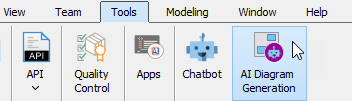
- Select Tools > AI Diagram Generation from the main menu.
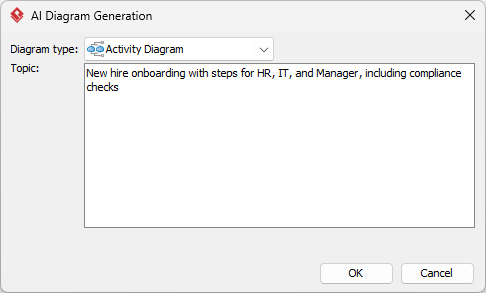
- Describe your process in plain language (e.g., “New hire onboarding with steps for HR, IT, and Manager, including compliance checks”).
- Review the AI draft.
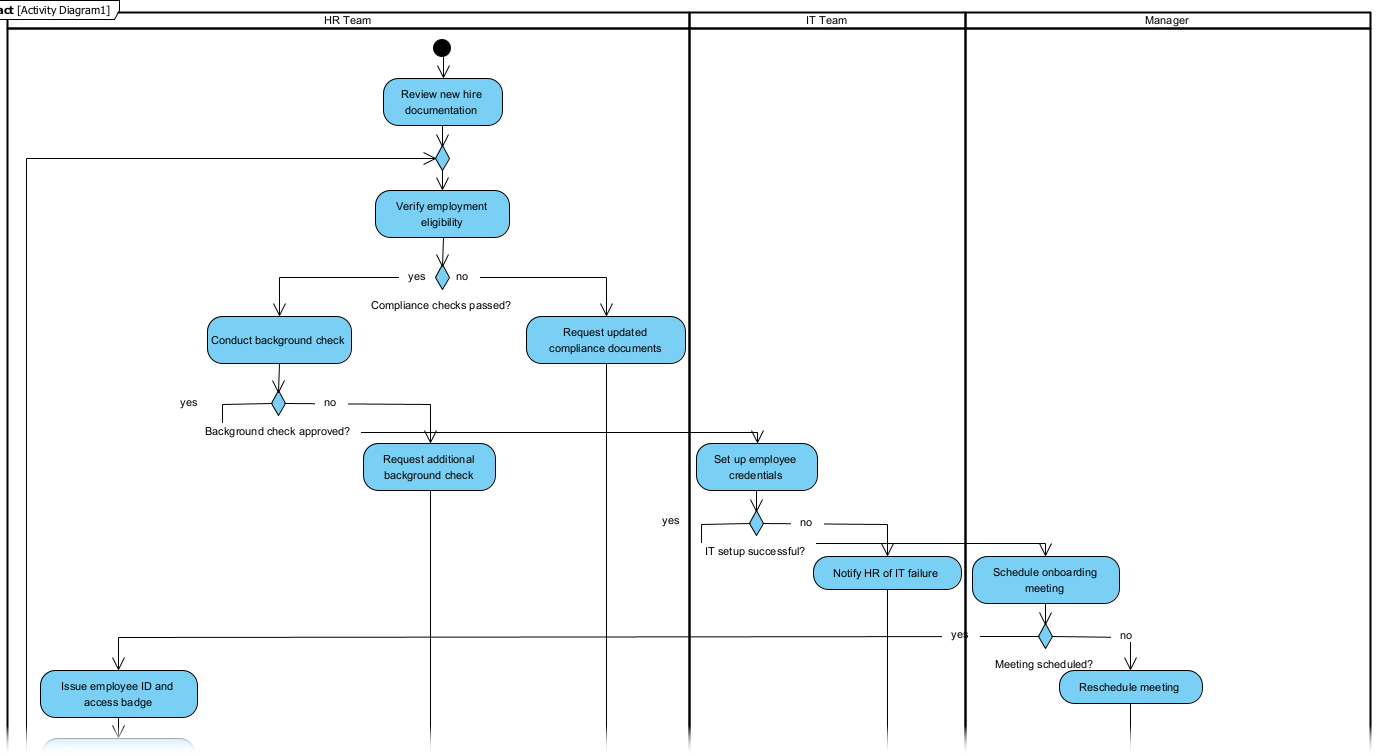
- Drag to add decision nodes, forks, or annotations.
- Export as PNG, SVG, or shareable link for your team.
Speedy Refinements
Take your diagram further with:
- Swimlane magic: Right-click the diagram > Add Shape > Swimlane. Label each lane by role (HR, IT, etc.) and drag steps into place. This instantly clarifies ownership.
- Decision trees: Add Branch to map “yes/no” paths (e.g., “Does role require hardware?”).
- Data integration: Link diagram elements to live data (e.g., Jira tickets or Trello cards) via External Data > Link to Task.
- Version control: Save iterations to Teamwork Server to track changes over time.
Quick Results
- Diagram ready for review in under 30 minutes.
- Stakeholder feedback incorporated in one revision cycle.
- Onboarding time reduced by 6+ days per hire.
- Compliance audit passed with zero findings.
The final activity diagram became a dynamic asset: new hires received a personalized version highlighting their specific path, while managers used the master diagram to monitor progress and spot delays.
Wrap & Go
Standardizing workflows doesn’t require months of meetings or expensive consultants. With Visual Paradigm’s AI Diagram Generation, you can map, optimize, and deploy processes faster than ever. Ready to try it?
Download Visual Paradigm Desktop and generate your first AI activity diagram today. Start with a simple process—like onboarding—and watch the clarity (and time savings) unfold.
