
Use case modeling serves as a cornerstone in systems analysis and design. It provides a structured approach to capturing functional requirements from the perspective of an end-user. By defining interactions between actors and the system, organizations can visualize complex workflows before a single line of code is written. This guide delves into practical applications, offering detailed case studies that illustrate how these diagrams function in diverse industries.
Understanding the theoretical underpinnings is only the first step. The true value emerges when applied to tangible business scenarios. We will examine three distinct domains: e-commerce, healthcare management, and financial transactions. Each section breaks down the actors, boundaries, and specific interactions required to build a robust system model.
🔍 Understanding the Core Components
Before diving into specific scenarios, it is essential to establish a shared vocabulary. A use case diagram is not merely a drawing; it is a contract between the development team and the business stakeholders. It clarifies who does what within the system.
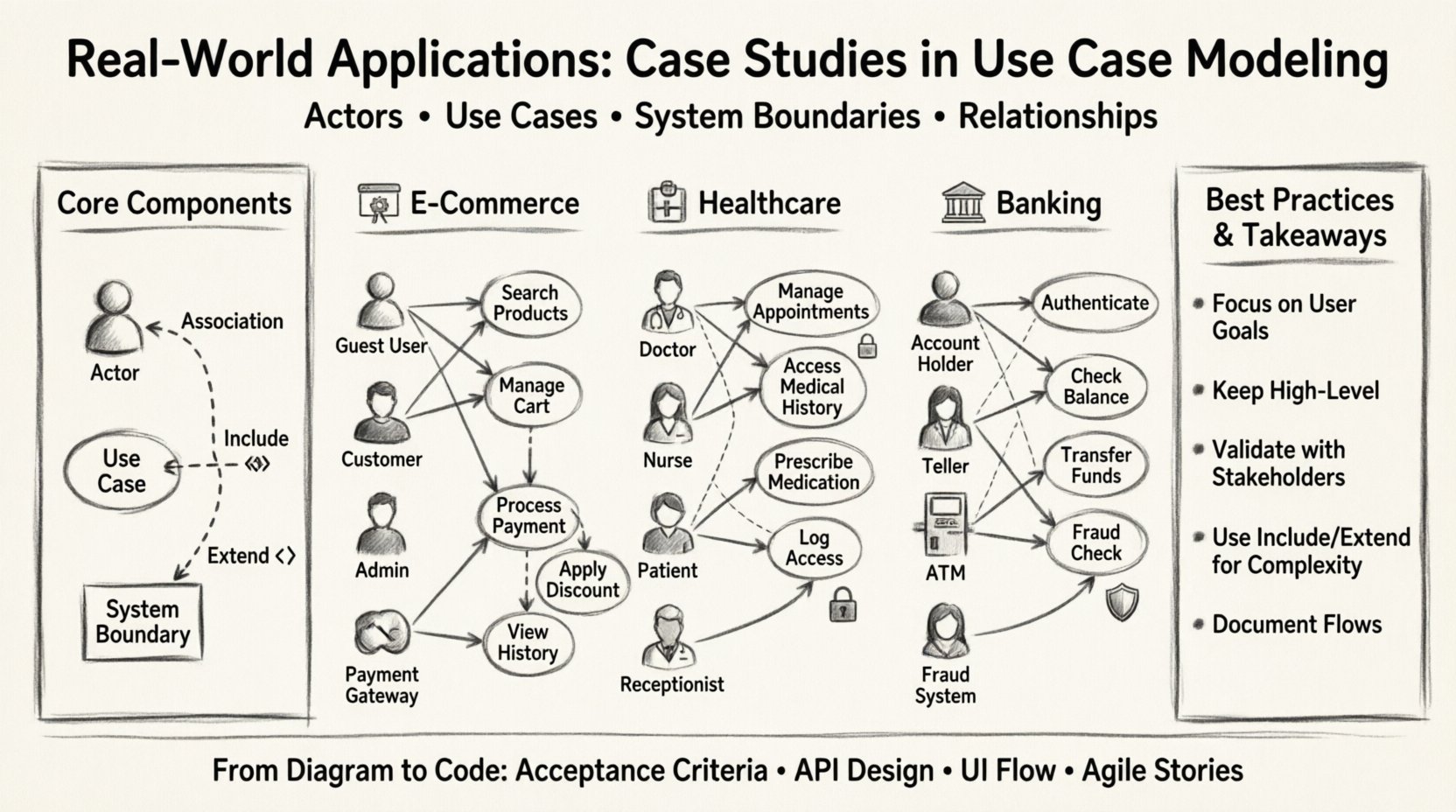
- Actors: These are the roles that interact with the system. They can be human users, external systems, or hardware devices.
- Use Cases: These represent specific functions or goals the system performs. They answer the question, “What can the system do?”
- System Boundary: The box that encapsulates the system under consideration. Everything inside is part of the system; everything outside is the environment.
- Relationships: Lines connecting actors to use cases. These include associations, includes, and extends.
Types of Relationships
Mapping the correct relationship is critical for accurate modeling. The table below outlines the primary connections.
| Relationship Type | Description | Example |
|---|---|---|
| Association | Standard link between an actor and a use case. | A Customer places an order. |
| Include | Mandatory inclusion of one use case within another. | Logging in is required to place an order. |
| Extend | Optional behavior that adds functionality under specific conditions. | Applying a discount code during checkout. |
🛒 Case Study 1: E-Commerce Platform
E-commerce systems are ubiquitous. They handle high volumes of transactions and require precise data integrity. A use case model here must account for browsing, purchasing, and account management.
Key Actors
- Guest User: Browses without logging in.
- Registered Customer: Has an account and order history.
- Admin: Manages products and user accounts.
- Payment Gateway: External system handling financial data.
Primary Use Cases
The following list details the core functions within this ecosystem:
- Search Products: Allows users to find items by category or keyword.
- Manage Cart: Add, remove, or update quantities of items.
- Process Payment: Securely handle funds via the gateway.
- View Order History: Access past transactions and invoices.
- Update Profile: Change shipping addresses or password.
Workflow Analysis
Consider the Process Payment use case. It includes the Validate Payment Method sub-function. If validation fails, an error message is returned. If successful, the Update Inventory use case is triggered.
There are also extension points. For example, a Apply Coupon use case extends the checkout process. It only activates if the user provides a valid code. This conditional logic is vital for business rules.
Diagrammatic Considerations
When drawing this model, avoid cluttering the diagram with every possible error state. Focus on the happy path and major exceptions. Group related use cases to maintain clarity. The system boundary should clearly separate internal logic from external dependencies like the payment gateway.
🏥 Case Study 2: Healthcare Management System
Healthcare applications demand higher security and privacy standards. Patient data must be protected, and workflows must be efficient to avoid delays in care. Use case modeling here helps ensure compliance with regulations.
Key Actors
- Doctor: Diagnoses and prescribes medication.
- Nurse: Records vital signs and assists with procedures.
- Patient: Views their own records and schedules appointments.
- Receptionist: Manages scheduling and billing.
Functional Requirements
The complexity in this domain arises from role-based access control. The model must reflect who can see what.
- Manage Appointments: Schedule, reschedule, or cancel visits.
- Access Medical History: View past treatments and allergies.
- Prescribe Medication: Generate digital prescriptions for pharmacies.
- Record Lab Results: Input data from diagnostic tests.
- Generate Invoice: Create bills for services rendered.
Security and Privacy
Security is not a separate feature but a constraint woven into every use case. The Access Medical History use case includes a mandatory Authenticate User step. Without valid credentials, the action cannot proceed.
Additionally, audit logging is a critical non-functional requirement. Every access to patient data should trigger a Log Access Event use case. This ensures accountability.
Scenario: Appointment Scheduling
The Manage Appointments use case interacts with the Doctor Availability data. If a slot is taken, the system suggests alternatives. This logic is often an extension of the base scheduling flow.
Receptionists have limited access compared to Doctors. They can book appointments but cannot view detailed clinical notes. The model must clearly depict these permissions to prevent data leaks.
🏦 Case Study 3: Banking Transaction System
Financial systems require absolute reliability. Errors in transaction modeling can lead to significant financial loss. Use case diagrams in banking focus heavily on authentication, authorization, and fund movement.
Key Actors
- Account Holder: The individual owning the funds.
- Teller: Bank employee assisting with over-the-counter services.
- ATM: Self-service hardware terminal.
- Fraud Detection System: Automated monitoring service.
Core Use Cases
- Authenticate User: Verify identity via password, PIN, or biometric.
- Check Balance: Display current account status.
- Transfer Funds: Move money between accounts or to external parties.
- Deposit Cash: Add funds via ATM or teller.
- Request Loan: Apply for credit facilities.
Transaction Logic
The Transfer Funds use case is the most complex. It involves multiple internal checks.
- Verify sufficient balance.
- Check daily transfer limits.
- Validate recipient account details.
- Deduct amount from source.
- Add amount to destination.
- Update transaction logs.
Each step represents a potential failure point. The model should account for Insufficient Funds and Invalid Recipient extensions. These branches guide the user interface design.
Integration with Fraud Detection
The Transfer Funds use case often includes an Invoke Fraud Check sub-function. If the system flags suspicious activity, the transaction is halted for manual review. This interaction highlights the importance of external systems in the model.
🛠 Best Practices for Modeling
Creating diagrams is an iterative process. To ensure the models remain useful throughout the project lifecycle, adhere to the following guidelines.
1. Focus on User Goals
Do not model technical steps. Instead, model what the user wants to achieve. For example, use Withdraw Cash rather than Access Database Record.
2. Keep it High Level
A single diagram should not contain fifty use cases. Break large systems into subsystems. Use a high-level view for stakeholders and detailed views for developers.
3. Validate with Stakeholders
Present the model to business users early. They can identify missing requirements or incorrect assumptions before development begins. Feedback loops are essential.
4. Maintain Consistency
Ensure naming conventions are consistent across all diagrams. Avoid synonyms for the same concept. Clarity reduces confusion during the coding phase.
🚀 Transitioning from Diagram to Code
Once the model is approved, it becomes a blueprint for the development team. The use cases serve as test cases. Each scenario described in the diagram corresponds to a unit of work.
- Acceptance Criteria: Define the conditions under which a use case is considered complete.
- API Design: Use cases inform the endpoints required for the backend.
- User Interface: The flow determines the navigation structure.
Agile Integration
In agile environments, use cases evolve into user stories. The high-level diagram guides the backlog. Stories are broken down into smaller tasks that map back to the original functional requirements.
Documentation
The diagram alone is insufficient. Detailed textual descriptions should accompany each use case. This includes pre-conditions, post-conditions, and the main flow of events.
🔄 Common Pitfalls to Avoid
Even experienced architects make mistakes. Being aware of common errors can save significant time during the implementation phase.
1. Over-Engineering
Do not model every edge case in the primary diagram. Save detailed exception handling for the textual descriptions or separate sequence diagrams.
2. Ignoring Non-Functional Requirements
Performance and security are constraints, not features. Ensure the model reflects these constraints, even if they do not appear as use cases themselves.
3. Mixing Layers
Do not mix business logic with technical implementation details. The diagram should represent the business domain, not the database schema.
🌐 Future Trends in Modeling
As technology evolves, so do the tools and techniques for systems analysis. Artificial intelligence is beginning to assist in generating diagrams from natural language requirements.
- Automated Generation: Tools that parse requirement documents to create initial drafts.
- Real-time Collaboration: Cloud-based platforms allowing teams to edit models simultaneously.
- Traceability: Linking diagrams directly to code repositories for better change management.
While tools change, the fundamental need for clear communication remains. The use case diagram endures because it bridges the gap between technical and business languages.
📝 Summary of Key Takeaways
Effective use case modeling requires a balance of technical precision and business understanding. By studying real-world examples across e-commerce, healthcare, and banking, teams can apply these patterns to their own projects.
- Define actors clearly based on their roles, not just their names.
- Use relationships like Include and Extend to manage complexity.
- Validate models with stakeholders to ensure alignment.
- Keep diagrams clean and focused on user goals.
- Document detailed flows alongside the visual representation.
Investing time in this phase pays dividends later. A well-modeled system reduces rework, clarifies requirements, and sets a solid foundation for development.