
Imagine describing a complex system interaction in plain English and instantly seeing a professional UML sequence diagram. That’s the power of AI-powered diagramming in Visual Paradigm. This article explores how to create detailed UML sequence diagrams effortlessly, using a tool that turns natural language into precise visual models. We’ll walk through the process, from a simple text prompt to a fully realized, editable diagram, using the innovative AI features within Visual Paradigm. Whether you’re a developer, analyst, or student, this guide will show you how to leverage AI to accelerate your modeling workflow and make dynamic system behavior easy to understand.
What is a UML Sequence Diagram?
A UML Sequence Diagram is a powerful visual tool that illustrates the order of interactions between objects in a system over time. It’s like a storyboard for your software, showing how different components—like a user, a web application, or a payment gateway—communicate with each other. The key elements of a sequence diagram include:
-
Lifeline: A vertical dashed line representing a participant (e.g., a user or a system component) in the interaction.
-
Message: An arrow indicating a communication between lifelines. Messages can be synchronous (solid arrow with a filled head) or asynchronous (solid arrow with an open head).
-
Activation: A thin rectangle on a lifeline showing when an object is processing a message.
-
Combined Fragment: A box grouping messages with interaction operators like alt (alternative paths), loop (repeated execution), or opt (optional steps).
These diagrams are essential for documenting system behavior, analyzing requirements, and ensuring everyone on the team—developers, testers, and business stakeholders—understands the flow of events.
Creating a Sequence Diagram with AI: A Step-by-Step Guide
Traditionally, creating a UML sequence diagram involves manually drawing lifelines, messages, and fragments, which can be time-consuming and prone to errors. The AI-powered features in Visual Paradigm streamline this process, allowing you to generate a high-quality diagram in seconds. Here’s how you can do it:
Workflow 1: Generating Your First Diagram
-
Launch Visual Paradigm Desktop and open or create a project.
-
Navigate to Tools > AI Diagram Generation.
-
From the diagram type dropdown, select Sequence Diagram.
-
Enter a clear, natural language description of the scenario. For example: “A customer places an online order. The customer selects items and proceeds to checkout. The system checks inventory. If items are available, the customer enters payment details. The payment gateway processes the transaction. Upon success, the system confirms the order and notifies the warehouse to ship the items. If payment fails, the system informs the customer and cancels the order.”
-
Click OK to generate the diagram.
-
Review the result. The AI will have created a structured diagram with lifelines, messages, and control fragments, which you can then edit and refine.
Quick Summary
-
AI converts natural language descriptions into UML sequence diagrams.
-
It automatically identifies participants, messages, and control structures.
-
The generated diagram is fully editable within Visual Paradigm.
-
It saves significant time compared to manual drawing.
Visualizing the AI Process
Let’s see how this process works in action, using the provided images.
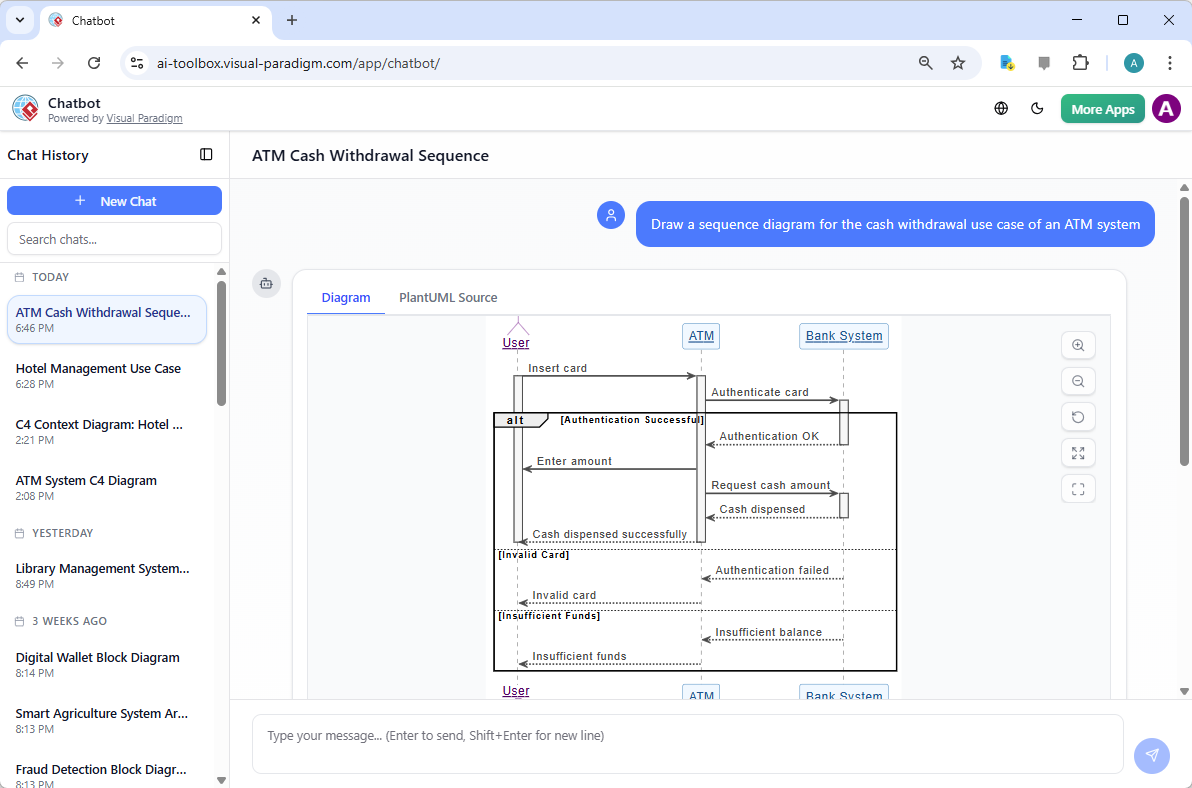
First, consider the Visual Paradigm AI Chatbot. In this screenshot, a user has simply typed a request: “Draw a sequence diagram for the cash withdrawal use case of an ATM system.” The AI instantly generates a complete diagram, showing the interactions between the User, ATM, and Bank System, complete with alternative paths for successful and failed authentication. This demonstrates the power of conversational AI for rapid modeling.
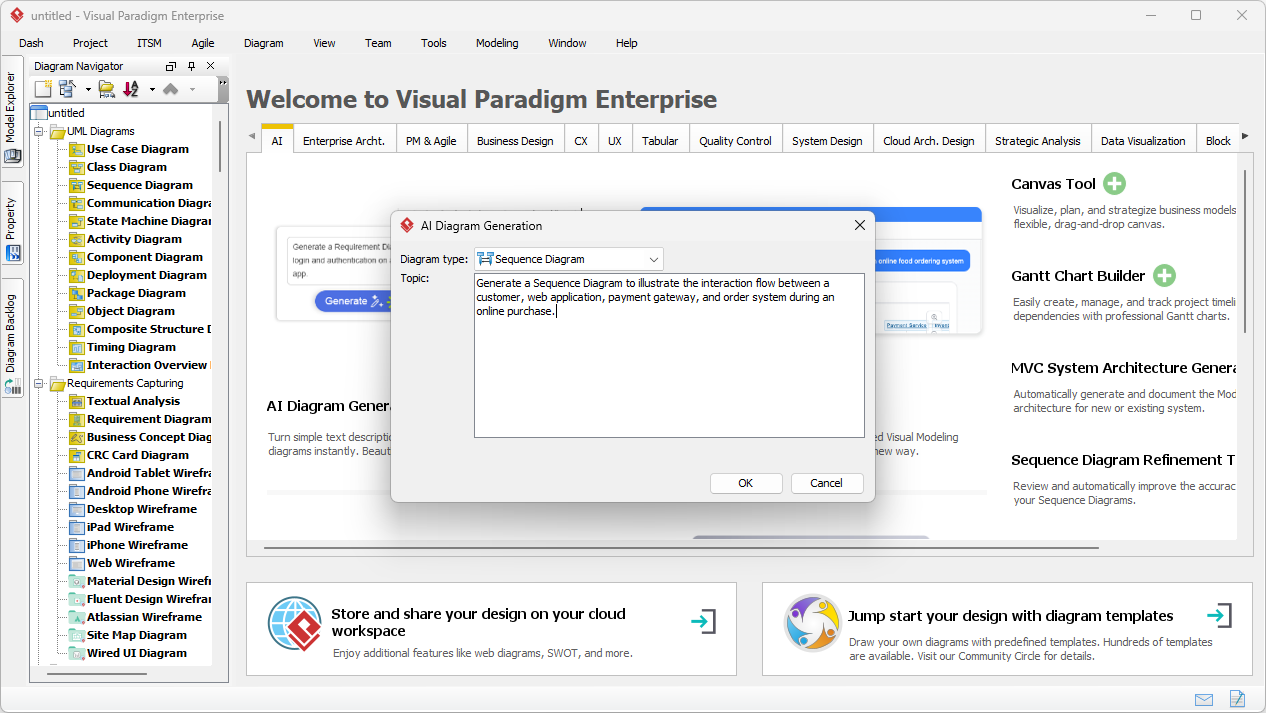
Now, let’s look at the Visual Paradigm Desktop application. This screenshot shows the AI Diagram Generation dialog box. The user has entered a prompt to generate a sequence diagram for an online purchase. The AI analyzes this text and prepares to create a diagram that illustrates the interaction flow between a customer, web application, payment gateway, and order system.
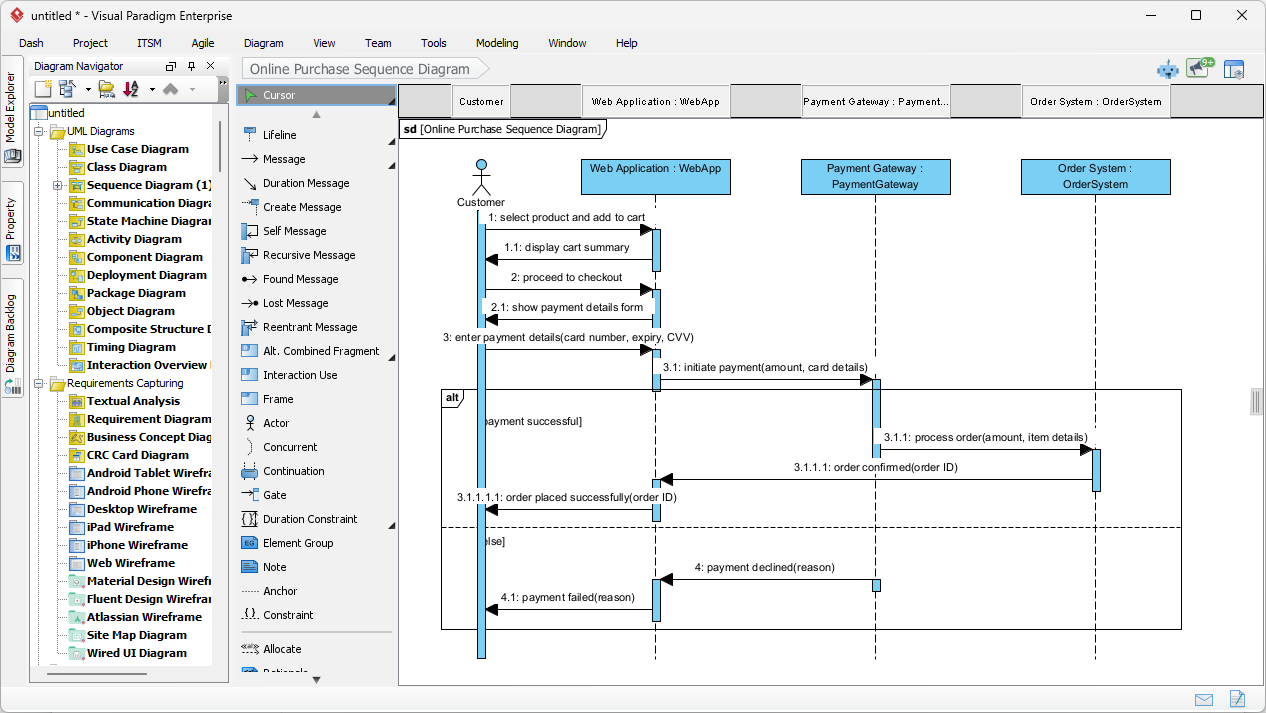
Finally, the third image shows the result of this AI generation process. The diagram is fully rendered, with all the necessary lifelines, messages, and combined fragments. You can see the detailed flow, including the alternative path for a failed payment. This diagram is not just a static image; it’s a fully editable model within Visual Paradigm, ready for refinement, documentation, or integration with other models.
Why Use AI for Sequence Diagrams?
Using AI to generate sequence diagrams offers several significant benefits:
-
Save Time: Eliminate the tedious task of manually drawing lifelines, messages, and alignments. The AI creates a structured starting point in seconds.
-
Ensure Correct Semantics: The AI automatically applies proper UML notation, including message types (synchronous, asynchronous, return) and control fragments, ensuring your diagrams are accurate.
-
Improve Clarity: Visualize complex interactions and user stories in a way that is easy for both technical and non-technical stakeholders to understand.
-
Support Rapid Iteration: Quickly generate diagrams for different scenarios or variations of the same use case to explore different design options.
-
Make Modeling Accessible: Even users new to UML can create meaningful models without needing deep expertise.
With AI, you can focus on the logic and behavior of your system, not the mechanics of drawing the diagram.
Take Your Modeling to the Next Level
AI-powered sequence diagram generation is a game-changer for anyone involved in software design and analysis. It transforms a complex, time-consuming task into a simple, intuitive process. Whether you’re a business analyst documenting a new feature, a developer designing a system architecture, or a student learning UML, Visual Paradigm’s AI tools empower you to create professional-grade models with ease.
Ready to experience the power of AI for your next project? Download Visual Paradigm today and start turning your ideas into clear, visual models in minutes.
Related Links
These articles and tutorials explore how artificial intelligence can be used to generate, automate, and optimize UML sequence diagrams. The resources cover techniques for converting natural language prompts into visual interaction models, utilizing AI-powered refinement tools to enhance diagram logic, and applying these capabilities to complex architectures like MVC.
-
Visual Paradigm – AI-Powered UML Sequence Diagrams: A primary guide on learning how to generate sequence diagrams instantly using AI automation.
-
AI-Powered Sequence Diagram Refinement in Visual Paradigm: This article explains how to transform use-case descriptions into precise, professional-grade sequence diagrams through AI refinement.
-
Comprehensive Tutorial: Using the AI Sequence Diagram Refinement Tool: A detailed, step-by-step walkthrough for improving diagram quality and consistency using specialized AI features.
-
AI-Powered Sequence Diagram Refinement Tool | Visual Paradigm: An overview of the specific tool capabilities that provide intelligent suggestions for system design.
-
Beginner’s Tutorial: Create Your First Professional Sequence Diagram in Minutes: A tutorial focused on using an AI chatbot to quickly build sequence diagrams without deep technical expertise.
-
Simplify Complex Workflows with Visual Paradigm AI Sequence Diagram Tool: This resource focuses on using AI to model and manage complex system interactions and large-scale workflows.
-
AI Sequence Diagram Refinement Tool | Visual Paradigm (Technical Overview): A technical breakdown of how the tool ensures the readability and correctness of interaction models.
-
AI Sequence Diagram Example: Video Streaming Playback Initiation: A practical case study showing how the AI Chatbot interprets user intent to generate specific interaction logic for a streaming service.
-
Mastering MVC Architecture with Sequence Diagram Refinement: This guide focuses on refining diagrams to specifically validate Model-View-Controller interactions and system behavior.
-
Refining Sequence Diagrams with AI: A Smarter Way to Design Systems: An exploration of how AI serves as a modeling partner to ensure accuracy in system-wide interaction design.