
Software architecture is the backbone of any robust application. As developers grow from writing scripts to designing systems, the need for clear structural representation becomes critical. One of the most effective tools for this is the UML Package Diagram. Despite its importance, many new developers find these diagrams confusing or unnecessary.
This guide addresses the most common inquiries regarding package diagrams. We will explore their purpose, syntax, and practical application without relying on specific tools or marketing hype. By the end, you will understand how to organize your code structure visually.
Q1: What Exactly Is a UML Package Diagram? 🤔
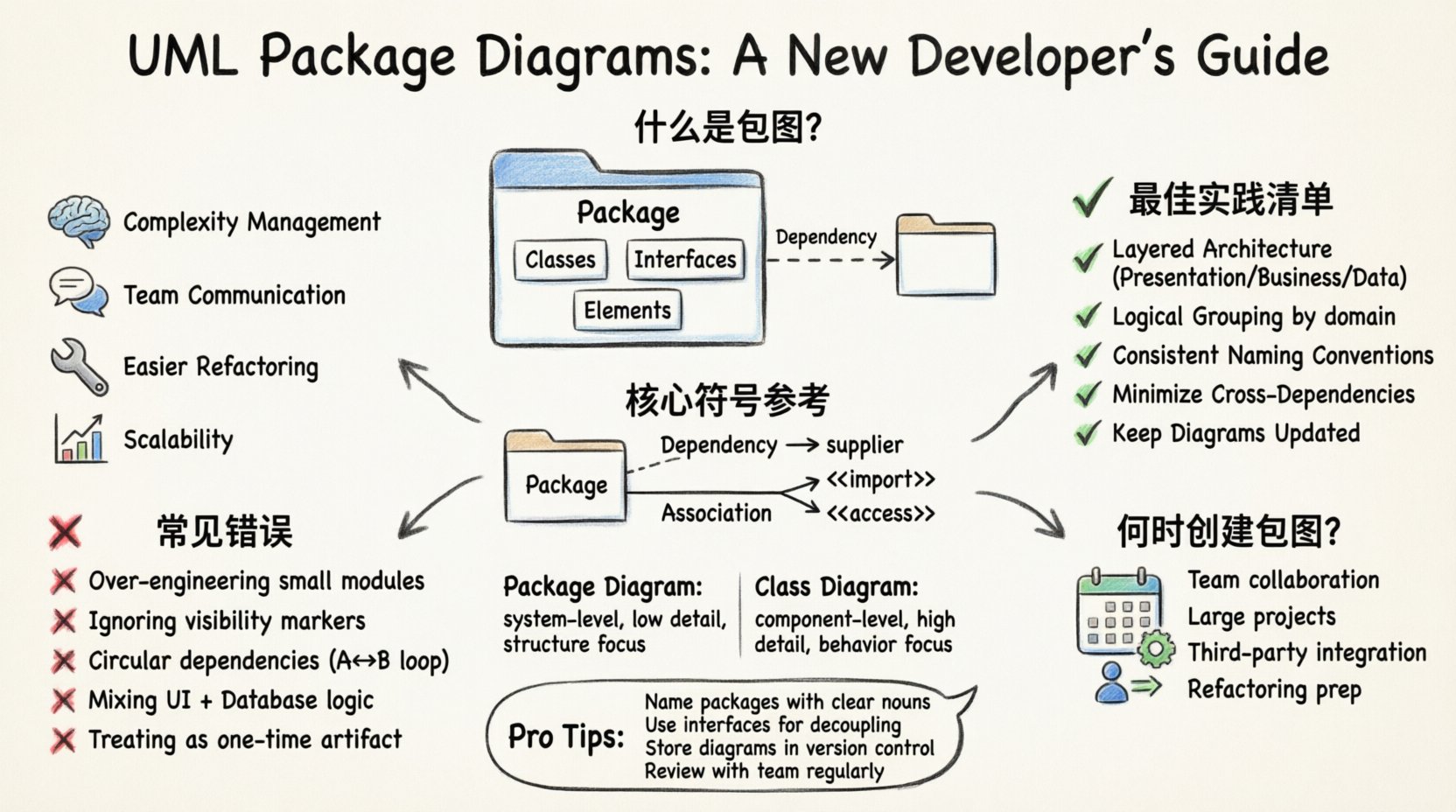
A UML Package Diagram is a type of structure diagram used in software engineering. It shows the organization and dependencies between different sets of classes, interfaces, and other elements. Think of a package as a folder in your file system. It groups related components together to manage complexity.
- Package: A namespace that contains a set of related elements.
- Element: Classes, interfaces, use cases, or other packages nested inside.
- Dependency: A relationship indicating that one package relies on another.
Unlike a class diagram that focuses on individual attributes and methods, the package diagram operates at a higher level of abstraction. It provides a macro view of the system architecture.
Q2: Why Should I Use Package Diagrams? 🛠️
Understanding the why is often more important than the how. New developers often skip documentation, assuming code speaks for itself. However, code changes, and without a visual map, the connections become opaque.
- Complexity Management: Large systems have thousands of files. Packages reduce cognitive load by grouping them logically.
- Communication: Stakeholders and architects need a shared language. Diagrams facilitate discussions about high-level structure.
- Refactoring: When reorganizing code, a diagram helps identify which packages will break if moved.
- Scalability: It becomes easier to onboard new team members who need to understand the project layout quickly.
Q3: What Are the Core Components? 🧱
Before drawing, you must know the symbols. Standard UML notation keeps these diagrams consistent across teams. Here is a breakdown of the essential elements you will encounter.
| Symbol | Meaning | Visual Representation |
|---|---|---|
| Package | A grouping container | Rectangle with a tab on top |
| Dependency | A requires relationship | Dashed arrow pointing to the supplier |
| Association | A structural link | Solid line connecting two packages |
| Import | Public visibility of elements | Dashed arrow with <<import>> label |
| Access | Visibility access | Dashed arrow with <<access>> label |
Each component serves a specific purpose in defining the boundaries and interactions of your software modules.
Q4: How Do Dependencies Work? 🔗
Dependencies are the most frequent element in package diagrams. They indicate that if Package A changes, Package B might need to change as well. This is not a physical connection like a database link, but a logical one.
- Usage Dependency: Package A uses operations or attributes defined in Package B.
- Instantiation Dependency: Package A creates instances of classes found in Package B.
- Derivation Dependency: Package A is a specialized version of Package B.
When drawing these, always ensure the arrow points to the element being depended upon. The tail of the arrow should be at the client, and the head at the supplier.
Q5: What Are Best Practices for Organization? 📂
Creating a diagram is easy; creating a good one is difficult. Follow these guidelines to maintain clarity and utility.
- Layered Architecture: Group packages by technical layers (e.g., Presentation, Business Logic, Data Access).
- Logical Grouping: Do not split functionality across unrelated packages. Keep domain concepts together.
- Naming Conventions: Use consistent naming. If you use "User" in one package, do not use "Client" in another for the same concept.
- Minimize Cross-Dependencies: High coupling between packages makes the system rigid. Aim for loose coupling.
- Keep It Updated: A diagram is useless if it does not match the current codebase.
Q6: What Are Common Mistakes to Avoid? ❌
Even experienced developers can stumble when modeling packages. Recognizing these pitfalls early saves time during the design phase.
- Over-Engineering: Creating a package diagram for every small module. Only use them where complexity warrants it.
- Ignoring Visibility: Failing to mark public vs. private elements can lead to confusion about what is accessible from outside.
- Circular Dependencies: Package A depends on B, and B depends on A. This creates a cycle that is hard to resolve and often indicates a design flaw.
- Mixing Concerns: Combining database logic with user interface logic in the same package violates separation of concerns.
- Static Only: Treating the diagram as a one-time artifact. Architecture evolves, and so should the diagram.
Q7: How Does This Relate to Class Diagrams? 🔄
Package diagrams and class diagrams are often used together, but they serve different roles. A class diagram details the internals of a single class. A package diagram details the relationship between groups of classes.
| Feature | Package Diagram | Class Diagram |
|---|---|---|
| Scope | System Level | Component Level |
| Detail | Low (Names only) | High (Attributes & Methods) |
| Primary Use | Structure & Organization | Behavior & Data |
| Complexity | Manageable for large systems | Can get cluttered in large systems |
Use the package diagram to navigate the system, and the class diagram to understand the implementation details of a specific module.
Q8: When Should You Create One? 📅
Not every project requires a package diagram. Small scripts or single-file applications do not need this level of abstraction. However, consider creating one under these conditions:
- Team Size: When multiple developers are working on different parts of the code.
- Project Size: When the number of files exceeds what is manageable in a single directory.
- Integration: When integrating third-party libraries or existing subsystems.
- Refactoring: Before restructuring the codebase to ensure dependencies are understood.
Q9: How to Handle Nested Packages? 📦📦
Sometimes a package is too large and needs to be subdivided. This is called nesting. You can place a package inside another package to create a hierarchy.
- Logical Hierarchy: Create sub-packages based on features (e.g., "Payment" inside "Billing").
- Physical Mapping: Map packages directly to directory structures in your version control system.
- Visibility Control: Nested packages allow you to control which parts of the system are exposed to the outside world.
Ensure that the nesting does not create confusion. If a developer has to navigate three levels deep just to find a class, the structure might need simplification.
Q10: What About Interfaces and Abstract Classes? 💡
Interfaces and abstract classes often act as bridges between packages. They define contracts without implementation details. In a package diagram, these can be shown within the package boundary.
- Contract Definition: Interfaces define what a package offers to others.
- Decoupling: Using interfaces allows packages to depend on abstractions rather than concrete implementations.
- Documentation: They serve as documentation for how the package should be used.
When drawing, indicate if an interface is provided (sold) or required (bought) by the package. This clarifies the flow of information.
Q11: How Do You Maintain Diagrams? 🔄
Maintaining documentation is often the hardest part. If the code changes and the diagram does not, the diagram becomes a liability. Here is how to keep them relevant.
- Version Control: Store the diagram files alongside the code in the repository.
- Automated Generation: If possible, use tools that generate diagrams from source code annotations.
- Code Reviews: Include diagram updates as part of the pull request process for structural changes.
- Regular Audits: Schedule periodic reviews to ensure the visual map matches the reality of the code.
Q12: Can You Use This for Database Design? 🗄️
While primarily for software structure, package diagrams can represent database schemas. You can treat a database as a package containing tables (elements).
- Schema Organization: Group tables by functional area.
- Relationships: Show foreign key dependencies as package dependencies.
- Separation: Keep the application logic packages separate from the data storage packages to maintain clean architecture.
This helps in understanding data flow between the application layer and the persistence layer.
Q13: What Are the Limitations? ⚠️
No tool is perfect. Package diagrams have specific limitations that you must be aware of.
- Dynamic Behavior: They do not show runtime behavior or state changes.
- Performance: They do not indicate performance bottlenecks or resource usage.
- Implementation Details: They hide the internal logic of classes within the package.
- Complexity: Very complex systems can result in diagrams that are too dense to read effectively.
Combine package diagrams with sequence diagrams or activity diagrams for a complete picture of the system.
Q14: How Do You Name Packages Effectively? 🏷️
Naming is critical for readability. A package name should be self-explanatory.
- Nouns: Use nouns to represent concepts (e.g., "User", "Order", "Report").
- Prefixes: Use prefixes for specific domains (e.g., "Auth" for authentication).
- Consistency: Do not mix plural and singular forms (choose one and stick to it).
- Clarity: Avoid abbreviations that are not standard industry terms.
Q15: Is There a Standard for Package Diagrams? 📜
Yes, the Object Management Group (OMG) defines the Unified Modeling Language (UML) standards. Package diagrams are part of the UML 2.0 specification. Following this standard ensures that anyone familiar with UML can read your diagram.
- Standardization: Ensures interoperability between different design tools.
- Best Practices: Provides a common vocabulary for developers worldwide.
- Tool Support: Most modeling tools adhere to the standard syntax.
Adhering to the standard reduces the learning curve for new team members joining the project.
Final Thoughts on Architecture 🎯
UML package diagrams are a fundamental skill for any developer aiming to work on scalable systems. They do not replace code, but they illuminate the structure that code resides in. By answering these top questions, you now have a framework for understanding when and how to apply them.
Start small. Create a diagram for your current project. Identify the packages. Draw the dependencies. Review them with your team. Over time, this practice will become second nature, leading to cleaner, more maintainable software.
Remember, the goal is clarity. If a diagram confuses the reader, it has failed its purpose. Keep it simple, keep it accurate, and keep it useful.