
Introduction
In an era where attention is the scarcest resource, static documentation no longer cuts it. Teams need content that engages, educates, and evolves—all within a single, searchable workspace. That’s exactly why Visual Paradigm’s latest integration between Flipbooks, Digital Bookshelves, and OpenDocs represents more than just a feature update: it’s a paradigm shift in how we create, share, and consume professional knowledge.
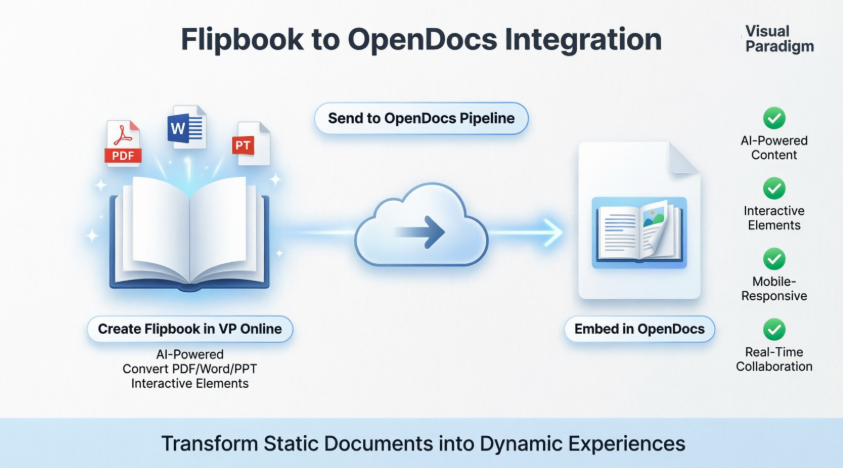
As someone who has evaluated nearly every major documentation, publishing, and knowledge-management platform on the market—from Notion and Confluence to Issuu and Flipsnack—I can say with confidence that this workflow is uniquely positioned at the intersection of AI-powered creation, interactive storytelling, and enterprise-grade collaboration.
This comprehensive guide walks you through everything you need to know: how to transform PDFs and presentations into immersive flipbooks, how to curate entire libraries using digital bookshelves, and how to embed both seamlessly into OpenDocs’ AI-driven knowledge hub. Along the way, I’ll share practical tips, compare this solution to similar tools, and highlight the architectural decisions that make this integration stand out.
Whether you’re a technical writer, product manager, training specialist, or knowledge architect, you’ll discover how to turn your documentation from a reference manual into an experience your audience actually wants to explore.
Let’s dive in. 📘✨
🔍 Why This Integration Matters
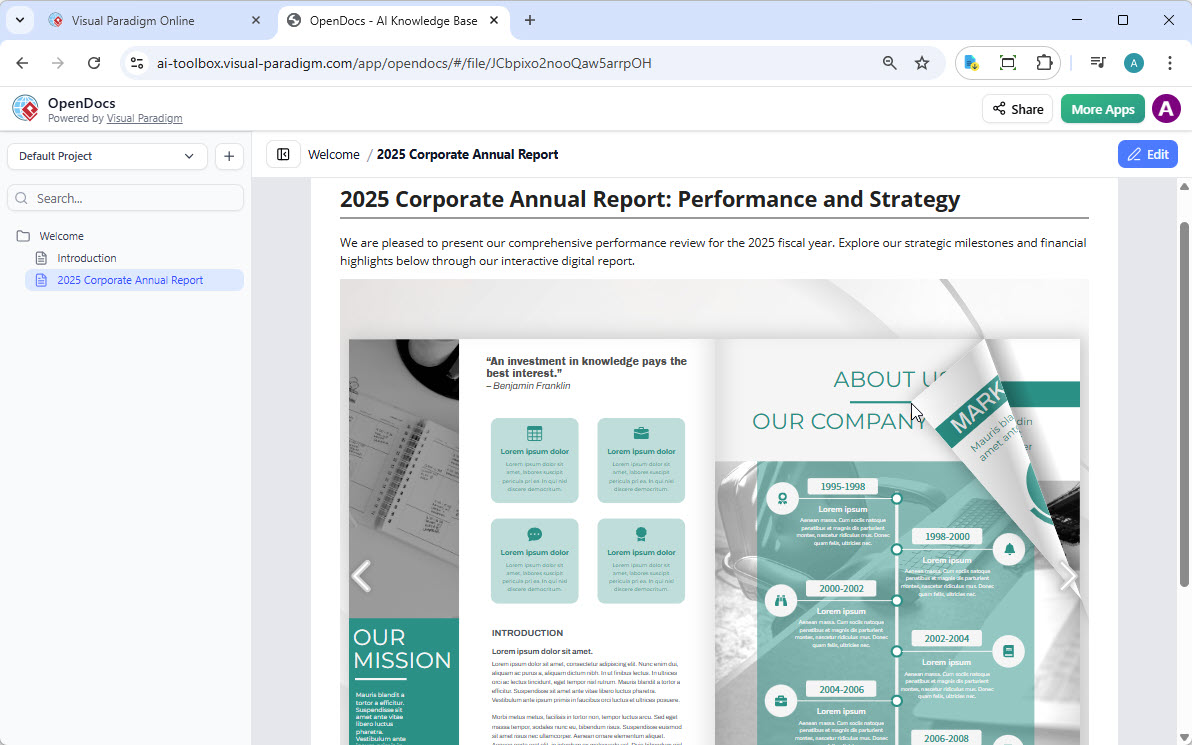
In today’s knowledge-driven workplaces, static PDFs and disconnected documentation tools create friction. Teams need content that’s interactive, searchable, and centrally managed.
Visual Paradigm’s new OpenDocs integration solves this by:
-
✅ Turning static documents into immersive, page-flipping experiences
-
✅ Embedding rich media (video, audio, links) directly into documentation
-
✅ Creating curated collections via digital bookshelves
-
✅ Maintaining a single source of truth with AI-powered knowledge management
Unlike tools like Issuu, Flipsnack, or even Notion’s embeds, this solution is natively integrated with professional diagramming, AI content generation, and enterprise-grade version control. That’s a combination I haven’t seen elsewhere.
📚 Part 1: Sharing Flipbooks to OpenDocs – Step-by-Step
What You Can Do With Visual Paradigm Flipbooks
Before diving into the workflow, let’s highlight what makes this flipbook software stand out:
| Feature | Benefit |
|---|---|
| Convert & Create | Instantly transform PDFs, Word docs, and PowerPoint slides into flipbooks, or design from scratch using drag-and-drop |
| AI-Powered Generation | Generate full book outlines, write content, and create matching illustrations in various art styles |
| Interactive Elements | Embed videos, audio, clickable links, and realistic page-flipping sound effects |
| Professional Branding | Customize covers, themes, and backgrounds to match corporate identity |
| Mobile-First Reading | Fully responsive design for perfect reading on desktops, tablets, and smartphones |
How to Share Your Flipbook to OpenDocs
Moving content from Visual Paradigm Online to OpenDocs is refreshingly simple:
-
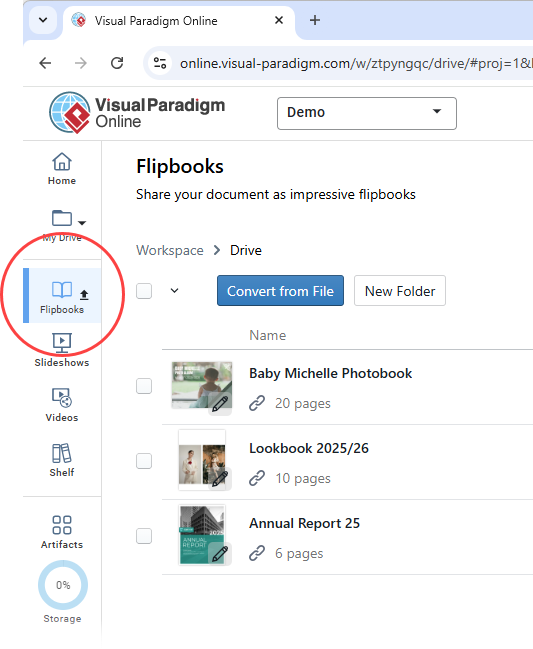
Open your workspace page in Visual Paradigm Online.
-
Select Flipbooks from the left-hand menu to view your library.
-
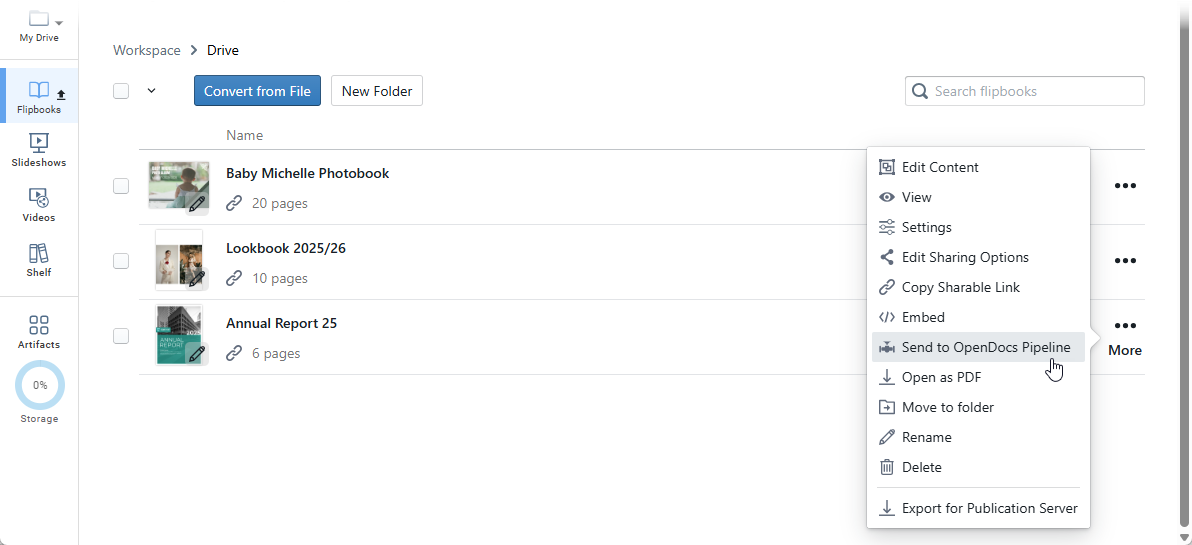
Locate the flipbook you wish to share and click More… on the right side.
-
Select Send to OpenDocs Pipeline.
-
(Optional) Enter a comment regarding this share and click OK to proceed.
Embedding Your Flipbook in OpenDocs
Once your flipbook is in the pipeline, embedding it into documentation takes seconds:
-
Navigate to the page in OpenDocs where you want to embed the book.
-
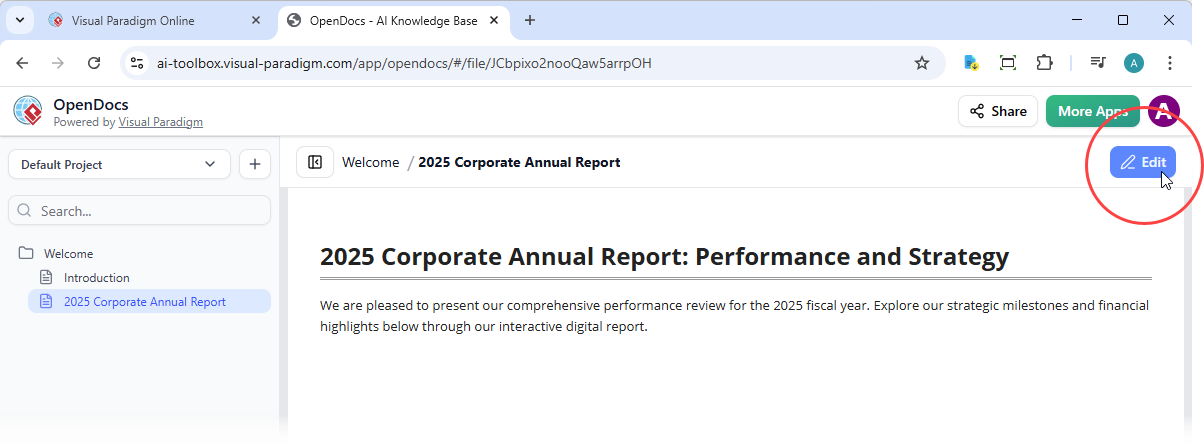
Click Edit at the top right of the screen.
-
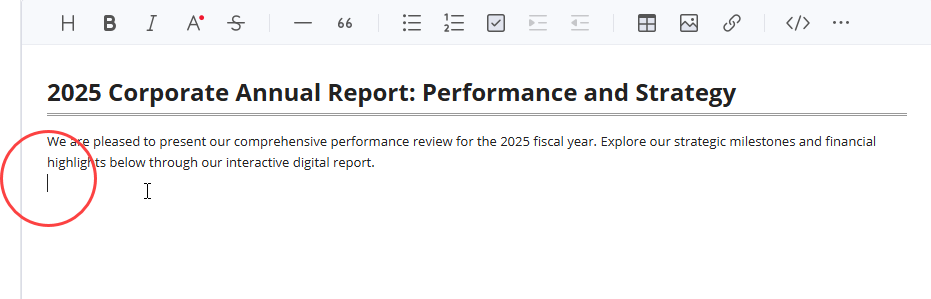
Position your cursor exactly where you want the flipbook to appear.
-
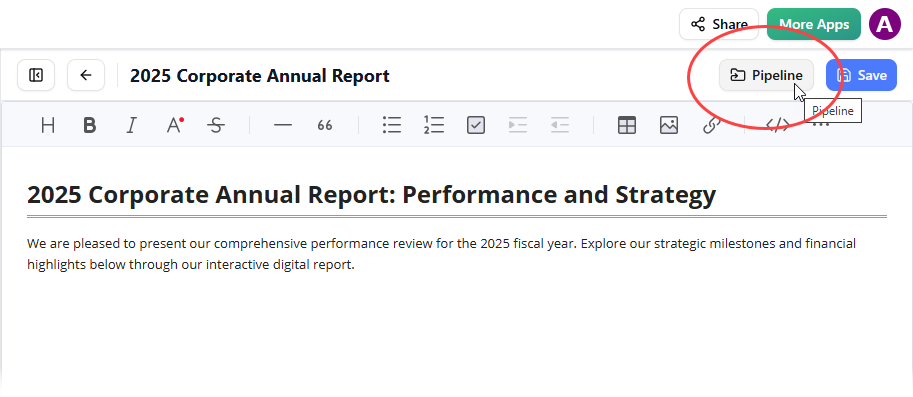
Click the Pipeline button located at the top right.
-
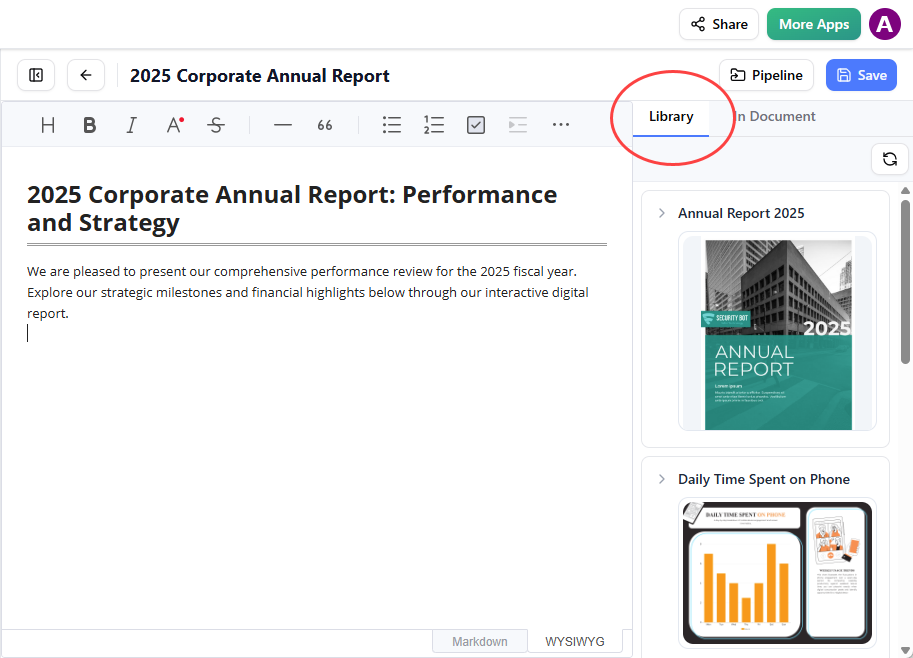
Open the Library tab; you will see the flipbook you sent from VP Online.
-
Click on the flipbook to insert it.
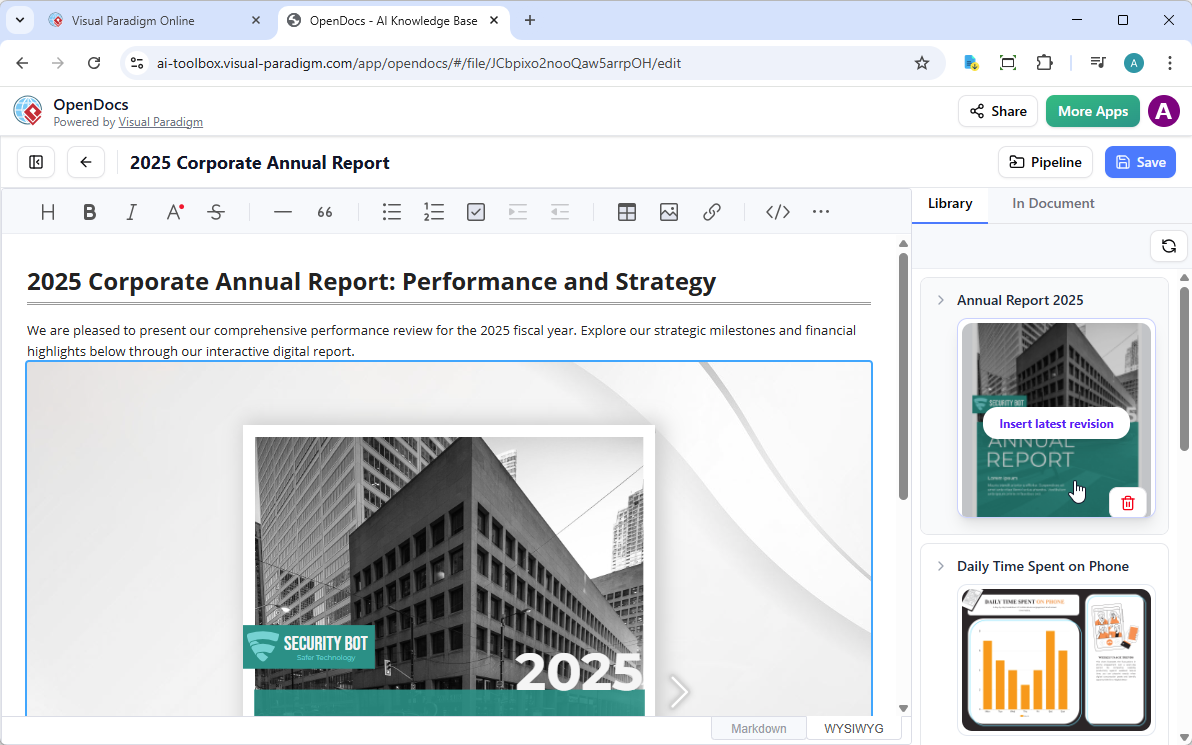
Tip: If the flipbook is added to the end of the page, select it and press Enter to create a new line and adjust the positioning.
Pro Tip: In Edit mode, the flipbook remains static. To interact with it, simply save your changes and exit Edit mode. Once live, you can share the page or the entire space using the Share button in the top bar.
🗄️ Part 2: Organizing & Embedding Digital Bookshelves
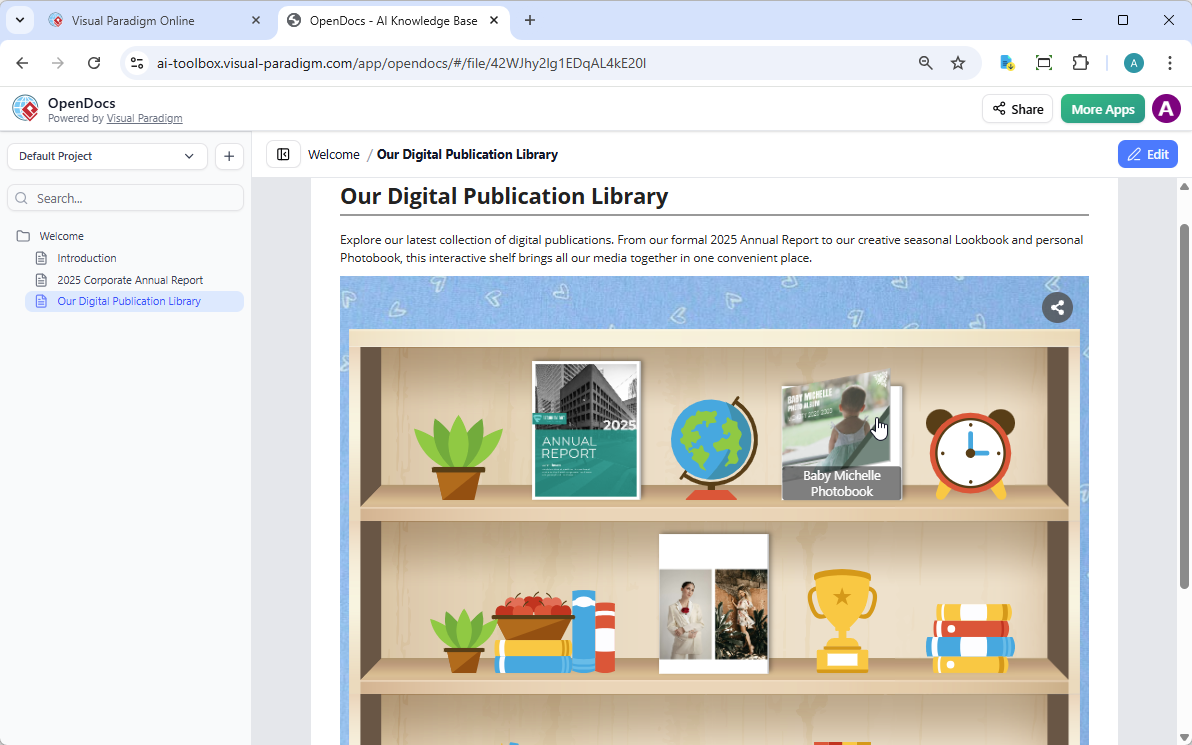
Flexible Sharing: Bookshelves vs. Individual Flipbooks
The digital bookshelf maker adds a layer of curation that’s perfect for training portals, resource libraries, or product documentation suites:
| Use Case | Recommended Format |
|---|---|
| Hero document (e.g., Annual Report) | Individual Flipbook |
| Training series, lookbooks, photobooks | Curated Bookshelf |
| Mixed media resource hub | Bookshelf with embedded videos |
Whether you’re using AI to generate one book or managing a hundred, the OpenDocs integration ensures your library is always accessible within your documentation workflow.
How to Send Your Bookshelf to the Pipeline
-
Navigate to your workspace in Visual Paradigm Online.
-
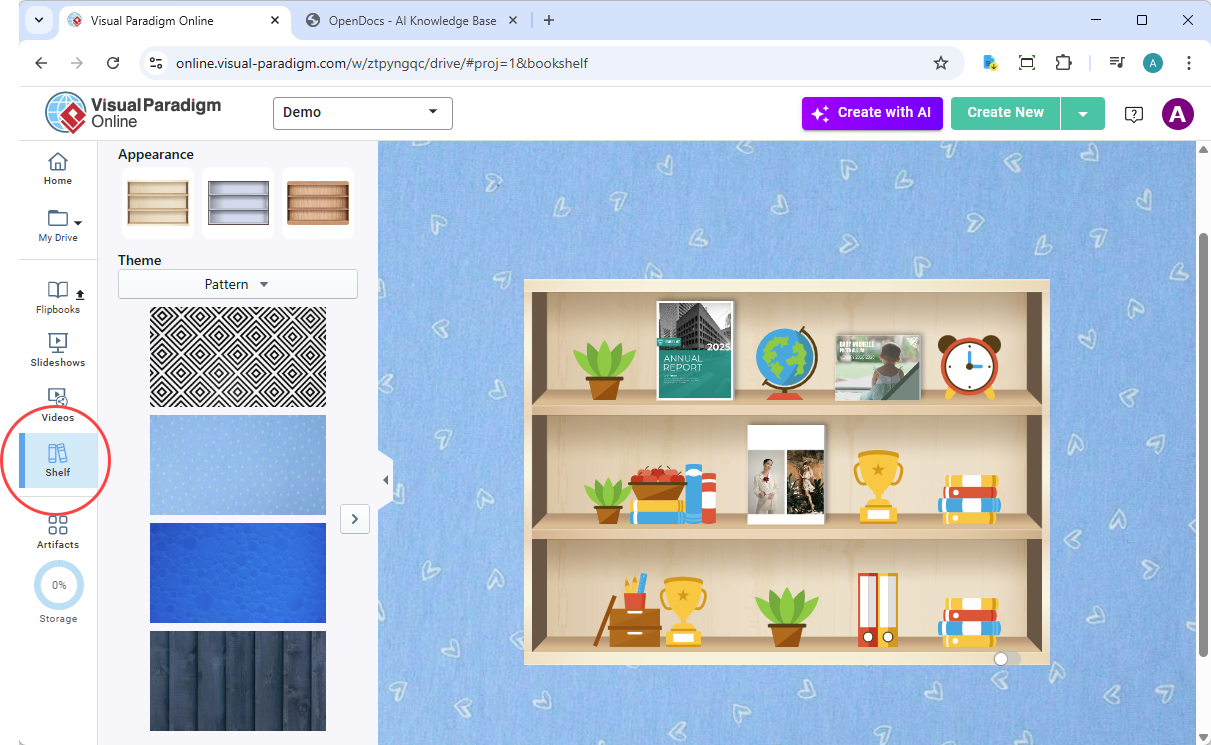
Select Shelf from the left-hand menu.
-
Select the bookshelf you wish to publish.
-
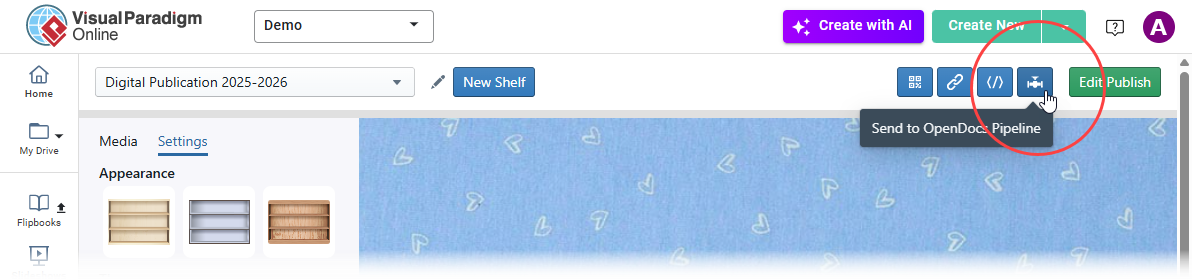
Click the Pipeline icon button at the top right of the screen.
-
(Optional) Enter a comment and click OK.
How to Embed the Bookshelf in OpenDocs
-
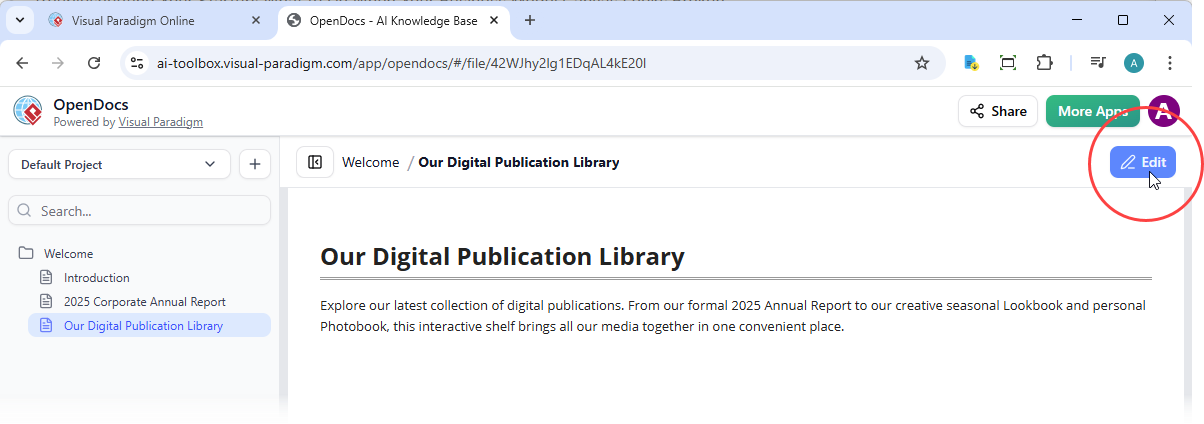
Open your OpenDocs page and click Edit.
-
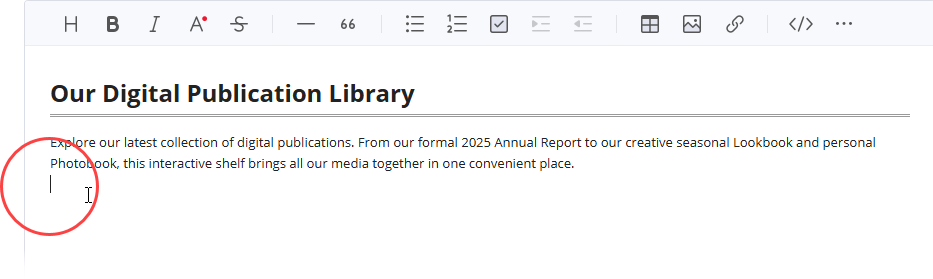
Position your cursor where you want the shelf to appear.
-
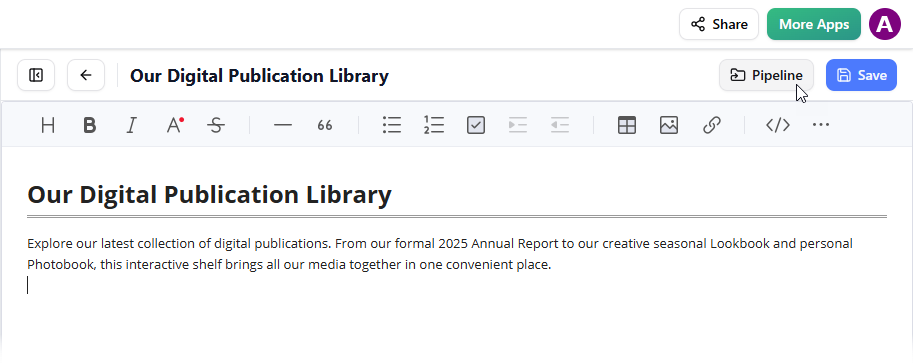
Click the Pipeline button (top right).
-
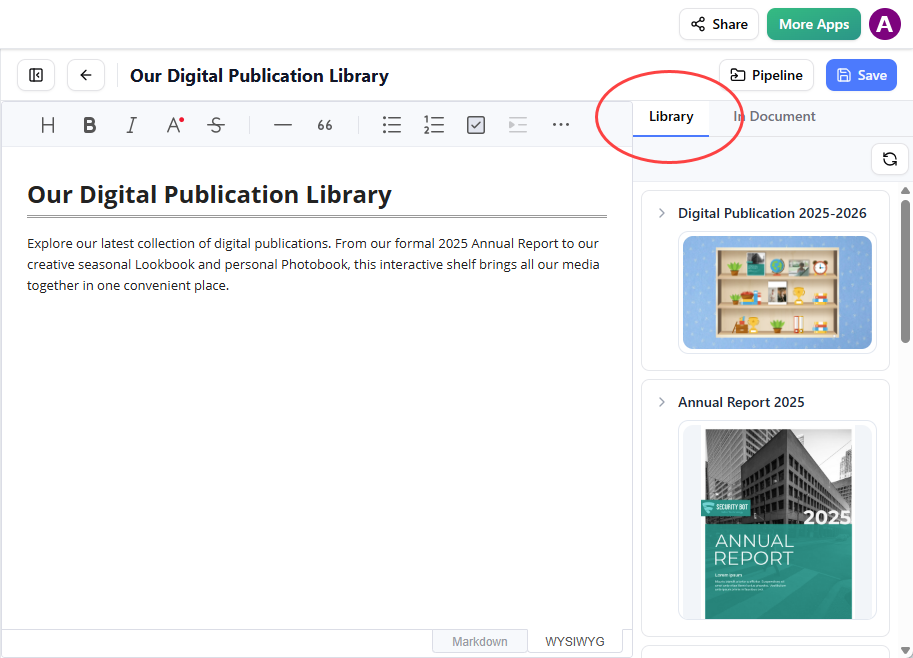
Open the Library tab.
-
Select your bookshelf to insert it into the page.
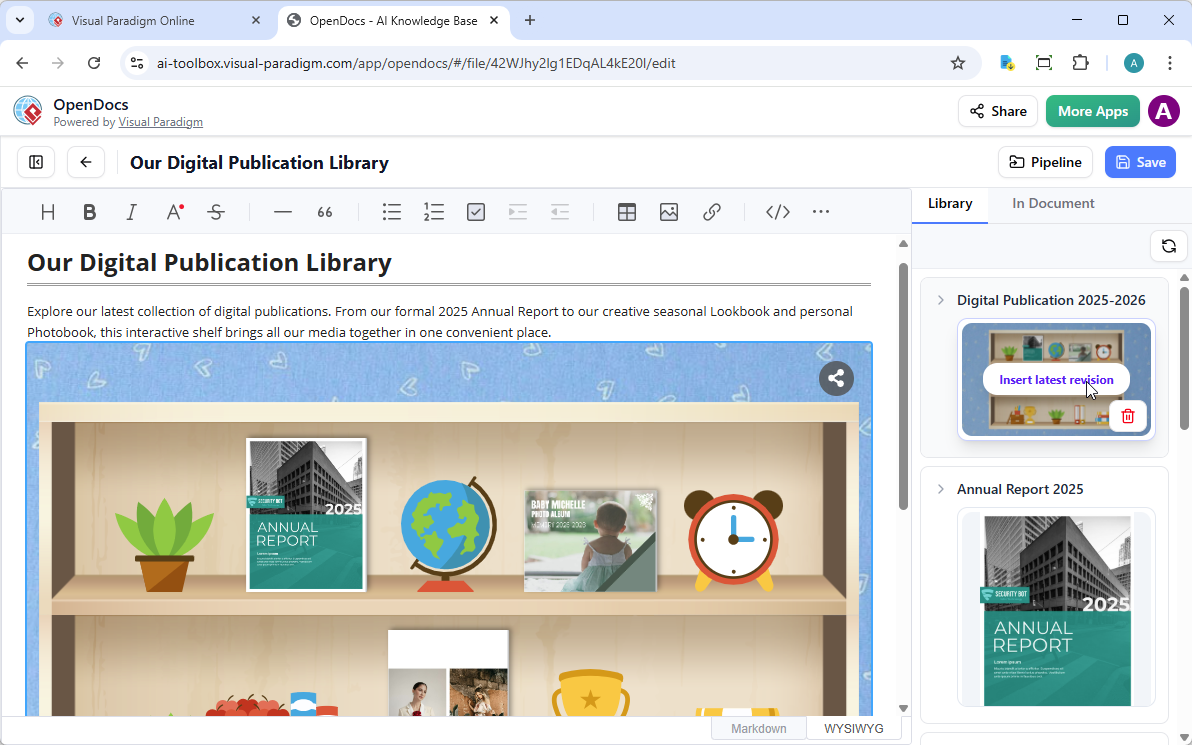
Tip: To move your cursor below the shelf after insertion, select the shelf and press Enter.
Note: While in Edit mode, the shelf is a static placeholder. Save your changes and exit Edit mode to interact with the shelf, browse the books, and play embedded videos. You can then use the Share button in the top bar to distribute your page.
🧠 OpenDocs: The AI-Powered Knowledge Hub Behind It All
Visual Paradigm OpenDocs isn’t just a documentation tool—it’s an AI-powered knowledge management ecosystem that functions as a “single source of truth” for teams.
Core Documentation & Writing Features
-
Rich Markdown & WYSIWYG Editor: Distraction-free writing with full Markdown support and real-time previews
-
Knowledge Tree Structure: Hierarchical folders with drag-and-drop organization for scalable information architecture
-
Unified Workspace: Create and edit professional diagrams directly within narrative text documents
AI-Powered Capabilities
-
AI Content Assistant: Generate article drafts, summarize technical documents, simplify complex topics
-
AI Diagram Generation: Transform natural language into flowcharts, PERT charts, UML models instantly
-
Contextual Q&A: Get answers based specifically on your OpenDocs knowledge base
-
Smart Visual Suggestions: AI recommends relevant diagrams to enhance comprehension
Collaboration & Integration
-
One-Click Sharing: Generate secure, read-only links for stakeholders (no login required)
-
Shared Workspaces: Real-time multi-user editing with version history and change tracking
-
Desktop-to-OpenDocs Pipeline: Securely transfer artifacts from Visual Paradigm Desktop while preserving editability
-
Web-Based Accessibility: Access via any modern browser—ideal for remote teams
⚖️ How This Stacks Up Against Similar Tools
| Feature | Visual Paradigm OpenDocs + Flipbooks | Issuu / Flipsnack | Notion + Embeds | Confluence + Plugins |
|---|---|---|---|---|
| Native Flipbook Creation | ✅ Built-in AI-powered maker | ✅ Dedicated flipbook tools | ❌ Requires third-party embed | ❌ Requires plugin |
| AI Content Generation | ✅ Outlines, writing, illustrations | ❌ Limited or none | ✅ Via third-party AI bots | ❌ Via marketplace apps |
| Diagram Integration | ✅ Professional UML, flowcharts natively | ❌ Not supported | ❌ Requires external tools | ⚠️ Via plugins (limited) |
| Pipeline/Version Sync | ✅ Desktop ↔ Cloud with editability | ❌ One-way publish | ⚠️ Manual sync | ✅ But complex setup |
| Interactive Bookshelves | ✅ Curated, embeddable collections | ⚠️ Playlists only | ❌ Manual linking | ❌ Not native |
| Mobile-First Responsive | ✅ Fully optimized | ✅ Yes | ✅ Yes | ⚠️ Varies by plugin |
| Enterprise Knowledge Mgmt | ✅ Unified search, AI Q&A, access control | ❌ Publishing-focused | ⚠️ Basic permissions | ✅ But fragmented UX |
🏆 What Makes This Integration Unique
-
End-to-End Workflow: From AI-assisted content creation → interactive flipbook → embedded documentation → team knowledge base. No tool-switching required.
-
Professional Diagramming + Rich Media: Most flipbook tools focus on marketing collateral. Visual Paradigm bridges technical documentation (UML, architecture diagrams) with engaging presentation layers.
-
Pipeline Architecture: The “Pipeline” isn’t just a share button—it’s a version-aware, editable bridge between desktop and cloud environments. Changes sync bidirectionally with audit trails.
-
AI That Understands Context: Unlike generic AI writers, OpenDocs’ assistant references your actual documentation, diagrams, and project data to generate relevant, accurate content.
-
Curated Discovery via Bookshelves: Presenting resources as an interactive shelf—not just a list—improves engagement and knowledge discovery, especially for training and onboarding.
🚀 Getting Started: Quick Checklist
-
Sign in to Visual Paradigm Online
-
Create or import a document into the Flipbook Maker
-
Enhance with AI content, media, or branding
-
Use More… → Send to OpenDocs [Pipeline] to share
-
In OpenDocs, edit a page → Pipeline → Library → Insert flipbook/bookshelf
-
Save, exit Edit mode, and share with your team
💡 Pro Insight: Start with a single flipbook to test the workflow, then scale to bookshelves for department-wide resource libraries. The AI assistant can help draft initial content—just provide an outline and let it generate the rest.
Conclusion
Elevating Documentation from Static to Strategic
🔗 Reference List
-
Visual Paradigm OpenDocs Feature Page: Official overview of OpenDocs capabilities, including AI-powered documentation, diagram integration, and collaboration features.
-
OpenDocs: AI-Powered Knowledge Platform Announcement: Press release detailing the launch of OpenDocs as an AI-driven knowledge management and documentation hub.
-
Visual Paradigm OpenDocs: The Complete Guide: In-depth third-party guide covering setup, AI features, diagram generation, and best practices.
-
Visual Paradigm OpenDocs: The Complete Guide (Duplicate Source): Alternate mirror of the comprehensive Archimetric guide to OpenDocs functionality.
-
Visual Paradigm OpenDocs Features Overview: Detailed breakdown of writing tools, knowledge architecture, and workspace unification capabilities.
-
OpenDocs Demo Video: Official YouTube walkthrough demonstrating OpenDocs interface, AI assistance, and flipbook embedding workflow.
-
OpenDocs AI Tool Portal: Direct access point for the AI-powered OpenDocs interface and documentation resources.
-
Archimetric’s OpenDocs Implementation Guide: Practical implementation strategies and use cases for enterprise teams adopting OpenDocs.
-
AI Breakdown Structure Chart Maker in OpenDocs: Release note covering AI-powered chart generation capabilities within OpenDocs.
-
OpenDocs Tutorial Video (Alternate Link): Supplementary video resource demonstrating core OpenDocs workflows and collaboration features.
-
Sync AI Diagrams to OpenDocs Pipeline Guide: Technical guide for transferring and synchronizing diagrams between Visual Paradigm Desktop and OpenDocs.
-
Mastering the Pipeline in Visual Paradigm OpenDocs: Expert tutorial on leveraging the Pipeline feature for seamless knowledge management and version control.
Final Verdict: If your team creates technical documentation, training materials, or client-facing reports that benefit from interactivity, Visual Paradigm’s Flipbook + OpenDocs integration is worth evaluating immediately. It’s not just another embed feature—it’s a cohesive ecosystem that respects both content creators and knowledge consumers. In a landscape of fragmented tools, this is a rare example of thoughtful, end-to-end design.