
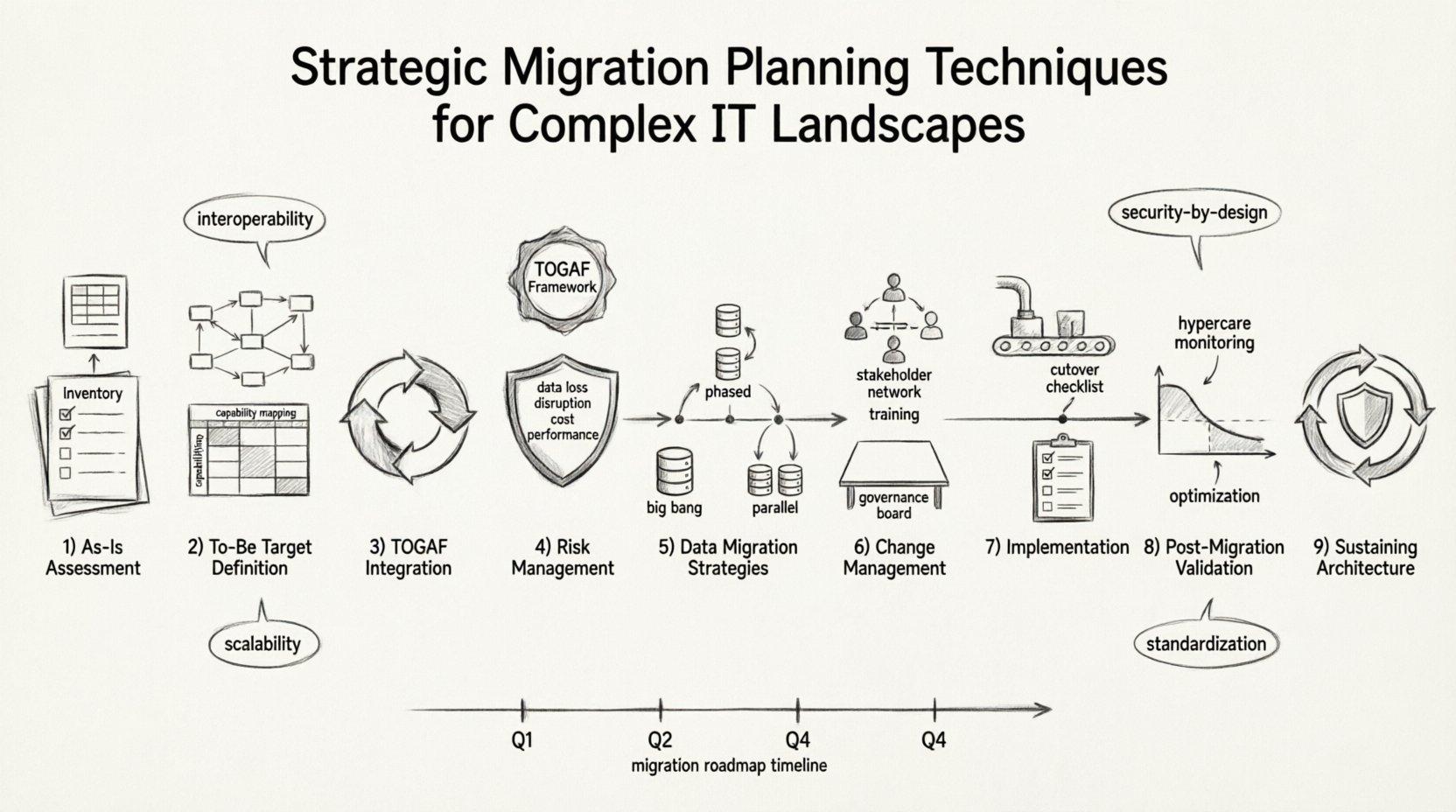
Moving an organization from a legacy state to a modernized architecture is rarely a simple task. It involves intricate dependencies, critical data integrity requirements, and significant business continuity risks. When dealing with complex IT landscapes, ad-hoc approaches often fail. A structured methodology grounded in proven frameworks provides the necessary stability. This guide outlines the essential steps for planning a strategic migration, drawing heavily on principles from the TOGAF standard to ensure architectural coherence.
The goal is not merely to move data or replace servers. It is to transform the enterprise capability while maintaining operational stability. This requires a deep understanding of the current state, a clear vision of the target, and a robust plan to bridge the gap. We will explore the technical and organizational dimensions required to execute this successfully without relying on specific tools or products.
1. Assessing the As-Is Architecture 📊
Before defining where you are going, you must understand exactly where you stand. In the context of TOGAF, this corresponds to the Architecture Vision and Business Architecture phases. A thorough assessment of the current environment is the foundation of any migration strategy.
- Inventory Assets: Catalog all applications, databases, infrastructure components, and integrations. Do not rely on outdated documentation. Conduct active discovery to map dependencies.
- Identify Technical Debt: Highlight legacy systems that incur high maintenance costs or pose security risks. These are often the primary candidates for replacement or decommissioning.
- Map Data Flows: Understand how information moves between systems. Critical bottlenecks or single points of failure must be identified early.
- Stakeholder Analysis: Identify who relies on the current systems. Business units, compliance teams, and external partners all have varying levels of dependency.
Creating a comprehensive inventory is not a one-time event. It requires continuous validation as the migration progresses. The following table outlines key categories for assessment:
| Category | Key Focus Areas | Risk Indicator |
|---|---|---|
| Infrastructure | Server age, support status, energy consumption | High if hardware is EOL (End of Life) |
| Application | Vendor support, code complexity, customization level | High if proprietary or unsupported |
| Data | Volume, quality, format standardization | High if data is siloed or unstructured |
| Integration | API availability, middleware complexity, latency | High if point-to-point connections dominate |
2. Defining the To-Be Target Architecture 🎯
The target state must be defined with precision. It should align with the business strategy and technology goals. This phase in TOGAF involves developing the Business, Information Systems, and Technology Architectures.
Core Principles
Establishing guiding principles ensures consistency throughout the migration. These principles act as a filter for decision-making when conflicts arise.
- Interoperability: New systems must communicate effectively with existing or external partners.
- Scalability: The architecture must handle growth without requiring a complete rebuild.
- Security by Design: Security controls must be embedded within the architecture, not added as an afterthought.
- Standardization: Adopt common protocols and data formats to reduce integration complexity.
Capability Mapping
Define the business capabilities the target architecture must support. This shifts the focus from “what systems do we need” to “what business functions must we enable”. This approach prevents technology-driven migration that does not deliver value.
When mapping capabilities, consider the following:
- Value Streams: How does the architecture support the flow of value from customer request to delivery?
- Service Coverage: Are all critical services covered by the new design?
- Redundancy: Does the design support high availability requirements?
3. Integrating TOGAF Migration Planning 🔄
The Migration Planning phase is central to TOGAF. It involves creating the detailed plan that moves the organization from the baseline to the target architecture. This is not just a project timeline; it is a roadmap for architectural realization.
Identifying Work Packages
Break down the transition into manageable work packages. Each package should represent a logical unit of change that delivers value or reduces risk.
- Incremental Approach: Avoid “big bang” migrations where possible. Smaller increments allow for testing and validation at each stage.
- Dependency Analysis: Determine the order of execution. Some work packages cannot start until others are complete.
- Resource Allocation: Assign responsibilities clearly. Who is accountable for each work package?
Gap Analysis
Conduct a rigorous gap analysis between the As-Is and To-Be states. This reveals what is missing, what must be removed, and what needs to be modified.
The output of this analysis drives the project schedule. It highlights:
- Functional Gaps: Features present in the target but missing in the source.
- Technical Gaps: Infrastructure or platform differences that need bridging.
- Process Gaps: Business processes that need re-engineering to fit the new system.
4. Risk Assessment and Mitigation Strategies ⚠️
Complex migrations introduce significant risk. A proactive approach to risk management is essential to prevent project failure. Risk assessment should be quantitative where possible and qualitative where necessary.
Key Risk Categories
| Risk Type | Description | Mitigation Strategy |
|---|---|---|
| Data Loss | Information fails to transfer correctly or is corrupted. | Implement validation checks and backup strategies before cutover. |
| Business Disruption | Services become unavailable during the transition. | Schedule migrations during low-activity windows; use parallel run strategies. |
| Cost Overrun | Unforeseen complexities increase resource requirements. | Maintain a contingency budget; review scope regularly. |
| Performance Degradation | New systems fail to meet latency or throughput targets. | Conduct load testing prior to production deployment. |
The Rollback Plan
Every migration plan must include a defined rollback strategy. If a critical failure occurs during cutover, the organization must be able to revert to the previous state quickly. This minimizes downtime and protects data integrity.
- Reversion Criteria: Define clear thresholds for when to trigger a rollback.
- Time Estimates: Know how long a rollback will take. If it takes longer than the acceptable downtime, the risk is too high.
- Communication: Ensure all stakeholders know the procedure for a rollback.
5. Data Migration Strategies 🗄️
Data is often the most valuable asset in an IT landscape. Moving it requires precision. The strategy depends on the volume, structure, and sensitivity of the data.
Migration Approaches
- Big Bang: All data is moved at once. This is high risk but offers a clear transition point. Suitable for smaller datasets or systems with low dependency.
- Phased: Data is moved in segments over time. This reduces risk but requires synchronization logic to handle data created during the transition.
- Parallel: Both old and new systems run simultaneously. Data is mirrored to ensure consistency. This is resource-intensive but provides the highest confidence.
Data Cleansing and Transformation
Never migrate dirty data. Use this opportunity to cleanse the dataset. Remove duplicates, standardize formats, and validate accuracy. Transformation logic must be defined before the migration begins.
Key considerations include:
- Encoding: Ensure character sets match between source and target.
- Schema Mapping: Map fields from the source database to the target schema accurately.
- Retention Policies: Determine what historical data needs to be archived versus migrated.
6. Change Management and Governance 🤝
Technical migration is only half the challenge. The organizational side often determines success or failure. People must adapt to new processes and tools.
Stakeholder Engagement
Keep stakeholders informed throughout the process. Transparency reduces anxiety and builds trust. Regular updates should cover:
- Current progress against the roadmap.
- Upcoming changes that affect daily operations.
- Known issues and their resolution status.
Training and Support
Provide training materials before the system goes live. Users should know how to perform their tasks in the new environment. Support channels must be established to handle issues immediately after deployment.
- Documentation: Create user guides, FAQs, and troubleshooting manuals.
- Workshops: Conduct hands-on sessions for critical user groups.
- Feedback Loops: Allow users to report issues and suggest improvements.
Governance Framework
Implement a governance framework to oversee the migration. This ensures adherence to standards and policies. A steering committee should review milestones and approve changes to the plan.
- Architecture Review Board (ARB): Validates that changes do not violate architectural principles.
- Change Control: Formal process for approving modifications to the migration plan.
- Compliance Checks: Ensure regulatory requirements are met throughout the process.
7. Implementation and Execution Phases 🚀
Execution is where the plan meets reality. This phase involves the actual deployment of the new architecture. It requires strict adherence to the schedule and the risk mitigation plans defined earlier.
Pre-Deployment Testing
Testing must occur in an environment that mirrors production. This includes:
- Unit Testing: Verify individual components function correctly.
- Integration Testing: Ensure components work together as expected.
- User Acceptance Testing (UAT): Confirm the system meets business requirements.
- Performance Testing: Validate that the system handles expected loads.
Cutover Management
The cutover event is the moment of truth. It requires coordination across all teams. A war room environment is often established to manage real-time issues.
Steps for successful cutover include:
- Final Backup: Ensure a complete backup of the legacy system exists.
- Service Shutdown: Stop write access to the legacy system at the agreed time.
- Data Sync: Perform the final data transfer.
- Validation: Verify data integrity in the new system.
- Service Startup: Enable the new system for users.
8. Post-Migration Validation and Optimization 🔍
The migration is not complete when the system goes live. Post-migration activities ensure long-term stability and value realization.
Hypercare Period
Establish a hypercare period immediately following deployment. This is a time of heightened monitoring and support. The goal is to resolve issues quickly before they impact the business significantly.
- Monitoring: Track system health, performance metrics, and error rates.
- Support Staffing: Keep technical experts available to troubleshoot.
- Issue Tracking: Log all incidents and resolve them systematically.
Performance Tuning
Once the system stabilizes, focus on optimization. Fine-tune configurations to improve efficiency. This might involve adjusting resource allocation or optimizing database queries.
Lessons Learned
Conduct a retrospective to capture lessons learned. Document what went well and what could be improved. This knowledge base is vital for future migration projects.
- Process Improvements: Identify steps in the migration process that can be streamlined.
- Technical Insights: Record architectural decisions and their outcomes.
- Organizational Impact: Assess how the change affected team dynamics and productivity.
9. Sustaining the Architecture 🛡️
After the migration, the architecture must be sustained. This involves ongoing maintenance, updates, and evolution. The goal is to keep the system aligned with business needs.
Continuous Architecture
Architecture is not a destination; it is a journey. Implement a continuous architecture practice. This ensures that future changes are made with a clear understanding of the landscape.
- Regular Reviews: Periodically review the architecture against business goals.
- Technology Watch: Stay informed about new technologies that could benefit the organization.
- Debt Management: Address technical debt as it arises rather than letting it accumulate.
Security Posture
Security must remain a priority. Regular audits and penetration tests help identify vulnerabilities. Keep security patches and updates current.
Conclusion on Strategic Planning 🏁
Successful migration in complex IT landscapes requires discipline, planning, and a structured approach. By leveraging frameworks like TOGAF, organizations can manage the complexity of transformation. The focus remains on business value, data integrity, and risk management. Avoid shortcuts. Invest time in assessment and planning. The cost of preparation is far lower than the cost of failure.
Every organization is unique. Adapt these techniques to fit your specific context. Engage your stakeholders early. Maintain clear communication. Execute with precision. With a solid plan, even the most complex IT landscape can be modernized effectively.