


The New Era of System Modeling
Starting any major Software Design project often begins with the most daunting task: facing a blank canvas. Whether you are creating a complex UML structure or mapping out business processes, manually placing and connecting every element is time-consuming and challenging. The traditional method of dragging and dropping individual shapes to construct a preliminary model can drain valuable time and mental energy better spent on architectural logic.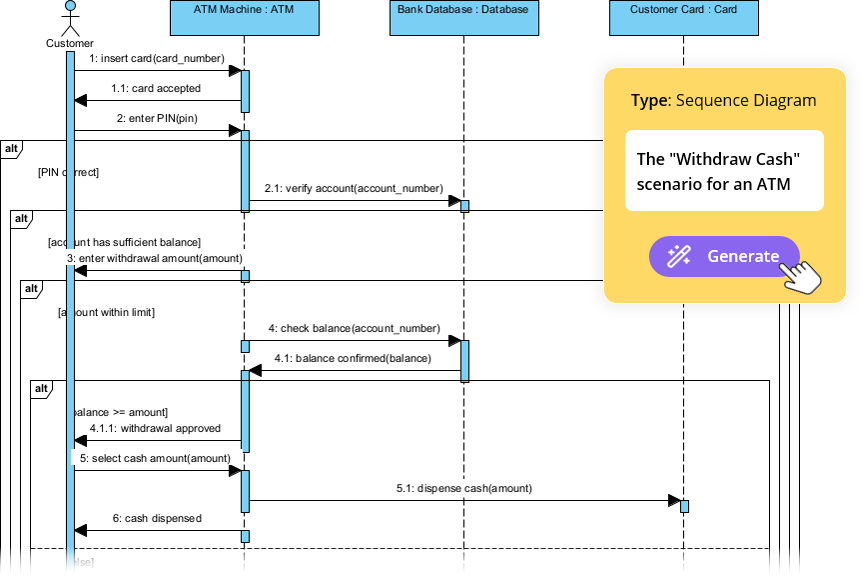
Visual Paradigm has introduced a revolutionary AI Diagram Generation feature designed to solve this specific friction point. This powerful AI tool allows users to transform a simple topic or system description, written in plain language, into a structured, well-laid-out diagram instantly. By accelerating the initial design phase, this capability allows system architects and developers to focus on refining logic rather than drawing lines, making System Modeling faster and smarter.
Understanding Visual Paradigm’s AI Diagram Feature
The AI Diagram Generation feature leverages advanced natural language processing (NLP) to understand the entities, concepts, and relationships within your text input. Unlike basic drawing tools that might suggest shapes, this engine intelligently parses requirements to construct semantic models.
There are three core pillars to how this technology functions:
- Intelligent Analysis: The AI processes your topic and applies core modeling standards, such as UML rules, to determine the necessary elements and connections. It identifies actors, classes, and relationships based on the syntax of your description.
- Native Output: Perhaps the most significant advantage is that the generated output is not a static image. It is a fully editable, native Visual Paradigm diagram file. Users can immediately manipulate elements, change styles, and continue modeling without any conversion steps.
- Automatic Layout: The AI ensures a professional layout right from the start. This saves hours of manual alignment and repositioning, providing a clean visual structure instantly.
Step-by-Step: How to Generate Diagrams with AI
Implementing AI into your workflow is straightforward. Below is a detailed walkthrough of the four essential steps to utilizing the AI Diagram Generation feature effectively.
Step 1: Launching the AI Diagram Generator
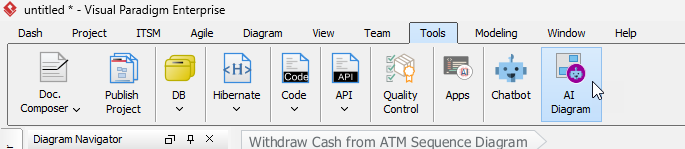
To begin the process, you must access the feature from the main application menu within Visual Paradigm. Navigate to Tools > AI Diagram. A dedicated popup window will appear, ready to accept your instructions. This interface is the bridge between your natural language requirements and the graphical modeling engine.
Step 2: Selecting the Target Diagram Type
Before providing the text description, it is crucial to specify the context for the AI. This selection tells the system which modeling rules to apply. You can select from various diagram types, including:
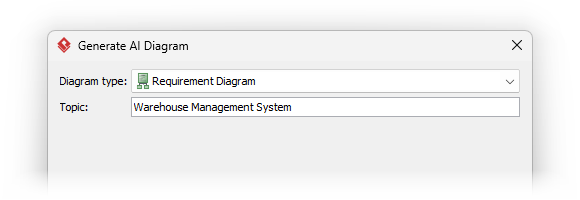
This choice focuses the AI’s analysis. For instance, selecting “Use Case Diagram” directs the AI to identify actors and functional requirements, whereas selecting “Class Diagram” prompts it to look for classes, attributes, and methods.
Step 3: Entering Your Topic or System Description
This is the critical input step where you provide the natural language description of your system. The clarity and detail of your input directly influence the quality of the output. Providing specific details regarding relationships and entities yields the best results.
Consider the following examples of effective prompts:
- For a Use Case Diagram: “An online library system that handles user login, book searching, borrowing, returns, and overdue notifications.”
- For a Class Diagram: “A simple point-of-sale system that includes Products with price and quantity, Orders that contain multiple order items, and Payment Methods like cash or card.”
The AI analyzes these detailed entities and relationships in the text to construct the diagram elements and their corresponding connections automatically.
Step 4: Generating and Reviewing the Initial Diagram
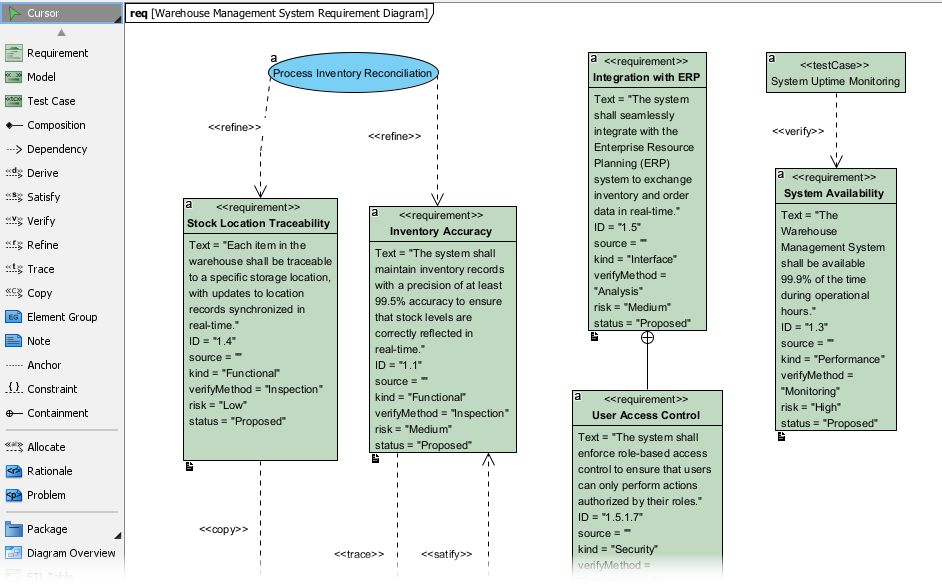
Once your topic is entered, click OK. The Diagram Generation process executes swiftly. The new diagram opens immediately in a new diagram editor. Upon review, you will notice that the elements are placed logically and organized with an optimized layout, providing an excellent starting point for deeper System Modeling.
Maximizing Your Workflow: The 80/20 Rule
While the AI Diagram feature provides a fantastic foundation, it is designed to initiate your work, not complete it. The generated structure typically accounts for 80% of the effort, leaving you to supply the final 20% of detail and refinement. This workflow shift allows for significant productivity gains.
To finalize your model, consider the following refinement steps:
- Refinement: Drag elements to adjust the visual flow, add specific data types to attributes, or assign specific methods to classes that the AI may have inferred generically.
- Detailing: Add crucial details that may not have been in the summary text. Change relationships from simple associations to generalizations or aggregations, and refine labels to meet specific project naming conventions.
- Speed: This feature significantly speeds up the overall Software Design lifecycle by handling the tedious initial setup. Instead of spending hours drawing basic shapes, you move straight into high-value analytical work.
Conclusion
The ability to turn a text description into a fully formatted, editable diagram represents a massive leap forward in productivity for software architects and developers. By leveraging AI Diagram Generation in Visual Paradigm, teams can eliminate the friction of starting a new project and dedicate more time to the architectural decisions that matter most. Start leveraging the power of Visual Paradigm’s AI today to accelerate your System Modeling and elevate the quality of your Software Design artifacts.