
Data modeling is the backbone of any robust information system. It defines how information is structured, stored, and retrieved. At the heart of this structure lies the Entity-Relationship Diagram, commonly known as the ERD. However, creating an ERD is not merely about drawing boxes and lines. It is a communication tool that bridges the gap between business requirements and technical implementation. The challenge often lies in finding the sweet spot between a diagram that is too complex to understand and one that is too simple to be useful. This guide explores how to achieve that balance.
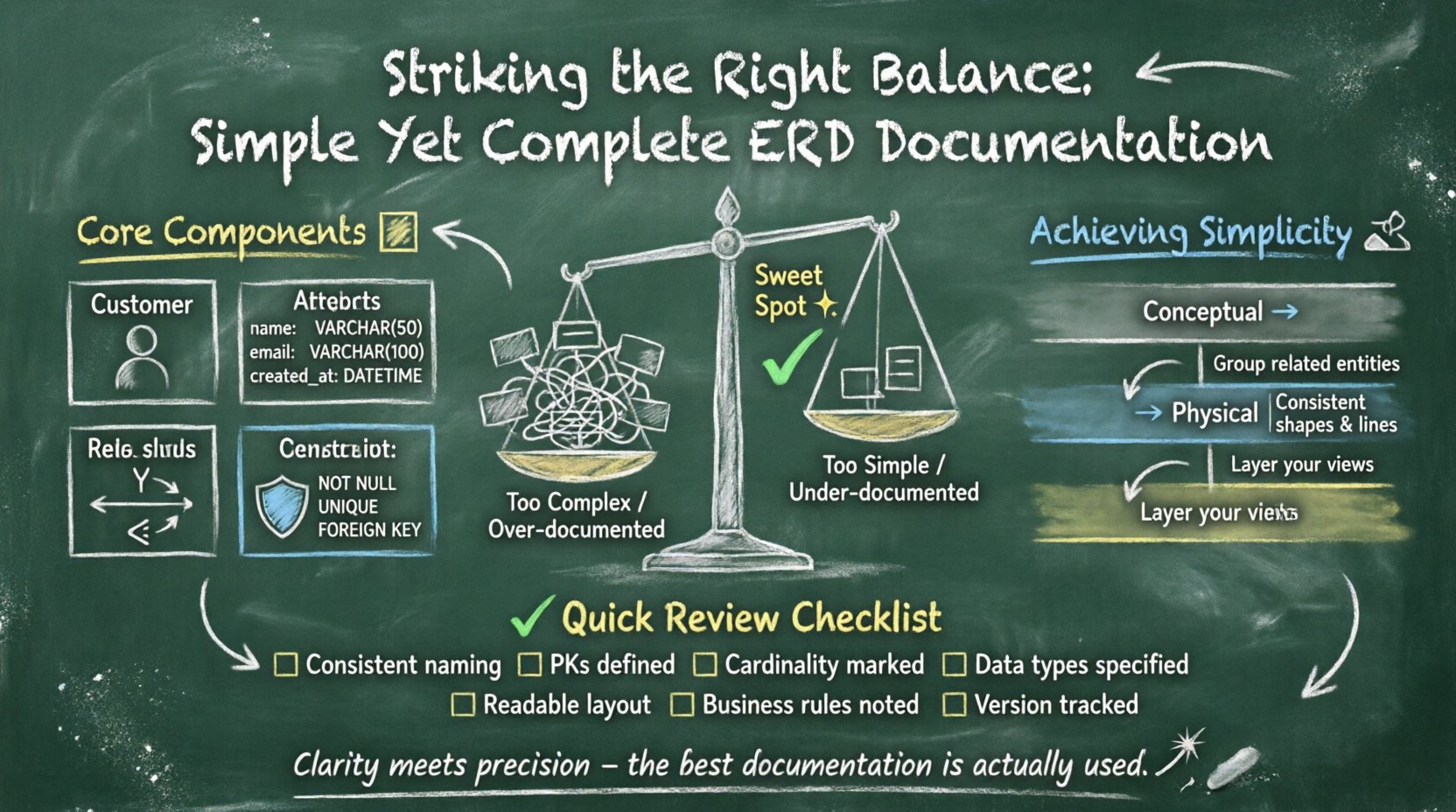
Understanding the Dual Challenge ⚖️
When teams begin designing a database schema, they often face a dilemma. On one side, there is the urge to document everything. This includes every possible attribute, every potential relationship, and every theoretical constraint. While thoroughness is good, excessive detail can create noise. It makes the diagram difficult to read and slows down the development process. Developers may struggle to find the critical paths amidst the clutter.
On the other side, there is the pressure for simplicity. Teams want quick wins and fast iterations. They might strip away constraints or omit relationship cardinalities to keep the diagram clean. While this looks neat, it leads to data integrity issues later. Missing foreign keys or undefined nullability can cause application errors and data corruption. The goal is to find a middle ground where the diagram is readable but technically sufficient for implementation.
- Over-documentation: Leads to analysis paralysis and confusion.
- Under-documentation: Leads to data inconsistencies and rework.
- The Balance: Focuses on clarity while ensuring technical accuracy.
Achieving this equilibrium requires a clear understanding of what is essential for the specific stage of the project. A conceptual model for stakeholders looks different from a physical model for database engineers. Recognizing the audience is the first step in balancing simplicity and completeness.
Core Components of a Robust ERD 🧱
To build a complete documentation set, you must understand the fundamental building blocks. An ERD is not a single monolithic object. It is a collection of defined elements that describe the data landscape. Each element serves a specific purpose in maintaining data integrity and clarity.
1. Entities and Tables
An entity represents a real-world object or concept. In a database, this translates directly to a table. Documentation must clearly define the table name, its purpose, and whether it is a core business entity or a supporting structure. For example, a “Customer” table holds distinct business value, while a “Log” table might be auxiliary. Distinguishing between these helps prioritize development effort.
2. Attributes and Columns
Attributes define the properties of an entity. In the documentation, this includes data types, lengths, and default values. However, listing every single column in a diagram can be overwhelming. A balanced approach groups attributes logically. For instance, address information can be grouped, or specific technical fields like timestamps can be separated from business data.
3. Relationships and Keys
Relationships define how entities interact. These are the lines connecting the boxes. Primary keys identify unique records, while foreign keys establish the links between tables. Documentation must explicitly state the cardinality. Is it one-to-one? One-to-many? Many-to-many? Without this information, the data model is incomplete and risky.
4. Constraints and Rules
Business rules often dictate how data behaves. These include unique constraints, check constraints, and referential integrity rules. While some constraints are enforced by the database engine, documenting them ensures that developers understand the intent behind the data structure.
Defining Completeness in Data Models 📝
Completeness does not mean including every possible piece of information. It means including enough information to build the system correctly without ambiguity. A complete ERD documentation set answers the questions a developer needs to ask before writing a single line of code.
Essential Documentation Elements
To ensure your ERD is complete, verify that the following elements are present and clearly defined:
- Primary Keys: Every table must have a unique identifier. Document the naming convention used.
- Foreign Keys: All relationships must be explicitly linked. Avoid relying on implicit connections.
- Data Types: Specify the type (e.g., VARCHAR, INT, DATE) to prevent storage issues.
- Nullability: Clearly indicate if a field can be empty or must have a value.
- Cardinality: Define the minimum and maximum number of relationships allowed.
- Business Rules: Note any logic that cannot be enforced by the database alone.
If any of these are missing, the documentation is incomplete. This leads to assumptions, and assumptions are the root of many software bugs.
Achieving Simplicity Without Sacrificing Detail 🧹
Simplicity is about visual hierarchy and focus. It does not mean removing information; it means organizing it so it is accessible when needed. A cluttered diagram hides the truth. A simple diagram reveals it.
Grouping and Abstraction
When dealing with complex systems, showing every single table on one screen is counterproductive. Use grouping mechanisms to organize related entities. For example, group all billing-related tables together. This allows the reader to focus on one domain at a time. Abstraction is key here. High-level diagrams show major entities, while detailed diagrams show specific attributes.
Visual Consistency
Consistency reduces cognitive load. Use the same shapes for the same types of entities. Use consistent line styles for different types of relationships. If a solid line means a mandatory relationship, do not switch to a dashed line for optional ones without a legend. Visual noise distracts from the logic.
Layered Documentation
Do not try to fit the entire system into one view. Create layers of documentation:
- Conceptual Layer: Focuses on high-level business concepts. No technical keys or types.
- Logical Layer: Defines relationships and keys without physical implementation details.
- Physical Layer: Includes specific data types, indexes, and partitioning strategies.
This approach allows stakeholders to review the business logic without getting bogged down in technical syntax. It keeps the documentation simple for the right audience at the right time.
Documentation Standards and Metadata 📚
An ERD is a living document. It changes as the system evolves. To maintain simplicity and completeness over time, you need standards. Standards provide a common language for the team. They reduce the time spent debating how to draw a line or name a table.
Naming Conventions
Consistent naming is critical. Use a standard prefix or suffix for tables and columns. For example, prefix foreign keys with the parent table name. This makes it easy to trace relationships. Document these conventions in a data dictionary alongside the ERD.
Version Control
Every change to the diagram should be tracked. Include a version number, date, and author for each iteration. This helps in auditing changes and understanding why a specific design decision was made. Metadata should also include the status of the diagram (e.g., Draft, Review, Approved).
Data Dictionary
The diagram is the map, but the data dictionary is the legend. It provides detailed descriptions for every field. Include the business definition, allowed values, and examples. This reduces the need to ask developers for clarification during the design phase.
Common Pitfalls and How to Avoid Them ⚠️
Even experienced teams fall into traps when designing ERDs. Being aware of common mistakes helps you navigate the balance between simplicity and completeness.
1. The Over-Engineered Model
Some teams try to anticipate every future need. They create complex structures for scenarios that may never happen. This bloats the diagram and confuses the team. Action: Stick to current requirements. Document extensibility as a note, but do not implement it in the diagram unless necessary.
2. The Missing Context
A diagram might look perfect in isolation but fail in the context of the application. Relationships might be valid technically but violate business logic. Action: Validate the model with business users. Ensure the diagram reflects actual workflows, not just data storage.
3. Ignoring Performance
A model can be logically correct but perform poorly. Joining too many tables or using wide tables can slow down queries. Action: Include notes on indexing strategies or denormalization where performance is critical.
4. Inconsistent Notation
Using different symbols for the same concept across different diagrams creates confusion. Action: Adopt a standard notation like Crow’s Foot or Chen and stick to it.
Maintenance and Evolution of the Diagram 🔄
Once the ERD is created, the work is not done. Databases evolve. New features are added. Old features are retired. The documentation must evolve with the system. If the diagram does not match the actual database, it becomes misleading.
Regular Reviews
Schedule periodic reviews of the data model. Check for drift between the documentation and the live environment. This is especially important after major releases. A quarterly review can catch issues before they become technical debt.
Change Management
When a change is proposed, update the ERD immediately. Do not wait for the code to be deployed. If the code changes and the diagram does not, the documentation loses trust. The diagram should be the single source of truth.
Archiving Old Versions
Keep a history of past versions. Sometimes you need to understand why a specific field was added or removed. Archiving ensures that historical context is preserved without cluttering the current view.
A Practical Checklist for Review ✅
Before finalizing your ERD documentation, run through this checklist. It ensures you have hit the balance between detail and clarity.
| Category | Question | Pass/Fail |
|---|---|---|
| Entities | Are all tables named consistently? | |
| Keys | Is every table uniquely identified? | |
| Relationships | Are cardinalities clearly marked? | |
| Attributes | Are data types and nullability defined? | |
| Clarity | Is the diagram readable without excessive zooming? | |
| Completeness | Are all business rules documented? | |
| Maintainability | Is there a version number and changelog? |
Completing this checklist ensures that the documentation is ready for development. It acts as a quality gate before the design phase moves forward.
Conclusion on Balance and Quality 🎯
Creating an ERD that is both simple and complete is a skill that improves with practice. It requires discipline to say no to unnecessary complexity, but also the discipline to include necessary detail. The goal is not perfection; it is functionality. A diagram that helps the team build the right system is a successful diagram. By focusing on clear standards, layered views, and regular maintenance, you ensure that your data models remain valuable assets throughout the lifecycle of the project.
Remember that the best documentation is the one that is actually used. If it is too hard to read, it will be ignored. If it is too vague, it will be ignored. Strive for the middle path where clarity meets precision.