


Data modeling is the backbone of reliable software systems. Without clear rules governing how data relates to itself, applications become fragile, inconsistent, and difficult to scale. Two fundamental concepts govern these relationships in Entity-Relationship Diagrams (ERD): cardinality and participation constraints. Understanding these is not just academic; it determines whether your database enforces business logic correctly.
This guide breaks down these constraints using real-world scenarios, visual logic, and implementation considerations. We will explore how to define relationships between entities without relying on specific tools, ensuring your logical models translate cleanly into physical structures.
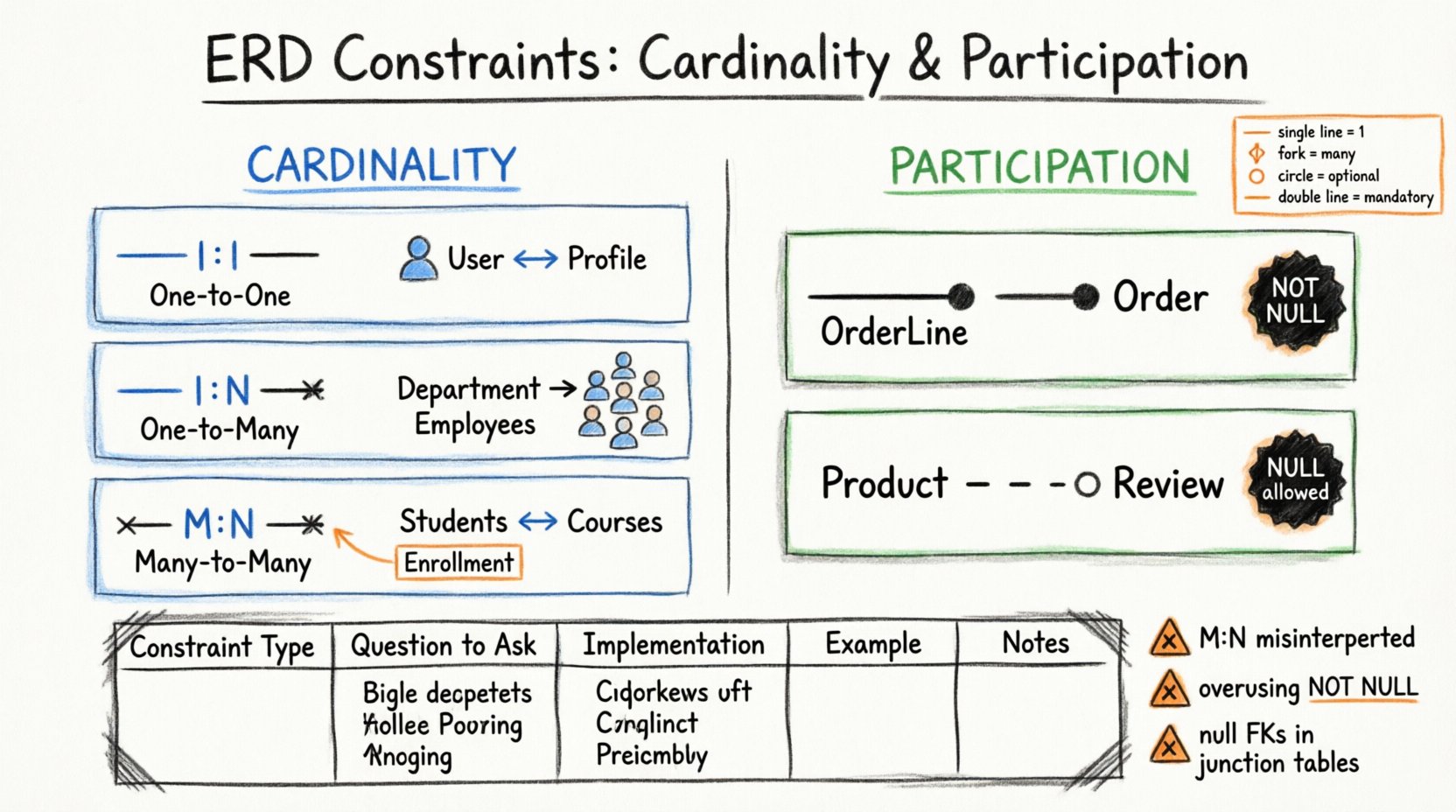
🔑 Understanding Cardinality
Cardinality defines the numerical relationship between entities. It answers the question: “How many instances of Entity A can relate to one instance of Entity B?” In database design, this dictates foreign key placement and index strategies.
There are three primary types of cardinality relationships:
- One-to-One (1:1)
- One-to-Many (1:N)
- Many-to-Many (M:N)
1️⃣ One-to-One (1:1)
In a 1:1 relationship, a single record in Entity A relates to only one record in Entity B, and vice versa. This is common when splitting a large entity to improve performance or security.
Example Scenario: User and Profile
- A User account typically holds login credentials.
- A Profile holds personal details like bio, avatar, and preferences.
- One User owns exactly one Profile.
- One Profile belongs to exactly one User.
Implementation Logic:
- Place a Foreign Key in one table pointing to the primary key of the other.
- Apply a
UNIQUEconstraint to the Foreign Key column. - This ensures no two User records point to the same Profile.
🔗 One-to-Many (1:N)
This is the most frequent relationship in relational databases. One record in Entity A can relate to multiple records in Entity B, but each record in Entity B relates to only one record in Entity A.
Example Scenario: Department and Employee
- Department (e.g., Engineering, Sales).
- Employee (Individual staff member).
- One Department employs Many Employees.
- One Employee works for Only One Department.
Implementation Logic:
- Place the Foreign Key in the “Many” side (Employee table).
- The Department table remains the parent.
- Deleting a Department may cascade to employees (if allowed) or require handling orphaned records.
🔄 Many-to-Many (M:N)
Multiple records in Entity A relate to multiple records in Entity B. You cannot directly link these in a physical database without an intermediary.
Example Scenario: Student and Course
- Student enrolls in many Courses.
- Course has many Students.
Implementation Logic:
- Create a junction table (also known as a linking table or bridge table).
- Include Foreign Keys from both original entities.
- Add a composite primary key or unique constraint to prevent duplicate enrollments.
🔒 Understanding Participation Constraints
Cardinality tells us the count, but participation tells us the obligation. It defines whether a relationship is mandatory or optional. This distinction is critical for nullability and data integrity.
📌 Total Participation (Mandatory)
Every instance of an entity must participate in the relationship. In database terms, the Foreign Key column cannot be null.
- Logic: An instance cannot exist without the related instance.
- Constraint:
NOT NULLon the foreign key column.
Example: Order and OrderLine
- Every OrderLine must belong to an Order.
- An OrderLine cannot exist without an Order context.
- Therefore, the
order_idin the OrderLine table is mandatory.
📍 Partial Participation (Optional)
An instance of an entity may participate in the relationship, but it is not required. The Foreign Key column allows null values.
- Logic: An instance can exist independently of the relationship.
- Constraint: Allow
NULLon the foreign key column.
Example: Product and Review
- A Product can exist without any Reviews.
- A Review must belong to a Product (usually).
- Therefore, the foreign key on the Review table is mandatory, but the reverse link (Product having a review) is optional.
🏢 Real-World Scenarios and Application
Let us examine complex environments where these constraints intersect. Understanding the business rules here prevents data corruption later.
🏥 Healthcare System: Doctor and Patient
Consider a hospital management context.
- Doctor: Medical professional.
- Patient: Individual receiving care.
Relationship Analysis:
- A Doctor treats many Patients over time. (1:N)
- A Patient sees many Doctors for different conditions. (N:1)
- Correction: To track specific visits, this becomes Many-to-Many via an
Appointmenttable.
Participation Rules:
- Appointment: Must have a Doctor (Total Participation).
- Appointment: Must have a Patient (Total Participation).
- Doctor: Can exist without an Appointment (Partial Participation – e.g., on leave).
🛒 E-Commerce Platform: Product and Inventory
Online retail requires precise stock tracking.
- Product: The item for sale (e.g., “Red Sneakers”).
- Warehouse: The physical location.
- Stock: The quantity available.
Cardinality:
- One Product can exist in many Warehouses. (1:N)
- One Warehouse holds many Products. (N:1)
Participation Rules:
- Stock Record: Must link to a Product (Total).
- Stock Record: Must link to a Warehouse (Total).
- Product: Does not need a Stock Record immediately (Partial – e.g., pre-order items).
📚 Library System: Book and Author
A classic example often misunderstood.
- Book: A physical copy or ISBN.
- Author: The writer.
Cardinality:
- A Book has one or more Authors. (N:1)
- An Author writes one or more Books. (N:1)
- Result: Many-to-Many.
Implementation:
- Create a
Book_Authorsjunction table. - Columns:
book_id,author_id. - Participation: Total for both sides. A book entry must have at least one author.
📊 Comparing Constraints in a Table
Use this reference table to quickly identify constraint types during modeling.
| Constraint Type | Question | Database Implementation | Example |
|---|---|---|---|
| 1:1 Cardinality | Is one record unique to another? | Foreign Key + Unique Constraint | User ↔ Profile |
| 1:N Cardinality | Does one record relate to many? | Foreign Key in child table | Department ↔ Employee |
| M:N Cardinality | Do both relate to many? | Junction Table | Student ↔ Course |
| Total Participation | Is the relationship required? | NOT NULL | OrderLine ↔ Order |
| Partial Participation | Is the relationship optional? | Allow NULL | Product ↔ Review |
⚠️ Common Pitfalls in Design
Even experienced designers make mistakes. These errors lead to data anomalies and application bugs.
❌ Misinterpreting M:N as 1:N
Attempting to store a Many-to-Many relationship directly often results in data duplication.
- Wrong: Adding a
course_idto astudenttable. This forces a student to pick one primary course, ignoring others. - Right: Using a junction table to allow multiple enrollments per student.
❌ Overusing Total Participation
Setting every relationship as mandatory restricts flexibility.
- Issue: If a
Managertable requires aDepartment_IDas NOT NULL, you cannot onboard a new manager until a department exists. - Solution: Allow NULL if the manager might be reassigned later or if departments are created asynchronously.
❌ Ignoring Nullability in M:N
Junction tables should rarely allow nulls in their foreign key columns.
- Logic: A link must connect two valid entities. If a row exists in the junction table, both foreign keys should be populated.
- Constraint: Define composite primary keys to prevent duplicate links and ensure both IDs are present.
🛠️ Implementation Considerations
Once the logical model is defined, these constraints translate into physical database structures. The following considerations ensure data integrity.
🔹 Foreign Key Actions
When a parent record changes or deletes, what happens to the child? This is defined by the participation constraint.
- CASCADE: If the parent deletes, the child deletes. Use when child cannot exist without parent (Total Participation).
- SET NULL: If the parent deletes, the child foreign key becomes null. Use when child can exist independently (Partial Participation).
- RESTRICT: Prevent deletion if children exist. Ensures data consistency.
🔹 Indexing Strategies
Constraints impact performance. Foreign keys often require indexing to speed up joins.
- 1:N Relationships: Index the Foreign Key column in the “Many” table.
- M:N Relationships: Index both foreign keys in the junction table.
- 1:1 Relationships: Index the Foreign Key in the table with the unique constraint.
🔹 Validation at the Application Level
While the database enforces rules, the application layer provides user feedback.
- Prevent users from submitting forms that violate participation rules (e.g., saving an Order without an Address).
- Handle partial participation gracefully (e.g., allow a Product to be created without immediate stock allocation).
🧩 Visualizing Notations
While software tools vary, the underlying logic remains consistent. Understanding standard notations helps communicate models across teams.
- Crow’s Foot: Uses lines with a fork (crow’s foot) to indicate “Many”. A single line indicates “One”. A circle indicates “Optional”.
- Chen: Uses diamonds for relationships and ovals for attributes. Lines connecting entities denote cardinality.
- UML: Uses multiplicities like
0..1,1..*, or0..*to denote specific counts.
Reading Multiplicity Notation:
1: Exactly one.0..1: Zero or one (Optional).1..*: One or many (Mandatory).0..*: Zero or many (Optional).
🚀 Moving Forward
Applying these constraints correctly reduces technical debt. When you define cardinality and participation accurately, your database schema becomes a self-documenting specification of business rules.
Review your current models against these principles. Check your Foreign Keys. Verify your NOT NULL constraints. Ensure your junction tables are properly normalized. These steps solidify the foundation of your data architecture.
Start by auditing your most critical entities. Ask what happens if a record is deleted. Ask if a record can exist without a relationship. The answers to these questions define the strength of your system.
Clear constraints lead to clear data. Clear data leads to reliable decisions. Keep the rules strict, the logic clear, and the models adaptable.
Related posts:
 Entity-Relationship Diagram Fundamentals: Visual Guide for Beginners
 ERD Guide: Entities, Attributes, Relationships: Core Concepts Every Developer Should Know
 ERD Guide: Weak vs Strong Entities: Practical Guidelines for Database Modeling
 ERD Notation Styles Compared: Pick the Right Visual Approach for Your Project