


Building a database system is akin to constructing the foundation of a skyscraper. If the blueprint is flawed, the structure will eventually crack under pressure. An Entity Relationship Diagram (ERD) is that blueprint. It defines how data connects, flows, and persists within your application. As your user base grows and data volume explodes, a static design often becomes a bottleneck. To ensure longevity, you must adopt scalable ERD design principles from the outset. This guide explores the technical strategies required to build systems that endure.
Understanding the Core of Data Modeling 🧱
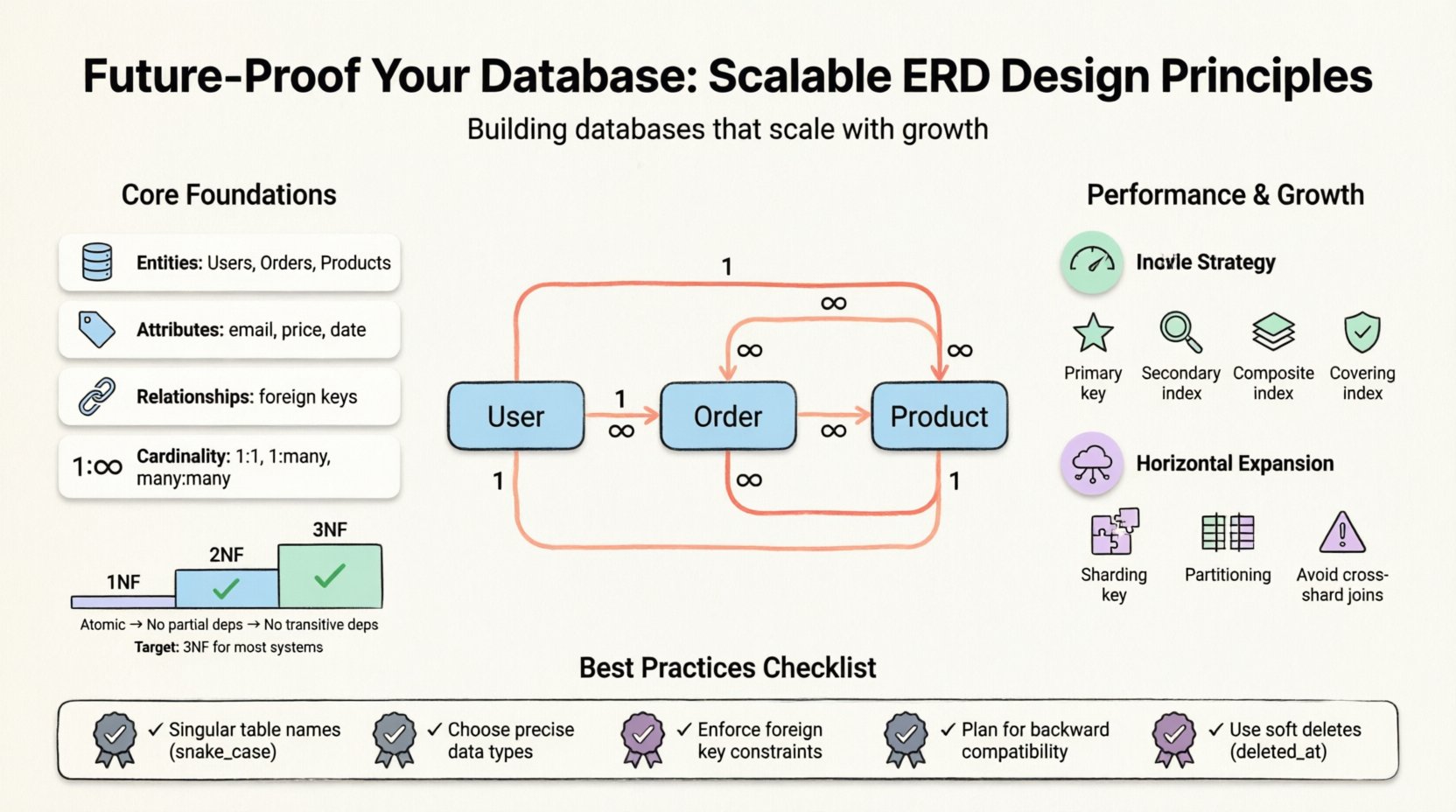
Before diving into specific tactics, it is essential to understand what an ERD represents. It visualizes the logical structure of a database. It maps entities (tables), attributes (columns), and relationships (keys). A well-crafted model balances data integrity with performance. However, “best practice” varies based on the workload. A read-heavy application requires different optimization than a write-heavy transactional system.
Key components include:
- Entities: The primary objects, such as Users, Orders, or Products.
- Attributes: The properties defining an entity, like email addresses or prices.
- Relationships: How entities interact, often defined by foreign keys.
- Cardinality: The numerical relationship between entities (one-to-one, one-to-many, many-to-many).
Normalization: The Balance Between Redundancy and Speed ⚖️
Normalization is the process of organizing data to reduce redundancy and improve integrity. While often treated as a strict rule, it is a trade-off. High normalization minimizes anomalies but can increase query complexity through joins. Low normalization (denormalization) speeds up reads but risks data inconsistency.
Levels of Normalization
Understanding the standard forms helps you decide where to stop. Each form addresses specific data anomalies.
- First Normal Form (1NF): Ensures atomicity. Each column must contain indivisible values. No repeating groups or arrays within a single cell.
- Second Normal Form (2NF): Builds on 1NF. All non-key attributes must depend on the whole primary key, not just part of it. This eliminates partial dependencies.
- Third Normal Form (3NF): Builds on 2NF. Non-key attributes must not depend on other non-key attributes. This removes transitive dependencies.
- Boyce-Codd Normal Form (BCNF): A stricter version of 3NF. It handles cases where determinants are not candidate keys.
For most scalable systems, reaching 3NF is the standard target. Going further often yields diminishing returns while increasing maintenance overhead. However, for analytics-heavy systems, a controlled return to denormalization is common.
Normalization Trade-Offs Table
| Normalization Level | Primary Benefit | Primary Drawback |
|---|---|---|
| 1NF | Atomic data storage | None |
| 2NF | Eliminates partial dependencies | More joins required |
| 3NF | Eliminates transitive dependencies | Increased join complexity |
| Denormalized | Faster read queries | Data redundancy and update anomalies |
Schema Design for Growth and Flexibility 📈
Designing for the present is insufficient. You must anticipate future schema evolution. Rigid structures break when business logic shifts. Flexible design allows for expansion without requiring a full system migration.
1. Naming Conventions and Standards
Consistency is vital for maintainability. A chaotic naming scheme leads to confusion and errors. Establish a standard early and enforce it across the team.
- Use Singular Names: Tables should represent a single entity (e.g.,
user, notusers). - Consistent Delimiters: Use snake_case for table names and columns to ensure compatibility across different operating systems and tools.
- Prefixes for Specificity: Use prefixes like
fk_for foreign keys oridx_for indexes to make their purpose clear. - Avoid Reserved Words: Never use keywords like
order,group, orselectas column names.
2. Data Types and Precision
Choosing the correct data type affects storage space and query speed. Overly generic types waste space and slow down processing.
- Integers: Use
TINYINTfor flags (0-1) or small counts. UseBIGINTonly when you anticipate massive scale. - Strings: Avoid
TEXTfor short values. UseVARCHARwith a specific length to save space and allow indexing. - Dates: Use
TIMESTAMPfor specific moments andDATEfor calendar dates only. Always store in UTC to avoid timezone confusion. - Decimals: For financial data, use fixed-point decimals rather than floating-point numbers to avoid rounding errors.
Relationships and Cardinality Management 🔗
How entities relate defines the integrity of your data. Mismanaged relationships lead to orphaned records and data loss.
1. Foreign Key Constraints
Foreign keys enforce referential integrity. They ensure that a record in one table cannot reference a non-existent record in another. While some developers disable these for performance, modern database engines handle them efficiently. Relying on application-level checks is error-prone.
2. Handling Many-to-Many Relationships
A many-to-many relationship (e.g., Students and Courses) cannot be represented directly in two tables. It requires a junction table (associative entity).
- Create a new table containing the primary keys of both related tables.
- Add a composite primary key consisting of both foreign keys.
- Use this table to store additional attributes specific to the relationship, such as enrollment dates.
3. Optional vs. Mandatory Relationships
Clearly define whether a relationship is required. A NULL value in a foreign key column indicates an optional relationship. This decision impacts validation logic in the application layer.
Indexing Strategies for Read Performance 🏎️
Indexes are the primary mechanism for speeding up data retrieval. However, they are not free. Every index consumes disk space and slows down write operations (inserts, updates, deletes).
1. Primary Indexes
Every table needs a primary key. This is often clustered, meaning the physical data is stored in the order of the key. Choose a key that is stable and never updated. Surrogate keys (auto-incrementing integers) are often better than natural keys (like emails) for performance.
2. Secondary Indexes
Use secondary indexes to optimize queries that filter or sort on non-primary columns. Common scenarios include:
- Searching by email address.
- Filtering by status or category.
- Ordering results by date.
3. Composite Indexes
When querying by multiple columns, a composite index can be more efficient than separate single-column indexes. The order of columns in the index matters. Place the most selective column first.
4. Covering Indexes
A covering index includes all the columns needed to satisfy a query. This allows the database to retrieve data directly from the index without accessing the main table, significantly reducing I/O.
Designing for Horizontal Scaling 🌐
Vertical scaling (adding more power to a single server) has limits. Eventually, you must distribute data across multiple nodes. The ERD design must account for this reality.
1. Sharding Keys
Sharding involves splitting data across multiple databases. The choice of sharding key is critical. It should be used frequently in queries to ensure data locality. If you shard by user_id, you can easily query all data for that user on a single node.
- Good Sharding Keys: High cardinality, frequently used in queries.
- Poor Sharding Keys: Low cardinality (e.g.,
country_code) or rarely used.
2. Avoiding Cross-Shard Joins
Joins across different shards are expensive and complex. Design your schema to minimize the need for them. If you need data from two entities that might be on different shards, consider denormalizing the data. Store the necessary foreign key data directly in the table to avoid the join.
3. Partitioning
Partitioning splits a large table into smaller, manageable pieces. This can be done by range (dates), list (categories), or hash. It improves maintenance and query performance without changing the application logic significantly.
Schema Evolution and Migration 🔄
Requirements change. New features demand new columns. Old features get deprecated. A robust ERD accommodates change without breaking existing functionality.
1. Backward Compatibility
When adding new features, ensure old clients can still function. Add new columns as nullable first. Populate them gradually. Do not remove columns immediately; mark them as deprecated and keep them for a migration window.
2. Versioning Data Models
Keep track of schema versions. This allows you to roll back changes if a migration causes critical failures. Use migration scripts that are idempotent, meaning they can be run multiple times without causing errors.
3. Handling Data Migration
Moving large volumes of data requires careful planning. Large locks can block production traffic. Perform migrations during low-traffic windows or use blue-green deployment strategies where possible.
Common Pitfalls to Avoid ⚠️
Even experienced architects make mistakes. Awareness of common errors helps you sidestep them.
- Over-Engineering: Designing for a scale you do not have yet. If you are starting, keep it simple. Complexity adds cost and risk.
- Ignoring Soft Deletes: Never permanently delete sensitive records immediately. Use a
deleted_attimestamp instead. This preserves audit trails and allows recovery. - Naming Conflicts: Using the same name for a table and a column creates ambiguity. Stick to the singular table rule.
- Missing Constraints: Relying solely on application logic to enforce business rules leads to data corruption. Enforce constraints at the database level.
- Ignoring Security: Design must include fields for access control. Ensure role-based access is supported in the schema design phase.
Final Considerations for Longevity 🏁
Creating a scalable database is an ongoing process. It requires monitoring, analysis, and adjustment. No design is perfect at launch. The goal is to create a foundation that is easy to modify.
Regularly audit your queries. Identify slow operations and optimize the underlying schema. Use profiling tools to understand how your data is accessed. This feedback loop ensures your architecture remains efficient as your data grows.
Remember that technology evolves. New storage engines and query languages emerge. A flexible schema adapts to these changes better than a rigid one. Focus on the core relationships and data integrity. Those remain constant even as the tools change.
By adhering to these principles, you build systems that are resilient. They handle growth gracefully and maintain performance under load. This is the essence of future-proofing your database infrastructure.
Related posts:
 Entity-Relationship Diagram Fundamentals: Visual Guide for Beginners
 ERD Guide: Entities, Attributes, Relationships: Core Concepts Every Developer Should Know
 ERD Guide: Cardinality and Participation Constraints: Real-World Examples Explained
 ERD Guide: Weak vs Strong Entities: Practical Guidelines for Database Modeling