


Database models form the backbone of any robust application. When entities, relationships, and attributes evolve, the underlying schema must adapt without compromising data integrity. This guide explores the discipline of managing Entity Relationship Diagram (ERD) changes through version control. We will examine how to maintain consistency, track history, and collaborate effectively across teams.
Modern development cycles require speed, yet data stability cannot be sacrificed for velocity. A database schema is not merely a collection of tables; it is a contract between the application and the persistent storage. Changing this contract without proper governance introduces risk. By treating the database model as code, teams can apply proven engineering practices to data infrastructure.
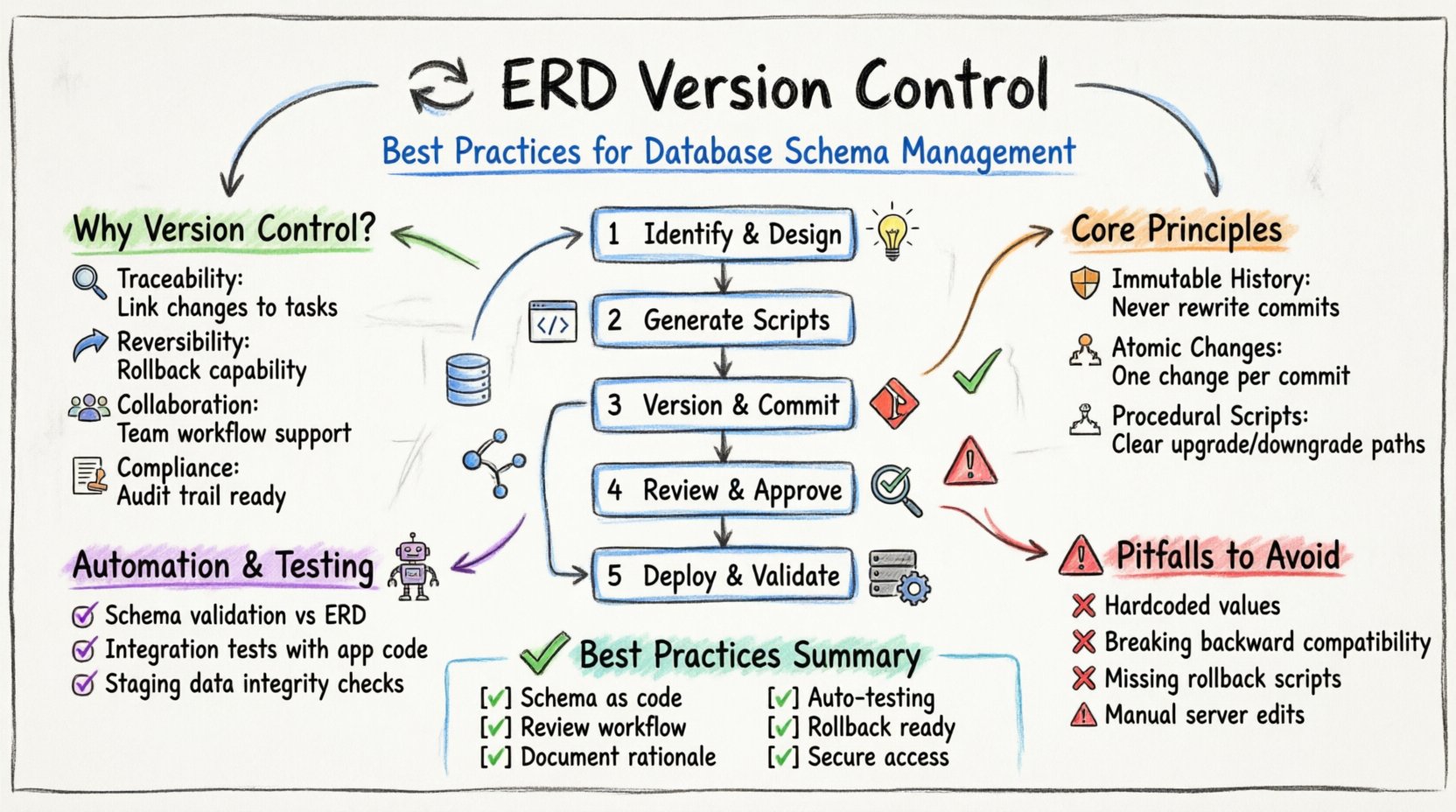
Why Database Schema Versioning Matters 🤔
Version control for database models is often overlooked compared to application code. Developers frequently manage application logic in repositories while treating database changes as ad-hoc scripts. This disconnect creates technical debt and operational fragility. A structured approach to schema evolution ensures that every change is documented, reviewed, and reversible.
Consider the implications of a missing migration script. In a production environment, an unexpected schema change can halt an entire deployment pipeline. Without a history of changes, debugging becomes a guessing game. Did this column exist last week? Was the index dropped intentionally? Version control answers these questions definitively.
- Traceability: Every modification is linked to a specific request or task.
- Reversibility: If a change causes issues, the system can be rolled back to a previous state.
- Collaboration: Multiple developers can work on different parts of the model without overwriting each other.
- Compliance: Audit logs satisfy regulatory requirements for data handling and access.
Core Principles of Model Stability 🛡️
Effective version control relies on a set of guiding principles. These rules dictate how changes are proposed, implemented, and merged. Adhering to these standards minimizes conflict and maximizes reliability.
1. Immutable History
Once a schema version is committed to the repository, it should never be altered. Even if an error is discovered, the correct approach is to create a new version that corrects the previous state. Rewriting history obscures the timeline of decisions and makes it difficult to audit changes.
2. Atomic Changes
Changes should be made in small, logical units. A single commit should address one specific requirement. Combining unrelated changes into a single package makes it difficult to isolate problems. If a deployment fails, knowing exactly which change caused the issue speeds up resolution.
3. Declarative vs. Procedural
There are two main philosophies for representing schema state. One approach focuses on the desired final state (declarative), while the other focuses on the steps to reach that state (procedural). Both have merits, but procedural migration scripts are often preferred for production environments because they provide a clear path for upgrade and downgrade.
The Lifecycle of a Schema Change 🔄
Managing an ERD change involves a structured workflow. This process moves a concept from a diagram in a modeling tool to a validated state in a live database. Following this lifecycle ensures that no step is skipped.
Step 1: Identification and Design
The process begins with identifying the need for a change. This could be a new table for a feature, a split of an existing table, or a change to a relationship. The design should be captured in the ERD modeling tool. At this stage, the focus is on logical consistency rather than physical implementation details.
- Define the entity and its attributes clearly.
- Establish primary and foreign keys.
- Review constraints for data integrity.
- Document the rationale for the change.
Step 2: Script Generation
Once the logical model is approved, it must be translated into executable scripts. This involves generating SQL statements that create, alter, or drop database objects. It is critical to verify that these scripts are idempotent where possible, meaning they can be run multiple times without causing errors.
Step 3: Versioning and Committing
The scripts are added to the version control system. Each script should have a unique identifier, often a timestamp or a sequence number. The commit message must describe the change thoroughly, referencing the associated task or issue. This creates a clear link between the code and the data.
Step 4: Review and Approval
Before merging, the changes must be reviewed by peers. This step is crucial for catching logical errors that automated tools might miss. Reviewers should check for naming conventions, constraint definitions, and potential performance impacts. A formal approval process prevents unauthorized changes from reaching the main branch.
Step 5: Deployment and Validation
The final step is applying the changes to the target environment. This is typically done through an automated pipeline. Post-deployment validation ensures the schema matches the expected state. This might involve running queries to verify column counts or checking data integrity constraints.
Handling Concurrent Development & Conflicts ⚔️
In teams with multiple developers, schema changes often happen simultaneously. When two people modify the same table or relationship, a conflict arises. Resolving these conflicts requires a systematic approach.
Conflict resolution is not just about merging text; it is about merging data structures. Merging two ERDs is more complex than merging two source code files. You must ensure that the combined model still makes logical sense.
- Communication: Developers should coordinate on shared entities before making changes.
- Branching Strategy: Use feature branches to isolate changes. Merge these branches into a shared integration branch before production.
- Manual Merge: Automated tools often struggle with schema conflicts. Human intervention is frequently required to reconcile differences.
- Conflict Resolution: When a conflict occurs, the team must decide which version of the change takes precedence. This decision should be documented.
Common Conflict Scenarios
| Scenario | Description | Resolution Strategy |
|---|---|---|
| Column Rename | Two developers rename the same column differently. | Agree on a standard naming convention and revert to the agreed name. |
| Table Deletion | One developer deletes a table another is modifying. | Ensure all dependencies are removed before deletion. Rollback the deletion if the table is still needed. |
| Data Migration | Scripts move data in conflicting directions. | Combine the logic into a single script that handles all transformations correctly. |
| Constraint Addition | Two developers add constraints to the same column. | Merge the constraints if compatible, or consolidate them into a single constraint definition. |
Automating Validation and Testing 🤖
Manual testing is prone to error. Automation ensures that schema changes meet quality standards before they are deployed. Integration with a continuous integration pipeline allows for immediate feedback on every commit.
Schema Validation
Automated tools can check the generated SQL against the ERD model. This ensures that the physical implementation matches the logical design. Any discrepancy triggers a failure in the build pipeline, alerting the developer immediately.
Integration Testing
Schema changes should be tested against the application code. If a column is removed, the application should fail to compile or run if it still references that column. This linkage prevents breaking changes from slipping through.
Data Integrity Checks
Running the migration on a staging database with production-like data volumes helps identify performance issues. Long-running queries or lock contention can be spotted before affecting live users. This step is essential for large-scale database environments.
Documentation and Audit Trails 📜
Documentation is often the first thing to go when deadlines approach. However, for database models, documentation is a form of insurance. It explains the “why” behind the “what”.
Every change should be accompanied by a description. This description should be stored alongside the scripts in the version control system. It should answer the following questions:
- Why is this change necessary?
- What data is being affected?
- Are there any dependencies on other systems?
- How long is the expected downtime?
Audit trails provide a record of who made changes and when. This is vital for security and compliance. If a data breach occurs or a query performs poorly, knowing the source of the schema change helps in troubleshooting.
Common Pitfalls to Avoid 🚫
Even with a robust process, mistakes happen. Being aware of common pitfalls helps teams avoid them.
Hardcoding Values
Avoid embedding environment-specific values into migration scripts. A script that works in development might fail in production if paths or credentials are hardcoded. Use configuration management to handle these differences.
Ignoring Backward Compatibility
Breaking changes should be avoided whenever possible. If a column is removed, ensure the application can still function. A common strategy is to add a new column, migrate data, and then deprecate the old one in a subsequent release.
Lack of Rollback Plans
Every migration script should have a corresponding rollback script. If a deployment fails, you must be able to undo the change quickly. Without a rollback plan, a failed deployment can leave the database in an inconsistent state.
Manual Script Editing
Never edit database scripts directly on the server. Always make changes in the version control system and deploy them. Direct edits are lost on restart and leave no record of the change.
Summary of Best Practices 🏁
Maintaining a healthy database model requires discipline. It is not enough to just write code; the data layer must be treated with the same rigor. The following table summarizes the key takeaways for managing ERD changes.
| Area | Best Practice |
|---|---|
| Versioning | Treat schema as code in a repository. |
| Workflow | Use a defined review and approval process. |
| Testing | Automate validation and integration tests. |
| Communication | Document the rationale for every change. |
| Recovery | Always maintain rollback scripts. |
| Security | Restrict direct access to production databases. |
By implementing these practices, teams can reduce risk and increase confidence in their data infrastructure. The goal is to make the database as reliable and predictable as the application code that runs on top of it.
Related posts:
 Entity-Relationship Diagram Fundamentals: Visual Guide for Beginners
 ERD Guide: Entities, Attributes, Relationships: Core Concepts Every Developer Should Know
 ERD Guide: Cardinality and Participation Constraints: Real-World Examples Explained
 ERD Guide: Weak vs Strong Entities: Practical Guidelines for Database Modeling