


Entering a technical interview for a database developer role requires more than just knowing SQL syntax. You must demonstrate a deep understanding of how data is structured, related, and maintained. The Entity Relationship Diagram (ERD) stands as a cornerstone of data modeling. It serves as the visual blueprint for your database architecture.
Interviewers use ERD questions to assess your ability to translate business requirements into technical structures. They want to see if you understand cardinality, normalization, and data integrity. This guide walks you through the essential concepts and common scenarios you will face.
🔍 Understanding the Core Components of an ERD
Before tackling complex scenarios, you must have a firm grasp of the fundamental building blocks. An ERD is not just a drawing; it is a representation of rules and constraints.
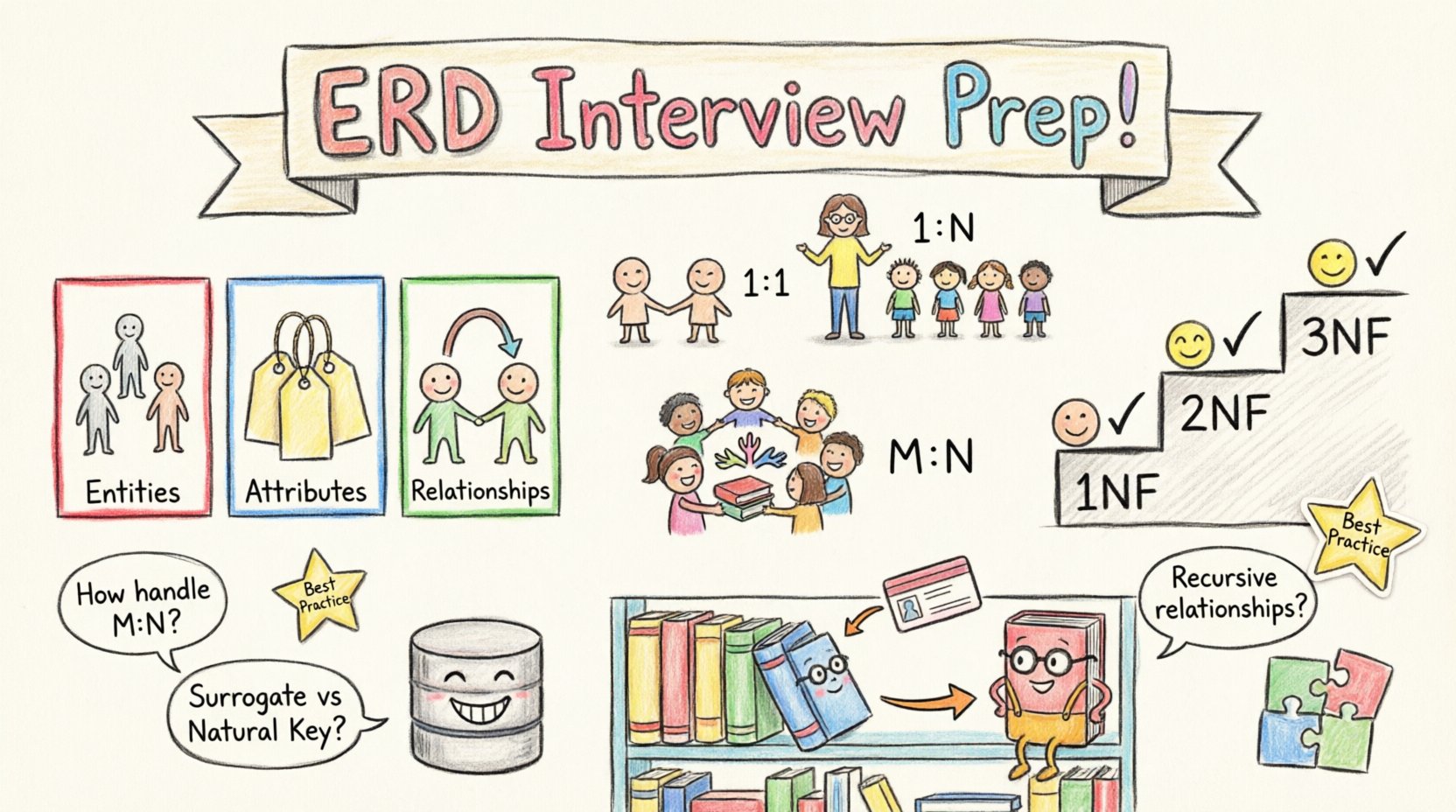
- Entities: These represent real-world objects or concepts, such as Customers, Orders, or Products. In the database, they map to tables.
- Attributes: These are the properties that describe an entity. For a Customer entity, attributes might include Name, Email, and Phone Number. These map to columns.
- Relationships: These define how entities interact. For example, a Customer places an Order. This interaction defines the connection between the two tables.
When drawing these diagrams, clarity is key. Use standard notation to ensure that other developers can read your design without confusion.
📊 Cardinality and Participation: The Heart of Relationships
Cardinality defines the number of instances of one entity that can or must relate to instances of another entity. This is often the most scrutinized part of an interview.
There are four primary types of cardinality you must be comfortable explaining:
- One-to-One (1:1): One instance of Entity A relates to exactly one instance of Entity B. Example: A Person has one Passport.
- One-to-Many (1:N): One instance of Entity A relates to many instances of Entity B. Example: One Department has many Employees.
- Many-to-One (N:1): The inverse of One-to-Many. Many instances of Entity A relate to one instance of Entity B.
- Many-to-Many (M:N): Many instances of Entity A relate to many instances of Entity B. Example: Students enroll in many Courses, and Courses have many Students.
Interviewers often ask you to identify these relationships in a business scenario. You must be able to explain why a relationship is designed a certain way.
Cardinality Reference Table
| Relationship Type | Notation | Database Implementation | Example Scenario |
|---|---|---|---|
| One-to-One | 1:1 | Foreign Key in one table | User and Profile |
| One-to-Many | 1:N | Foreign Key in the ‘many’ table | Author and Books |
| Many-to-Many | M:N | Join Table with two Foreign Keys | Students and Classes |
🧩 Normalization and ERD Design
Normalization is the process of organizing data to reduce redundancy and improve integrity. While often taught separately, normalization directly impacts how you draw your ERD.
During an interview, you might be asked to take a messy set of requirements and normalize them. Here is how to approach it:
- First Normal Form (1NF): Ensure every column contains atomic values. No repeating groups. Every row must be unique.
- Second Normal Form (2NF): Meet 1NF requirements and ensure all non-key attributes are fully dependent on the primary key. Remove partial dependencies.
- Third Normal Form (3NF): Meet 2NF requirements and remove transitive dependencies. Non-key attributes should not depend on other non-key attributes.
Consider a scenario where you have a single table containing Employee Name, Department Name, and Department Manager. If the Department Manager changes, you must update every row for that department. This violates 3NF. A proper ERD would separate the Department entity from the Employee entity.
❓ Common Interview Questions & Detailed Answers
Practicing specific questions helps you articulate your thoughts clearly under pressure. Below are high-frequency questions and the logic behind strong answers.
Q1: How do you handle a Many-to-Many relationship?
Answer Strategy: Explain the need for a junction table.
- Explanation: Database systems typically do not support Many-to-Many relationships directly.
- Solution: I introduce an associative entity, often called a junction table or bridge table.
- Implementation: This new table contains foreign keys referencing the primary keys of both related entities. This breaks the M:N relationship into two One-to-Many relationships.
- Benefit: It allows for additional attributes to be stored on the relationship itself, such as a “Join Date” or “Role” in the relationship.
Q2: When would you choose a surrogate key over a natural key?
Answer Strategy: Discuss stability, performance, and flexibility.
- Natural Keys: These are business-defined identifiers (e.g., Social Security Number, Email). They can change or be unavailable.
- Surrogate Keys: These are system-generated (e.g., an auto-incrementing integer or UUID).
- Recommendation: I prefer surrogate keys for primary keys in most enterprise systems. They ensure stability even if business data changes. They also optimize join performance because integers are faster to process than long strings.
Q3: How do you handle recursive relationships?
Answer Strategy: Explain hierarchical data structures.
- Definition: A recursive relationship occurs when an entity relates to itself.
- Example: An Employee entity where an Employee can manage other Employees.
- Implementation: The table includes a self-referencing foreign key column (e.g., ManagerID pointing back to EmployeeID).
- Consideration: Be aware of null values for root nodes (top-level managers) and ensure the database constraints allow for this.
Q4: What is the difference between a Weak and a Strong Entity?
Answer Strategy: Focus on dependency and identification.
- Strong Entity: Has a primary key that uniquely identifies it independently of other tables.
- Weak Entity: Does not have a primary key of its own and relies on a foreign key from a parent entity for identification.
- Example: A “Line Item” in an order cannot exist without an “Order”. The primary key for Line Item is often a composite of the Order ID and an Item Sequence Number.
⚙️ Advanced Considerations for Complex Models
Senior roles often require you to think beyond basic diagrams. You must consider performance and maintenance.
- Cascading Deletes: Decide what happens when a parent record is deleted. Should child records be deleted automatically, moved to a default, or blocked? This requires careful design in the ERD.
- Soft Deletes: Instead of physically removing a record, add a “DeletedAt” timestamp. This preserves history and relationships.
- Architectural Patterns: Understand when to use a Star Schema for reporting versus a Normalized Schema for transactional processing. The ERD changes based on the workload.
📝 Best Practices for Drawing ERDs
Even if you are not drawing by hand, your conceptual model must be logical. Follow these guidelines to ensure your designs are professional and maintainable.
- Consistent Naming: Use singular nouns for entities (e.g., “Customer” not “Customers”). Use clear, descriptive names for attributes.
- Clear Notation: Stick to a standard like Crow’s Foot or Chen notation. Do not mix styles within the same diagram.
- Indexing Strategy: While not always drawn on the diagram, know which columns will be indexed based on the relationships defined.
- Documentation: Add notes to explain complex logic or business rules that cannot be represented by lines and boxes alone.
🛠️ Tools vs. Concepts
It is common to be asked about the tools you use for modeling. However, the focus should always remain on the concepts.
- Conceptual Models: High-level diagrams that capture business rules without technical details.
- Logical Models: Include data types, keys, and relationships, but remain independent of specific database software.
- Physical Models: The final implementation schema including specific constraints and storage parameters.
Interviewers value candidates who can explain the Logical Model before worrying about the Physical implementation. If you know the data structure, you can adapt to any system.
🧠 Scenario-Based Problem Solving
Be prepared for open-ended design questions. You might be given a vague requirement and asked to sketch a solution.
Scenario: Designing a Library System
- Entities: Book, Author, Member, Loan.
- Relationships:
- Authors write Books (One-to-Many).
- Members borrow Books (Many-to-Many, resolved via Loan entity).
- Books have multiple Authors (Many-to-Many, resolved via BookAuthor junction).
- Attributes: Track Loan Dates, Due Dates, and Fines.
When answering, walk the interviewer through your thought process. Ask clarifying questions. For example, “Do we need to track historical loan data or just current loans?” This shows you think about requirements, not just syntax.
🔒 Data Integrity and Constraints
An ERD is useless if it does not enforce rules. Discuss how you ensure data quality.
- Primary Keys: Ensure uniqueness.
- Foreign Keys: Ensure referential integrity between tables.
- Check Constraints: Validate specific values (e.g., Age must be greater than 0).
- Unique Constraints: Ensure specific columns (like Email) do not have duplicates.
🏁 Final Thoughts on Preparation
Preparation for database interviews is about building mental models. Practice drawing diagrams for everyday systems like social media platforms, e-commerce sites, or inventory management.
- Review Fundamentals: Revisit normalization rules and relationship types.
- Practice Scenarios: Take business requirements and convert them into tables.
- Explain Your Reasoning: When you present a design, explain why you made each choice. The “why” is often more important than the “what”.
By focusing on these core principles and practicing clear communication, you will demonstrate the authority and confidence needed to succeed in your next interview. Good luck with your preparation! 🌟
Related posts:
 Entity-Relationship Diagram Fundamentals: Visual Guide for Beginners
 ERD Guide: Entities, Attributes, Relationships: Core Concepts Every Developer Should Know
 ERD Guide: Cardinality and Participation Constraints: Real-World Examples Explained
 ERD Guide: Weak vs Strong Entities: Practical Guidelines for Database Modeling