In the complex ecosystem of software creation, the gap between a conceptual idea and a functional application is often bridged by a singular, critical artifact: the use case. While many teams rush straight into coding, the most successful projects prioritize understanding what the system must do before deciding how it will do it. Precise use case documentation serves as the blueprint for this understanding, aligning stakeholders, developers, and testers around a shared vision.
This guide explores the mechanics of creating effective use case specifications. We will move beyond simple diagrams to discuss the narrative depth required for robust development. By focusing on clarity and precision, teams can reduce ambiguity, minimize rework, and ensure that the final product meets the actual needs of its users.
1. The Foundation of Clear Communication 🗣️
Development failures often stem not from technical inability, but from misaligned expectations. When requirements are vague, developers make assumptions. Testers verify against different criteria. Product owners envision features that were never explicitly defined. Use case documentation acts as the contract that resolves these discrepancies.
A use case describes a specific interaction between an actor and the system to achieve a goal. It is not merely a list of features; it is a description of behavior. This distinction is vital. Features are static; behavior is dynamic. By documenting behavior, we capture the flow of data, the decision points, and the user journey.
- Reduces Ambiguity: Vague terms like “user-friendly” are replaced with specific actions like “click the submit button within three seconds.”
- Facilitates Testing: Testers derive test cases directly from the scenarios outlined in the documentation.
- Improves Maintainability: Future developers can understand the logic behind the code by reading the original intent.
2. Anatomy of a Use Case Diagram 🎨
The visual component of use case documentation is the diagram. While text provides the detail, the diagram provides the map. It allows stakeholders to see the scope of the system at a glance without getting bogged down in technical syntax.
Core Components
To create a valid diagram, one must understand the fundamental elements:
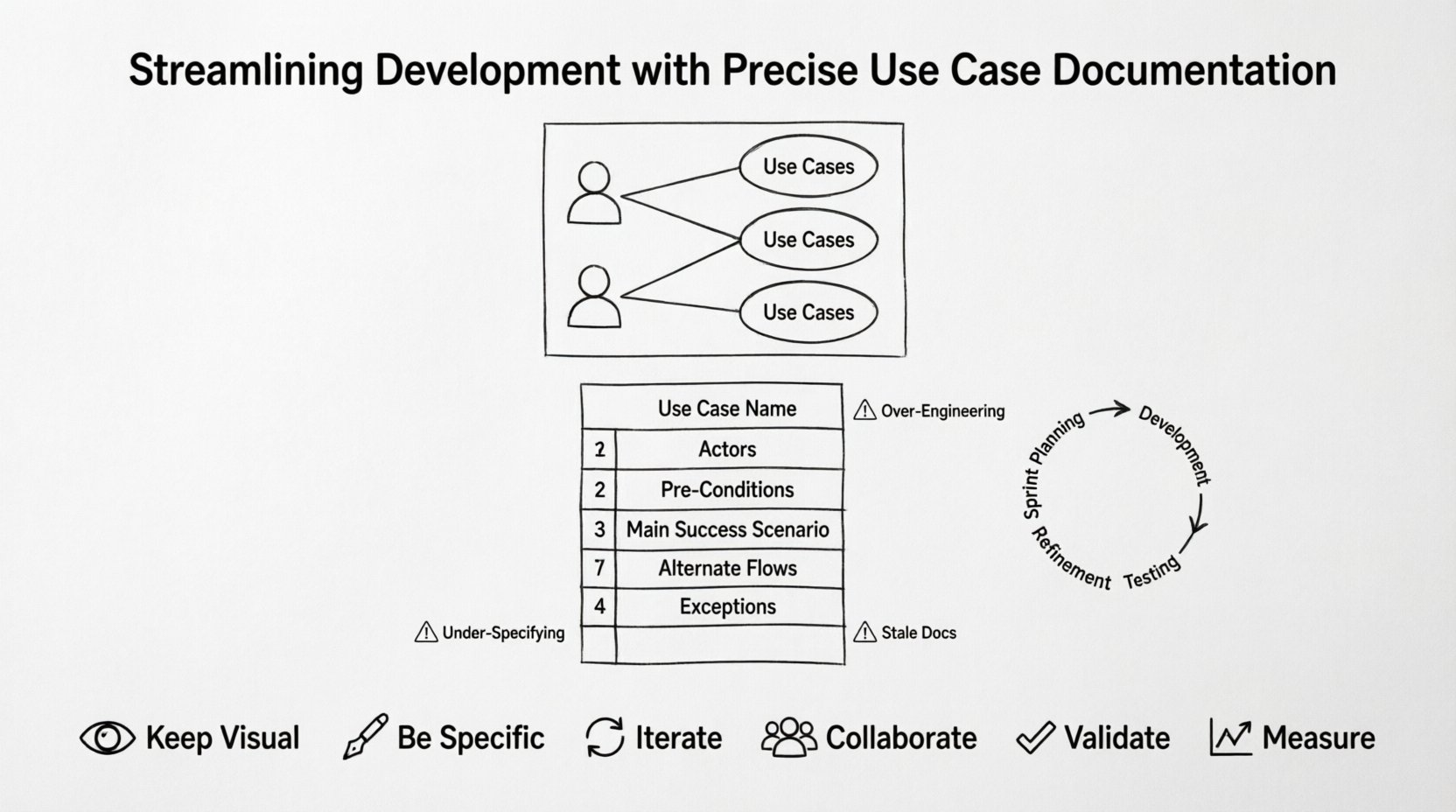
- Actors: These are the entities that interact with the system. An actor can be a human user, another software system, or a hardware device. They are represented by stick figures in standard notation.
- Use Cases: These are the specific goals or tasks the system performs. They are represented by ovals.
- System Boundary: A box that defines what is inside the system and what is outside. Actors exist outside this boundary.
- Relationships: Lines connecting actors to use cases. These include association (basic interaction), include (mandatory sub-behavior), and extend (optional sub-behavior).
Types of Actors
| Actor Type | Description | Example |
|---|---|---|
| Primary Actor | Initiates the use case | Customer logging in |
| Secondary Actor | Interacts during the process but does not start it | Payment Gateway |
| System Actor | Another automated system | Email Server |
Understanding the distinction between primary and secondary actors is crucial for defining scope. If a secondary actor fails, does the primary use case fail? The diagram should reflect this dependency. For instance, if the Payment Gateway is down, the “Complete Purchase” use case cannot succeed, even if the user followed all steps correctly.
3. From Visuals to Verbal Specifications 📄
A diagram alone is insufficient. It shows *what* connects to *what*, but not *how* the interaction unfolds. The textual specification is where the logic lives. This section details the structure of a high-quality use case document.
Standard Specification Structure
Every use case should follow a consistent template to ensure readability and completeness. A standard specification includes the following sections:
- Use Case Name: A clear, verb-noun identifier (e.g., “Reset Password”).
- Actors: Who is involved in this specific flow?
- Pre-Conditions: What must be true before the process starts? (e.g., “User must be logged in”).
- Post-Conditions: What must be true after the process ends? (e.g., “Password is encrypted and updated”).
- Main Success Scenario: The happy path. Step-by-step instructions where everything goes right.
- Alternate Flows: What happens when things go wrong or deviate from the norm? This includes error handling, validation failures, and user cancellations.
- Exceptions: System-level failures that prevent the use case from completing.
Writing the Main Flow
The Main Success Scenario is the backbone of the documentation. It should be written in a way that a non-technical person can read it and understand the workflow. However, it must be precise enough for a developer to implement.
Each step should be numbered and start with a verb. Avoid passive voice. Instead of “The data is submitted,” write “The user submits the data.” This keeps the focus on the actor’s action.
- User navigates to the login page.
- User enters email address and password.
- User clicks the “Sign In” button.
- System validates credentials against the database.
- System redirects user to the dashboard.
Notice the progression. It moves from the user interface to the system logic and back. This level of detail prevents developers from guessing where validation occurs or what happens after authentication.
Handling Alternate Flows
Software rarely follows a perfect path. Alternate flows account for reality. They specify what happens at specific steps if an error occurs or a different choice is made.
For the login example, an alternate flow might address an invalid password:
- Step 4a: System detects invalid credentials.
- Step 4b: System displays an error message “Invalid password.”
- Step 4c: System waits for new input.
Documenting these paths ensures that the error handling logic is built into the code from the start, rather than patched later.
4. Integrating Documentation into the Workflow ⚙️
Documentation should not be a separate phase that happens before development begins. In modern workflows, it is an iterative process that evolves alongside the code. This approach prevents documentation from becoming stale.
Agile Integration
In iterative development environments, use cases are often broken down into smaller user stories. Each story represents a slice of a larger use case. The documentation must be flexible enough to accommodate these slices.
- Sprint Planning: Teams review use case fragments to estimate effort.
- Definition of Done: A story is not complete until the use case scenario is verified.
- Refinement: Use cases are updated as new requirements emerge during the sprint.
This integration ensures that the documentation remains a living document. If the system changes, the use case changes. If the use case changes, the team understands why.
Collaboration Tools
While specific software names are not the focus, the principle of shared access is. Teams should utilize platforms where documentation is accessible to all roles. Designers can see the user flow. Developers can see the logic. Stakeholders can see the business value.
Centralizing this information reduces the risk of version control issues where one team is working off an outdated document. Real-time collaboration allows questions to be answered immediately, preventing bottlenecks.
5. Avoiding Common Documentation Traps ⚠️
Even with the best intentions, teams can create documentation that hinders rather than helps. Recognizing these patterns is the first step to avoiding them.
Over-Engineering
Not every feature requires a full 20-page specification. For simple interactions, a diagram and a brief note may suffice. Over-documenting consumes resources that could be spent on actual development. Aim for just enough detail to remove ambiguity.
Under-Specifying
Conversely, assuming that developers will “figure it out” is dangerous. If a use case says “Save the file,” it does not define the file format, the location, or the validation rules. Leaving these decisions to the developer leads to inconsistent implementations across the codebase.
Ignoring Non-Functional Requirements
Use cases often focus on functionality. However, performance and security are critical. A use case should note constraints such as response time limits or data encryption requirements. If a “Search Records” use case takes 10 seconds, is that acceptable? This should be documented alongside the functional steps.
Stale Documents
Documentation that is not updated is worse than no documentation. It creates a false sense of security. Teams must establish a process for reviewing and archiving old use cases when features are deprecated.
6. Measuring Documentation Quality 📏
How do you know if your use case documentation is effective? Rely on metrics and feedback loops rather than subjective feelings.
- Defect Rate: If the number of bugs related to misunderstood requirements is high, the documentation may be lacking clarity.
- Rework Percentage: High rework due to scope changes suggests that the initial use cases were not thorough enough.
- Onboarding Time: New team members should be able to understand the system logic by reading the documentation. If they rely solely on verbal handovers, the docs are insufficient.
- Test Coverage: High coverage of use case scenarios in the test suite indicates that the documentation is being used as a source of truth.
Review Process
Implement a peer review system for use cases. One team member writes the specification, and another reviews it for clarity and completeness. This double-check mechanism catches gaps before development begins. It also fosters a culture of shared ownership over the product requirements.
7. The Role of Edge Cases and Security 🔒
Standard flows cover the typical user journey. However, robust systems must handle the unusual. Edge cases are the boundaries of the system’s tolerance. Security is the protection of the system’s integrity.
Edge Case Scenarios
These are scenarios that occur at the extreme ends of operational parameters. For example, what happens if a user uploads a file larger than the system limit? What happens if the user enters special characters in a name field?
Documenting these scenarios forces the team to consider limits and validations early. It prevents the “it works on my machine” syndrome where the system works in development but fails in production under stress.
Security Considerations
Every interaction involves data. Use cases should explicitly state how data is handled. Does the system log user actions? Is sensitive data masked on the screen? Are there permissions required for specific use cases?
Integrating security into the use case description ensures that security is a feature, not an afterthought. It aligns the development effort with compliance standards and risk management policies.
8. Future-Proofing with Modular Design 🧩
As systems grow, use cases can become overwhelming. Modular design principles apply to documentation just as they do to code. Breaking down large processes into smaller, reusable use cases makes the system easier to understand and modify.
For example, a “Process Payment” use case might be included in both “Make Purchase” and “Refund Request.” By defining “Process Payment” once and referencing it, you ensure consistency. If the payment logic changes, it only needs to be updated in one place.
- Reusability: Identify common behaviors across different use cases.
- Abstraction: Group low-level details into higher-level concepts.
- Versioning: Track changes to use cases over time to maintain a history of evolution.
This modularity supports scalability. As new features are added, they can plug into existing use case structures without rewriting the entire documentation suite.
9. The Impact on User Experience 👥
Ultimately, all development efforts aim to serve the user. Precise documentation directly correlates with a better user experience. When developers understand the user’s goal, they build interfaces that support that goal efficiently.
If a use case specifies that a user needs to complete a task in under two minutes, the design team knows to prioritize speed over elaborate animations. If a use case specifies that a user might lose their connection, the system knows to implement auto-save features.
Alignment between documentation and user goals ensures that the product feels intuitive. It reduces the cognitive load on the user because the system behaves exactly as predicted by the documentation.
10. Summary of Best Practices ✅
To ensure success in your documentation efforts, adhere to the following guidelines:
- Keep it Visual: Use diagrams to provide a high-level overview.
- Be Specific: Avoid vague language in the text.
- Iterate: Update documents as the product evolves.
- Collaborate: Involve all roles in the creation process.
- Validate: Test the documentation against the actual code.
- Measure: Track metrics to identify areas for improvement.
By treating documentation as a core component of the development lifecycle rather than a secondary task, teams can achieve higher quality outputs with greater efficiency. The investment in precise use case documentation pays dividends in reduced errors, smoother collaboration, and a product that truly meets user needs.