


Introduction
In today’s fast-paced software development landscape, the ability to quickly visualize, design, and document complex systems is more critical than ever. Visual Paradigm has emerged as a leading solution that bridges the gap between traditional UML modeling and cutting-edge AI technology. This comprehensive guide explores how Visual Paradigm transforms the software modeling experience, making it accessible to both seasoned architects and developers just starting their journey.
Whether you’re designing enterprise-level systems, documenting business processes, or creating agile software solutions, Visual Paradigm’s comprehensive toolset—now enhanced with AI-powered features and the innovative OpenDocs platform—provides everything you need to succeed. This guide will walk you through the platform’s capabilities, real-world applications, and why it has become the go-to choice for thousands of organizations worldwide.
What is Visual Paradigm?
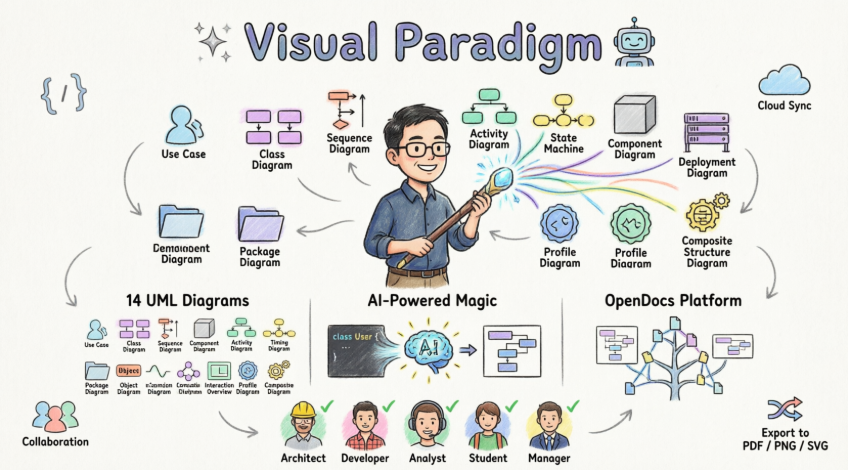
Visual Paradigm is a comprehensive, award-winning visual modeling platform that has established itself as the industry standard for software modeling. It offers robust support for UML 2.x (Unified Modeling Language) along with numerous other industry-standard notations including BPMN, ArchiMate, SysML, ERD, and DFD.

The platform serves multiple purposes:
- Software Design & Architecture
- Business Process Modeling
- Enterprise Architecture
- Requirements Management
- Team Collaboration & Documentation
Visual Paradigm goes beyond simple diagramming by providing real modeling capabilities such as syntax checking, element reusability, sub-diagrams, model referencing, and traceability—making it a true engineering tool rather than just a drawing application.
Complete UML Diagram Support
Visual Paradigm fully supports all 14 official UML 2.x diagram types, each designed to address specific modeling needs throughout the software development lifecycle.
Use Case Diagram
Capture functional requirements with UML use case diagram tool. Each use case in a use case diagram represents a high level business goal that yields a measurable result of business values. (UML) Actors are connected with use cases to represent the roles that interact with the functions.

Best For: Requirements gathering, stakeholder communication, system scope definition
Class Diagram
The UML modeling tool lets you model the structure of system by modeling its classes, their attributes and operations in a UML class diagram. UML class diagram is a blueprint of the classes (code level) required to build a software system. Programmers implement a software system with the help of both the class diagram and the class specification.

Best For: Object-oriented design, database schema planning, code generation
Sequence Diagram
Visualize the interactions between users, systems and sub-systems over time through message passing between objects or roles. If class diagram represents the skeleton of classes by showing their attributes and methods, UML sequence diagram complete the classes by representing the programming logic to be filled in methods’ body.

Best For: Understanding system behavior, API design, debugging complex interactions
Communication Diagram
Collaboration between objects in runtime can be modeled in the UML tool, with a UML communication diagram. In a communication diagram, objects, called lifelines, are connected to represent the need of communication during the execution of an interaction. Messages can be added on top of the connectors to list the calls made from and to those lifelines.

Best For: Runtime behavior analysis, object collaboration mapping
Activity Diagram
Use UML activity diagram, a flowchart-based diagram to model the flow of control. Partition actions according to the type of participant involved.

Best For: Business process modeling, workflow design, algorithm visualization
State Machine Diagram
State machine diagram is a critical design model for event-driven systems. Well-designed state machine shows accurately the essential states of objects as well as the triggers of state change, which facilitates the development of error-free state machine.

Best For: Event-driven systems, UI state management, protocol design
Component Diagram
Components diagrams are used to model the structure of systems by showing how little parts of the system gear up in forming a bigger part, or forming the entire software systems.

Best For: System architecture, microservices design, module dependencies
Deployment Diagram
Models the physical deployment of software components with UML deployment diagram. In deployment diagram, hardware components (e.g. web server, mail server, application server) are presented as nodes, with the software components that run inside the hardware components presented as artifacts.

Best For: Infrastructure planning, cloud architecture, system deployment
Package Diagram
Arrange and organize model for large-scale project with package diagrams. Package diagram is also good in visualizing structure and dependency between sub-systems or modules.

Best For: Large project organization, namespace management, dependency visualization
Object Diagram
View a snapshot of instances of classifiers in UML class diagrams. Similar to class diagrams, object diagrams show the static design of a system from a prototypical perspective.

Best For: Testing scenarios, data modeling, instance validation
Composite Structure Diagram
Visualize the internal structure of a class or collaboration with UML composite structure diagram. Model a system from a micro point-of-view using UML composite structure diagram.

Best For: Detailed component design, internal architecture, collaboration modeling
Timing Diagram
Timing diagrams model the behavior of objects throughout a given period of time. It is a commonly used UML tool for designing real-time and distributed systems. Just drag to move a time unit back and forth. Have a timing frame updated automatically according to your change.

Best For: Real-time systems, performance analysis, concurrent processes
Interaction Overview Diagram
View the sequence of interactions with UML interaction overview diagram. Interaction overview diagram helps represent complex scenario that involve multiple interactions presented as multiple UML sequence diagrams.
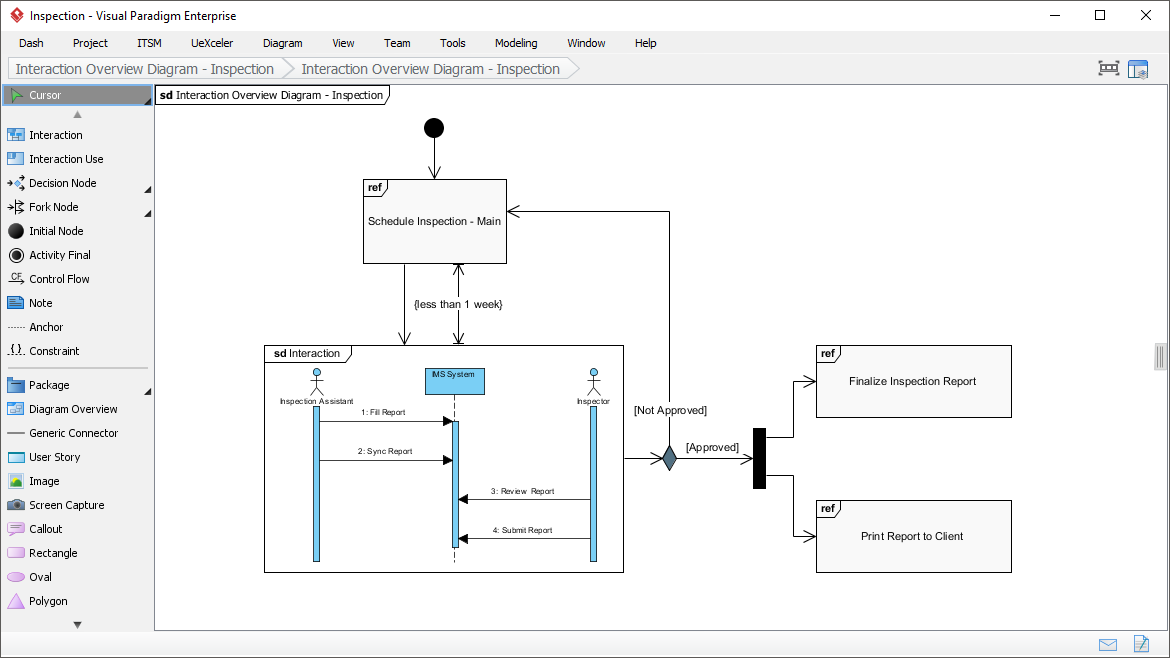
Best For: High-level interaction flows, complex scenario modeling
Profile Diagram
A visual way to define stereotypes to use in your project. Draw stereotypes, define their tags and their inter-relationships like generalizations and associations. Specify formatting options like background color and icons.

Best For: Custom extensions, domain-specific modeling, metamodeling
Model Element Referencing

Add diagrams, shapes, model elements as internal references
Make internal links between different kinds of project artifacts. Those references work both in Visual Paradigm and in any document and Web contents generated from your design.
Add business documents as external references
Maintain reference between software design and the business documents to help find out why a design decision was made.
Mark in shape body when have reference added
Glance over a design. The tiny marker that appear in shapes’ body indicates that the shapes have references added.
Reference model element in description
Insert model element references to rich text description. The referenced model elements will be linked and highlighted.
AI-Powered Modeling Revolution
Visual Paradigm has taken a quantum leap forward by integrating comprehensive AI capabilities into its modeling ecosystem. This isn’t just an incremental update—it’s a fundamental transformation of how software modeling is done.
Architecture Meets Intelligence: AI-Powered UML Modeling
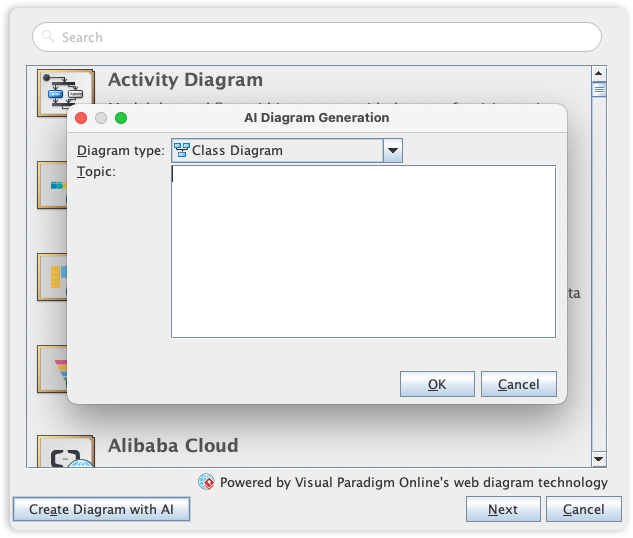
Visual Paradigm’s UML toolset is the industry standard for software modeling, offering the full range of diagrams needed to bridge the gap between requirements and implementation. We are now elevating the entire modeling experience by integrating comprehensive UML support into our AI Diagram Generator, enabling you to visualize system behavior and structure with unprecedented speed.
This capability allows you to instantly generate a wide array of UML diagrams—including Use Case, Class, Sequence, State Machine, Requirement, and Object Diagrams—from a simple textual description. By leveraging AI to interpret your system requirements, the tool automatically maps out the necessary entities, relationships, and interactions, allowing you to move directly to design validation and architectural refinement instead of starting from a blank canvas.
Key AI Features
1. Text-to-Diagram Generation
Simply describe your system in natural language (e.g., “Generate a class diagram for an online shopping system with customers, products, orders, and payment processing”) and watch as the AI instantly creates a professional, standards-compliant UML diagram.
2. AI Chatbot Assistant
Interact with your diagrams conversationally:
- “Add a new class called ShoppingCart”
- “Connect Customer to Order with a one-to-many relationship”
- “Add attributes to the Product class”
- “Generate a sequence diagram for the checkout process”
3. Specialized AI Generators
The platform includes specialized AI tools for:
- Class Diagrams – Object-oriented design
- Sequence Diagrams – Interaction flows
- Use Case Diagrams – Requirements modeling
- Activity Diagrams – Process flows
- State Machine Diagrams – Event-driven behavior
- Deployment Diagrams – Infrastructure architecture
- Component Diagrams – System structure
- Profile Diagrams – Custom stereotypes
4. Intelligent Quality Analysis
AI can perform automated quality checks on your models, suggesting improvements, identifying potential issues, and generating detailed analysis reports with design rationales.
5. Seamless Integration
AI features work seamlessly across both desktop and online editions, requiring only an appropriate license and AI service access.
OpenDocs: Next-Generation Knowledge Management
OpenDocs represents Visual Paradigm’s bold vision for the future of technical documentation—a web-based, AI-native knowledge base that unifies documentation with visual modeling in one cohesive platform.
Key Features of OpenDocs
Unified Workspace
OpenDocs combines a rich text editor with a built-in professional diagram editor, allowing text and visuals to coexist on a single page. No more switching between tools or copying diagrams—everything lives together harmoniously.
Knowledge Tree Structure
Organize your documents and diagrams in a hierarchical tree with nested folders, similar to a local file system. This intuitive structure makes it easy to manage complex projects with hundreds of pages and diagrams.
AI-Powered Diagram Generation
Type a description directly in your document and get instant diagrams (flowcharts, UML, ERD, etc.) embedded right where you need them. The AI understands context and generates diagrams that match your documentation style.
AI Content Assistant
The built-in AI assistant can:
- Generate article drafts from bullet points
- Summarize long technical documents
- Answer contextual questions based on your knowledge base
- Suggest improvements to your documentation
- Transform static docs into dynamic, interactive knowledge bases
Pipeline Integration
A specialized feature allows users of Visual Paradigm Desktop Professional Edition to sync their professional models directly into OpenDocs, ensuring a “single source of truth” across the team. Changes in your models automatically reflect in your documentation.
Easy Sharing & Collaboration
Share entire knowledge bases via single links. Export and import pipelines make it easy to move content between Visual Paradigm Desktop and OpenDocs, creating a seamless workflow from modeling → AI generation → documented knowledge base.
Ideal Use Cases for OpenDocs
- Project Documentation – Living documentation that evolves with your project
- Team Wikis – Centralized knowledge repositories
- Requirements Documentation – Traceable requirements with visual models
- Architecture Overviews – High-level system designs with detailed diagrams
- API Documentation – Technical specs with sequence and class diagrams
- Training Materials – Interactive guides with embedded examples
Core Features & Capabilities
Beyond UML and AI, Visual Paradigm offers a comprehensive suite of tools designed to support every aspect of software development and business analysis.
Intuitive Diagramming
Support for multiple industry-standard notations:
- BPMN 2.0 – Business process modeling
- ArchiMate 3.2 – Enterprise architecture
- DFD – Data flow diagrams
- ERD – Entity relationship diagrams
- CMMN – Case management
- SoaML – Service-oriented architecture
- SysML – Systems engineering
- Mind Maps – Brainstorming and ideation
Code & Database Engineering
- Round-trip Engineering – Generate code from models and reverse-engineer code to UML
- Supported Languages – Java, C++, C#, Python, PHP, and more
- ORM Support – Object-relational mapping with Hibernate integration
- DDL Generation – Automatic database schema generation
- Code Synchronization – Keep models and code in sync automatically
Requirements & Analysis Tools
- User Story Mapping – Agile requirements management
- Textual Analysis – Extract requirements from documents
- CRC Cards – Class-Responsibility-Collaboration cards
- SWOT Analysis – Strategic planning
- PESTLE Analysis – Environmental scanning
- Business Model Canvas – Business strategy
Collaboration & Documentation
- Team Modeling – Real-time collaboration features
- Version Control – Integration with Git and other VCS
- Automatic Report Generation – HTML, PDF, Word, Excel exports
- Image Export – PNG, SVG, JPEG, and other formats
- Web Publishing – Publish diagrams to web servers
Project Management Integration
- TOGAF Support – Enterprise architecture framework
- Agile Processes – Scrum and Kanban integration
- Guide-Through Wizards – Step-by-step methodology support
- Risk Management – Identify and track project risks
- Resource Planning – Allocate and manage resources
Cross-Platform Availability
- Desktop Edition – Windows, macOS, Linux
- Online Edition – Browser-based access
- Community Edition – Free for non-commercial use with full UML 2.x + ERD support
- Professional Edition – Advanced features for enterprise teams
Who Should Use Visual Paradigm?
Visual Paradigm serves a diverse range of professionals across multiple disciplines:
Software Architects & Designers
Create comprehensive system architectures, design patterns, and technical specifications using industry-standard UML diagrams. The AI-powered features help you quickly prototype and validate architectural decisions.
Developers & Programmers
Generate code from models, reverse-engineer existing codebases, and maintain synchronization between your design and implementation. Perfect for teams practicing model-driven development.
Business Analysts
Model business processes with BPMN, capture requirements with use cases, and create clear documentation that bridges the gap between business stakeholders and technical teams.
Project Managers
Track project progress, manage resources, identify risks, and maintain comprehensive project documentation with integrated diagrams and reports.
Enterprise Architects
Design enterprise-wide architectures using ArchiMate, TOGAF frameworks, and comprehensive modeling tools that support large-scale organizational transformation.
Students & Educators
Learn and teach software engineering concepts with the free Community Edition. Create educational materials with clear, professional diagrams.
Consultants
Deliver professional documentation and architecture designs to clients. The platform’s extensive export options and presentation features make it ideal for consulting work.
Why Visual Paradigm Stands Out
In a crowded market of modeling tools, Visual Paradigm distinguishes itself through several key differentiators:
1. True Modeling vs. Simple Drawing
Unlike basic diagramming tools, Visual Paradigm provides genuine modeling capabilities with syntax validation, element reusability, model transformations, and traceability. Your diagrams are intelligent, interconnected models—not just pictures.
2. AI-Powered Innovation
Visual Paradigm is at the forefront of AI integration in modeling tools. The AI Diagram Generator, AI Chatbot, and AI-powered OpenDocs platform represent a fundamental shift in how software modeling is done, making it faster, more accessible, and more intelligent.
3. Comprehensive Standards Support
Full support for UML 2.x, BPMN 2.0, ArchiMate 3.2, SysML, and numerous other industry standards ensures compatibility with enterprise workflows and professional best practices.
4. Round-Trip Engineering
The ability to generate code from models and reverse-engineer code back to models creates a true bi-directional relationship between design and implementation, keeping your documentation always in sync with your code.
5. Unified Platform
From initial requirements gathering through architecture design, implementation, and documentation—Visual Paradigm provides a single platform that supports the entire software development lifecycle.
6. OpenDocs Integration
The revolutionary OpenDocs platform bridges the gap between modeling and knowledge management, creating living documentation that evolves with your project and leverages AI to enhance productivity.
7. Flexibility & Accessibility
Available in desktop, online, and free Community Edition formats, Visual Paradigm adapts to your needs and budget. Cross-platform support ensures you can work on any operating system.
8. Professional-Grade Features
Enterprise-level capabilities including team collaboration, version control integration, advanced reporting, and methodology support make it suitable for large-scale, mission-critical projects.
9. Continuous Innovation
Regular updates and new features (like the AI capabilities introduced in version 18.0) demonstrate Visual Paradigm’s commitment to staying at the cutting edge of software modeling technology.
10. Strong Community & Support
Extensive documentation, tutorials, active user community, and professional support options ensure you have the resources you need to succeed.
Getting Started: Your Journey
Step 1: Choose Your Edition
- Community Edition (Free) – Perfect for learning, personal projects, and non-commercial use. Includes full UML 2.x and ERD support.
- Professional Edition – Unlocks advanced features, AI capabilities, team collaboration, and enterprise tools.
- Online Edition – Browser-based access for teams that prefer cloud-based solutions.
Step 2: Start with AI
If you’re new to modeling or want to accelerate your workflow:
- Open the AI Diagram Generator
- Describe your system in plain English
- Review and refine the AI-generated diagram
- Use the AI Chatbot to make modifications
Step 3: Explore Diagram Types
Start with the diagram type that matches your immediate need:
- Requirements Phase – Use Case Diagrams
- Design Phase – Class Diagrams, Sequence Diagrams
- Architecture Phase – Component Diagrams, Deployment Diagrams
- Process Modeling – Activity Diagrams, BPMN
Step 4: Integrate with OpenDocs
Create comprehensive documentation:
- Set up your OpenDocs knowledge base
- Embed diagrams directly in your documentation
- Use AI to generate content and refine descriptions
- Share with your team via link
Step 5: Leverage Code Engineering
Connect your models to implementation:
- Create class diagrams for your system
- Generate skeleton code in your preferred language
- Implement business logic
- Reverse-engineer changes back to your models
Step 6: Collaborate & Share
- Use version control integration for team projects
- Generate professional reports for stakeholders
- Export diagrams in multiple formats for presentations
- Publish documentation to web or internal portals
Conclusion
Visual Paradigm represents the evolution of software modeling from a tedious, manual process to an intelligent, AI-powered experience that accelerates development while maintaining professional standards. Whether you’re a solo developer creating your first class diagram or an enterprise architect designing complex distributed systems, Visual Paradigm provides the tools, flexibility, and innovation you need to succeed.
The platform’s unique combination of comprehensive UML support, cutting-edge AI capabilities, and the revolutionary OpenDocs knowledge management platform creates an ecosystem that goes far beyond traditional modeling tools. It’s not just about creating diagrams—it’s about building a living, breathing representation of your system that evolves with your project and serves as a single source of truth for your entire team.
With features like text-to-diagram generation, round-trip code engineering, and seamless documentation integration, Visual Paradigm eliminates the traditional barriers between design, implementation, and documentation. The result is faster development cycles, better communication among team members, and higher-quality software systems.
Whether you choose the free Community Edition to explore the basics or the Professional Edition to unlock the full power of AI-assisted modeling, Visual Paradigm offers a path to more efficient, more effective software development. The future of modeling is here, and it’s intelligent, integrated, and incredibly powerful.
Ready to transform your software modeling experience? Start with the Community Edition today and discover why thousands of organizations worldwide trust Visual Paradigm for their modeling needs.
- Reference List
- OpenDocs: AI-Powered Knowledge Management Platform: Visual Paradigm’s web-based AI knowledge base combining rich text editing with embedded professional diagramming in one unified workspace.
- Visual Paradigm Official Website: The official homepage for Visual Paradigm’s comprehensive visual modeling platform offering UML, BPMN, ArchiMate, and AI-powered diagram generation tools.
- Guide to AI-Powered UML Diagram Generation: Comprehensive guide on using Visual Paradigm’s AI chatbot and diagram generation capabilities for creating UML models from natural language descriptions.
- Comprehensive Guide to Visual Paradigm’s AI-Powered UML and Modeling Ecosystem 2025-2026: In-depth analysis of Visual Paradigm’s complete modeling ecosystem, AI features, and enterprise capabilities for modern software development.
- Visual Paradigm OpenDocs: The Complete Guide to AI-Powered Knowledge Management and Diagram Generation: Detailed exploration of OpenDocs platform features, AI integration, and knowledge management workflows.
- Visual Paradigm Platform Overview: Overview of Visual Paradigm’s visual modeling capabilities including business analysis tools like SWOT, PESTLE, and Business Canvases.
- UML Modeling Software Process and Tool Guide: Guide to effective UML modeling tools featuring element transformation, syntax validation, and custom properties in Visual Paradigm.
- AI-Assisted UML Class Diagram Generator: Feature page detailing Visual Paradigm’s AI-powered class diagram generation from natural language descriptions.
- Visual Modeling Tool Features: Comprehensive overview of Visual Paradigm’s visual modeling capabilities across multiple diagram types and notations.
- Visual Paradigm Features Overview: Complete listing of all Visual Paradigm features including UML, BPMN, ArchiMate, code engineering, and collaboration tools.
- Visual Paradigm Features: Main features page showcasing the platform’s comprehensive modeling and documentation capabilities.
- Visual Paradigm AI Platform: Visual Paradigm’s AI-powered tools and services portal for intelligent diagram generation and modeling assistance.
- What is Object Diagram: Guide to UML object diagrams with information on AI-enabled platforms for generating object instances and specification documents.
- AI Diagram Generation: Feature overview of Visual Paradigm’s AI diagram generation capabilities supporting multiple diagram types from text descriptions.
- AI Component Diagram Generator Update: Release notes and updates for Visual Paradigm’s AI-powered component diagram generation feature.
- AI Deployment Diagram Generator in OpenDocs: Announcement of AI deployment diagram generation capabilities integrated into the OpenDocs platform.
- Use Case to Activity Diagram: Feature demonstrating transformation from use case diagrams to activity diagrams for process modeling.
- Visual Paradigm Tutorial Video: Video tutorial demonstrating Visual Paradigm features and modeling techniques.
- Visual Paradigm Features Video: Video showcase of Visual Paradigm’s modeling capabilities and user interface.
- AI-Assisted UML Class Diagram Generator: Detailed feature page for AI-powered class diagram generation with examples and use cases.
- OpenDocs AI Tool: OpenDocs AI-powered knowledge management and diagram generation tool interface.
- OpenDocs AI-Powered Knowledge Platform Release: Official release announcement for OpenDocs platform with AI-powered knowledge management features.
- Sync AI Diagram to OpenDocs Pipeline Guide: Guide for syncing AI-generated diagrams from Visual Paradigm Desktop to OpenDocs using the pipeline integration feature.
- Mastering the Pipeline in Visual Paradigm OpenDocs: Complete guide to using the pipeline feature for streamlined knowledge management between Visual Paradigm Desktop and OpenDocs.
- UML Tool Features: Comprehensive UML modeling tool features including all 14 UML 2.x diagram types and advanced modeling capabilities.
- Import and Export Features: Details on Visual Paradigm’s import and export capabilities for diagrams, models, and documentation in various formats.
- AI Diagram Generator Now Supports 13 Diagram Types: Release announcement detailing AI diagram generator support for 13 different diagram types including UML, DFD, ERD, and more.
Related posts:
 Generate UML Activity Diagrams Instantly with Visual Paradigm AI Chatbot
 Deploying with Intelligence: A Modern Guide to AI-Powered Deployment Diagrams
 From Overwhelmed to Empowered: A Practitioner’s Journey Through the 14 UML Diagram Types with AI-Powered Tools
 Diagram-as-Code vs. Drag-and-Drop vs. AI Diagramming: Which is Right for Your Team?