


Software architecture is the blueprint of your system. It dictates how components interact, how data flows, and how teams collaborate. At the heart of this documentation often lies the UML package diagram. It is designed to show the organization of packages and their dependencies. However, when these diagrams become cluttered, crossed, and confusing, they cease to be useful tools and become sources of frustration.
A messy diagram obscures the logic of the system. It increases cognitive load for anyone trying to understand the structure. In this guide, we will explore the specific steps to identify, analyze, and resolve common issues that make UML package diagrams difficult to read. We will focus on structural integrity, dependency management, and maintenance practices without relying on specific tools.
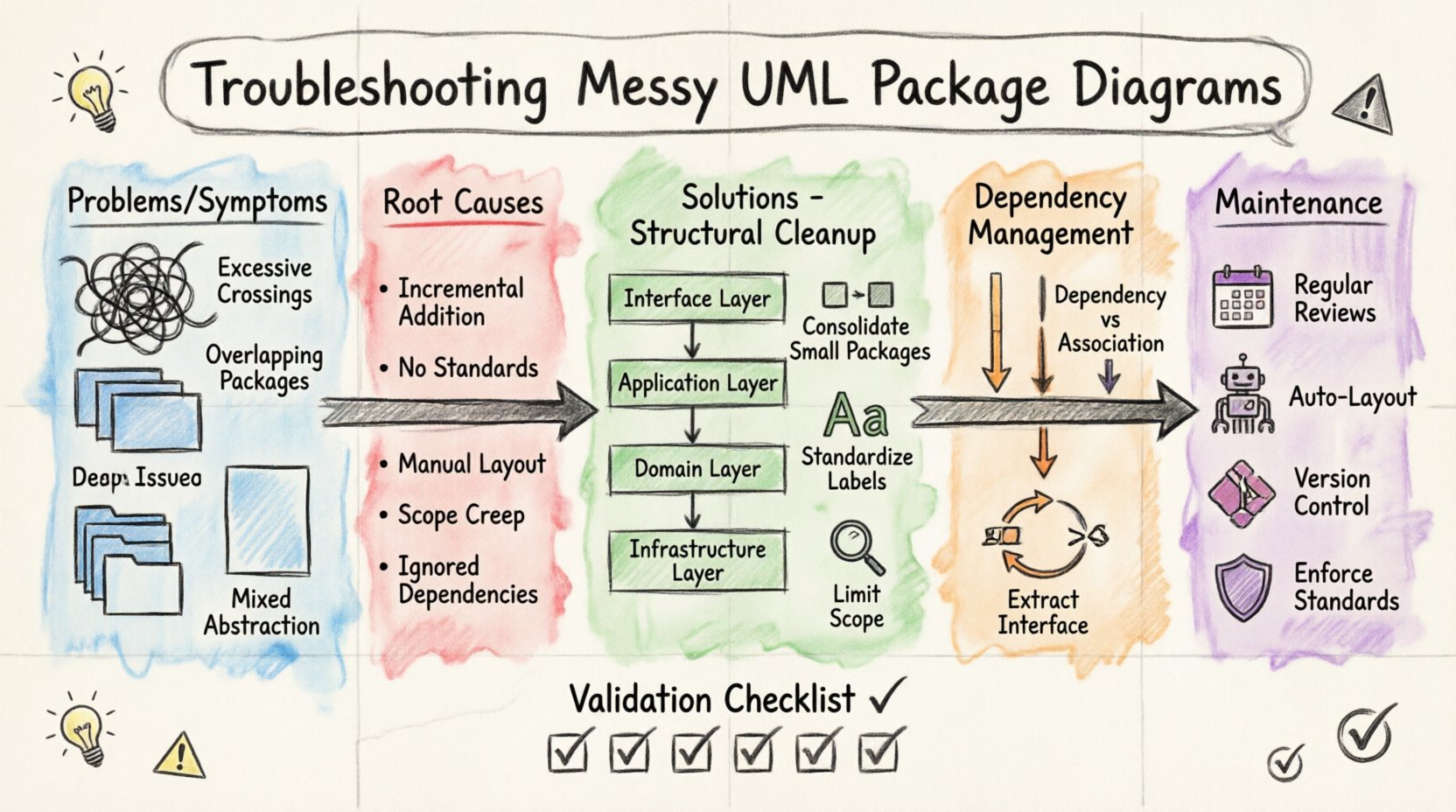
Why Clarity Matters in Package Diagrams 📊
Before diving into the troubleshooting steps, it is important to understand the cost of a disorganized diagram. A UML package diagram serves as a communication artifact. It is read by developers, architects, and stakeholders.
- Onboarding: New team members rely on these diagrams to grasp the system landscape quickly.
- Impact Analysis: When a change is proposed, the diagram helps identify which packages will be affected.
- Design Consistency: It enforces boundaries between layers, modules, and subsystems.
If the diagram is messy, these functions fail. Misinterpretation leads to technical debt. Developers might place code in the wrong package, creating tight coupling. This creates a cycle where the architecture degrades faster than intended. Therefore, troubleshooting a messy diagram is not just about aesthetics; it is about system health.
Identifying the Symptoms of a Messy Diagram 🕵️♂️
You may not know exactly what is wrong until you see the visual noise. Here are the common indicators that your package diagram requires attention.
1. Excessive Crossings ⛓️
When dependency lines cross each other frequently, the diagram becomes a “spaghetti” map. It is visually exhausting to trace a path from one package to another. This usually indicates that the layout is arbitrary rather than logical.
2. Overlapping Packages 📦
Packages should be distinct. If visual boundaries overlap, it suggests that the grouping logic is flawed. It becomes unclear which elements belong to which namespace or module.
3. Inconsistent Naming 🏷️
One package might be named utils while another is UtilityFunctions. Inconsistent naming conventions make it hard to scan the diagram for specific functionality. It also suggests a lack of governance in the modeling process.
4. Deep Nesting Depth 🏗️
If you find yourself clicking through five or six levels of folders to find a single class or component, the hierarchy is too deep. This hides the high-level structure of the system.
5. Mixed Abstraction Levels 📉
A diagram should generally maintain a consistent level of detail. Mixing high-level subsystems with low-level implementation classes in the same view confuses the reader about the scope of the diagram.
Root Causes Analysis 🔍
To fix the problem, you must understand the cause. Messy diagrams rarely happen by accident. They are usually the result of specific modeling behaviors.
- Incremental Addition: Packages are added as the code is written, without a pre-defined structure. This leads to ad-hoc grouping.
- Lack of Standards: There is no agreed-upon naming convention or structural guideline for the project.
- Manual Layout: Dragging and dropping elements without an auto-layout strategy creates visual chaos.
- Scope Creep: Trying to show every single class in one diagram defeats the purpose of a package diagram. Package diagrams are for structure, not implementation details.
- Ignoring Dependencies: Adding a package without considering which other packages it relies on.
Structural Cleanup Tactics 🧹
Once you have identified the symptoms, you can begin the cleanup process. This section outlines the specific actions required to restore order.
1. Define a Layered Architecture 🏢
Most systems follow a layered pattern. Organize your packages to reflect this. Common layers include:
- Interface Layer: Handles user interaction or external API calls.
- Application Layer: Manages workflows and business logic.
- Domain Layer: Contains core business entities and rules.
- Infrastructure Layer: Manages databases, file systems, and network access.
When drawing the diagram, arrange these layers vertically or horizontally. This creates a predictable flow for the reader.
2. Consolidate Small Packages 📦
Do not create a new package for every single utility function. If a package contains only two classes, consider merging it with a related parent package. Small packages increase navigation overhead. Aim for packages that represent cohesive functional areas.
3. Standardize Labeling 🏷️
Establish a naming rule and apply it strictly. For example:
- Use lowercase for namespaces.
- Use prefixes for specific domains (e.g.,
api_,core_). - Ensure all packages use the same pluralization or singularization rules.
4. Limit Diagram Scope 🎯
Do not attempt to fit the entire system into one image. Create separate diagrams for different views.
- System Overview: High-level packages only.
- Subsystem Detail: Deep dive into specific areas like the Authentication module.
- Integration View: Focus on how external systems connect.
This reduces visual clutter and allows you to focus on the relevant relationships for that specific context.
Managing Dependencies Effectively ⛓️
Dependencies are the lines connecting your packages. They are the most common source of visual mess. A diagram with hundreds of crossing lines is unusable.
1. Enforce Dependency Direction ⬆️
Dependencies should generally flow in one direction. For example, lower layers should not depend on upper layers. If the Infrastructure layer depends on the Interface layer, you have a circular dependency. This creates tight coupling and makes testing difficult. Review every line and ask: does this dependency make sense?
2. Use Import vs. Use Relationships Correctly 📌
UML distinguishes between different types of relationships. Using them correctly reduces noise.
- Dependency (Dashed Line): Use this for temporary usage or local variable usage.
- Import (Dashed Line with Arrow): Use this for namespace inclusion. It indicates that the contents of one package are visible in another.
- Association (Solid Line): Use this only if there is a persistent structural link.
Overusing solid lines makes the diagram look dense. Dashed lines are lighter visually and help distinguish structural links from usage links.
3. Group Related Dependencies 🧩
If Package A depends on Package B, Package C, and Package D, and these three are related, consider grouping them. Sometimes, creating a “Bridge” package that encapsulates these dependencies can reduce the number of lines crossing the diagram.
4. Handle Circular Dependencies ⚠️
Circular dependencies occur when Package A depends on Package B, and Package B depends on Package A. This is a code smell. In a diagram, it often creates a loop that looks messy. To fix this:
- Extract the shared interface or abstract class into a third package.
- Use dependency inversion principles.
- Refactor the logic to remove the need for the bidirectional link.
Comparison: Clean vs. Messy Diagrams 📋
Visualizing the difference helps in understanding the goal. The table below summarizes the contrast.
| Feature | Messy Diagram ❌ | Clean Diagram ✅ |
|---|---|---|
| Line Crossing | High frequency, chaotic | Minimal, organized routing |
| Package Size | Varied, many tiny packages | Consistent, cohesive groups |
| Naming | Inconsistent, vague | Standardized, descriptive |
| Dependency Flow | Circular, bidirectional | Unidirectional, layered |
| Readability | Requires zooming and panning | Understandable at a glance |
| Abstraction | Mixes levels of detail | Consistent abstraction level |
Maintenance and Iteration 🔄
A clean diagram is not a one-time fix. It requires ongoing maintenance. Software evolves, and your diagram must evolve with it.
1. Schedule Regular Reviews 📅
Make diagram cleanup part of your sprint or release cycle. Do not let it accumulate. A small refactor in the code should trigger a small update in the diagram.
2. Automate Where Possible 🤖
Many modeling environments allow for auto-layout features. Use these to reorganize packages based on dependency graphs. Do not rely on manual dragging for every new package. Let the tool handle the positioning so you can focus on the logic.
3. Version Control the Model 📂
Treat the diagram file like code. Commit changes to version control. This allows you to revert if a cleanup effort goes wrong and helps track how the architecture evolves over time.
4. Enforce Standards via Code 🛡️
If possible, link the diagram to the actual code structure. Some tools can generate diagrams from the source code. While this is not always perfect, it ensures that the diagram reflects the reality of the codebase.
Common Pitfalls to Avoid ⚠️
As you clean up your diagram, watch out for these common mistakes.
- Over-documentation: Adding notes and comments everywhere. Keep the diagram clean. Put details in the specification documents.
- Static Views: Showing a diagram that represents the system as it was five years ago. Keep it current.
- Ignoring Interfaces: Focusing only on concrete classes. Package diagrams should focus on the contracts (interfaces) that packages expose.
- Ignoring Context: Drawing a diagram for a developer who needs a high-level overview. Tailor the diagram to the audience.
Validation Checklist ✅
Before finalizing your updated diagram, run it through this checklist.
- Are all packages necessary? Remove any that are redundant.
- Is the naming consistent? Check capitalization and underscores.
- Are dependencies logical? Ensure no circular references exist.
- Is the layout readable? Can you trace a flow without the lines crossing?
- Is the abstraction level correct? Does it match the intended audience?
- Are the labels clear? Do they explain the function, not just the name?
Final Thoughts on Architecture Documentation 🎓
UML package diagrams are powerful assets when they are clear. They reduce the risk of architectural drift and help teams align on the system design. Troubleshooting a messy diagram is an investment in the long-term maintainability of your software.
By applying structured cleanup tactics, managing dependencies rigorously, and maintaining a consistent standard, you transform a confusing map into a clear guide. This process requires discipline, but the return on investment is a system that is easier to build, test, and scale.
Start with one package. Organize it perfectly. Then move to the next. Small steps lead to a clear architecture.