


Introduction
In the dynamic landscape of Agile development, teams constantly balance speed, collaboration, and precision. One persistent challenge has been translating abstract requirements, user stories, and architectural concepts into clear, shareable visual models—without slowing down sprint cycles. Traditional diagramming tools often demand significant manual effort, steep learning curves, and time-consuming revisions that can bottleneck iterative progress.
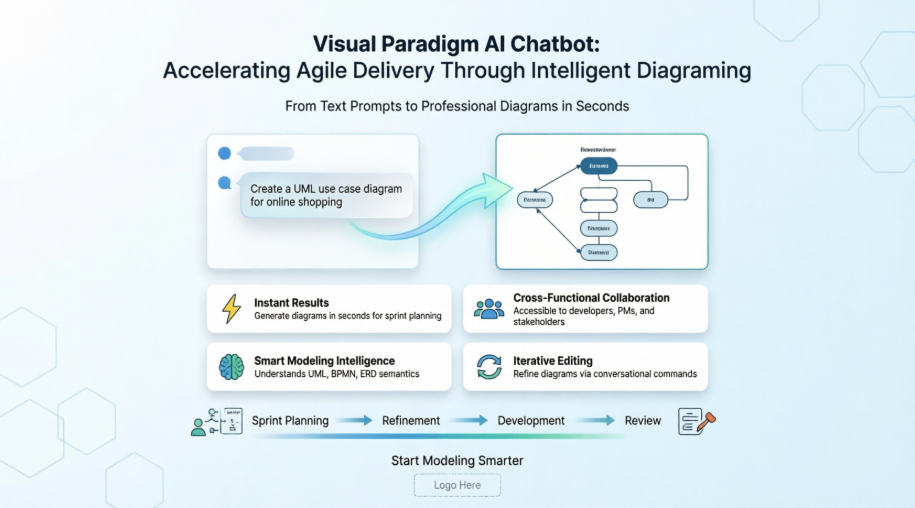
Enter Visual Paradigm’s AI Chatbot: an intelligent modeling assistant designed to bridge the gap between idea and visualization. By leveraging natural language processing and deep modeling semantics, this tool empowers Agile teams to generate, refine, and analyze professional diagrams—from UML and BPMN to flowcharts and ERDs—in seconds. This case study explores how the AI Chatbot transforms Agile workflows, shares real-world user experiences, and demonstrates practical applications that accelerate delivery while maintaining architectural rigor.

What Is Visual Paradigm’s AI Chatbot?
The AI Chatbot in Visual Paradigm Online is an advanced assistant that lets you create diagrams using natural language. Instead of manually dragging and connecting shapes, you simply describe what you want—and the chatbot automatically generates a fully structured, presentation-ready diagram.
You can ask it to create UML diagrams, flowcharts, BPMN, ERD, mind maps, SWOT analyses, and many other visual models. It understands modeling concepts and syntax, so you do not need to worry about technical notations or formatting.
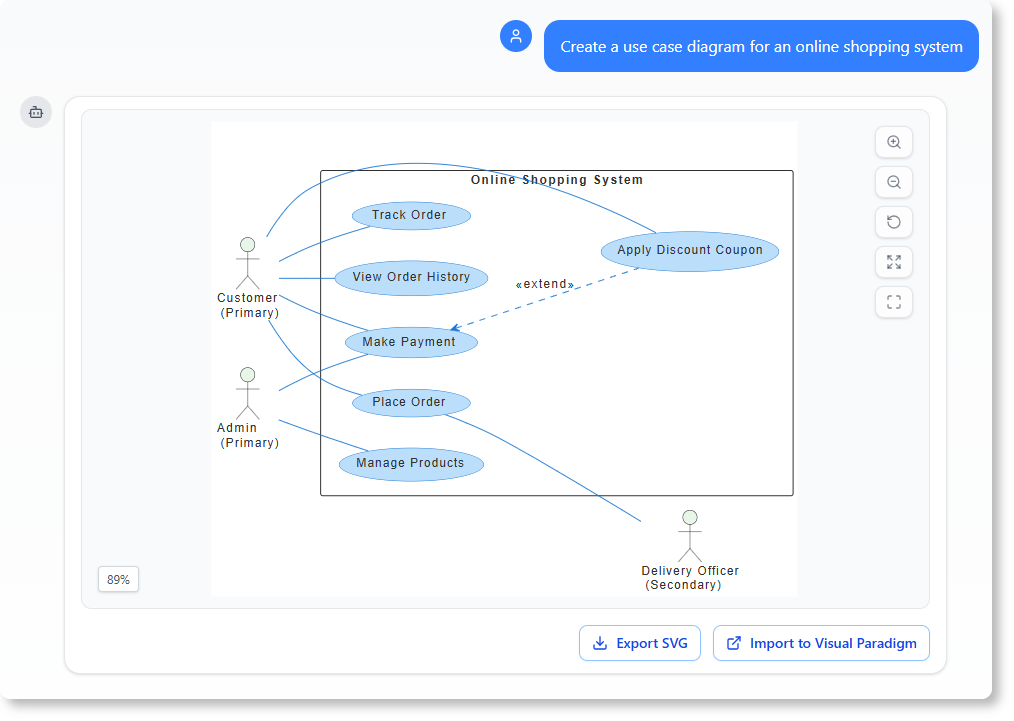
For example, typing “Create a use case diagram for an online shopping system” will instantly produce a clear, accurate diagram, ready for refinement or export.
Why It Benefits Agile Teams
1. No More Manual Drawing
Say goodbye to repetitive drag-and-drop work. The AI Chatbot in VP Online automatically arranges elements, relationships, and labels for you. Instead of spending time formatting shapes and connectors, Agile teams can concentrate on refining user stories, discussing acceptance criteria, or aligning on sprint goals. The chatbot takes care of the structure, ensuring that diagrams remain clean, readable, and ready for presentation.
2. Instant Results for Sprint Cycles
Speed is everything in Agile workflows. Whether you are brainstorming a new feature during sprint planning, explaining a business process in a refinement session, or documenting architecture for a spike, the AI Chatbot generates accurate diagrams in just a few seconds. This quick turnaround makes it ideal for design discussions, project proposals, and instant visualization during stand-ups—helping teams move from concept to clarity faster than ever.
3. Accessible for Cross-Functional Collaboration
You do not need to be a modeling expert to produce high-quality diagrams. The AI Chatbot is designed for everyone—from developers and Scrum Masters to product owners and business analysts. Even if team members are unfamiliar with UML, BPMN, or ERD syntax, the chatbot understands intent and creates the right diagram type automatically. This democratization of modeling simplifies professional visualization, making it approachable and enjoyable for all stakeholders.
4. Smart Understanding of Agile Artifacts
What sets this AI apart is its awareness of modeling context. It recognizes different entities, such as user roles, system components, or process steps, and applies the correct relationships between them. This means your diagram is not just visually correct, but also logically meaningful. You can trust it to capture intent—whether you are describing a user journey, a microservice architecture, or a workflow automation.
5. Seamless Iterative Editing
Agile is built on iteration—and the AI Chatbot supports that philosophy. You can continue improving your diagram naturally through conversational commands. Ask it to “add a payment process,” “connect this with a data store,” or “rename this class,” and the tool updates your diagram instantly. The conversational editing approach saves teams from manual adjustments while keeping the flow of refinement uninterrupted.
Why Agile Teams Need This Tool
Many online diagramming tools now use AI, but Visual Paradigm’s AI Chatbot is built by modeling experts for modelers. It is not just a text-to-image generator; it understands diagram semantics and business logic.
Here is what makes it different for Agile contexts:
-
True modeling intelligence – It knows the difference between a user story and an epic, a process and a sub-process, a class and an attribute, a data flow and a control flow.
-
Contextual understanding – It keeps your conversation context, so teams can build diagrams progressively across sprint ceremonies without starting from scratch each time.
-
Unified workspace – Everything happens inside VP Online—diagram creation, editing, sharing, and documentation—reducing context-switching and tool sprawl.
When Agile Teams Use It
-
Sprint Planning – Quickly sketch feature flows, dependency maps, or architecture sketches before formal modeling begins.
-
Refinement Sessions – Turn user story descriptions or acceptance criteria into visual workflows instantly.
-
Sprint Reviews – Convert completed work into clear diagrams for stakeholder demonstrations.
-
Retrospectives – Visualize process bottlenecks or improvement ideas using flowcharts or swimlanes.
-
Documentation Sprints – Convert textual specifications into ready-to-use diagrams for knowledge bases or handoffs.
Case Study: Agile Team Success Stories
Example 1: Sprint Planning Acceleration at FinTech Startup
A mid-sized FinTech company adopted Visual Paradigm’s AI Chatbot to streamline their two-week sprint cycles. During planning, the product owner described a new “Fraud Detection Workflow” in plain English. Within seconds, the chatbot generated a BPMN diagram outlining decision points, system integrations, and human approval steps. The development team used this visual as a shared reference to break down tasks, estimate effort, and identify dependencies. Result: Planning time reduced by 40%, and misalignment on scope decreased significantly.
Example 2: Cross-Functional Collaboration for E-Commerce Platform
An e-commerce team with members across time zones struggled to align on a new checkout redesign. Using the AI Chatbot, the UX designer prompted: “Create a sequence diagram for guest checkout with payment gateway integration.” The generated diagram became a living artifact in their Confluence page. Developers added technical notes via chat commands (“Add timeout handling for payment service”), while QA engineers appended test scenarios. The conversational model allowed asynchronous, contextual collaboration—eliminating lengthy email threads and version confusion.
Example 3: Rapid Prototyping for Stakeholder Reviews
A healthcare SaaS team needed to present a new patient onboarding architecture to non-technical executives. Instead of spending days crafting slides, the architect used the chatbot: “Generate a component diagram for patient registration with HIPAA-compliant data storage.” The AI produced a clean, labeled diagram in under a minute. During the review, stakeholders requested changes (“Show integration with insurance verification”), which were implemented via simple chat commands. The team delivered a polished, interactive prototype in one session—accelerating approval by weeks.
Example 4: Documentation Automation for Compliance
A regulated financial services team used the AI Chatbot to automate audit documentation. For each sprint deliverable, they prompted the bot to “Generate a data flow diagram for transaction processing with GDPR annotations.” The chatbot not only created the visual but also exported accompanying text descriptions and risk assessments. This reduced manual documentation effort by 60% and ensured consistency across compliance artifacts.
Step-by-Step: Generating and Managing Diagrams in Agile Workflows
1. Generate the Initial Diagram
-
Access the tool: Navigate directly to the Visual Paradigm AI Chatbot Web App or open it via the “Tools” menu in your desktop platform.
-
Submit your prompt: Type a clear description of what you need using plain English.
-
Examples:
-
“Generate a UML use case diagram for an online food delivery app.”
-
“Draw a sequence diagram for booking a flight online.”
-
“Create a DFD for a warehouse management system.”
-
2. Refine with Conversational Commands
You can change, grow, or correct your canvas mid-stream by chatting directly with the bot:
-
Modify elements: Type commands like “Rename ‘User’ to ‘Customer'” or “Rename the Employee class to Staff.”
-
Add new components: Provide rules like “Add a database to the backend process” or “Add payment gateway.”
-
Adjust relationships: Direct the bot by typing “Change the relationship from association to composition.”
3. Analyze and Document
The chatbot also serves as a context-aware knowledge base for your architectural designs:
-
Code/Flow Explanations: Ask “Explain this Sequence Diagram to me” or “Describe the user journey.”
-
Risk Assessments: Ask questions like “What are the security risks in this Deployment Diagram?”
-
Generate Text Files: Request “Generate a Use Case Description for the Withdraw Cash function.”
4. Export and Import to Workspace
Once your model looks complete, click the “Import to Visual Paradigm” button on screen. This brings the layout directly into your workspace or desktop software tool for granular, manual fine-tuning and saving.
User Experiences: Voices from the Field
“As a Scrum Master, I used to spend hours whiteboarding processes during refinement. Now, I type a prompt, and the team has a shared visual in seconds. It’s transformed how we collaborate.”
— Maria T., Agile Coach, SaaS Company
“I’m a backend developer, not a UML expert. The chatbot lets me focus on logic, not notation. When I need a class diagram, I just describe the domain—it just works.”
— James L., Senior Engineer, FinTech
“During sprint reviews, stakeholders love seeing concepts visualized instantly. The AI Chatbot helps us tell a clearer story about what we built and why.”
— Priya K., Product Owner, HealthTech
Conclusion
Visual Paradigm’s AI Chatbot represents a paradigm shift for Agile teams seeking to balance velocity with clarity. By transforming natural language into precise, editable diagrams, it eliminates manual overhead, accelerates collaboration, and ensures that visual artifacts evolve alongside iterative development. Whether you are sketching a feature in planning, refining architecture mid-sprint, or documenting for compliance, the chatbot acts as an always-available modeling partner—freeing teams to focus on what matters most: delivering value.
In an era where Agile success hinges on adaptability and shared understanding, tools that bridge communication gaps without sacrificing rigor are not just convenient—they are essential. Visual Paradigm’s AI Chatbot doesn’t just draw diagrams; it empowers teams to think visually, iterate confidently, and deliver with precision. If you are ready to see how AI can simplify your modeling workflow, try Visual Paradigm Online and start chatting your way to smarter diagrams today.
Reference
- Visual Paradigm AI Chatbot Features: Official overview of AI Chatbot capabilities for diagram generation, editing, and analysis within Visual Paradigm’s ecosystem.
- Turn Your Ideas into Diagrams Instantly: Blog post introducing the AI Chatbot’s value proposition for rapid, natural-language-driven diagram creation.
- How to Turn Requirements into Diagrams with an AI Chatbot: Practical guide on converting textual requirements into structured visual models using conversational AI.
- AI-Powered DFD Generator Release Notes: Announcement of enhanced Data Flow Diagram generation capabilities powered by the AI Chatbot.
- AI Chatbot Tool Page: Dedicated landing page for the AI Chatbot tool with feature highlights and access instructions.
- AI Toolbox Chatbot Application: Direct access point for the web-based AI Chatbot interface within Visual Paradigm’s AI Toolbox.
- YouTube: Visual Paradigm AI Chatbot Demo: Video demonstration showcasing real-time diagram generation and editing using natural language prompts.
- Visual Paradigm AI Chatbot Web App: Primary web application URL for interacting with the AI Chatbot for diagramming and modeling tasks.
- Guide to Powered UML Diagram Generation: User guide for leveraging AI to generate UML diagrams efficiently through conversational commands.
- YouTube: Agile Modeling with AI Chatbot: Tutorial video focused on applying the AI Chatbot within Agile development workflows and ceremonies.
- Complete Guide to Visual Paradigm AI Chatbot: Third-party comprehensive guide covering setup, use cases, and best practices for team adoption.
- Generate UML Sequence Diagrams Instantly with AI: Focused article on using the AI Chatbot to rapidly produce sequence diagrams for system design and documentation.
- YouTube: Chatbot Editing Workflow: Video tutorial demonstrating conversational editing techniques for refining AI-generated diagrams.
- YouTube: Export and Integration Tips: Guide on exporting AI-generated diagrams to Visual Paradigm workspace and integrating with other development tools.