


Creating a robust software architecture requires more than just drawing lines and boxes. It demands a clear understanding of how components relate, interact, and organize themselves. The UML package diagram serves as a high-level blueprint for this organization. It is the structural foundation upon which developers build modular systems. However, even experienced architects frequently fall into traps that introduce unnecessary complexity. Redundancy in these diagrams often leads to confusion during implementation and maintenance.
When a package diagram contains overlapping responsibilities or duplicated structures, the clarity of the system design diminishes. This guide explores the specific pitfalls that create redundancy and provides actionable strategies to maintain clean, logical structures. By focusing on these patterns, you ensure that the visual representation matches the intended physical and logical reality of the software.
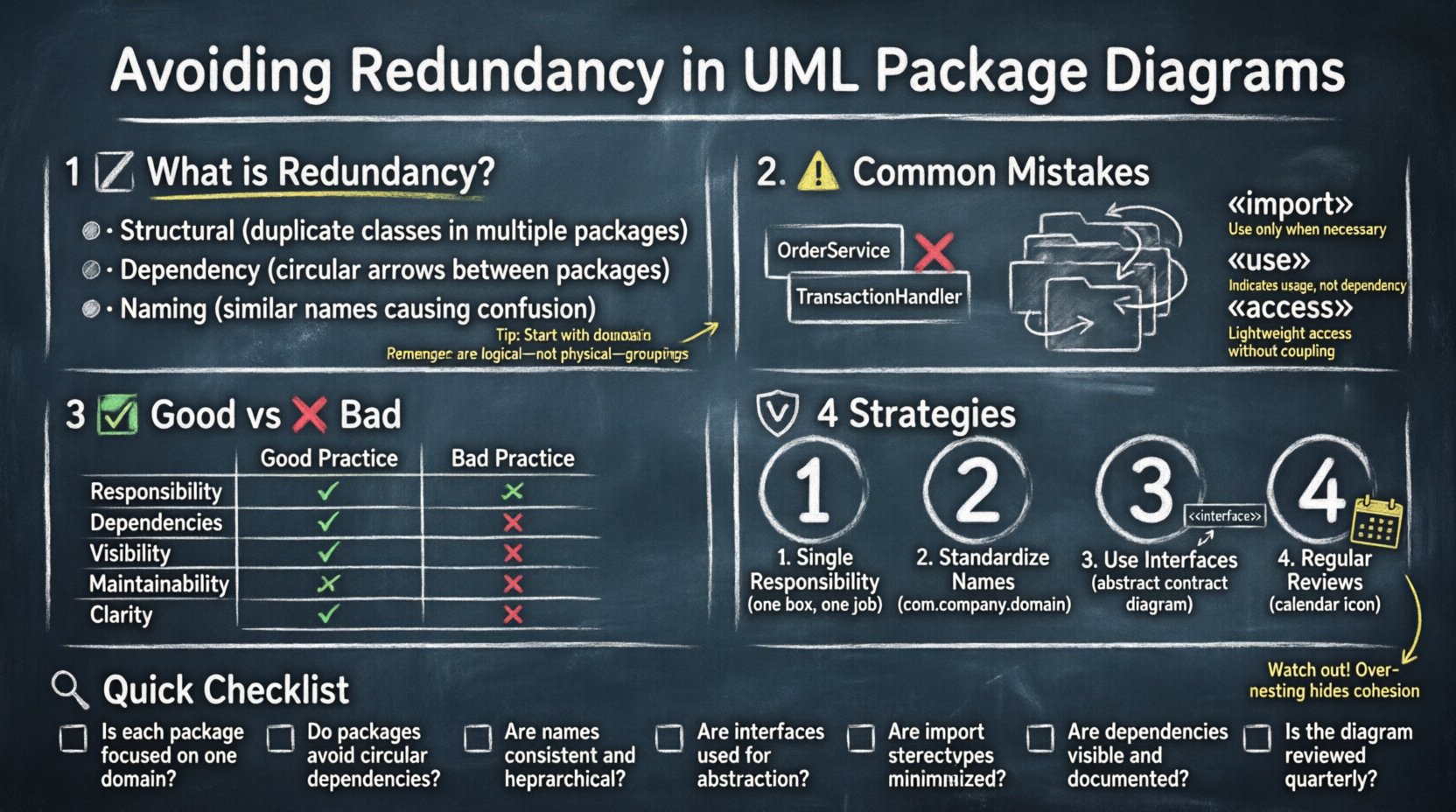
🧐 Understanding Package Redundancy 🧠
Before addressing errors, it is crucial to define what constitutes redundancy in this context. In UML modeling, redundancy does not merely mean repeating the same text. It refers to structural duplication where distinct packages claim ownership of the same functional areas, or where the hierarchy obscures rather than clarifies relationships.
- Structural Redundancy: This occurs when the same set of classes or interfaces exists in multiple packages without a clear logical reason.
- Dependency Redundancy: This happens when packages depend on each other in circular or unnecessary patterns that create loops in the dependency graph.
- Naming Redundancy: Using similar names for packages that serve different purposes, leading to ambiguity during navigation.
A well-designed package diagram acts as a map. If the map shows two roads leading to the same destination without a bridge connecting them, or if the same city is labeled with two different names, navigation becomes difficult. The goal is single-source-of-truth organization.
⚠️ Common Mistakes Leading to Redundancy ⚠️
Identifying where things go wrong is the first step toward fixing them. The following sections detail the most frequent errors made during the design phase.
1. Overlapping Functional Responsibilities
One of the most prevalent issues is allowing two or more packages to handle the same business logic. This often happens when a project grows organically without a central review of the architecture. Developers create new packages for new features, inadvertently duplicating existing functionality.
- The Symptom: You find similar class names or methods in
OrderServiceandTransactionHandlerthat perform the same calculation. - The Cause: Lack of a centralized governance model for where logic belongs.
- The Fix: Consolidate logic into a single domain package and expose it through interfaces.
2. Deep Nesting Without Purpose
Organizers sometimes create deeply nested packages to organize large codebases. While this seems tidy, it often introduces redundancy in the dependencies. A package nested five levels deep might need to import from a sibling package, creating long, convoluted paths.
- The Risk: It becomes difficult to trace where a dependency originates.
- The Impact: Changes in a parent package ripple unpredictably through the sub-packages.
- The Fix: Flatten the hierarchy. Use a logical grouping rather than a folder-like structure.
3. Ignoring Import and Export Semantics
UML package diagrams utilize specific stereotypes like «import», «use», and «access». Misusing these stereotypes creates false dependencies. If a package imports everything from another package instead of specific elements, it creates a tight coupling that mimics redundancy.
- «import»: Makes the contents of one package visible in another. Use sparingly.
- «use»: Indicates a dependency without exposing internal details. Preferred for loose coupling.
- «access»: Allows direct access to the internal structure. Avoid in standard designs.
📊 Comparison: Good vs. Bad Package Structures
To visualize the difference between a redundant design and a clean design, consider the following comparison table.
| Aspect | ❌ Redundant Design | ✅ Optimized Design |
|---|---|---|
| Responsibility | Multiple packages handle validation logic. | Single ValidationCore package handles all checks. |
| Dependencies | Circular imports between User and Auth packages. |
Auth depends on User interface; User does not depend on Auth. |
| Visibility | Deep nesting hides the root cause of errors. | Flat structure allows immediate visibility of entry points. |
| Maintainability | Updating logic requires changes in three files. | Updating logic requires changing one source file. |
| Clarity | Naming conventions vary between teams. | Consistent naming standards applied across all packages. |
🛡️ Strategies to Eliminate Redundancy 🛡️
Once you understand the mistakes, you can apply specific strategies to prevent them. These approaches focus on simplification and strict adherence to architectural principles.
1. Enforce Single Responsibility
Every package should have a single reason to change. If a package handles both database connections and user interface rendering, it is likely too broad. Splitting these concerns reduces the surface area for redundancy. When a package has one job, it is easier to verify that no other package is doing that same job.
- Review the package name. Does it imply multiple functions?
- Check the classes within. Do they share a common domain concept?
- If not, move them to a more specific package.
2. Standardize Namespace Conventions
Inconsistency in naming is a primary driver of perceived redundancy. If one team uses com.company.service and another uses com.company.api for the same functionality, confusion arises. Establishing a strict namespace convention helps the human reader and automated tools identify duplicates.
- Use a hierarchical structure based on domain, not technology.
- Ensure package names reflect the business context.
- Document the naming convention in the project wiki.
3. Utilize Interfaces for Decoupling
Direct dependencies between concrete classes often lead to duplication. If Package A uses a concrete class from Package B, and Package C needs the same logic, you might be tempted to copy the class. Instead, define an interface in Package B and implement it. Package A and C both depend on the interface, not the implementation.
- Define contracts before implementing logic.
- Allow packages to depend on abstractions.
- Reduce the need for physical duplication of code.
4. Regular Architecture Reviews
Redundancy creeps in over time. A design that was clean at the start of the project may become cluttered after six months of feature additions. Scheduled reviews are necessary to catch these issues early. During these sessions, the team should walk through the package diagram and question every link.
- Ask: “Why does this package depend on that one?”
- Ask: “Is this package necessary, or can it be merged?”
- Ask: “Does this relationship exist in the code, or just the diagram?”
🔍 Validation and Review Checklist
Before finalizing a package diagram, use the following checklist to validate against common redundancy patterns. This ensures that the model remains a reliable artifact throughout the development lifecycle.
- ✅ No Duplicate Packages: Verify that no two packages share the exact same set of classes.
- ✅ No Cyclic Dependencies: Ensure there are no loops in the dependency graph between packages.
- ✅ Clear Visibility: Confirm that
«import»is only used when absolutely necessary for visibility. - ✅ Consistent Depth: Check that nesting levels are consistent and do not exceed three to four levels.
- ✅ Logical Grouping: Verify that packages group by domain concept, not by file type (e.g., avoid
ModelsvsViewsif they belong to the same domain). - ✅ Interface Usage: Ensure concrete classes are not directly exposed to other packages without an interface layer.
- ✅ Documentation: Every package should have a brief description explaining its purpose and boundaries.
🚀 Advanced Considerations for Scalability 🚀
As systems grow, the package diagram must evolve. Redundancy management becomes harder in large-scale enterprise systems. Here are advanced considerations for maintaining clarity at scale.
1. Microservices and Distributed Packages
In distributed architectures, packages often map to services. Redundancy here is critical because it increases network traffic and deployment complexity. Ensure that data models are not duplicated across service boundaries unless necessary for performance optimization.
- Map packages directly to deployment units.
- Use API contracts to define the boundary between services.
- Avoid sharing internal package structures between services.
2. Versioning and Evolution
Packages evolve. Old versions should not clutter the current diagram. Maintain a clear history of how packages have changed. If a package is deprecated, mark it as such rather than deleting it immediately. This preserves the context for legacy code without polluting the active design.
- Use stereotypes like
«deprecated»for old packages. - Document the migration path from old packages to new ones.
- Archive old diagrams for reference but keep the active model clean.
3. Cross-Cutting Concerns
Security, logging, and caching are cross-cutting concerns. They often appear in every package, creating visual redundancy. Do not duplicate these concerns in every package diagram. Instead, create a dedicated infrastructure package that others depend on.
- Create a
Infrastructurepackage for system-wide concerns. - Reference this package via interfaces.
- Keep domain packages focused on business logic only.
📝 Summary of Best Practices
Maintaining a clean UML package diagram is an ongoing discipline. It requires vigilance against the natural tendency to add complexity as features are added. By avoiding overlapping responsibilities, deep nesting, and improper dependency usage, you create a model that supports rather than hinders development.
Focus on clarity. If a developer can look at the diagram and understand the system structure in minutes, the design is successful. If they have to guess where a class belongs or trace a dependency through five levels of nesting, redundancy has taken root. Apply the strategies outlined above to keep your architecture solid, maintainable, and efficient.
Remember that the diagram is a tool for communication. Its primary audience is the human brain, not just the compiler. A redundant diagram confuses the human reader. A redundant design confuses the machine. Ensure your design avoids both.