
Mastering Living Documentation with VP OpenDocs: The Unified Architecture
In the modern software development lifecycle, the gap between the code you write and the documentation you read often widens into a chasm. This phenomenon, known as “documentation drift,” occurs when diagrams are exported as static images, pasted into Word documents, and then forgotten. By the time the next release cycle begins, those diagrams no longer reflect reality.
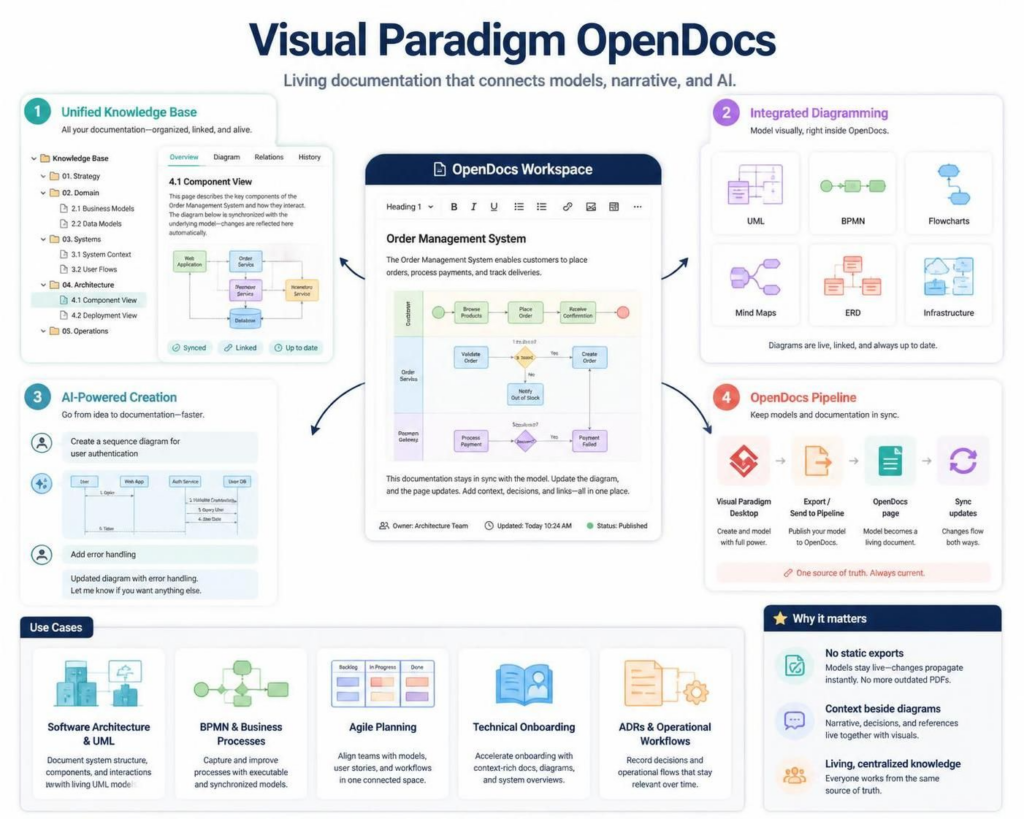
Visual Paradigm OpenDocs solves this by redefining documentation not as a static artifact, but as a living ecosystem. It bridges the gap between visual modeling and narrative writing, unifying rich-text editing, a robust diagramming suite, and generative AI into a single workspace. This tutorial explores the core architecture and modeling concepts that make OpenDocs a powerful tool for enterprise architects and technical writers.
1. The Unified Knowledge Base Architecture
The foundational philosophy of OpenDocs is to treat documentation as a centralized, hierarchical ecosystem rather than a collection of disconnected files. The system employs a “Unified Home” architecture where text and visuals coexist side-by-side.
Contextual Documentation
Unlike traditional wikis where text is separated from visuals, OpenDocs allows for Contextual Documentation. Every diagram is framed by its driving requirements, design rationale, and operational workflows. This ensures that a reader understands not just what the system looks like, but why it was designed that way.
Hierarchical Organization
The system utilizes a robust folder structure to map out entire project structures. This allows for the creation of complex knowledge trees:
- Strategy & Domain: High-level business context.
- Architecture: System context, component views, and deployment views.
- Operations: Maintenance and support workflows.
2. Integrated Diagramming & Shape Libraries
One of the primary friction points in documentation is the need to switch applications. OpenDocs eliminates this by embedding a powerful drawing tool directly into the editor canvas. This is not merely a text editor with an image plugin; it is a full-featured modeling environment.
Supported Modeling Standards
The platform supports a vast array of industry-standard notations, ensuring that the documentation speaks the language of the stakeholders:
- UML (Unified Modeling Language): Essential for software architecture, including Class, Sequence, and Component diagrams.
- BPMN (Business Process Model and Notation): Used for mapping complex business workflows and identifying process triggers.
- ERD (Entity Relationship Diagrams): For visualizing database structures and data relationships.
- IT Infrastructure Maps: To document cloud topology and network components.
3. The OpenDocs Pipeline: From Desktop to Cloud
For enterprise architects working in Visual Paradigm Desktop or VP Online, the system offers a seamless Asset Pipeline. This workflow ensures that the heavy lifting of professional modeling happens in the dedicated tool, while the narrative and collaboration happen in OpenDocs.
The 3-Step Workflow
- Model: Build or refine your professional models (UML, BPMN) inside the desktop application.
- Push: Right-click your diagram and select Export > Send to OpenDocs Pipeline.
- Embed & Sync: Inside OpenDocs, insert the diagram. When the model changes upstream, the update loops back seamlessly, ensuring your documentation never goes stale.
4. AI-Powered Generation & Chat
OpenDocs leverages generative AI to accelerate the documentation process, moving beyond simple text generation to structural modeling.
Text-to-Diagram
The system allows you to skip manual alignment and box-dragging. By typing a plain text prompt, the AI generates the structural layout instantly. This is particularly useful for rapid prototyping of system architectures.
Conversational Refinement
Once a diagram is generated, you can iteratively modify it using natural language commands. For example, you can instruct the AI to “Add error handling to this workflow” or “Link the Checkout module to the Payment class.”
Example: AI Interaction
Consider the following interaction flow for creating a sequence diagram:
User: "Create a sequence diagram for user authentication."
AI: [Generates basic flow: User -> Login -> Auth Service -> Database]

User: "Add error handling to this workflow."
AI: [Updates diagram: Inserts decision diamond for "Valid Credentials?" with 'No' branch leading to 'Display Error' node]
5. Recommended Use Cases
OpenDocs scales across various organizational needs, serving as a central hub for collaboration.
- Software Architecture & Engineering Specs: Document system context, API boundaries, and component layouts alongside live UML diagrams and Architecture Decision Records (ADRs).
- Business Process Management (BPM): Combine BPMN execution workflows with narrative descriptions to identify process triggers and exception paths.
- Project Management & Agile Planning: Maintain Work Breakdown Structures (WBS) and Gantt timelines in a single collaborative view.
- Technical Onboarding Hubs: Build centralized internal wikis containing glossary terms and deployment flows.
Conclusion
Visual Paradigm OpenDocs represents a significant shift in how technical information is managed. By eliminating the friction between design tools and documentation platforms, it ensures that your documentation is not just a static record of the past, but a living, breathing reflection of your system’s current state. Whether you are a software architect mapping complex UML models or a project manager tracking agile roadmaps, OpenDocs provides the unified environment necessary for modern collaboration.