
Mastering BPMN Modeling: 6 Critical Mistakes to Avoid for High-Quality Process Design
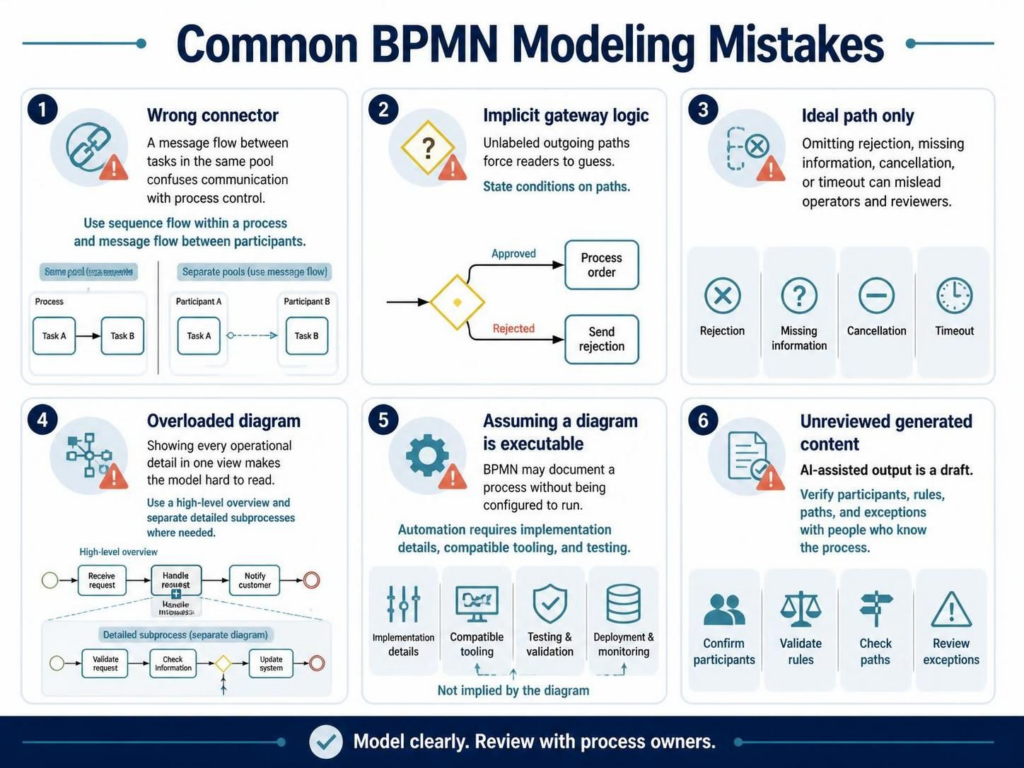
In the world of Business Process Management, a diagram is only as good as its clarity. Whether you are designing a workflow for a banking transaction or a customer service ticket, your model serves as the blueprint for both human operators and automation engines. Using tools like Visual Paradigm combined with AI-assisted generation can accelerate your workflow, but it introduces specific pitfalls if you are not vigilant.
This tutorial walks you through the six most common BPMN modeling mistakes—extracted from industry standards—and how to correct them to ensure your process maps are accurate, executable, and easy to understand.
1. The Connector Confusion: Message Flow vs. Sequence Flow
The first rule of BPMN is to understand the scope of your interaction. A frequent error occurs when modelers use the wrong connector type within the same context. This often happens when trying to depict a conversation between two tasks that belong to the same business actor.
The Mistake: Using a Message Flow (dashed line) to connect two tasks inside the same pool. This confuses the reader because message flows are strictly reserved for communication between different participants (different pools).
The Fix: Use Sequence Flow (solid line with an arrow) for tasks within the same process. Reserve Message Flow for interactions between different Pools (e.g., between “Customer” and “Bank”).
Visual Comparison
- Incorrect: Task A —(dashed)→ Task B [Same Pool]
- Correct: Task A —(solid)→ Task B [Same Pool]
- Correct: Participant A —(dashed)→ Participant B [Different Pools]
2. Implicit Gateway Logic: The “Guessing Game”
Gateways (diamond shapes) control the branching logic of a process. A critical error in modeling is leaving the outgoing paths unlabeled. This forces the reader to mentally simulate the process flow to guess which path is taken, which is a recipe for misinterpretation.
The Mistake: A gateway with two outgoing arrows, but neither has a condition attached.
The Fix: Always label your gateway paths with specific conditions. For example, label one path Approved and the other Rejected. This removes ambiguity and ensures that anyone reviewing the model knows exactly under what circumstances the process diverges.
3. The “Happy Path” Fallacy: Modeling Only the Ideal Scenario
One of the most dangerous errors is designing a process that works perfectly every time it runs. In the real world, things go wrong. If your BPMN diagram only shows the ideal path, it misleads operators and reviewers into thinking the process is foolproof.
The Mistake: A linear process that never encounters errors, cancellations, or timeouts.
The Fix: Explicitly model exceptions. Your diagram must include paths for:
- Rejection: What happens if a user denies a request?
- Missing Information: What happens if a required field is empty?
- Cancellation: How does the user abort the process?
- Timeout: What happens if a task takes too long?
4. Overloading the Diagram: Cognitive Load
A single diagram should not attempt to show every single operational detail of a complex system. Trying to cram everything into one view makes the model hard to read and prone to errors.
The Mistake: A diagram with hundreds of tasks and gateways, making the flow impossible to trace.
The Fix: Adopt a hierarchical approach. Create a High-Level Overview (Level 0 or Level 1) that shows the major phases. Then, expand specific phases into Detailed Subprocesses (Level 2) in separate diagrams. This keeps the main view clean while allowing deep dives where necessary.
5. The Executability Assumption: Documentation vs. Code
A common misconception is that a visually complete BPMN diagram is automatically executable software. While tools like Visual Paradigm can generate code, a diagram is often just a documentation artifact.
The Mistake: Assuming the process engine can run the diagram exactly as drawn without additional configuration.
The Fix: Remember that automation requires implementation details. A standard BPMN diagram does not imply:
- Implementation details: Specific API endpoints or database logic.
- Compatible tooling: The specific BPM engine configuration.
- Testing & Validation: Proof that the logic works in a sandbox.
- Deployment: The actual release of the workflow.
6. Unreviewed Generated Content: AI as a Draft Tool
With the rise of AI-assisted modeling, the temptation is to accept the generated output as the final truth. However, AI generates based on patterns, not business reality.
The Mistake: Accepting AI-generated diagrams without human verification.
The Fix: Treat AI output as a draft. You must verify the participants, rules, paths, and exceptions with actual subject matter experts (SMEs) who know the process. AI can suggest the structure, but humans must validate the business logic.
Conclusion
By avoiding these six common mistakes, you ensure that your BPMN models are not just pretty pictures, but robust blueprints for process improvement. Always model clearly, review with process owners, and remember that a good diagram tells the whole story—including the errors.