
Mastering UML Use Case AI: From Text Prompt to Architecture
In the realm of software architecture, few challenges are more daunting than translating vague business requirements into precise technical models. Historically, creating a Use Case Diagram—a blueprint for how actors interact with a system—required hours of manual drawing and formatting. Today, Visual Paradigm’s AI-powered modeling suite has revolutionized this workflow. By leveraging natural language processing, architects can convert plain English descriptions into professional, industry-standard UML diagrams in seconds.
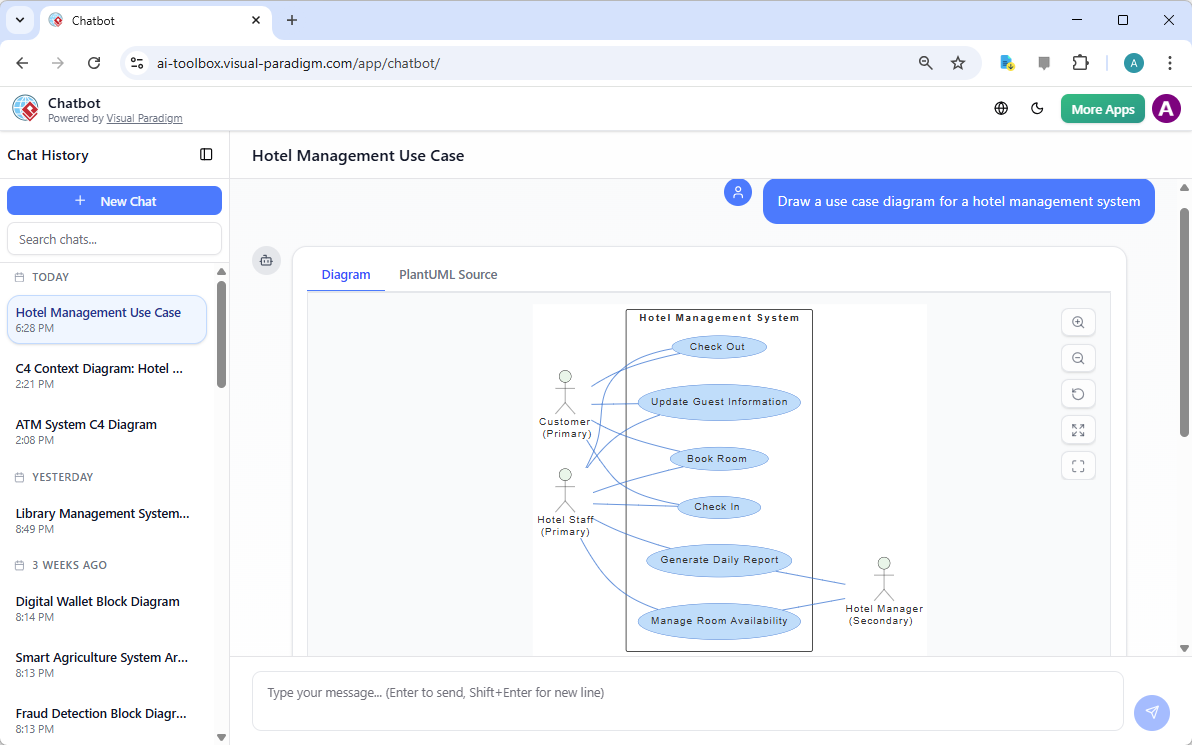
This tutorial explores the architecture behind the visual output shown in the interface, breaking down how the AI interprets your system’s logic and maps it to the correct UML syntax.
Deconstructing the System Architecture
When you analyze the generated diagram for the “Hotel Management System,” you are looking at a classic Level 0 Data Flow perspective. The AI has identified specific components that are critical to the system’s definition:
1. The System Boundary
The large rectangle labeled Hotel Management System represents the system boundary. In UML modeling, this box defines the scope of the software. Anything outside the box is external to the system, while anything inside represents a function the system provides.
2. Identifying Actors
Actors represent the entities that interact with the system. The AI correctly categorized these based on the prompt:
- Customer (Primary): The main user initiating the interaction (e.g., checking in).
- Hotel Staff (Primary): Operational staff managing the day-to-day functions (e.g., generating reports).
- Hotel Manager (Secondary): A higher-level actor often responsible for oversight or less frequent interactions (e.g., managing room availability).
3. Mapping Use Cases
The ovals inside the boundary represent specific functions or goals the system achieves. The AI mapped the following interactions:
- Check Out / Check In: Core transactional flows for the Customer.
- Book Room: A critical service provided to the Customer.
- Update Guest Information: A data maintenance task.
- Generate Daily Report: A reporting function for Staff.
- Manage Room Availability: An administrative function for the Manager.
Understanding the Relationships
The lines connecting the stick figures (actors) to the ovals (use cases) are Association Relationships. In a formal UML specification, these lines indicate that the actor is authorized to initiate or participate in that specific use case.
Notice how the Hotel Manager interacts specifically with Manage Room Availability, while the Customer is linked to the transaction flows like Check In. The AI ensures that these relationships are logically sound, preventing common errors like an actor being linked to a use case they physically cannot access.
From Natural Language to PlantUML Code
One of the most powerful features of this AI integration is the ability to view the underlying code. Visual Paradigm generates this diagram using PlantUML, a text-based diagramming language. This allows developers to version control their diagrams just like source code.
If you inspect the “PlantUML Source” tab in the interface, you will see code that looks structurally similar to this:
@startuml
skinparam usecaseBackgroundColor White
skinparam usecaseBorderThickness 1

package "Hotel Management System" {
    usecase "Check Out" as UC1
    usecase "Update Guest Information" as UC2
    usecase "Book Room" as UC3
    usecase "Check In" as UC4
    usecase "Generate Daily Report" as UC5
    usecase "Manage Room Availability" as UC6
}

actor "Customer (Primary)" as C
actor "Hotel Staff (Primary)" as S
actor "Hotel Manager (Secondary)" as M

C --> UC1
C --> UC2
C --> UC3
C --> UC4

S --> UC5
S --> UC2

M --> UC6
@enduml
This code defines the package, the actors, the use cases, and the specific associations between them. The AI renders this text into the visual representation you see on the screen.
Iterative Refinement
The power of this tool lies in its conversational nature. You do not need to manually edit the code. If you need to add a new actor, such as a “Payment Processor,” you simply type:
“Add Payment Processor as an external actor and include secure online payment flow.”
The AI will instantly update the model, add the new actor, and connect the new relationship, allowing you to focus on the business logic rather than the visual drafting.