
Mastering the Visual Paradigm Ecosystem: From Code to Collaborative AI Modeling
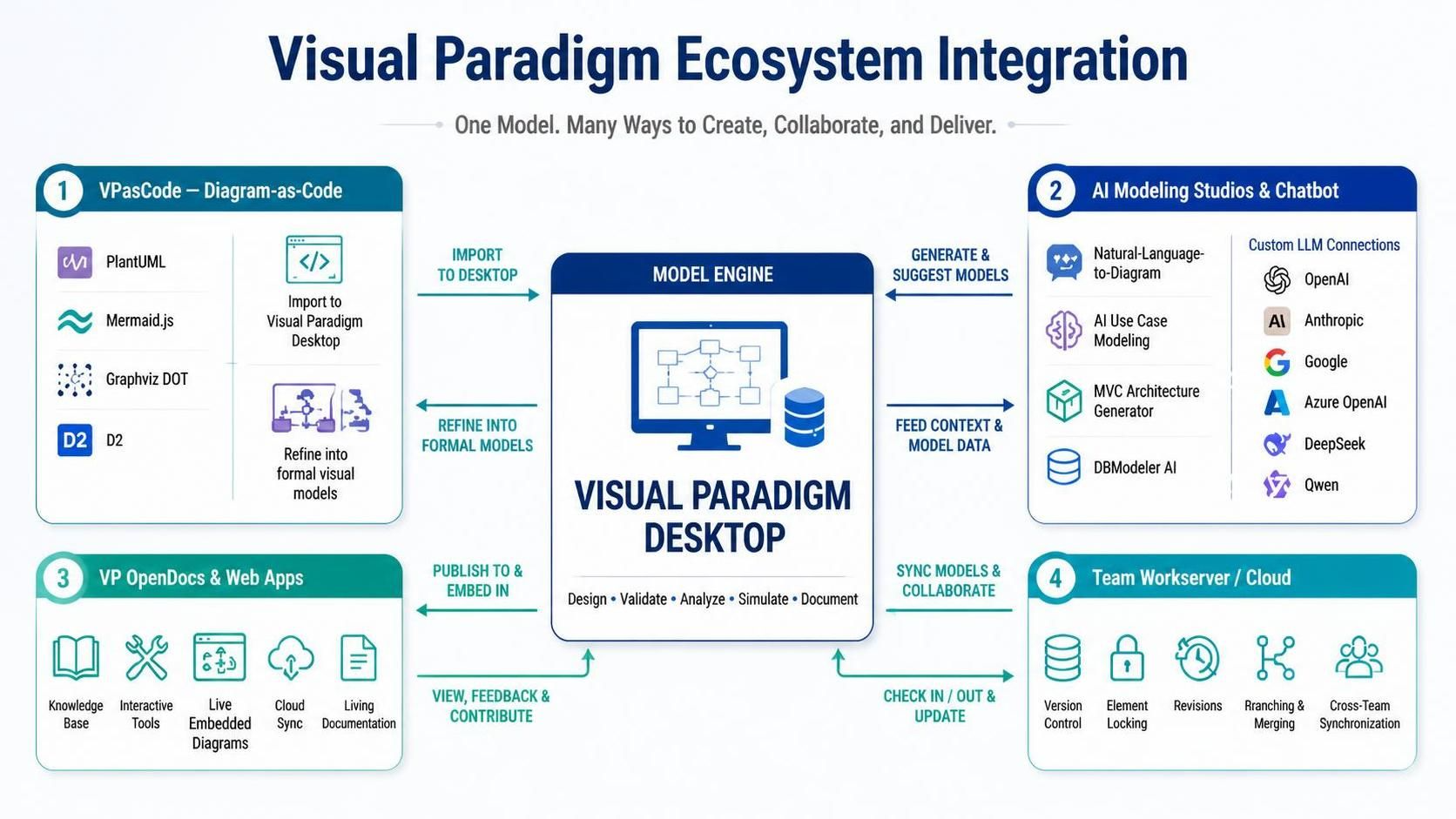
In modern software architecture, the era of siloed modeling tools is over. The Visual Paradigm ecosystem is built on a central philosophy: One Model. Many Ways to Create, Collaborate, and Deliver. At the heart of this architecture lies the Visual Paradigm Desktop, which acts not merely as a drawing tool, but as the central Model Engine that orchestrates data across web applications, AI assistants, and version-controlled repositories.
This tutorial breaks down the four pillars of this integration ecosystem, demonstrating how to leverage text-based coding, generative AI, and cloud synchronization to streamline your system design process.
1. VPasCode: The Diagram-as-Code Pipeline
For developers and architects who prefer speed and version control, the ecosystem supports a “Diagram-as-Code” workflow via VPasCode. This module allows you to define system structures declaratively using text-based languages rather than dragging and dropping mouse elements.
The Hybrid Workflow
The integration creates a seamless bridge between rapid prototyping and formal engineering:
- Declarative Scripting: You write a script using standard diagram languages such as PlantUML, Mermaid.js, Graphviz DOT, or D2.
- Import to Desktop: This script is imported directly into Visual Paradigm Desktop, automatically rendering the visual model.
- Refinement: The textual prototype transitions into a formal, traceable visual model within the Desktop environment, ready for deep analysis.
This hybrid approach allows teams to maintain the speed of coding while retaining the robust feature set of a graphical modeling tool.
2. AI Modeling Studios & Chatbot Co-Pilot
The ecosystem is powered by advanced AI integration that moves beyond simple chat interfaces into actual generative modeling. Visual Paradigm Desktop connects with specialized AI Studios to automate the creation of complex architectural artifacts.
Generative Model Creation
Through the AI Chatbot or web tools, you can provide high-level text descriptions. The system converts this natural language into visual layouts and pushes them directly to the Desktop canvas. Specific AI Studios available include:
- AI Use Case Modeling Studio: Generates functional requirement diagrams.
- AI MVC Architecture Generator: Creates Model-View-Controller structures.
- DBModeler AI: Auto-generates database schemas.
Custom Enterprise Endpoints
For organizations prioritizing data privacy, the architecture supports Custom LLM configurations. You are not limited to public models; you can connect your Desktop environment to:
- OpenAI
- Anthropic
- Google (Vertex AI)
- Azure OpenAI
- DeepSeek
- Qwen
By bringing your own API keys, teams can ensure that sensitive architectural data never leaves their secure enterprise environment.
3. VP OpenDocs & Cloud Knowledge Base
A model is useless if it remains isolated in a local file. The VP OpenDocs integration transforms diagrams into “living elements” of a knowledge base.
Once a model is created in the Desktop engine, it syncs with the VP Cloud. From there, it can be embedded directly into external platforms like WordPress or internal documentation wikis. This is achieved via interactive SVG/iframe containers.
The “Living” Advantage: Unlike static images, these embedded diagrams update automatically. When an architect modifies a system component in the Desktop application, the published documentation reflects that structural change instantly, ensuring the team always has access to the source of truth.
4. Team Workserver & Collaboration
Enterprise modeling requires robust version control. The ecosystem integrates with the Visual Paradigm Team Workserver (or cloud backend) to facilitate real-time, multi-user collaboration.
Advanced Versioning
The system handles complex engineering requirements including:
- Element-level Locking: Prevents conflicting edits on specific parts of a diagram.
- Revision Control: Tracks the history of changes.
- Branching & Merging: Allows teams to experiment with different architectural paths before committing to the main branch.
External Toolchain Connectivity
The architecture does not stop at the modeling tool. Direct plugins for Eclipse, IntelliJ IDEA, and Visual Studio keep developer codebases aligned with the architectural definitions. Similarly, integrations with Jira and Confluence bridge the gap between high-level system design and agile project management backlogs.