
From Static to Living: Architecting the Visual Paradigm AI Ecosystem
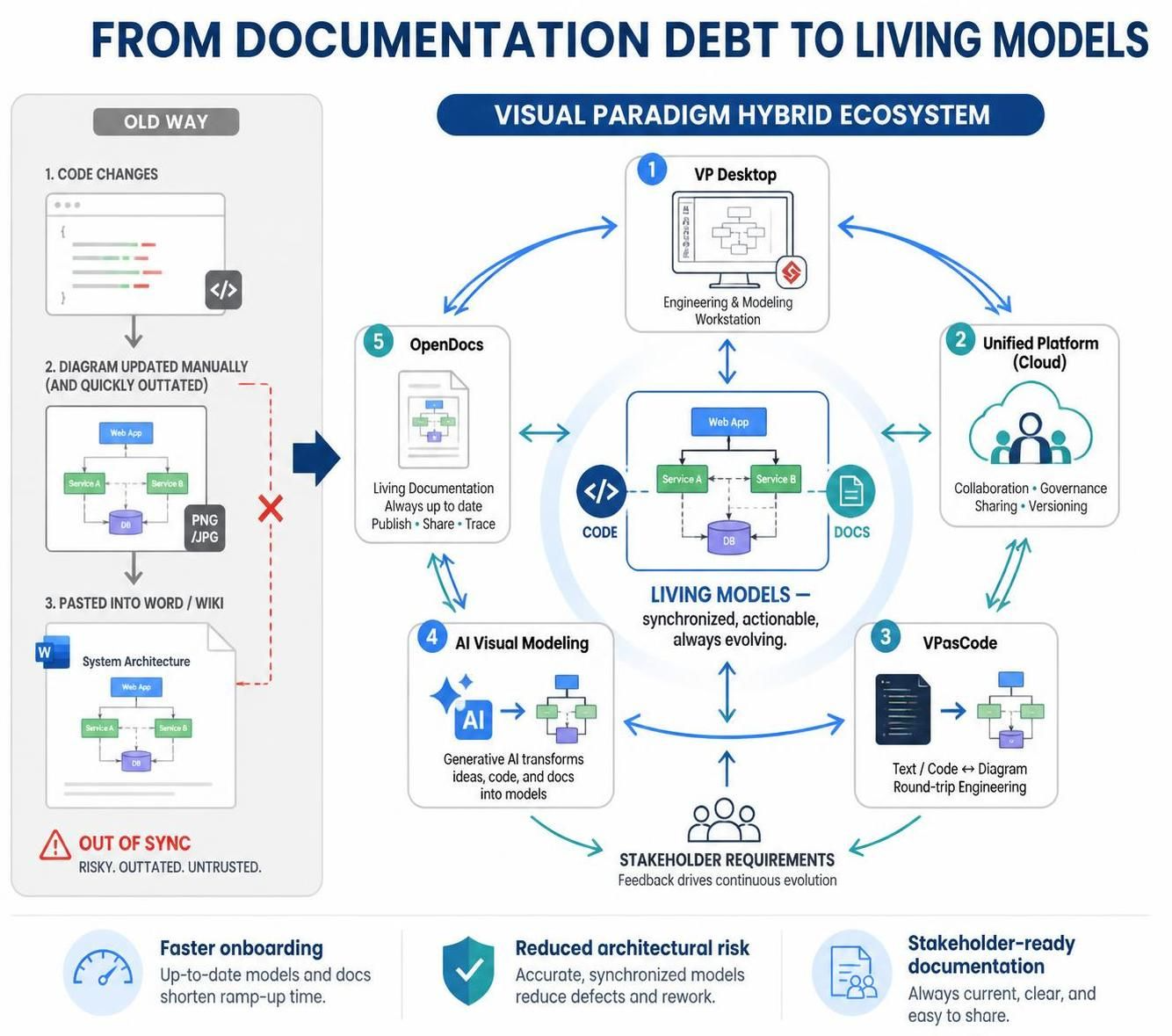
In the realm of Enterprise Architecture (EA), a persistent challenge has long plagued organizations: “Documentation Debt.” For decades, the standard workflow involved creating diagrams in isolation, exporting them as static images (PNG or JPG), and pasting them into Word documents or wikis. The result? The moment the code changed, the diagram became obsolete. This disconnect between engineering reality and architectural documentation creates significant risk, slows down team onboarding, and frustrates stakeholders.
Visual Paradigm (VP) has evolved to solve this by moving beyond a traditional desktop modeling tool into a Hybrid Ecosystem. This guide explores how to leverage the integration of VP Desktop, the Unified Platform (Cloud), VPasCode, AI Visual Modeling, and OpenDocs to create a live, bi-directional loop between text-based code, generative AI, desktop engineering, and dynamic documentation.
The Shift: From “Old Way” to “Living Models”
Understanding the architecture of this ecosystem requires a comparison between the legacy process and the modern “Living Model” approach.
The Legacy “Old Way” (The Disconnect)
The traditional workflow depicted in the diagram highlights a broken feedback loop:
- Code Changes: Developers modify the codebase.
- Manual Updates: Architects or engineers must manually update the diagram to reflect these changes. This step is often skipped or done quickly and incorrectly.
- Static Export: The diagram is exported as a PNG/JPG and pasted into a Word document or Wiki.
- Out of Sync: The documentation is now risky, outdated, and untrusted. It no longer reflects the system’s actual state.
The Visual Paradigm Hybrid Ecosystem (The Solution)
The new architecture creates a “Living Model”—a synchronized, actionable, and always-evolving representation of your system. This ecosystem consists of five interconnected components that drive a continuous cycle of engineering and documentation.
Core Components of the Hybrid Ecosystem
1. VP Desktop: The Engineering Workstation
VP Desktop remains the powerful, local engine for heavy-duty engineering and modeling. It serves as the primary interface for architects to design complex system architectures, database schemas, and workflows. In the new ecosystem, it is no longer an island; it acts as the central hub for authoring models that feed into the cloud and documentation layers.
2. Unified Platform (Cloud): Collaboration & Governance
The Cloud layer acts as the single source of truth for the organization. It facilitates:
- Collaboration: Allowing distributed teams to work on the same models simultaneously.
- Governance: Ensuring architectural standards are met across the enterprise.
- Sharing & Versioning: Maintaining a clear history of changes and enabling secure access control.
3. VPasCode: Text-to-Diagram Round-Trip Engineering
One of the most powerful features of this ecosystem is VPasCode. It bridges the gap between text-based code and visual diagrams through round-trip engineering.
Round-trip engineering means changes can flow in both directions:
- Code to Diagram: You can write code or text descriptions, and VPasCode generates the corresponding diagram.
- Diagram to Code: You can modify the visual model, and the system generates or updates the code structure.
This ensures that the diagram and the codebase remain perfectly synchronized, eliminating the “manual update” bottleneck.
4. AI Visual Modeling: Generative Engineering
The ecosystem leverages Generative AI to transform ideas into models. Instead of manually drawing boxes and lines, architects can use AI prompts to generate diagrams from requirements or code snippets. This component acts as a catalyst, speeding up the initial modeling phase and allowing for rapid prototyping of system architectures.
5. OpenDocs: Living Documentation
The final piece of the puzzle is OpenDocs. This component transforms the static PNG/JPGs of the past into “Living Documentation.” OpenDocs automatically publishes the current state of the models, ensuring that documentation is always up to date. It enables publishing, sharing, and tracing of requirements directly from the model, providing stakeholders with a clear view of the system without requiring them to open the modeling tool.
Workflow: The Continuous Evolution Loop
The power of the Hybrid Ecosystem lies in the flow of data between these components, driven by Stakeholder Requirements.
- Input: Stakeholder requirements and feedback drive the process.
- Generation: AI Visual Modeling and VPasCode generate initial models or code from these requirements.
- Engineering: Developers and Architects work in VP Desktop to refine the architecture.
- Sync: The Unified Platform (Cloud) ensures that the code and diagrams remain synchronized.
- Output: OpenDocs publishes the latest, accurate diagrams as Living Documentation.
This loop ensures that documentation is not a byproduct of development but an integral part of the engineering lifecycle.
Key Benefits of the Living Model Approach
Adopting this ecosystem architecture delivers three major benefits:
- Faster Onboarding: Up-to-date models and docs shorten ramp-up time for new team members. They can see the current system architecture instantly without hunting for outdated documents.
- Reduced Architectural Risk: Accurate, synchronized models reduce defects and rework. When the diagram matches the code, you can trust the architecture decisions.
- Stakeholder-Ready Documentation: Documentation is always current, clear, and easy to share. Stakeholders receive the latest version of the system design automatically.
By moving from static images to Living Models, organizations can finally break the cycle of documentation debt and build a truly agile, transparent enterprise architecture.