


Introduction
As a senior software architect who has spent over a decade wrestling with the perennial challenge of keeping documentation in sync with rapidly evolving codebases, I can confidently say that the gap between diagramming tools and documentation platforms has been one of the most persistent pain points in our industry. We’ve all been there: spending hours crafting a perfect architecture diagram in one tool, exporting it as a PNG, uploading it to a wiki or document platform, only to have it become obsolete within weeks as the system evolves. The manual overhead of updating these visuals creates what we call “documentation drift”—a slow but steady divergence between reality and representation.
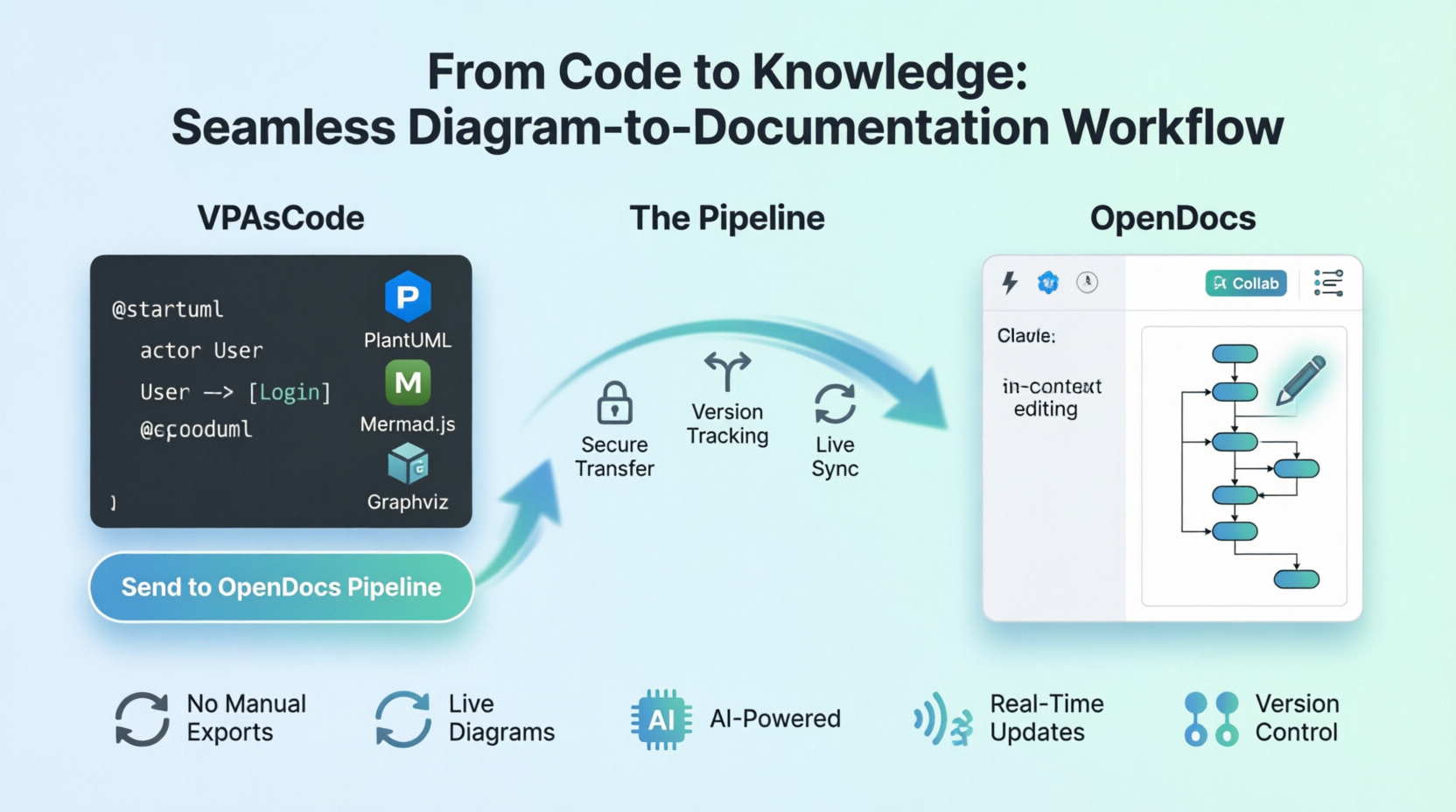
When Visual Paradigm announced the integration between VPasCode and OpenDocs, I was initially skeptical. Having tried numerous “seamless” integrations before that promised more than they delivered, I approached this new pipeline with cautious optimism. However, after three months of daily use across multiple projects, I’m convinced that this integration represents a genuine paradigm shift in how technical teams approach living documentation. This case study shares my journey from skeptic to advocate, offering practical insights for both experienced practitioners looking to optimize their workflows and beginners taking their first steps into integrated documentation practices.
Understanding the Tools: VPasCode and OpenDocs Explained
Before diving into the integration itself, let me briefly introduce the two platforms that form the backbone of this workflow.
VPasCode is Visual Paradigm’s text-to-diagram platform that allows creators to build rich visuals using popular formats like PlantUML, Mermaid.js, and Graphviz. What sets it apart is its real-time preview capability and support for an extensive catalog of diagram types—from simple flowcharts to complex ArchiMate enterprise models. Whether you’re a developer who prefers writing code over dragging shapes, or a technical writer who needs quick visual representations, VPasCode provides a unified environment for rendering text-to-diagram syntaxes instantly.
OpenDocs, on the other hand, is Visual Paradigm’s next-generation, AI-powered knowledge management platform. Unlike traditional documentation tools where images are static snapshots, OpenDocs treats diagrams as live, interactive elements that remain synchronized with their source models. It combines rich text editing capabilities with hierarchical folder structures, making it ideal for organizing complex project documentation while maintaining web accessibility through any modern browser.
The magic happens when these two platforms connect through the newly introduced pipeline integration, creating a seamless bridge between diagram creation and documentation.
Real-World Use Cases: Where the Integration Shines
Software Architecture & Technical Specifications
My first major test of the VPasCode-to-OpenDocs pipeline came during a microservices migration project. As the lead architect, I needed to document a complex system architecture involving twelve interconnected services, each with distinct responsibilities and communication patterns.
Traditionally, this would have involved creating the diagram in a modeling tool, exporting it, uploading it to our Confluence wiki, and then writing the accompanying technical specification separately. Any change to the architecture meant repeating this entire process—a tedious cycle that often led to outdated diagrams lingering in production documentation.
With the new integration, the workflow became remarkably streamlined. I started by drafting the system architecture using PlantUML inside VPasCode, leveraging its support for C4 model notation to create clear, layered views of the system. Once the logic looked solid, I simply clicked the “Send to OpenDocs Pipeline” button. Within seconds, the diagram appeared in my OpenDocs workspace, ready to be embedded into the technical specification document I was simultaneously authoring.
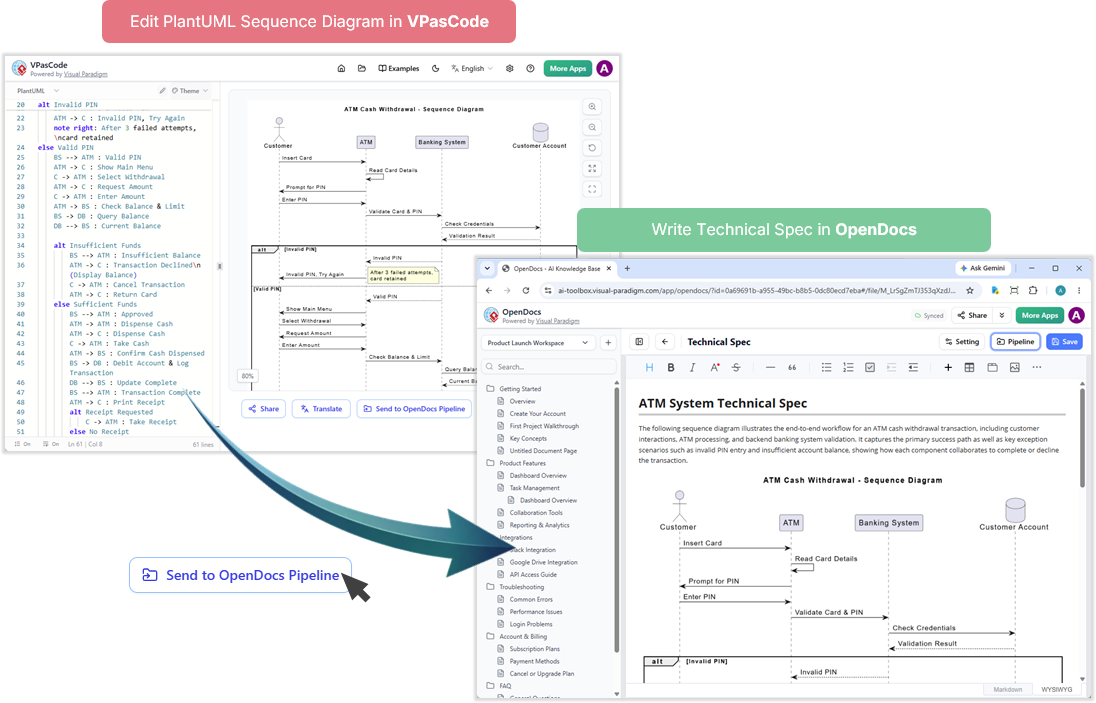
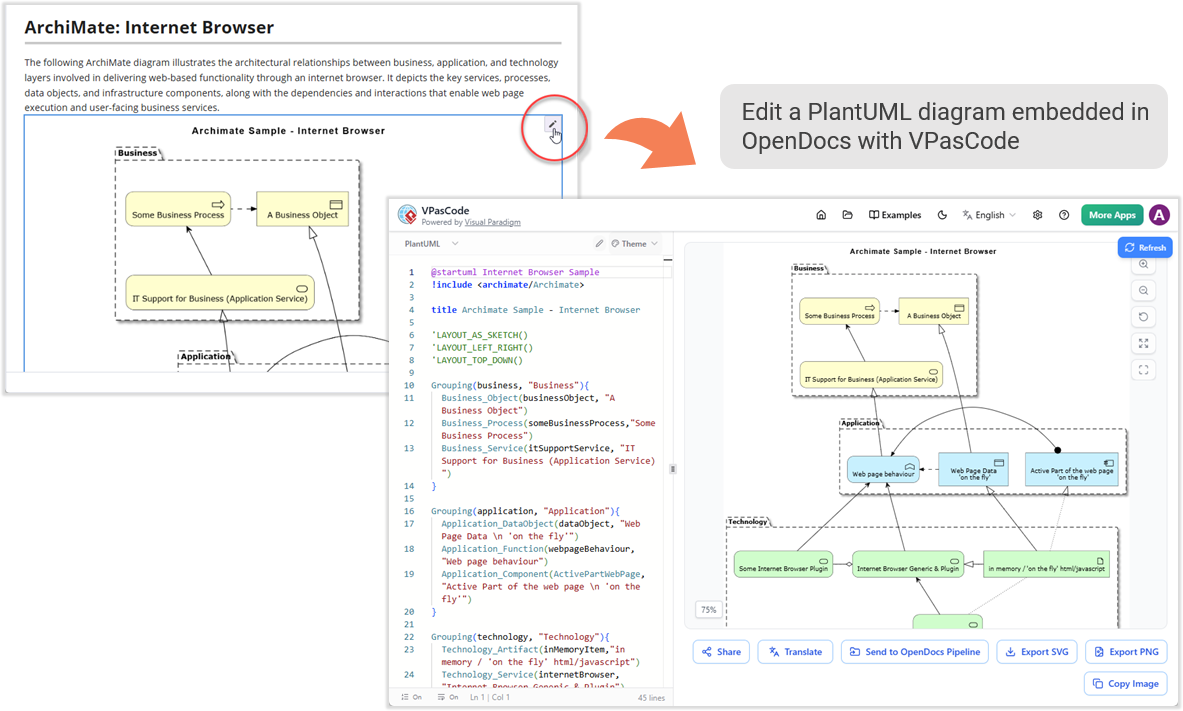
What impressed me most wasn’t just the speed of transfer, but the quality of the integration. The diagram remained “live” within OpenDocs, meaning that when I later needed to add a new service to the architecture, I could click the pencil icon on the embedded image, make my changes in VPasCode, and the updated diagram would automatically reflect in the documentation. No re-exporting, no re-uploading, no version confusion.
Agile Sprint Retrospectives & Project Roadmaps
Our project management team also benefited significantly from this integration. During our bi-weekly sprint retrospectives, we needed to quickly visualize workflow bottlenecks, resource allocation issues, and timeline adjustments. Previously, this involved someone manually creating charts in Excel or PowerPoint, then sharing them via email or uploading them to shared drives—a process that fragmented information and made historical tracking difficult.
Now, our project manager uses Mermaid.js within VPasCode to create Kanban boards, Gantt charts, and timeline visualizations directly from textual descriptions. These diagrams are piped straight into our team handbook in OpenDocs, creating a centralized, searchable repository of sprint documentation that evolves with each iteration.
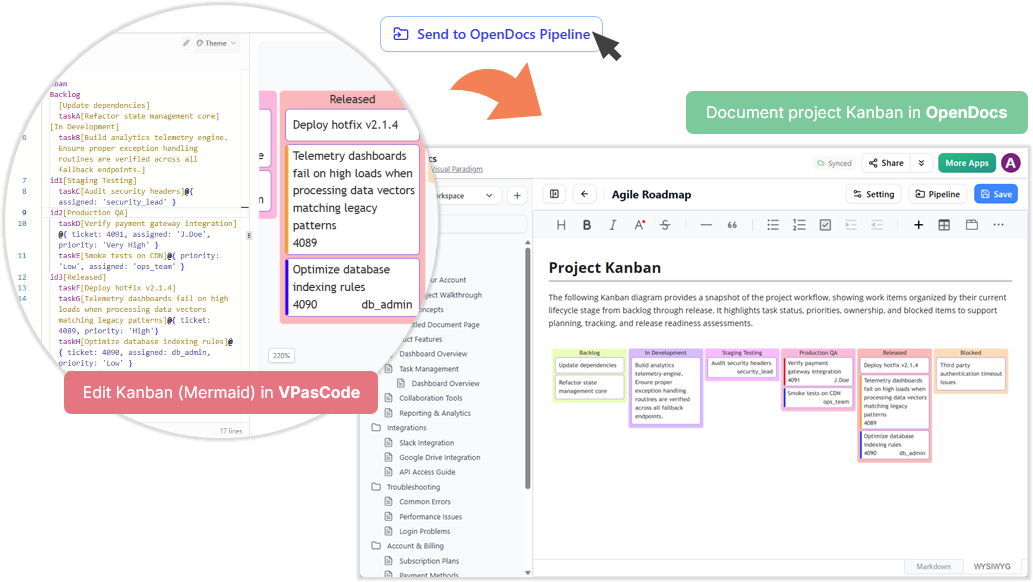
The collaborative aspect has been particularly valuable. Team members can view the latest sprint metrics and roadmap adjustments in real-time, without waiting for someone to manually update shared files. The hierarchical folder structure in OpenDocs allows us to organize retrospectives by quarter, sprint, and theme, making it easy to identify patterns and track improvements over time.
Rapid Documentation Updates in Fast-Paced Environments
Perhaps the most compelling use case emerged during a critical incident response scenario. When a production issue required immediate changes to our data processing pipeline, our technical writer needed to update the corresponding documentation within hours—not days.
In the past, this would have meant coordinating with the engineering team to get updated diagrams, waiting for exports, and manually replacing images in the documentation. With the VPasCode-to-OpenDocs pipeline, the process was dramatically simplified. The engineer modified the sequence diagram in VPasCode to reflect the new error handling logic, sent it through the pipeline, and the technical writer inserted the updated diagram into the runbook within minutes.
The ability to click the tiny Pencil button located at the top right of the inserted image inside OpenDocs proved invaluable. This action securely opened the code script back inside the VPasCode editor, allowing for quick refinements without losing context or breaking the documentation flow.
Step-by-Step Guide: Mastering the 5-Step Pipeline
For those new to this integration, here’s a detailed walkthrough of the workflow that has become second nature to our team:
Step 1: Initiate the Transfer
Inside the VPasCode interface, look under the diagram viewer on the right-hand side and click the “Send to OpenDocs Pipeline” button. This simple action triggers the packaging process that prepares your diagram for transfer.
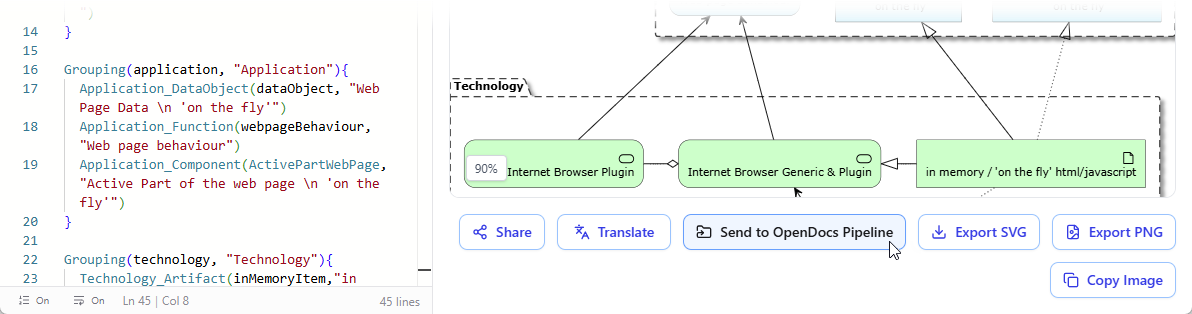
Pro Tip: Make sure your diagram renders correctly in the preview pane before sending. While the pipeline preserves your code, starting with a clean visualization saves time downstream.
Step 2: Add Context (Optional but Recommended)
A prompt will appear asking for an optional description. I strongly recommend using this field to note down details about the diagram, log a brief changelog, or indicate which documentation section it belongs to. Even a simple note like “Updated authentication flow for OAuth2 implementation – June 2026” can save hours of confusion later when you’re searching through dozens of diagrams.
Step 3: Confirm and Send
Click Confirm. Your diagram code and preview are instantly packaged and securely routed to your OpenDocs workspace pipeline. At this point, you have a choice: continue refining your code in VPasCode if you’re iterating on multiple versions, or head directly over to OpenDocs to integrate the diagram into your documentation.
Step 4: Access the Pipeline
Navigate over to your OpenDocs Dashboard. Edit any documentation page where you want the visual to live and open up the Pipeline pane. Your newly sent diagram will be waiting for you in the list, complete with any contextual notes you added.
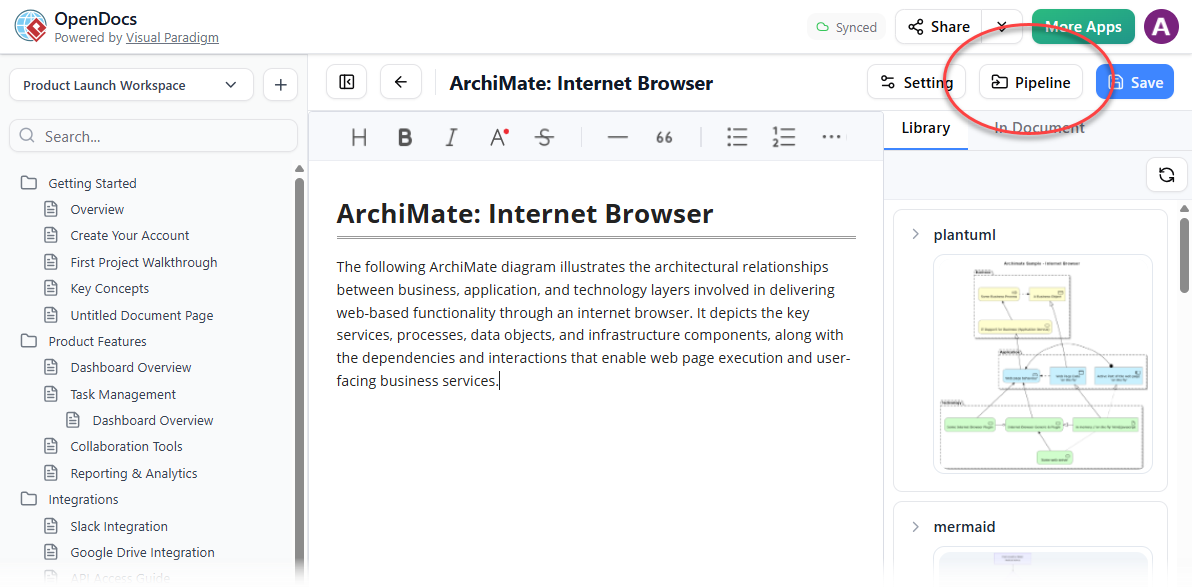
Beginner’s Note: If you don’t see your diagram immediately, check that you’re logged into the same Visual Paradigm account across both platforms. The pipeline is account-specific, so mismatched credentials are the most common reason for missing transfers.
Step 5: Insert and Publish
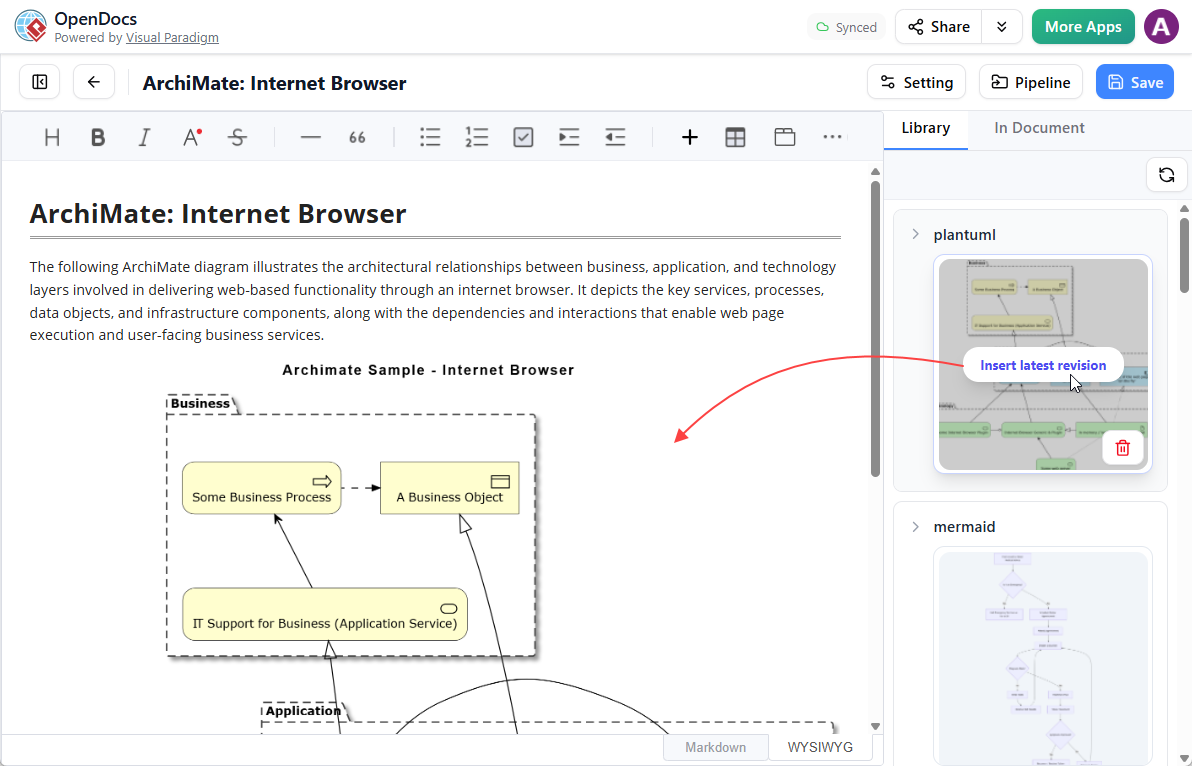
Hover over the thumbnail of your diagram inside the Pipeline pane, click the Insert button, and watch it drop perfectly into your document. From there, you can continue typing out the rest of your knowledge base page, adding explanatory text, cross-references, or additional sections as needed.
Advanced Features: Beyond Basic Diagram Transfer
While the basic pipeline functionality is impressive on its own, several advanced features have proven particularly valuable in our enterprise environment:
Live Diagram Embedding and Version Control
Unlike standard tools where images are static snapshots, visuals in OpenDocs remain live. This means that when changes occur in the source model, the documentation can automatically update to reflect the latest revision. The background version control tracking has eliminated countless instances of “which version of this diagram is current?” questions during code reviews and stakeholder presentations.
AI-Powered Enhancements
Both platforms leverage AI capabilities that complement the pipeline integration. In VPasCode, paid editions unlock advanced features like AI code error fixing and AI translation, which have been invaluable when working with international teams or debugging complex PlantUML syntax. In OpenDocs, the AI assistants can draft text, summarize complex reports, or even generate diagrams from plain English prompts—creating a powerful feedback loop where natural language descriptions can seed visual models that then feed back into comprehensive documentation.
Cross-Platform Ecosystem Integration
The VPasCode-to-OpenDocs pipeline is part of a broader Visual Paradigm ecosystem that includes multiple entry points for content creation:
- Desktop Modeling to Docs: Enterprise-grade blueprints from Visual Paradigm Desktop can be sent seamlessly to the documentation pipeline
- VP Online to Docs: Web-based cloud diagrams export natively into OpenDocs
- Digital Bookshelves to Docs: Interactive flipbooks and organized digital bookshelves embed straight into knowledge portals
- AI Chatbots to Docs: AI-generated visual concepts send directly into the OpenDocs pipeline for immediate context building
This multi-platform approach means that regardless of where your diagrams originate—whether from desktop modeling tools, cloud-based editors, or AI generation—they can all converge in OpenDocs as part of a unified knowledge base.
Lessons Learned: Advice for Beginners and Experienced Users Alike
After three months of intensive use, here are the key insights I’d share with others embarking on this journey:
For Beginners:
- Start Small: Don’t try to migrate your entire documentation library at once. Begin with a single project or module, master the workflow, then expand gradually.
- Learn the Syntax Basics: While you don’t need to be a PlantUML or Mermaid expert, understanding the fundamental syntax will dramatically improve your efficiency. Both platforms offer excellent documentation and examples to get started.
- Use Descriptive Naming: When sending diagrams through the pipeline, use clear, descriptive names and add contextual notes. Your future self (and your teammates) will thank you.
- Embrace Iteration: The beauty of this workflow is that diagrams are never “final.” Treat them as living documents that evolve with your understanding of the system.
For Experienced Users:
- Establish Standards: Define team conventions for diagram types, naming schemes, and documentation structure. Consistency makes the knowledge base more navigable and maintainable.
- Leverage AI Wisely: Use AI features for initial drafts and error correction, but always review and refine the output. AI is a powerful assistant, not a replacement for human judgment.
- Integrate with CI/CD: Consider automating parts of the pipeline through API integrations with your continuous integration workflows, ensuring that documentation updates trigger alongside code deployments.
- Train Your Team: The technology is only as good as the people using it. Invest time in training sessions and create internal guides tailored to your organization’s specific use cases.
Challenges and Considerations
No tool is perfect, and honest assessment requires acknowledging limitations:
Learning Curve: Teams unfamiliar with text-to-diagram syntaxes will need initial training time. While PlantUML and Mermaid are well-documented, there’s still a learning investment required.
Dependency on Internet Connectivity: As cloud-based platforms, both VPasCode and OpenDocs require reliable internet access. Offline work scenarios need alternative planning.
Paid Features Limitation: Some of the most powerful AI capabilities require paid editions (Visual Paradigm Online Combo Edition or Desktop Professional Edition with active maintenance). Teams should evaluate whether the investment aligns with their needs.
Migration Effort: Existing documentation libraries won’t automatically convert to the new format. Organizations need to plan for gradual migration or maintain parallel systems during transition periods.
Conclusion: A New Era of Living Documentation
The integration between VPasCode and OpenDocs represents more than just a convenient feature—it signals a fundamental shift toward treating documentation as a living, breathing extension of the development process rather than a separate, static artifact. By eliminating the friction between diagram creation and documentation, Visual Paradigm has addressed one of the most persistent challenges in software engineering: keeping visual representations synchronized with evolving systems.
For experienced practitioners, this integration offers the efficiency gains and automation we’ve long desired. For beginners, it provides an accessible entry point into professional-grade documentation practices without the traditional overhead. The combination of text-to-diagram flexibility, AI-powered assistance, and seamless pipeline integration creates a workflow that feels natural rather than forced.
As our team continues to adopt and refine this approach, I’m increasingly convinced that tools like VPasCode and OpenDocs will become standard components of modern development stacks. The question is no longer whether documentation should be integrated with design and development workflows, but how quickly organizations can make the transition.
If you’re struggling with documentation drift, spending too much time on manual diagram updates, or simply wanting to elevate your team’s knowledge management practices, I strongly encourage you to explore this integration. Visit VPasCode to start creating diagrams, set up your workspace on OpenDocs, and experience firsthand how seamless the connection between code and knowledge can be.
The future of technical documentation is live, integrated, and intelligent—and it’s available today.
Reference List
- Visual Paradigm OpenDocs Features: Overview of OpenDocs as an AI-powered, web-based knowledge management platform that merges technical text documentation with live, interactive diagramming.
- From Static Snapshots to Living Knowledge: Blog post discussing how Visual Paradigm OpenDocs unifies documentation and modeling to eliminate documentation drift.
- Archimetric Visual Paradigm OpenDocs Beginner’s Guide: Comprehensive beginner’s guide to getting started with Visual Paradigm OpenDocs.
- Third-Party Review of Visual Paradigm’s OpenDocs Workflow: Independent review examining the OpenDocs workflow from concept to knowledge base creation.
- Sync AI Diagram to OpenDocs Pipeline Guide: Official guide for syncing AI-generated diagrams to the OpenDocs pipeline.
- Visual Paradigm Cloud Diagramming Tool: Information about Visual Paradigm’s cloud-based diagramming solutions.
- AI Profile Diagram Generation in OpenDocs: Release announcement for AI-powered UML profile diagram generation support in OpenDocs.
- AI-Powered Data Flow Diagram Support in OpenDocs: Update on new AI-powered data flow diagram (DFD) support in OpenDocs.
- OpenDocs AI Timeline Diagram Integration: Integration update for AI-powered timeline diagram creation in OpenDocs.
- OpenDocs AI-Powered Knowledge Platform: Announcement of OpenDocs as an AI-powered knowledge management platform.
- OpenDocs Tutorial Video: Video tutorial demonstrating OpenDocs features and workflows.
- Visual Paradigm Team Collaboration Guide: Official documentation introducing Visual Paradigm’s team collaboration features.
- Visual Paradigm AI Toolbox – OpenDocs: Direct access to the OpenDocs tool within Visual Paradigm’s AI toolbox.
-
AI Breakdown Structure Chart Maker in OpenDocs: Release information about AI-powered breakdown structure chart creation in OpenDocs.
Related posts:
 📘 The Ultimate Guide: Sharing Visual Paradigm Flipbooks & Digital Bookshelves to OpenDocs
 From Static Docs to Interactive Libraries: A Hands-On Review of Visual Paradigm’s OpenDocs Flipbook Integration
 Mastering Modern Diagrams with Mermaid in VPasCode: A Beginner’s Guide to Ishikawa, Event Modeling, Venn, and Wardley Maps
 Diagram-as-Code vs. Drag-and-Drop vs. AI Diagramming: Which is Right for Your Team?