


Introduction: Why I Turned to Visual Paradigm for Database Design
As someone who has navigated countless database projects—from startup MVPs to enterprise-scale systems—I’ve learned that the difference between a maintainable system and a technical debt nightmare often starts with how well you model your data. After trying several modeling tools over the years, I recently decided to give Visual Paradigm a thorough test drive for a new project requiring clean, traceable entity-relationship modeling. What I discovered wasn’t just another diagramming tool, but a comprehensive workflow that actually respects the iterative nature of real-world database design. In this review, I’m sharing my hands-on experience moving from conceptual sketches to production-ready schemas, with special attention to the features that made my workflow smoother—and a few considerations for fellow practitioners.
My Experience: Walking Through the ERD Workflow
Starting with Conceptual Design: Where Ideas Take Shape
When I began my project, I needed to capture high-level business concepts without getting bogged down in technical details. Visual Paradigm’s approach to conceptual ERDs felt intuitive:
-
Project Browser navigation (
View > Project Browser) gave me immediate orientation—no hunting through menus. -
Creating a
Conceptual Modeland naming my diagramSales Order Conceptual Designtook seconds. The interface clearly indicated the ERD type in the top-right corner, preventing accidental mode switches. -
Dragging entities and defining relationships felt responsive. I appreciated that the tool didn’t force premature decisions about data types or keys at this stage.
User tip: I found it helpful to involve non-technical stakeholders during this phase. The clean, jargon-free conceptual diagrams made collaboration significantly easier.
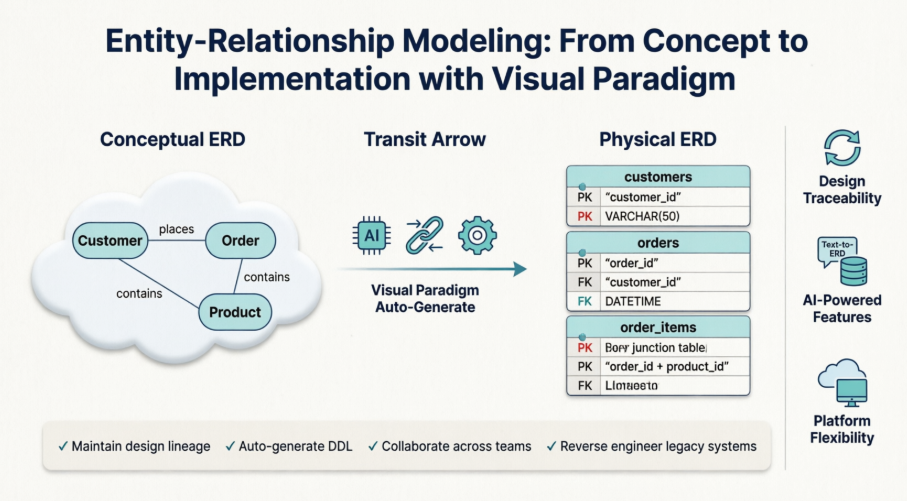
The “Magic” Moment: Transit to Physical ERD
Here’s where Visual Paradigm genuinely impressed me. Instead of manually recreating my conceptual model, I:
-
Right-clicked the diagram canvas →
Utilities > Transit to Physical ERD… -
Created a new
Physical Modelin the dialog -
Watched as the tool automatically:
-
Added primary and foreign keys
-
Resolved many-to-many relationships with junction tables
-
Applied naming conventions consistent with my target DBMS
-
Renaming the output to Sales Order Physical Design and verifying the ERD type took moments. The generated physical model wasn’t just a copy—it was a thoughtful translation that respected database engineering best practices.
Real-world note: I still needed to refine data types, add indexes, and apply environment-specific constraints, but having 80% of the heavy lifting done automatically saved me hours of repetitive work.
Design Traceability: The Feature That Changed My Workflow
As projects grow and teams change, understanding why a table exists matters as much as what it contains. Visual Paradigm’s traceability features became indispensable:
-
Tracing backward: Clicking any table in my physical ERD →
Model Transitor→Transit Frominstantly navigated me to its conceptual origin. When a new developer joined mid-project, this feature cut their onboarding time dramatically. -
Tracing forward: From the conceptual view,
Transit Tolet me jump directly to implementation details.
Why this matters: During a recent audit, we needed to justify several schema decisions. Being able to demonstrate the lineage from business requirement → conceptual entity → physical table provided clear, defensible documentation without manual cross-referencing.
AI-Powered Features: My Hands-On Assessment
Visual Paradigm recently integrated AI capabilities, so I tested the text-to-ERD workflow with a simple prompt: “Create an e-commerce order system with customers, products, orders, and payments.”
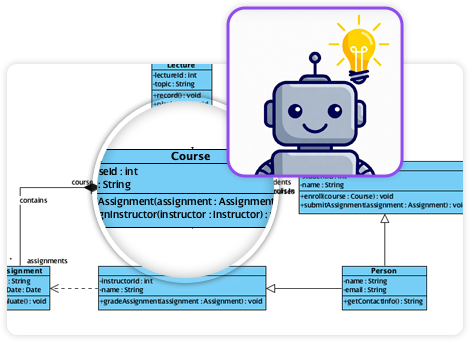
What worked well:
-
The AI correctly identified core entities and suggested appropriate primary/foreign keys
-
Support for both standard ERD and Chen notation gave flexibility for different stakeholder preferences
-
The integrated chatbot helped refine ambiguous requirements (“Should orders support multiple shipments?”)
Considerations:
-
AI suggestions are starting points—I still reviewed and adjusted relationships for business logic nuances
-
For complex domains, iterative prompting yielded better results than a single detailed prompt
-
AI features require connection to Visual Paradigm Online workspace (desktop users, note this setup step)
My verdict: The AI tools excel at accelerating initial prototyping and brainstorming. For production systems, I use them to generate a first draft, then apply domain expertise for refinement.
Platform Experience: Where I Used Visual Paradigm
-
Visual Paradigm Online: Ideal for quick iterations and team collaboration. The cloud environment made sharing prototypes with remote stakeholders seamless.
-
Desktop Client: When connected to an Online workspace, I accessed advanced AI features while enjoying the performance of a native application.
-
OpenDocs Integration: Embedding generated ERDs directly into technical documentation eliminated version-sync headaches—a small feature with outsized impact on documentation quality.
Core Capabilities Beyond the Hype
While AI features grab headlines, I found equal value in Visual Paradigm’s mature engineering tools:
-
Reverse Engineering: Connecting to a legacy database and generating an ERD helped me document an undocumented system in hours, not weeks.
-
DDL Code Generation: Exporting validated schemas to PostgreSQL and MySQL with one click reduced deployment errors.
-
Data Dictionary Sync: Keeping diagrams and documentation aligned automatically saved me from the “which source is current?” dilemma that plagues many projects.
Conclusion: Who Should Consider Visual Paradigm for ERD Work?
After extensive use across multiple projects, I can confidently say Visual Paradigm delivers exceptional value for teams serious about disciplined database design. Its greatest strength isn’t any single feature, but the cohesive workflow that connects conceptual thinking to production implementation while maintaining traceability.
I recommend Visual Paradigm if you:
-
Manage projects where design decisions need clear audit trails
-
Collaborate with mixed technical/non-technical stakeholders
-
Value automation for repetitive modeling tasks without sacrificing control
-
Need to bridge legacy systems and new development
You might explore alternatives if you:
-
Only need very simple, one-off diagrams (a lighter tool may suffice)
-
Work exclusively in environments without internet access (AI features require connectivity)
-
Prefer open-source tools with community-driven development
For me, Visual Paradigm struck the right balance between powerful automation and professional control. The ability to start with a whiteboard-style concept and end with deployable DDL—while keeping every decision traceable—has made it a permanent part of my database design toolkit. If you’re evaluating modeling tools, I’d suggest trying the transit workflow with a small project; experiencing that seamless progression from idea to implementation is the best way to understand its value.
References
- Visual Paradigm ERD Tool Solution: Comprehensive ERD tool solution for database design and modeling
- Database Design with ERD Tools: Professional features for entity relationship diagram creation and database engineering
- OpenDocs ERD AI Generation Release: Announcement of AI-powered ERD generation capabilities in OpenDocs
- AI Diagram Generation Features: AI-powered diagram creation tools including text-to-ERD functionality
- Visual Paradigm Taiwan ERD Solution: Traditional Chinese resource for ERD tool features and capabilities
- Chen Entity Relationship Diagram Editor: Specialized editor for Chen notation ERDs for conceptual modeling
- AI Diagram Generator New Types Release: Update announcing DFD and ERD support in AI Diagram Generator
- Visual Paradigm China ERD Solution: Simplified Chinese resource for ERD tool features
- Visual Paradigm Shop: Product purchasing and licensing information for Visual Paradigm
- Click Start AI Technical Support: Guide for enabling AI features in Visual Paradigm Desktop
- Visual Paradigm OpenDocs Developer Guide: Third-party comprehensive guide to AI-powered documentation with OpenDocs
- AI Process Overview Diagram Generator: Guide to using AI for faster, smarter diagram creation
- What is Entity Relationship Diagram: Educational guide explaining ERD fundamentals and reverse engineering capabilities
- Data Modeling Data Dictionary Tutorial: Tutorial on synchronizing ERDs with data dictionaries
Related posts:
 From Business Vision to Database Reality: Conceptual, Logical, and Physical Data Modeling with Visual Paradigm
 Comprehensive Guide to Visual Paradigm UML Tools and AI-Powered Modeling
 Visual Paradigm UML Tool: The Complete AI-Powered Modeling Guide for Modern Software Development
 📘 The Absolute Beginner’s Guide to Sharing Flipbooks & Bookshelves to OpenDocs