
BPMN & AI: Mastering Visual Paradigm Desktop to OpenDocs Integration
In the realm of enterprise architecture and software development, the gap between design and documentation is often where efficiency is lost. Visual Paradigm has bridged this gap through its OpenDocs platform, powered by a robust infrastructure known as the Pipeline.
This tutorial explores the architecture of the Visual Paradigm Desktop to OpenDocs Integration Workflow. By understanding this flow, technical teams can eliminate manual maintenance overhead and ensure their documentation remains a dynamic, accurate reflection of their system designs.
The Architecture of Automated Documentation
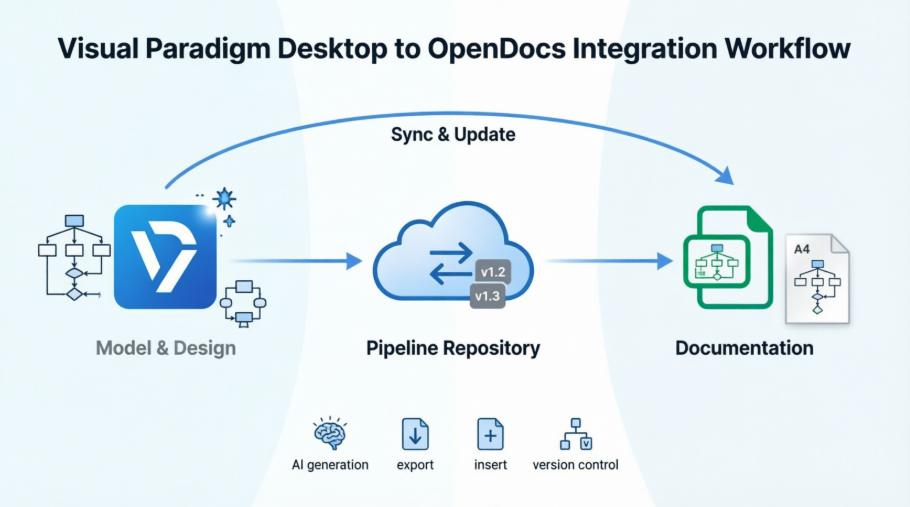
The workflow depicted in the integration diagram represents a shift from static documentation to a “living” knowledge base. Instead of exporting images or static PDFs, the system treats diagrams as live, interactive elements that synchronize with textual documentation automatically.
Here is a step-by-step breakdown of the architecture:
1. Model & Design (The Source)
The process begins in Visual Paradigm Desktop, where architects and developers create their system models. Whether it is a BPMN process, a UML class diagram, or an architecture map, this is the “Single Source of Truth.”
- Live Diagrams: Unlike traditional tools where diagrams are snapshots, these are live objects.
- AI Integration: As noted in the workflow, AI Assisted modeling allows for rapid generation of these diagrams, ensuring the design phase is as efficient as the documentation phase.
2. Pipeline Repository (The Engine)
The core of the integration is the Pipeline Repository, represented by the cloud icon. This is the middleware that handles the heavy lifting of synchronization.
- Version Control: The diagram shows version markers (v1.2, v1.3), indicating that the repository maintains a history of changes. This ensures that you can always trace back to previous states of the documentation.
- Sync & Update: The bidirectional arrows within the cloud signify that the Pipeline doesn’t just push data; it manages the synchronization logic, ensuring that updates made in the Desktop client are immediately reflected in the repository.
- Export & Insert: The Pipeline automates the extraction of data from the model and its insertion into the documentation structure.
3. Documentation (The Output)
The final stage is the OpenDocs output. This is where the “Single Source of Truth” becomes accessible to business stakeholders.
- Interactive Elements: The output isn’t a static image. It is a document where diagrams are embedded as interactive web elements.
- Tree-Structured Organization: As mentioned in the benefits, the system supports scalable knowledge management, organizing content in a tree structure that mimics the complexity of the system itself.
Key Workflow Mechanics
Understanding the specific capabilities highlighted in the diagram is crucial for implementing this workflow effectively.
Automated Synchronization
The most critical feature is the Sync & Update arrow connecting Desktop to Documentation. In a traditional workflow, if a developer changes a database schema, they must manually open a PDF editor or Word document to update the diagram. In the OpenDocs workflow:
- The modeler updates the diagram in Visual Paradigm Desktop.
- The Pipeline Repository detects the change.
- The documentation is automatically regenerated to reflect the new state.
AI-Powered Generation
The diagram highlights AI generation as a foundational step. This means that the “Model & Design” phase can be accelerated by AI tools that suggest flows or generate initial diagrams based on text prompts, which are then fed directly into the Pipeline.
Version Control & Change Management
The presence of version labels (v1.2, v1.3) underscores the importance of version control. For technical teams, this means that documentation is never “stale.” If a stakeholder asks, “What did the system look like last quarter?”, the version history in the Pipeline Repository provides the answer instantly.
Benefits for Technical Teams
By adopting this architecture, organizations unlock several key advantages:
- Reduced Maintenance Overhead: Automatic synchronization eliminates the need for manual diagram updates.
- Improved Accuracy: Live connections ensure documentation always reflects current system design.
- Enhanced Collaboration: Shared workspace enables real-time collaboration between architects, developers, and analysts.
Conclusion
The Visual Paradigm Desktop to OpenDocs Integration Workflow represents a significant evolution in how organizations manage technical knowledge. By treating diagrams as live, interactive elements rather than static images, it transforms documentation from a maintenance burden into a dynamic asset.
For teams engaged in complex projects involving multiple stakeholders and evolving requirements, this platform offers a compelling solution. The combination of AI-powered generation, automated synchronization, and interactive visualization creates a knowledge management environment that scales with organizational needs while reducing the overhead traditionally associated with maintaining accurate documentation.