
Chat with Your Diagrams: An AI Enterprise Solution for Interactive Knowledge
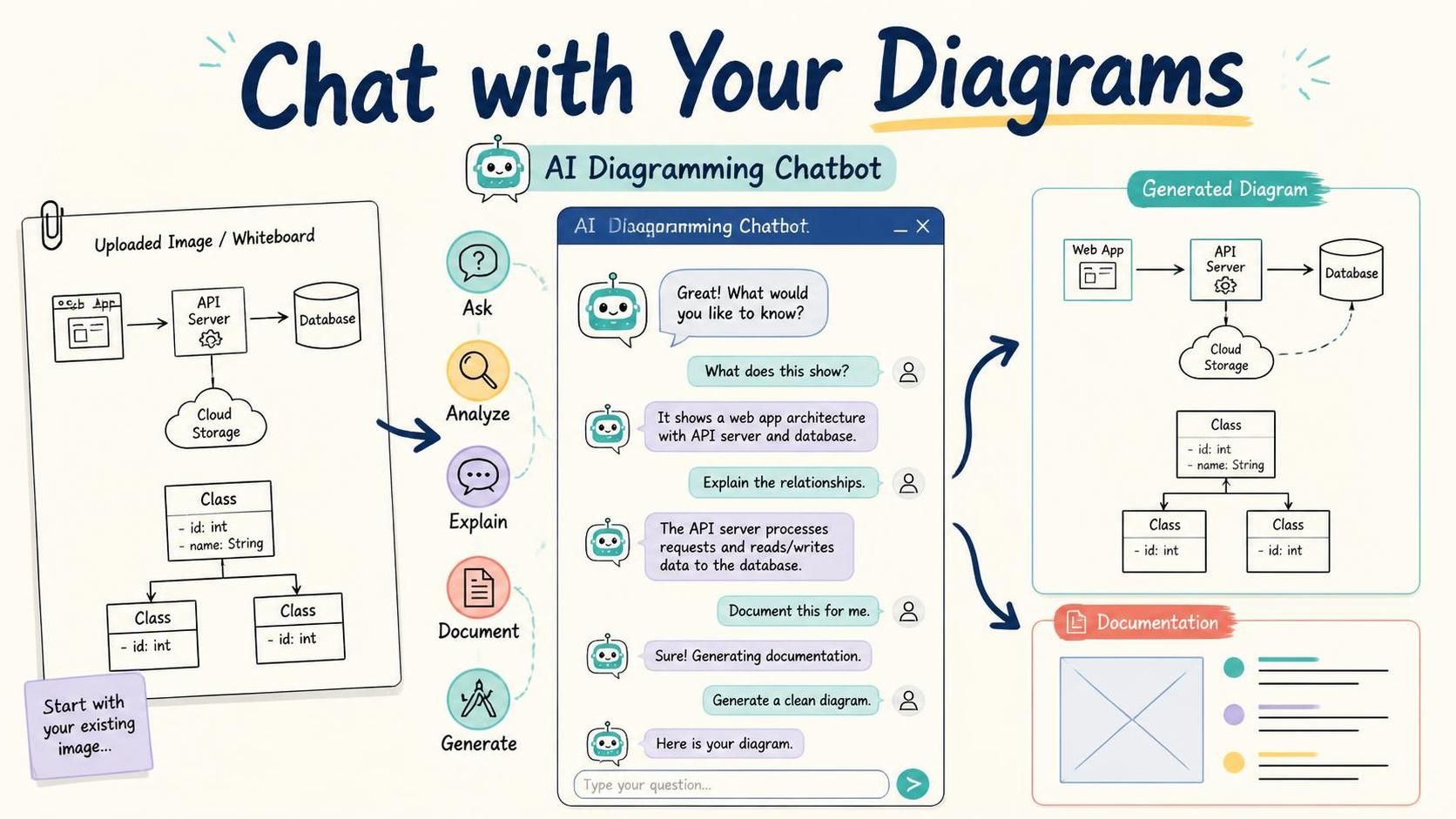
In the modern enterprise, technical knowledge often resides in two distinct places: the minds of the developers and the static diagrams within documentation tools. Bridging the gap between these two is the challenge of making visual data accessible and interactive. Visual Paradigm’s AI ecosystem, specifically the AI Diagramming Chatbot, addresses this by transforming static diagrams into a dynamic, conversational interface.
This tutorial explores the architecture of this “Chat with Your Diagrams” workflow, explaining how organizations can leverage the Visual Paradigm Ecosystem to turn images, whiteboard sketches, and existing models into actionable insights.
1. The System Architecture: From Static to Interactive
The core innovation illustrated in the diagram is a cyclical process that connects three distinct states: Input (Static), Processing (AI Analysis), and Output (Generation/Documentation). Unlike traditional tools where a diagram is a finished artifact, this architecture treats the diagram as a data source for an AI agent.
The workflow relies on a seamless integration of the Visual Paradigm Ecosystem with the AI Core Components. This combination allows the system to understand not just the text, but the semantic relationships and structural logic within a visual representation.
The Four-Step Interaction Loop
The architecture operates through a specific sequence of actions that an end-user triggers via a chat interface:
- Ask (Inquiry): The user poses a natural language question about the diagram. The AI analyzes the visual structure to formulate an answer.
Example: “What does this show?” or “Explain the relationships.”
- Analyze (Interpretation): The AI Core scans the uploaded image or whiteboard. It identifies components (e.g., Web App, API Server, Database) and their connections (e.g., Cloud Storage, data flow).
Example: “It shows a web app architecture with an API server and database.”
- Document (Knowledge Capture): The AI extracts the logic from the diagram to create structured documentation. This ensures that the visual model is backed by textual explanations.
Example: “Sure! Generating documentation.”
- Generate (Reconstruction): The AI converts the analysis back into a clean, editable digital diagram. This reverses the process, turning a rough sketch or screenshot into a professional model.
Example: “Here is your diagram.”
2. Understanding the Input: “Start with your existing image”
A critical component of this architecture is the Input Layer. The system is designed to accept unstructured or semi-structured inputs, specifically labeled as “Uploaded Image / Whiteboard”.
This capability is vital for SMEs and large enterprises because it lowers the barrier to entry. Users do not need to start with a blank canvas or know complex modeling syntax. They can upload a photo of a whiteboard brainstorming session, a screenshot of an old architecture, or a hand-drawn sketch.
The AI acts as a translator in this stage. It converts the visual pixels into semantic data. For instance, if the user uploads a sketch containing a cloud icon and a database cylinder connected by an arrow, the AI interprets this as a data flow relationship between cloud storage and a database system.
Technical Implementation
While the user experience is conversational, the underlying technical process involves Computer Vision and Natural Language Processing (NLP). The system must:
- Object Detection: Identify standard modeling symbols (classes, actors, servers, databases).
- OCR (Optical Character Recognition): Read the text within shapes (e.g.,
- id: int,- name: String). - Graph Traversal: Map the spatial relationships (left-to-right arrows) to logical dependencies.
3. The Output: Structured Modeling and Documentation
The true power of the Integrated Quick AI Visual Modeling solution lies in the “Generated Diagram” and “Documentation” outputs. This transforms the system from a simple chatbot into a full-fledged modeling assistant.
Generated Diagrams
When the user requests to “Generate a clean diagram,” the AI utilizes the Training and Setup Assistance capabilities of the Visual Paradigm engine to reconstruct the model. The output shown in the image demonstrates high-fidelity reconstruction:
- Architecture Reconstruction: The AI creates a standard System Architecture diagram with clearly defined tiers (Web App, API Server, Database, Cloud Storage).
- Class Modeling: The AI reconstructs Object-Oriented models, preserving attributes like
id: intandname: String, and inheritance structures (parent classes branching to child classes).
Automated Documentation
The “Documentation” output is the bridge between visual modeling and corporate knowledge management. By converting the diagram into text, the AI ensures that the knowledge is searchable and accessible without needing to view the image. This aligns with the goal of reducing time spent locating information.
4. Strategic Value for SME to Enterprise
This architecture solves a specific problem for organizations: Knowledge Silos. Often, a project’s architecture is documented in a diagram that no one reads because it is buried in a file system. By introducing the “Chat with Your Diagrams” layer, Visual Paradigm makes that knowledge immediately accessible.
The system effectively turns static assets into a dynamic knowledge base. Instead of searching through multiple documents manually, employees can interact with the AI assistant using natural language. For example:
“What is the procedure for handling this type of customer request?”
The AI can now look at the architecture diagram, understand the flow from the Web App to the API Server, and explain the logic behind the data handling.
Conclusion
The integration of AI into the Visual Paradigm ecosystem represents a shift from “Modeling Tools” to “Intelligent Knowledge Systems.” By enabling users to upload images, ask questions, and generate clean diagrams, the platform democratizes access to complex system architectures. Whether for a small business sketching on a whiteboard or an enterprise managing complex cloud infrastructures, this AI-driven workflow ensures that corporate knowledge is not just stored, but actively understood and utilized.