
Mastering the Modern Visual Paradigm Workflow: From Concept to Documentation
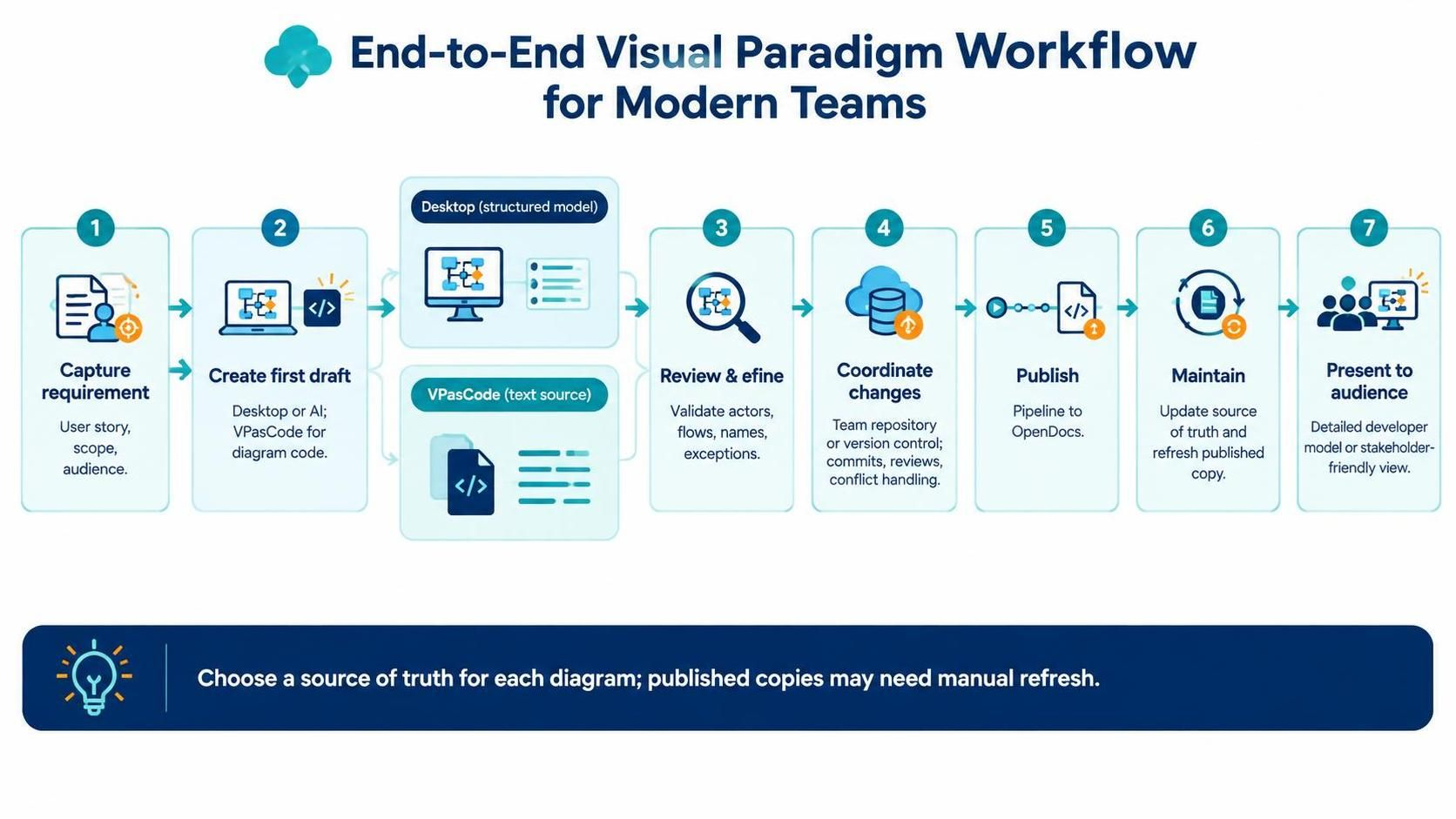
In the era of DevOps and continuous integration, diagramming has evolved from a static drawing exercise into a dynamic, code-driven process. The modern development team requires a robust, end-to-end workflow that bridges the gap between abstract requirements and concrete documentation. This tutorial explores the seven-step Visual Paradigm ecosystem, integrating Visual Paradigm Desktop and VPasCode to create a seamless lifecycle for system architecture.
Phase 1: Foundation and Drafting
The journey begins before a single line of code or a single node is placed on a canvas. It starts with the precise capture of requirements. Whether you are starting with a user story, a business process, or an architecture decision, the goal is to establish the diagram’s scope, audience, and level of detail.
Once the requirements are clear, the team must decide on the modeling approach. Will the team utilize a formal model within the Desktop environment for its structural integrity, or will they prefer a text-based diagram generated via VPasCode for version control agility? Sometimes, a hybrid approach is best, leveraging both.
Drafting Strategies
For the initial draft, developers have two primary paths:
- Visual Paradigm Desktop: Utilize the drag-and-drop interface to construct a structured model. This is ideal for complex architectures requiring strict adherence to UML standards.
- VPasCode & AI: Use the text-based definition to generate a starting point. You can use prompts to have an AI tool produce the initial diagram code. This method allows for rapid iteration and keeps the source text as the primary artifact.
When drafting, it is crucial to be explicit. Do not leave error handling, alternative paths, or exceptions implicit. Include these scenarios directly in the description or code to ensure the model represents reality, not just the “happy path.”
Phase 2: Validation and Refinement
Once the draft exists, the model must be rigorously checked against the actual requirements. This is the “Review and Refine” phase where the diagram becomes a source of truth.
Validation involves confirming:
- Key Actors & Components: Are all necessary entities represented?
- Relationships & Flows: Do the data flows match the system requirements?
- Failure Paths: Are the error handling mechanisms clearly defined?
Refinement depends on the chosen tool:
- In Desktop, you refine the diagram as a project model, ensuring the visual representation matches the logical structure.
- In VPasCode, you revise the source code and inspect the live preview to verify that the text definition renders the intended logic.
Phase 3: Collaboration and Coordination
Modern development is rarely a solitary activity. Step 4 focuses on coordinating changes with the team. The approach varies based on the modeling method:
Desktop Collaboration
For shared Desktop projects, the workflow relies on the team repository. You can commit and update changes, resolve conflicts, and coordinate edits using built-in locks and permissions. This ensures that multiple engineers can work on the same system architecture without overwriting each other’s work.
Diagram as Code
For VPasCode users, the workflow mimics software development. The source files are stored in a version-control system (like Git). Changes are reviewed alongside related code or requirements. While the rendered output is available for discussions, the focus remains on maintaining the clean, readable source definition.
Phase 4: Publishing and Maintenance
The final steps of the workflow bridge the gap between the engineering team and the broader organization. Approved diagrams are not meant to sit in a local folder; they must be published to documentation.
This is achieved by sending the artifacts to the OpenDocs Pipeline. Here, the diagram is inserted into relevant documentation pages, accompanied by explanatory text that clarifies the context, the target audience, and the decisions recorded in the diagram.
The Importance of Maintenance
A common pitfall in documentation is assuming that an update to a local file automatically updates the published copy. This is rarely true.
- Update the Source: When a model changes, update the appropriate source of truth (Desktop project or VPasCode file).
- Publish the Artifact: Re-run the pipeline to generate the new version.
- Refresh Documentation: Ensure the documentation that uses the diagram is refreshed. Do not assume a Desktop edit automatically changes every copy already embedded in a document.
Presenting the Right Level of Detail
The final step is presenting the model to the audience. Different stakeholders require different views of the system:
- Developers: May need a detailed model with specific component interactions and failure paths.
- Product, Operations, or Business Stakeholders: Often prefer a simpler process view that focuses on the high-level flow and business value.
OpenDocs excels here by combining diagrams with explanatory documentation. This allows teams to present the context alongside the visual, ensuring that every reader—from the C-suite to the DevOps engineer—understands the system architecture.
By following this seven-step workflow, teams can ensure their diagrams are not just static images, but living documents that evolve with the software they describe.