
Mastering Nobel Prize Nominations with BPMN: A Complex Workflow Blueprint
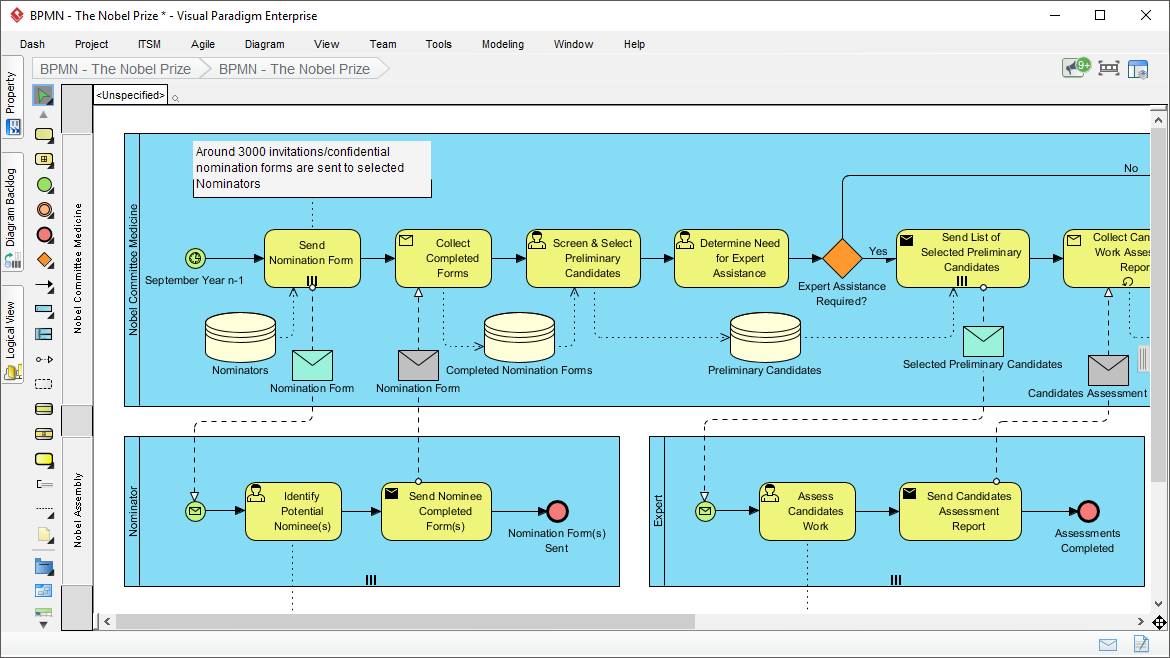
In the realm of Business Process Management (BPM), few scenarios are as complex and high-stakes as the process of selecting the world’s most prestigious award winners. The diagram provided illustrates a sophisticated BPMN 2.0 (Business Process Model and Notation) workflow created using Visual Paradigm. This model is not merely a flowchart; it is a precise architectural blueprint of the Nobel Prize Nomination Process.
This tutorial breaks down the system architecture, the specific roles involved, and the intricate data flows that govern this multi-year cycle. By understanding this example, you will learn how to model high-level organizational interactions and manage conditional logic within a professional modeling environment.
1. The Architecture: Pools and Lanes
The visual structure of a BPMN diagram is defined by its Pools and Lanes. In this specific model, we see a multi-pool architecture designed to handle interactions between distinct legal and organizational entities.
- The Nobel Committee (Medicine): Represented as the primary container (Pool), this lane houses the central logic of the process. It controls the timeline, starting in September Year n-1 and managing the selection of candidates.
- The Nominator: A separate pool representing external entities (such as university professors or previous laureates) who have the right to propose candidates.
- The Expert: A distinct pool representing the specialized scientific bodies or researchers tasked with evaluating the technical merit of the candidates.
- Nobel Assembly: While mentioned in the text as a pool, the diagram focuses primarily on the interaction between the Committee, Nominators, and Experts, showing a three-tiered ecosystem.
2. Step-by-Step Process Flow
The workflow is chronological, moving from the initial invitation to the final selection. Here is the breakdown of the logic:
Phase 1: Initiation and Collection
The process begins with the Nobel Committee sending out approximately 3,000 invitations (Confidential Nomination Forms) to selected Nominators. This is depicted by a message flow (dashed line with an envelope) connecting the Committee to the Nominator pool. The Nominator’s role is to Identify Potential Nominee(s) and subsequently Send Nominee Completed Form(s).
Phase 2: Screening and Assessment
Once the Committee Collects Completed Forms, the workflow branches into two distinct paths based on a decision gateway (the orange diamond labeled Expert Assistance Required?):
- Path A (No): If expert assistance is not deemed necessary, the process moves directly to screening.
- Path B (Yes): If expert assistance is required, the Committee sends a list of selected preliminary candidates to the Expert pool. The Expert then performs the Assess Candidates Work and sends back an Assessment Report.
Phase 3: Final Selection
After the assessment phase, the Committee Screens & Selects Preliminary Candidates and then proceeds to Collect Candidate Work Assessment Reports. The final step involves the Committee selecting the winners based on this comprehensive data.
3. Understanding Data Objects and Message Flows
One of the most critical aspects of this diagram is the use of Data Objects and Message Flows. In Visual Paradigm, these are not just decoration; they represent the physical or digital transfer of information.
- Message Flows (Dashed Lines with Envelopes): These cross the boundaries between Pools. For instance, the line connecting the Nominator to the Nobel Committee represents the physical or electronic submission of a Nomination Form. This is distinct from a Sequence Flow (solid line), which stays within a single pool.
- Data Stores (Cylinders): The diagram utilizes standard database symbols (cylinders) to represent persistent storage. For example, the Completed Nomination Forms are stored in a database before being processed by the Committee.
- Annotations: The text box at the top left (“Around 3000 invitations…”) serves as a contextual annotation, providing business rules that are not strictly part of the execution logic but are vital for human understanding.
4. Technical Modeling Best Practices
When recreating this model in Visual Paradigm, pay close attention to the following technical details:
- Gateway Logic: The diamond shape is a Exclusive Gateway. It ensures that only one path is taken based on the condition “Expert Assistance Required?”. This is crucial for preventing process loops and ensuring efficiency.
- Message Flow vs. Sequence Flow: Never confuse these. Sequence flows (solid arrows) dictate the order of tasks within the Committee. Message flows (dashed arrows) dictate the communication between the Committee, Nominators, and Experts.
- Event-Based Start: The green circle icon in the Nominator and Expert pools indicates a Message Start Event. This signifies that these subprocesses are triggered by an external message (the invitation) rather than starting automatically.
Conclusion
This diagram serves as a textbook example of how to model complex, multi-party interactions. By separating concerns into distinct pools (Committee, Nominator, Expert) and using clear message flows, the model ensures that every stakeholder’s responsibility is clearly defined. Whether you are modeling a Nobel Prize selection or a corporate procurement process, the principles of separation of concerns and clear data exchange remain the foundation of effective BPMN design.