
Mastering Agile with Visual Paradigm Unified Platform
In the fast-paced world of software development, modern teams face a significant challenge: fragmentation. Developers often work in Jira, designers in Figma, and architects in Visio, leading to disconnected repositories and a lack of “single source of truth.” The Visual Paradigm Unified Platform addresses this by shifting the paradigm from application-centric work to artifact-centric work.
This tutorial explores how the Unified Platform’s architecture enables Agile teams to centralize their workflows, manage diverse deliverables, and leverage AI-assisted creation within a single, cohesive environment.
1. The Architecture: From Silos to a Unified Drive
Traditional modeling tools often require users to launch a specific application to create a specific file type. The Visual Paradigm Unified Platform restructures this workflow. Instead of starting with “Which application do I need?”, the user starts with “What outcome do I want to produce?”
1.1 The Unified Drive (Artifact Hub)
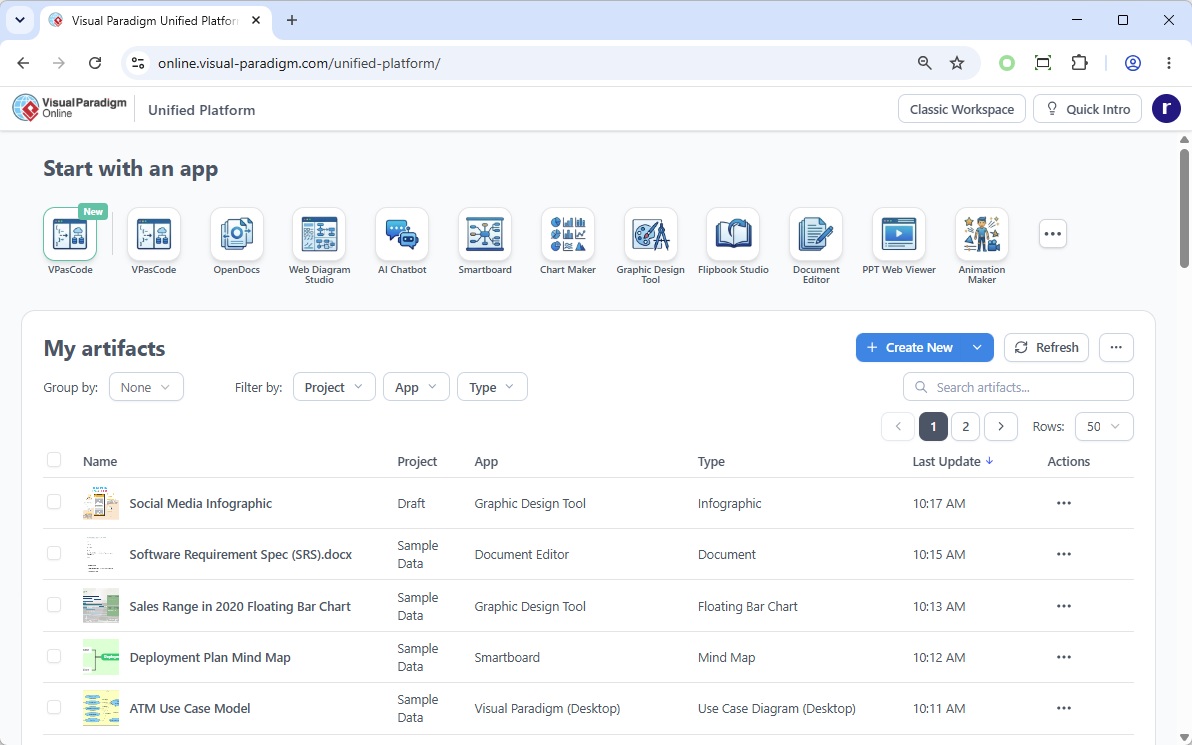
The core of this architecture is the Unified Drive. As illustrated in the platform’s dashboard, resources are no longer siloed by file format or origin. Instead, they are presented in a centralized, drive-like space that treats all project resources as part of a single body of work.
This architecture is particularly valuable for Agile projects where technical and non-technical deliverables must remain connected. For example, a single project folder might contain:
- Technical Artifacts: Visual Paradigm Desktop diagrams, ER diagrams, and architecture blueprints.
- Business Artifacts: Strategy canvases, business analysis documents, and user story maps.
- Planning Materials: Gantt charts, project plans, and roadmaps.
- Visual Assets: Wireframes and presentations.
1.2 The Application Launcher
Behind the scenes, the platform acts as a centralized launcher for over 100 specialized web applications. The dashboard (shown in the provided screenshot) groups these tools into categories like:
- Visual Modeling: For UML, BPMN, and SysML diagrams.
- Enterprise Architecture: For TOGAF and ArchiMate frameworks.
- Agile Management: For backlog planning and sprint tracking.
- AI-Assisted Creation: For leveraging AI Chatbots to generate models.
2. Outcome-Oriented Creation
The most significant shift in the Unified Platform is the implementation of the Create Menu. This design principle is intended to reduce the time spent searching through menus or remembering which specific application handles a particular task.
2.1 How It Works
When a user needs to produce a deliverable, they utilize the Create function to define the outcome rather than the tool. The platform automatically routes the request to the appropriate application behind the scenes.
For instance, if you need a User Story Map, you do not search for a “Mapping Tool.” You simply select “User Story Map” from the list, and the platform opens the relevant editor. This list includes:
- UML & BPMN Diagrams
- Mind Maps & Flowcharts
- Wireframes & ER Diagrams
- Strategy Canvases & Documentation Pages
3. Integrating with Agile Workflows
The Unified Platform is designed to support the iterative nature of Agile development. By treating a “Software Requirement Spec,” a “Deployment Plan,” and an “ATM Use Case Model” as connected artifacts within the same project, the platform ensures that changes in one area are easily traceable to others.
The “My Artifacts” View
The dashboard provides a granular view of project history, showing the type of application used (e.g., “Graphic Design Tool” or “Visual Paradigm Desktop”), the project it belongs to, and the last update time. This transparency is crucial for team collaboration and version control.
4. Leveraging AI for Rapid Prototyping
One of the standout features of the modern Unified Platform is the integration of AI Chatbots directly into the dashboard. This allows teams to bypass the manual drawing of diagrams by using natural language prompts.
For example, a team lead can instruct the AI Chatbot to “Generate a sequence diagram for a login process,” and the platform will render the diagram in the Unified Drive, ready for review. This capability significantly accelerates the “Model First” approach often advocated in modern software architecture.
Conclusion
The Visual Paradigm Unified Platform represents a move away from disconnected tools toward a holistic engineering environment. By unifying the drive, the launcher, and the creation process, it allows teams to focus on the what and the why of their software, rather than the how of managing file paths and application windows.