
Mastering BPMN 2.0: A Visual Guide to Flow Types and Connecting Objects
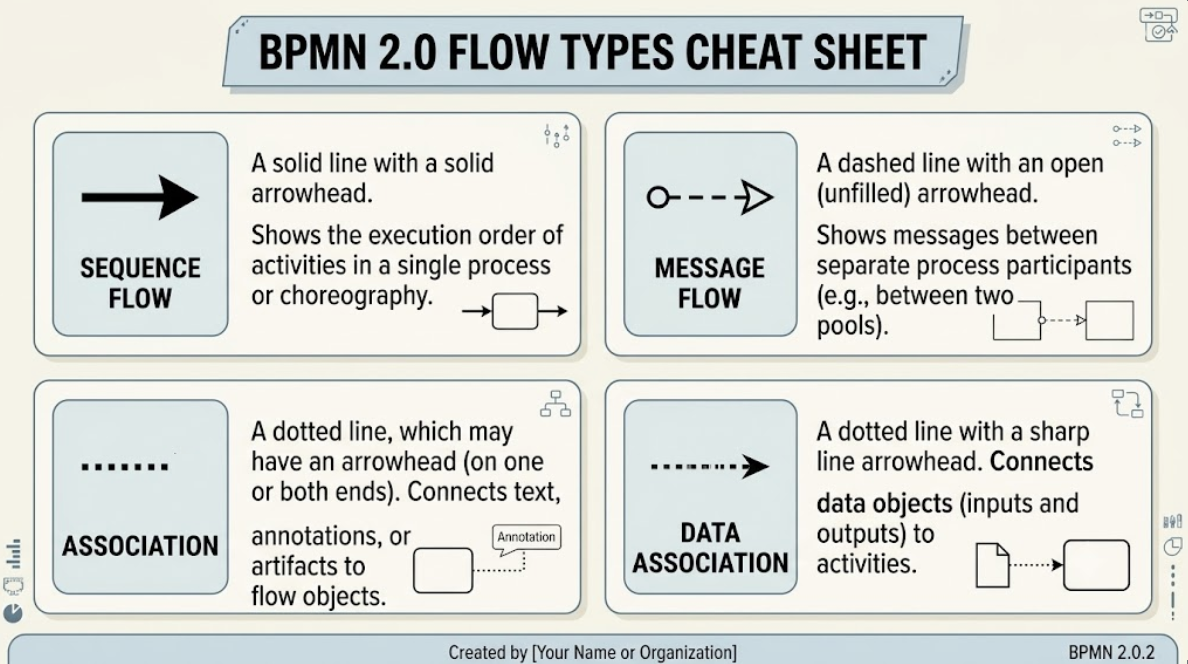
In the world of Business Process Model and Notation (BPMN), clarity is king. A diagram that is ambiguous is a diagram that cannot be executed. The backbone of any BPMN model is the set of Connecting Objects. These are the lines that hold the logic together, dictating how information moves, how time progresses, and how different systems communicate.
While beginners often confuse these lines, understanding the subtle differences between a solid line and a dashed line is the difference between a confusing sketch and a robust architectural blueprint. This tutorial breaks down the four primary flow types found in BPMN 2.0, explaining not just how they look, but how they behave within a process.
1. Sequence Flow: The Pulse of the Process
At the heart of every BPMN diagram is the Sequence Flow. This is the most common connector you will encounter. It represents the order in which activities occur. If you were to trace the path of a single task from start to finish, you would be following the sequence flows.
- Visual Signature: A solid line with a solid arrowhead.
- Function: It defines the control flow. It tells the engine, “Finish this task, then do that one.”
- Scope: Sequence flows are local. They exist strictly within a single pool (or lane).
Crucial Rule: You cannot have a sequence flow cross the boundary of a pool. If a task needs to communicate with an external entity, you must switch to a different type of connector.
2. Message Flow: Crossing the Boundaries
When a process involves multiple participants—such as a “Customer” and a “Bank”—we need a way to show communication between them. This is the domain of the Message Flow. It represents the actual exchange of information between two separate process participants.
- Visual Signature: A dashed line with a circle at the start and an open (unfilled) arrowhead at the end.
- Function: It indicates that a message is being sent from one entity to another.
- Scope: It must cross pool boundaries.
Think of Message Flows as the physical mail or digital packets traveling between departments. In a “black box” pool (where the internal process is hidden), a message flow connects to the boundary of the pool itself, signifying that a message enters or leaves the system entirely.
3. Association: The Contextual Glue
Processes are often complex, and sometimes you need to explain why a decision was made or add a note to a specific activity. This is where the Association comes in. It is a non-executable link used to attach artifacts to the process.
- Visual Signature: A dotted line. The arrowhead is optional and depends on whether it points to the object or from the object.
- Function: It connects text annotations, groups, or other artifacts to flow objects.
- Execution Impact: None. The process engine ignores associations completely.
Associations are purely for human readability. If you draw a dotted line, you are simply adding a sticky note to your diagram. It does not move the process forward.
4. Data Association: The Input/Output Link
While Associations are for text, Data Associations are for the actual data objects. In BPMN, data is a first-class citizen. Activities often consume inputs or produce outputs, and Data Associations map these relationships.
- Visual Signature: A dotted line with a sharp, solid line arrowhead.
- Function: It connects a Data Object (like a “Purchase Order” or “Invoice”) to an Activity.
- Usage: It shows the direction of data flow. Does the activity read the data? Does it write to it?
This connector is vital for data-centric modeling. It ensures that stakeholders understand exactly which data objects are required for a specific task to execute successfully.
Summary of Differences
To ensure you are modeling correctly, always check your connecting objects against this checklist:
- Is the line solid? It is likely a Sequence Flow (internal logic).
- Is the line dashed? It is likely a Message Flow (external communication).
- Is the line dotted? Check the arrowhead.
- No arrowhead or optional arrowhead? It is an Association (annotation).
- Sharp line arrowhead? It is a Data Association (data object).
By mastering these four connectors, you build a foundation for robust, executable BPMN models that are clear to both business stakeholders and technical developers.