
Mastering C4 Context Diagrams: E-Commerce Architecture with AI Chatbot Integration
In the rapidly evolving world of software architecture, clarity is king. One of the most effective ways to communicate high-level system boundaries and interactions is through the C4 Model Context Diagram. This tutorial will walk you through the fundamental concepts of this diagram type, specifically focusing on an E-Commerce Platform architecture, and how to model it effectively using the VPasCode tool.
What is the C4 Model?
The C4 Model is a standard for visualizing software architecture. It uses a hierarchy of four levels to describe a system at increasing levels of detail. The Level 1: Context Diagram is the starting point for any architectural discussion. It answers the question: What is the system, and who interacts with it?
Unlike complex detailed diagrams, a Context Diagram is intentionally simplified. It focuses on the system as a single “black box” (or a high-level container) and its relationship with external users (actors) and other systems.
Deconstructing the E-Commerce Architecture
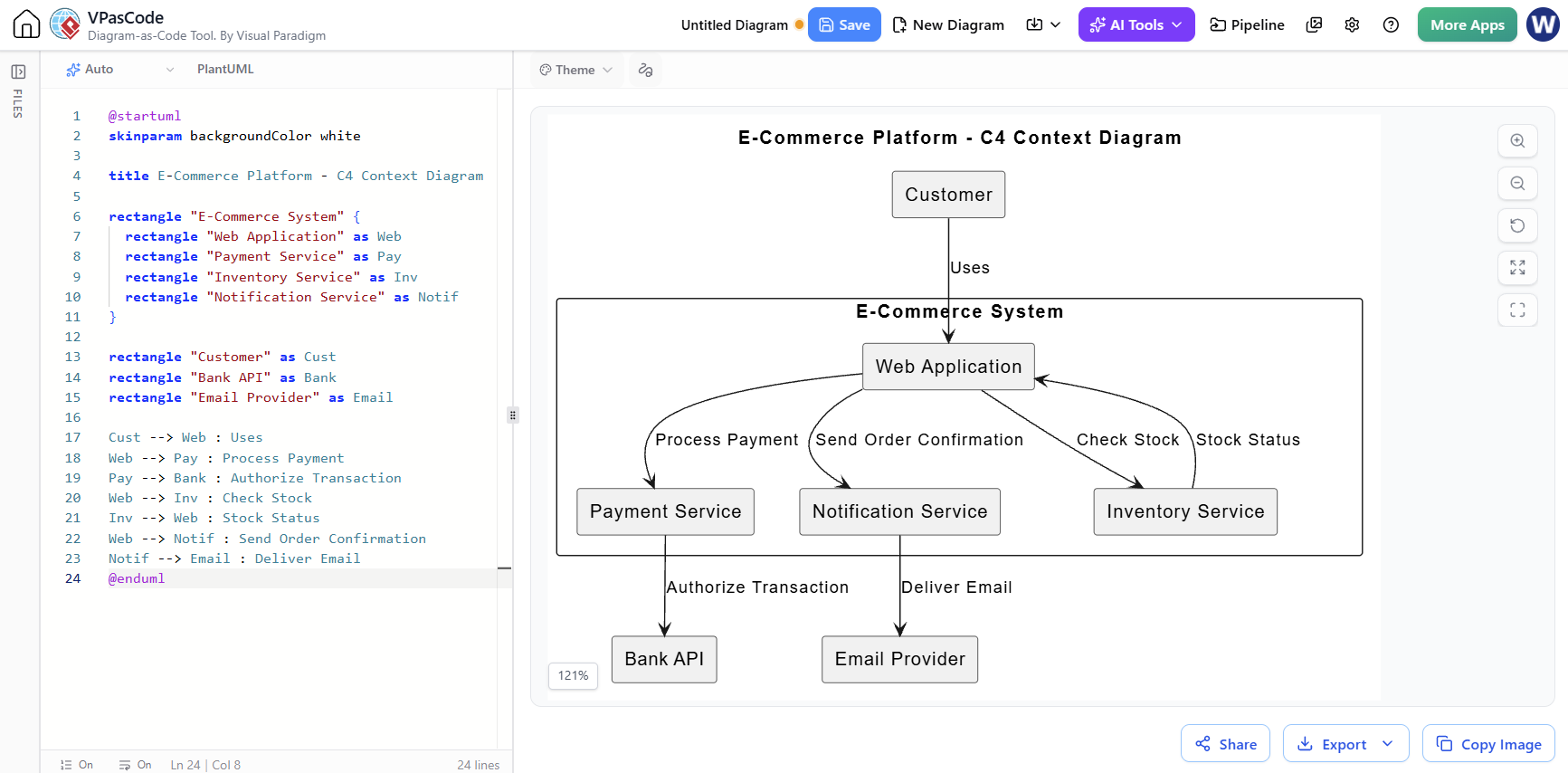
Let’s analyze the specific E-Commerce example provided in the diagram. This architecture represents a modern, service-oriented approach to handling online orders.
1. The System Boundary
At the center of the diagram is the “E-Commerce System”. This rectangle represents the entire software solution being built. Inside this boundary, we see the “Web Application” acting as the primary entry point.
2. The Actors (People)
External to the system boundary is the “Customer”. This is the human user initiating the process. The interaction labeled “Uses” is the trigger for the entire workflow.
3. The External Systems (Partners)
Modern applications rarely exist in a vacuum. Our E-Commerce platform relies on two critical external services:
- Bank API: An external financial institution service required to process money.
- Email Provider: A third-party service (like SendGrid or Mailgun) responsible for delivering notifications.
4. Internal Microservices
Although this is a context diagram, it often peeks inside the “black box” to show the major internal components. The Web Application orchestrates three distinct microservices:
- Payment Service: Handles financial transactions.
- Inventory Service: Manages product stock levels.
- Notification Service: Handles communication with the user.
Mapping the Data Flow
Arrows in a C4 diagram represent data flow, not just control flow. Understanding the direction is key to understanding the system logic.
- Order Initiation: The Customer sends data to the Web Application.
- Stock Verification: The Web Application asks the Inventory Service for stock status. The Inventory Service responds with the current availability.
- Payment Processing: The Web Application delegates the payment task to the Payment Service. The Payment Service then communicates with the Bank API to authorize the transaction.
- Confirmation: Once the order is confirmed, the Web Application tells the Notification Service to send a confirmation. The Notification Service reaches out to the Email Provider to deliver the message to the Customer.
Modeling with VPasCode
The diagram above was generated using VPasCode, a tool that allows you to define diagrams using code rather than drag-and-drop tools. This approach is powerful for version control and automated documentation.
Below is the exact PlantUML syntax used to render this architecture. Notice how the code maps directly to the visual elements we discussed.
@startuml
skinparam backgroundColor white

title E-Commerce Platform - C4 Context Diagram

rectangle "E-Commerce System" {
  rectangle "Web Application" as Web
  rectangle "Payment Service" as Pay
  rectangle "Inventory Service" as Inv
  rectangle "Notification Service" as Notif
}

rectangle "Customer" as Cust
rectangle "Bank API" as Bank
rectangle "Email Provider" as Email

Cust --> Web : Uses
Web --> Pay : Process Payment
Pay --> Bank : Authorize Transaction
Web --> Inv : Check Stock
Inv --> Web : Stock Status
Web --> Notif : Send Order Confirmation
Notif --> Email : Deliver Email
@enduml
Key Takeaways from the Code
- Grouping: The
rectangle "E-Commerce System" { ... }block defines the system boundary, visually grouping the internal services. - Aliases: Using
as Weboras Custallows us to reference these elements later in the arrow definitions, keeping the syntax clean. - Labels: The text after the colon (e.g.,
: Uses) defines the label on the interaction line, explaining the nature of the data flow.
Conclusion
The C4 Context Diagram is an essential tool for aligning stakeholders, developers, and architects. By clearly defining the scope of the E-Commerce platform and its dependencies, this model serves as the foundation for more detailed design work. Using tools like VPasCode ensures that your architectural documentation remains up-to-date and maintainable as your system evolves.