
Mastering Embedded AI in VPasCode: A Guide to Diagram Generation, Modification, and Translation
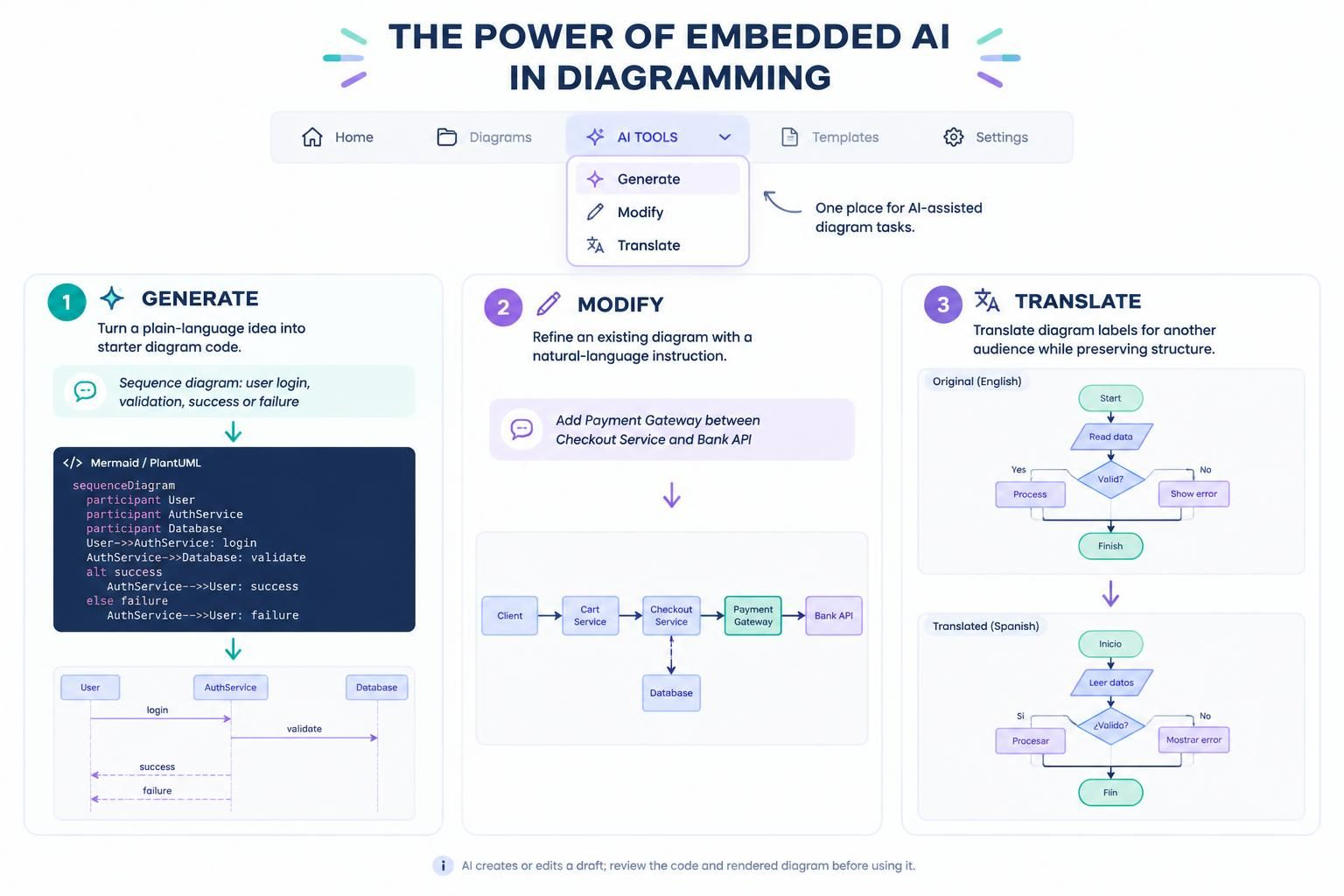
The landscape of software architecture and system modeling is rapidly evolving. For years, tools like Visual Paradigm’s VPasCode have bridged the gap between text-based coding and visual diagramming, allowing developers to write code and instantly visualize the results. The latest evolution in this technology is the Embedded AI initiative, which transforms the user experience from a manual coding workflow to a natural language-driven interface.
This tutorial explores the architecture of the new AI Tools menu and how it streamlines the three critical pillars of modern diagramming: Generation, Modification, and Translation. By centralizing these capabilities, VPasCode reduces the cognitive load required to manage complex system models.
1. The Unified AI Interface Architecture
The core innovation in this update is not merely the addition of artificial intelligence, but its architectural centralization. In traditional workflows, AI features might be scattered across settings or require separate prompts. VPasCode has consolidated these powerful actions into a single, intuitive drop-down menu located directly in the application bar.
This design choice is intentional. By grouping AI actions under one umbrella, the system prioritizes a streamlined user experience. It reduces the friction of finding tools, allowing the architect to focus on the logic of the system rather than the mechanics of the software. The interface presents three distinct operational modes:
- Generate: The initiation of a new model from scratch.
- Modify: The iterative refinement of existing structures.
- Translate: The localization of content for global stakeholders.
2. AI Diagram Generation: From Concept to Code
The first step in the modeling process is often the most daunting: starting from a blank canvas. In traditional text-based diagramming, the user must recall specific syntax rules (such as those for Mermaid or PlantUML) to define actors, lifelines, and message flows. The AI Generation feature fundamentally changes this paradigm.
Concept: Natural Language to Structured Syntax
The AI Generation tool acts as a semantic translator. Instead of asking the user to write code, it asks for intent. The user describes the scenario in plain English, and the AI interprets the relationships and logic to construct the underlying diagram code.
Workflow Example: User Authentication
Consider the common scenario of modeling a user login sequence. A developer might describe the flow as follows:
“Create a sequence diagram for a user logging into a system, including steps for entering credentials, server validation, and either success or failure responses.”
Upon processing this input, the AI engine:
- Parses the Intent: Identifies “User” and “Server” as actors.
- Constructs Logic: Establishes a sequence where the User sends a request, the Server validates, and conditional logic (alt blocks) handles success or failure.
- Generates Visuals: Renders the corresponding Mermaid or PlantUML code and displays the visual sequence diagram instantly.
3. AI Diagram Modification: Iterative Refinement
System architecture is rarely static. As projects evolve, requirements change, and new components are introduced. Historically, updating a diagram required the user to locate the specific lines of code, delete or insert text, and manually re-run the visualization process.
Concept: Command-Based Editing
The AI Modification tool allows users to treat the diagram as a living document. By issuing natural language commands, users can instruct the AI to alter the model’s structure. This is particularly valuable for adding new components, changing relationships, or reorganizing layout structures without breaking the underlying syntax.
Workflow Example: Expanding a Component Diagram
Imagine a component diagram where a “Checkout Service” currently communicates directly with a “Bank API.” A requirement change introduces a new security layer. The user does not need to edit the code manually. Instead, they can input:
“Add a new ‘Payment Gateway’ component between the ‘Checkout Service’ and the ‘Bank API’ in my current component diagram.”
The AI understands the spatial and logical relationship implied by the instruction. It updates the underlying code to insert the new node and re-establish the connections, instantly refreshing the visual representation of the system.
4. AI Diagram Translation: Breaking Language Barriers
In global development teams, diagram consistency is paramount. However, maintaining visual models in multiple languages is a logistical challenge. Manually translating labels, notes, and descriptions is time-consuming and prone to error.
Concept: Structural Preservation
The AI Translation feature is designed to decouple content from structure. It allows users to convert the text labels within a diagram into another language while strictly preserving the structural logic, node positions, and code syntax.
Workflow Example: Localization for International Teams
For a team presenting to stakeholders in Spain, a flowchart describing a data validation process needs to be localized. The user simply requests:
“Translate all labels in this flowchart from English to Spanish.”
The AI engine scans the text content of the diagram nodes and edges and translates them (e.g., changing “Start” to “Inicio” and “Yes” to “Si”). Crucially, the structural logic—the diamond decision shapes, the flow arrows, and the code definition—remains intact, ensuring the diagram remains valid and renderable.
Conclusion
The integration of AI into Visual Paradigm’s VPasCode represents a shift from “coding diagrams” to “designing with language.” By centralizing Generation, Modification, and Translation into a single workflow, developers can focus on the architectural value of their models rather than the syntax required to build them.