
Mastering Gantt Architecture: Integrating PERT Logic & AI Chatbots for VPasCode
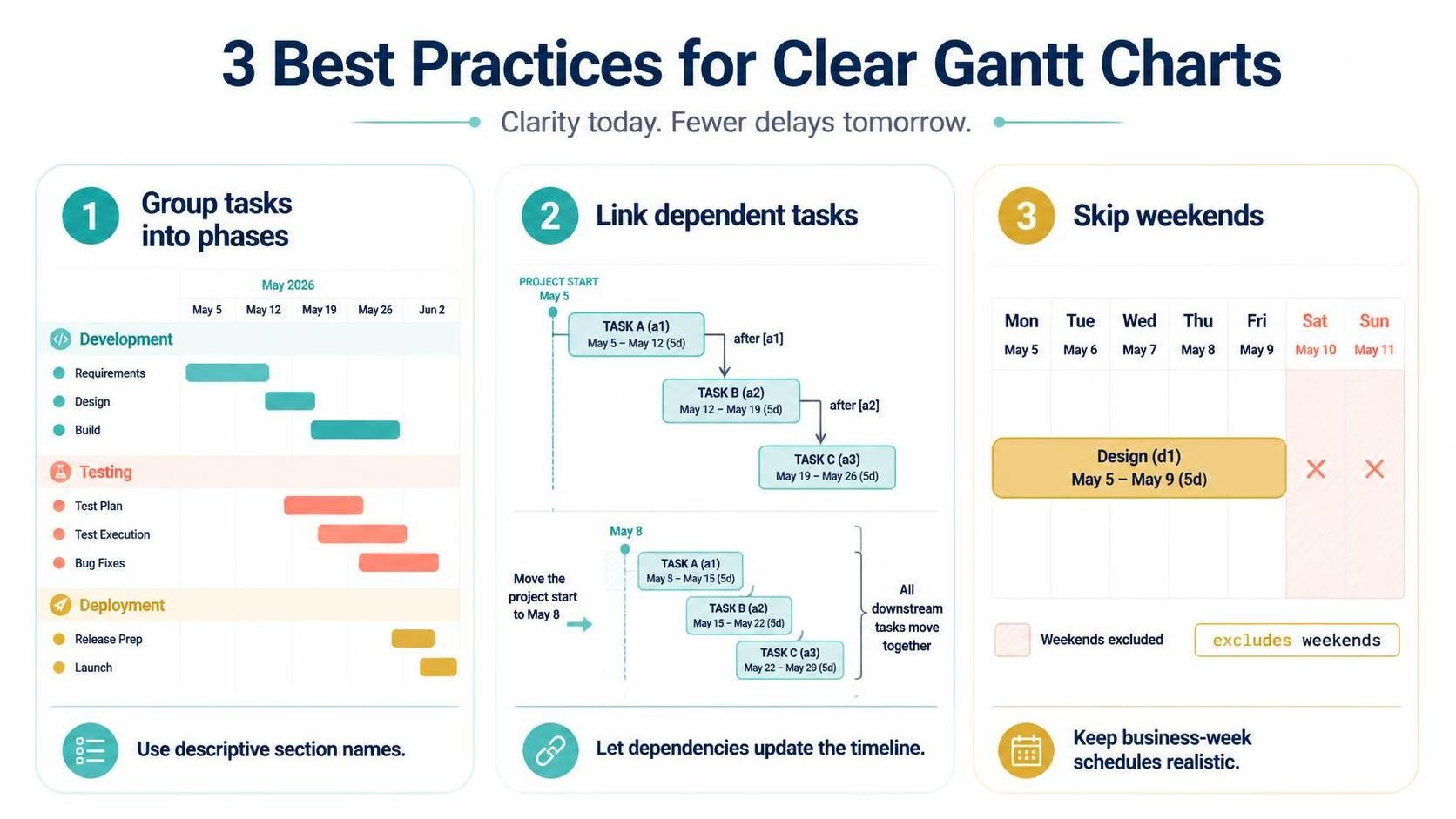
Creating effective project schedules requires more than just inputting dates; it demands a robust understanding of how to structure logic within your modeling language. Whether you are using PlantUML, Mermaid, or the specialized VPasCode syntax for Visual Paradigm, the architecture of a Gantt chart dictates its readability and maintainability. Below, we explore three critical architectural best practices that transform a raw data list into a dynamic, actionable project timeline.
1. Architectural Segmentation: Grouping Tasks into Phases
A common pitfall in project modeling is creating a single, monolithic list of tasks. This approach creates a “wall of text” that is difficult for stakeholders to parse. The solution lies in hierarchical segmentation. By utilizing the section keyword, you can group related tasks into logical phases such as “Development,” “Testing,” or “Deployment.”
This structural decision creates a vertically segmented grid. It visually separates the project lifecycle into digestible chunks, allowing team members to instantly identify which phase a specific task belongs to. It is not merely cosmetic; it establishes a mental model of the project’s workflow.
Implementation Example
When defining your sections, assign clear, descriptive names that act as headers. This ensures the grid remains clean.
gantt
    title Project Schedule
    section Development
        Requirements :a1, 2026-05-05, 3d
        Design :a2, after a1, 3d
        Build :a3, after a2, 5d

    section Testing
        Test Plan :b1, after a3, 2d
        Bug Fixes :b2, after b1, 3d
2. Dynamic Dependency Logic: Leveraging the ‘after’ Keyword
Static scheduling is fragile. If a project’s start date shifts, hard-coded dates (e.g., “May 15th”) force the project manager to manually recalculate every single subsequent task. This leads to human error and wasted time.
To solve this, you must implement relative dependency logic. Instead of calculating absolute dates, use the after keyword (or equivalent dependency syntax) to link tasks. This ensures that the timeline is elastic; if Task A is delayed, Task B automatically adjusts its start date based on Task A’s new finish.
Implementation Example
Observe how the syntax after [task_id] creates a chain reaction. If the start date of the project moves, the entire downstream flow updates automatically without manual editing.
gantt
    title Dynamic Timeline
    section Tasks
        Task A (a1) :2026-05-05, 5d
        Task B (a2) :after a1, 5d
        Task C (a3) :after a2, 5d
3. Realism and Constraints: Excluding Non-Working Days
A schedule that includes weekends or holidays is unrealistic for most business environments. If a task is scheduled for 5 days but the calendar counts Saturday and Sunday as working days, the actual duration will be compressed, leading to missed deadlines.
To maintain a realistic business-week schedule, you must explicitly exclude non-working days. In VPasCode and similar tools, this is achieved through the excludes weekends directive. This architectural constraint ensures that the calendar only counts Monday through Friday, providing accurate duration estimates.
Implementation Example
Ensure your global or section-level configuration handles calendar exclusions.
gantt
    title Realistic Schedule
    excludes weekends
    section Design
        Design (d1) :2026-05-05, 5d