


In the fast-paced world of software development, the ability to visualize complex architectures quickly is invaluable. For years, architects and developers have spent countless hours manually mapping out dependencies and interfaces. The release of the new AI Diagram Generator in Visual Paradigm Desktop marks a significant shift in this workflow. This comprehensive guide explores how this new tool leverages Artificial Intelligence to generate professional-grade UML Package Diagrams in seconds, allowing teams to move from concept to code faster than ever before.
The Evolution of Architectural Blueprinting
Traditionally, creating a comprehensive UML Package Diagram was a labor-intensive process requiring deep technical expertise. Development teams had to manually identify and draw relationships, dependencies, and structural hierarchies for large systems. This manual approach often led to:
- Bottlenecks: Significant time investment delayed the start of actual implementation.
- Human Error: Manual mapping is prone to inconsistencies and oversight.
- Alignment Issues: Slow updates meant documentation frequently lagged behind the actual code structure.
The latest update to Visual Paradigm Desktop directly addresses these challenges. By automating the creation of architectural blueprints, the tool empowers product managers, engineers, and analysts to focus on validating designs rather than drawing them.
Core Features of the AI Package Diagram Generator
The new AI-powered tool is designed to be more than just a drawing assistant; it is an intelligent architectural partner. It offers several advanced capabilities that tailor the output to specific project needs:
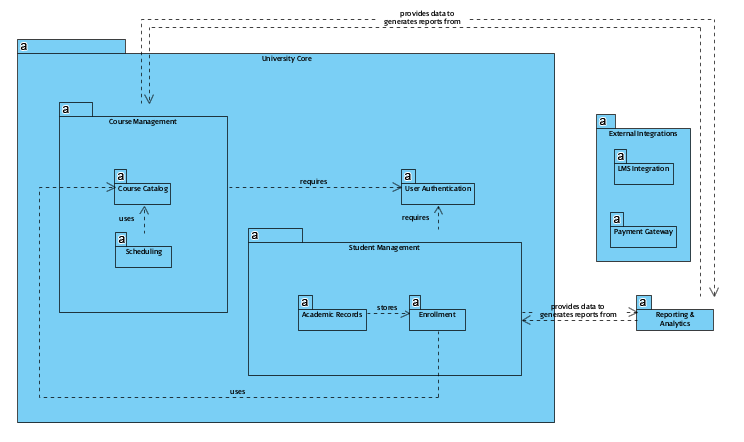
- Instant Structure Generation: Users can structure complex software projects simply by typing a topic or concept. The AI interprets the prompt and builds the necessary packages and dependencies.
- Audience Targeting: The tool allows users to specify the intended audience (e.g., engineers, stakeholders, or general readers). This ensures the complexity and terminology of the diagram fit the context.
- Tone and Content Customization: Beyond the visual elements, users can select the tone and content type for accompanying documentation, ensuring a cohesive presentation.
- Full Editability: The generated output is not a static image. It is a fully editable diagram that serves as a high-quality starting point for further refinement.
Step-by-Step Guide: How to Generate UML Package Diagrams
Accessing the new AI capabilities within Visual Paradigm Desktop is straightforward. Follow this workflow to produce a polished architectural model:
1. Access the Tools Menu
Launch Visual Paradigm Desktop and navigate to the Tools tab located on the main toolbar.
2. Initiate AI Diagram Generation
Select the option for AI Diagram Generation to open the interface.
3. Select Diagram Type
From the Diagram Type Menu, choose Package Diagram.
4. Define Your Topic
Enter a specific topic or concept relevant to your software architecture. This prompt guides the AI in structuring the packages.
5. Generate and Review
Click to generate the diagram. Within seconds, you will see a structured result that can be immediately edited or exported.
Comparing Manual Design vs. AI Generation
To understand the impact of this update, consider the differences between the traditional workflow and the AI-assisted approach:
| Feature | Manual Approach | AI-Powered Approach |
|---|---|---|
| Time Required | Hours or Days | Seconds |
| Skill Level | Requires deep UML expertise | Accessible to PMs and Analysts |
| Documentation | Written separately | Drafted alongside the diagram |
| Flexibility | Hard to iterate | Instantly regenerable and editable |
Accelerating the Software Development Lifecycle
The integration of AI into UML Package Diagram generation is not merely a feature update; it represents a fundamental improvement in how projects are initiated. By removing the friction of manual drawing, teams can accelerate the initial design phase.

Furthermore, the tool’s ability to draft surrounding documentation—allowing users to select technical tones or explainer styles—means that the diagram comes with context. This creates a powerful starting point for internal learning materials, technical blogs, or stakeholder presentations.
To experience the future of intelligent diagramming, update to the latest version of Visual Paradigm Desktop (Professional Edition or higher) and start transforming your architectural workflows today.