


Designing a robust database schema is a foundational step in software engineering. The blueprint for this architecture is the Entity-Relationship Diagram (ERD). An ERD visualizes the structure of data, defining how different pieces of information relate to one another. While a functional diagram ensures data integrity, a clean, maintainable diagram ensures that the system remains understandable and adaptable over time. Technical debt often accumulates not in the code itself, but in the documentation and design artifacts that become obsolete or confusing. This guide outlines the essential principles for creating ERDs that stand the test of time.
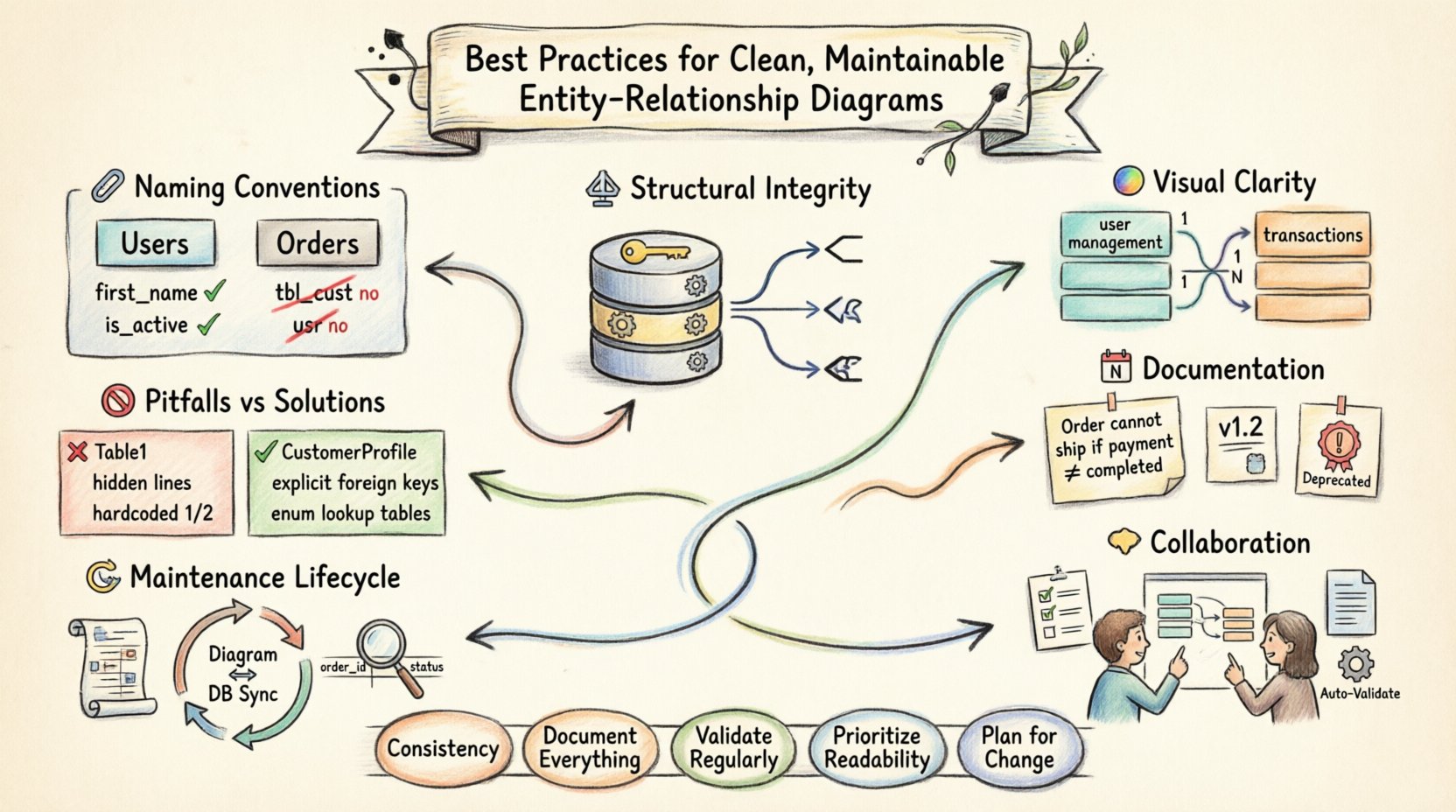
1. Naming Conventions and Standards 🏷️
The name of an entity or attribute is the first point of contact for any developer reviewing the schema. Inconsistent naming creates friction, slows down onboarding, and increases the likelihood of errors during development. A standardized naming strategy is not merely aesthetic; it is a communication protocol.
Entity Naming Rules
- Pluralization: Entities should generally be named in the plural form (e.g.,
Users,Orders) to represent a collection of records. Singular names (e.g.,User) can imply a singleton instance, which is rarely the case in relational tables. - CamelCase or SnakeCase: Choose one style and apply it universally. CamelCase (e.g.,
CustomerOrder) is common in object-oriented contexts, while SnakeCase (e.g.,customer_order) is often preferred in SQL environments. Avoid mixing styles. - Descriptiveness: Names must describe the data contained within. Avoid abbreviations like
tbl_custorord. If an abbreviation is necessary, define a glossary. PreferCustomeroverCust. - Avoid Reserved Words: Ensure entity names do not conflict with database keywords (e.g.,
Group,Order,Key). If a conflict is unavoidable, wrap the name in quotes or use a prefix, though renaming is preferable.
Attribute Naming Rules
- Lowercase Standard: Use lowercase for attributes to ensure case-insensitivity across different database engines.
FirstNameshould befirst_name. - Prefix Foreign Keys: When referencing another entity, the foreign key should ideally match the primary key name of the referenced entity, often with a suffix indicating the source or a prefix indicating the target. For example, if the
Userstable has auser_id, theOrderstable should reference it asuser_id. - Boolean Clarity: Boolean attributes should be named as questions or clear flags (e.g.,
is_active,has_subscription) rather than generic flags likestatusorflag.
2. Structural Integrity and Normalization ⚖️
A diagram that looks good but violates normalization principles will lead to data anomalies. Maintainability requires that the structure supports efficient querying and minimizes redundancy.
Primary Keys
- Explicit Declaration: Every table must have a clearly defined primary key. Never rely on the database engine to implicitly generate one without documentation.
- Surrogate Keys: Consider using surrogate keys (auto-incrementing integers or UUIDs) rather than natural keys (like email addresses or social security numbers). Natural keys can change, requiring cascading updates across the entire database, which is risky and expensive.
- Composite Keys: Use composite keys only when logically necessary (e.g., many-to-many junction tables). Avoid them for main entities as they complicate indexing and relationships.
Foreign Keys and Referential Integrity
- Define Relationships: Every foreign key must be explicitly defined in the diagram. Do not leave relationships implied by naming conventions alone.
- Cascade Rules: Document the behavior of deletes and updates. Should a record be deleted when the parent is removed? Should it be nullified? These rules (CASCADE, SET NULL, RESTRICT) must be visible in the design documentation.
- Avoid Circular Dependencies: Ensure relationships do not create circular dependencies that make joins impossible or performance unpredictable.
3. Visual Clarity and Layout 🎨
An ERD is a visual tool. If the layout is chaotic, the data model is difficult to comprehend. Visual hierarchy helps the reader understand the system’s architecture at a glance.
Grouping and Organization
- Functional Grouping: Group related entities together. For example, place all user management tables near each other, and all transactional tables in a separate cluster.
- Logical Separation: Separate read-only data from write-heavy data. If your system has reporting tables, visually distinguish them from operational tables.
- Directional Flow: Arrange diagrams to suggest data flow. Typically, this means placing core reference data at the top or left, and transactional or log data at the bottom or right.
Connection Lines
- Orthogonal Routing: Use right-angle lines rather than diagonal lines where possible. Diagonal lines cross each other frequently, creating visual noise.
- Minimize Crossings: Adjust entity positions to reduce the number of times relationship lines cross. Crossing lines obscure the path of the relationship.
- Cardinality Notation: Use standard notation (Crow’s Foot, Chen, or UML) consistently. Ensure the “one” and “many” ends are clearly marked. Do not rely on line thickness or color alone to denote cardinality.
4. Documentation and Metadata 📝
The diagram itself is not enough. Metadata provides the context required to understand the “why” behind the design decisions.
Comments and Annotations
- Business Logic: Add notes explaining specific business rules. For example, a note on an
Orderstable might explain that an order cannot be shipped if the payment status is notcompleted. - Constraints: Document unique constraints, check constraints, and default values. These are often lost when looking only at the schema visual.
- Deprecation Flags: If an entity or attribute is deprecated but kept for backward compatibility, mark it clearly. Do not hide it, as it may still be referenced in legacy code.
Version Control
- Change Logs: Maintain a history of changes. Who modified the schema? When? Why? This is crucial for debugging production issues.
- Version Numbers: Tag diagrams with version numbers (e.g., v1.0, v1.1). This prevents confusion when multiple database migrations are in progress.
5. Collaboration and Review Processes 🤝
Database design is rarely a solitary task. It requires input from backend engineers, data analysts, and business stakeholders.
Peer Reviews
- Independent Audit: Have a developer who did not write the design review it. Fresh eyes catch logical gaps and naming inconsistencies.
- Domain Expert Validation: Ensure the model accurately reflects the business domain. A data modeler might see a table, but a business analyst knows if that table represents the actual workflow.
Tooling and Standards
- Standardized Templates: Use a template for all diagrams to ensure consistency across different projects within the organization.
- Automated Validation: Use tools to validate the diagram against the actual database schema. Drift between the diagram and the code is a common source of error.
6. The Maintenance Lifecycle 🔄
Once deployed, an ERD is not static. It evolves. Maintaining this evolution requires discipline.
Schema Drift Management
- Sync Regularly: Periodically regenerate the diagram from the production database to ensure it matches reality.
- Migration Scripts: Every change to the ERD must correspond to a migration script. Never alter the database manually without updating the diagram.
- Impact Analysis: Before changing a primary key or deleting a column, analyze which downstream reports or applications depend on it.
Performance Considerations
- Indexing Strategy: Document which columns are indexed and why. This helps future developers understand query optimization decisions.
- Partitioning: If a table is massive, note the partitioning strategy in the diagram. This affects how data is queried and maintained.
7. Common Pitfalls and Anti-Patterns 🚫
Avoiding mistakes is just as important as following best practices. Below is a comparison of common errors versus recommended approaches.
| Pitfall | Recommended Approach | Reasoning |
|---|---|---|
| Generic Names e.g., Table1, Data |
Specific Names e.g., CustomerProfile, ProductInventory |
Specific names allow developers to understand the data without external documentation. |
| Hidden Relationships No lines drawn between tables |
Explicit Foreign Keys Lines clearly drawn and labeled |
Implicit relationships lead to data integrity violations and confusion. |
| Over-Normalization Too many small tables |
Appropriate Normalization Balance between 3NF and performance needs |
Excessive joins can degrade query performance significantly. |
| Missing Metadata No descriptions or types |
Rich Metadata Include data types, constraints, and comments |
Metadata is essential for onboarding and long-term maintenance. |
| Hardcoded Values Status codes like 1, 2 in diagram |
Enumerated Types Use lookup tables or explicit enums |
Hardcoded integers are meaningless without a legend and prone to change. |
Conclusion on Long-Term Viability
Creating a clean ERD is an investment in the future of the project. It reduces the cognitive load on developers, minimizes the risk of data corruption, and ensures that the system can evolve without requiring a complete rewrite. By adhering to strict naming conventions, maintaining visual clarity, and documenting metadata, you build a foundation that supports scalable growth. The effort spent on design today prevents the chaos of maintenance tomorrow.
Remember that an ERD is a living document. It requires the same level of care and version control as the source code it represents. Regular reviews, adherence to standards, and a commitment to accuracy will keep your data architecture robust and your team productive.
Key Takeaways ✅
- Consistency is Key: Stick to one naming convention and one visual style throughout the entire project.
- Document Everything: Do not assume that the code explains itself. Add comments for business logic and constraints.
- Validate Regularly: Ensure the diagram matches the actual database state to prevent drift.
- Prioritize Readability: If a diagram is hard to read, it is hard to maintain. Simplify connections and group logically.
- Plan for Change: Design with the future in mind. Use surrogate keys and avoid hard dependencies where possible.
Related posts:
 Entity-Relationship Diagram Fundamentals: Visual Guide for Beginners
 ERD Guide: Entities, Attributes, Relationships: Core Concepts Every Developer Should Know
 ERD Guide: Cardinality and Participation Constraints: Real-World Examples Explained
 ERD Guide: Weak vs Strong Entities: Practical Guidelines for Database Modeling