


An Entity Relationship Diagram (ERD) serves as the foundational blueprint for any robust database system. It visually represents the structure of data, the relationships between entities, and the constraints that govern interactions. When executed correctly, an ERD ensures data integrity, query performance, and scalability. However, when design flaws exist at this stage, they propagate through the entire development lifecycle, often leading to costly refactoring, performance bottlenecks, or data corruption. This guide examines frequent errors in database schema design and provides actionable strategies to maintain high standards.
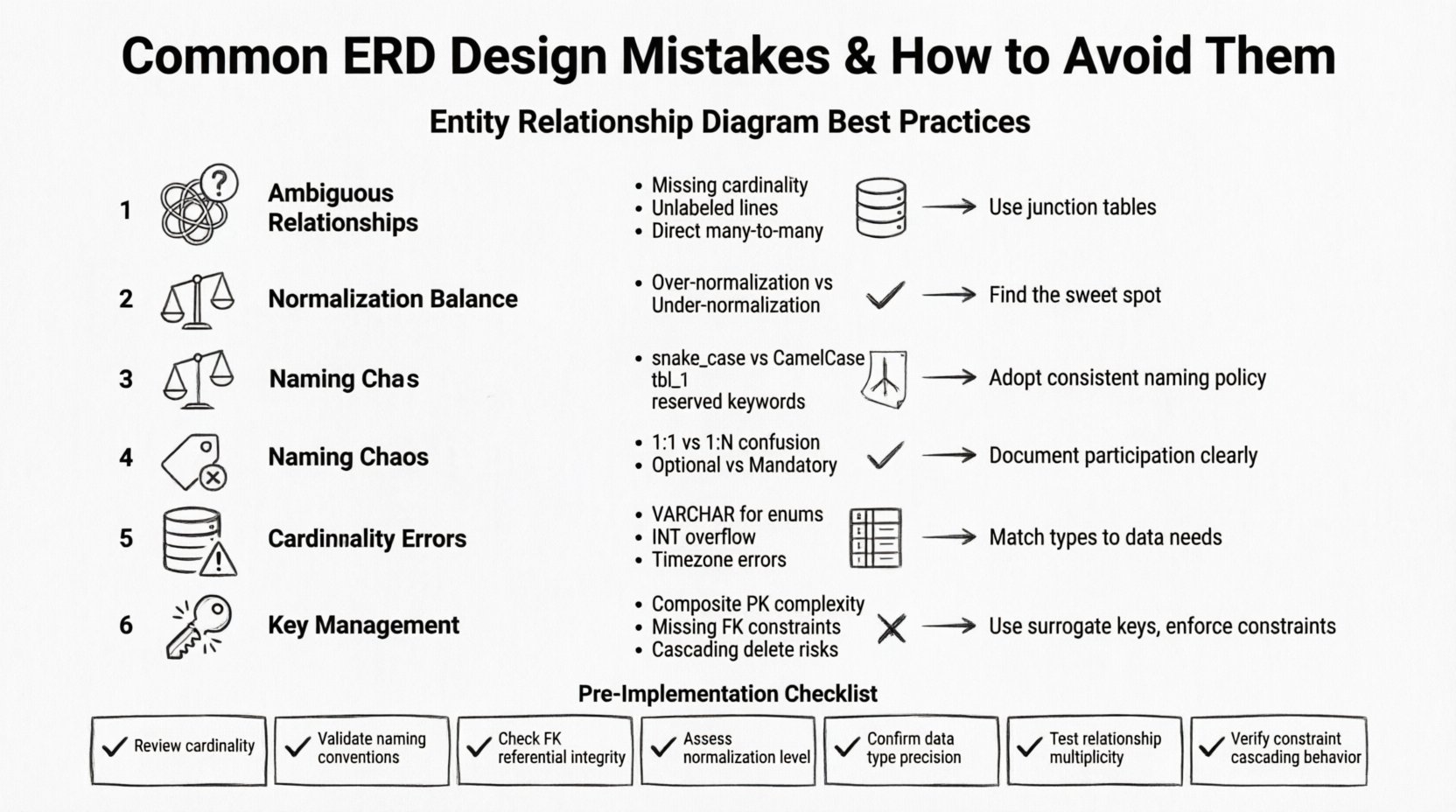
1. Ambiguous Relationship Definitions 🤔
One of the most prevalent issues involves unclear or undefined relationships between entities. A relationship defines how data in one table connects to data in another. If this connection is vague, the database engine cannot enforce referential integrity, and application logic becomes brittle.
- Missing Cardinality: Failing to specify whether a relationship is one-to-one, one-to-many, or many-to-many creates ambiguity. For example, does a single customer own multiple orders, or is there a limit of one? Without clear cardinality, developers make assumptions that may not align with business rules.
- Unlabeled Lines: ERD lines connecting entities should always be labeled with the nature of the relationship. A bare line provides no context regarding the volume of data or the direction of the relationship.
- Incorrect Many-to-Many Handling: A common error is representing a many-to-many relationship directly between two tables. Relational databases do not support this natively without an intermediary table. This results in a loss of data granularity and difficulty in tracking intermediate states.
Best Practices for Relationships
To resolve ambiguity, ensure every connecting line specifies the minimum and maximum participation. Use a junction table for many-to-many scenarios. This intermediate table holds the primary keys of both parent entities, creating two distinct one-to-many relationships. This structure allows for additional attributes on the relationship itself, such as timestamps or status flags.
2. Normalization Balance Issues ⚖️
Normalization is the process of organizing data to reduce redundancy and improve integrity. However, applying normalization rules rigidly without considering the operational context can lead to performance degradation. Conversely, ignoring normalization entirely creates anomalies.
- Over-Normalization: Creating too many tables forces complex joins to retrieve basic information. If a query requires joining ten tables to fetch a single user profile, read performance will suffer significantly. This often happens when designers normalize every attribute into its own table to satisfy Third Normal Form (3NF) without practical validation.
- Under-Normalization: Storing redundant data, such as saving a customer address in every order table, leads to update anomalies. If a customer moves, you must update every single record associated with them. Failure to do so results in inconsistent data states.
- Ignoring Denormalization for Read-Heavy Workloads: In scenarios where reads vastly outnumber writes, denormalization can be a valid strategy. Caching repeated data can reduce join overhead, provided there is a mechanism to keep the data in sync.
3. Naming Convention Chaos 🏷️
Consistency in naming entities, attributes, and relationships is vital for maintainability. A schema where some tables use snake_case and others use CamelCase confuses developers and increases the likelihood of syntax errors during query writing.
- Inconsistent Case Usage: Mixing
user_idanduserIdin the same schema makes it difficult to write automated scripts or ORMs (Object-Relational Mappers) that rely on convention. - Non-Descriptive Names: Using names like
tbl_1orfield_aprovides zero semantic meaning. Future maintainers will struggle to understand the purpose of a table without external documentation. - Reserved Keywords: Naming a column
orderorgroupcan conflict with SQL syntax. These names require special escaping in queries and are prone to breaking when SQL dialects are updated.
Standardizing Naming
Adopt a strict policy for naming. Tables should be plural nouns (e.g., customers), and columns should be singular nouns describing the data (e.g., first_name). Primary keys should follow a convention like _id or _pk. Foreign keys should reflect the referenced table name, such as customer_id.
4. Cardinality Misinterpretation 📉
Cardinality defines the numerical relationship between records in two tables. Misinterpreting this fundamental concept leads to data integrity violations and logical errors in application queries.
- Confusing 1:1 with 1:N: Designing a one-to-one relationship when the business logic supports multiple records creates artificial limits. For instance, limiting a user to only one profile picture when they should be able to upload a gallery.
- Ignoring Optionality: Determining if a relationship is mandatory or optional is crucial. If a table requires a foreign key, the relationship is mandatory. If the foreign key column allows NULL values, the relationship is optional. Failing to document this leads to bugs where the application attempts to insert records without valid references.
- Directional Confusion: Relationships are directional. A
userhas manyposts, but apostbelongs to oneuser. Flipping this direction in the schema breaks the logic of cascading deletes or updates.
5. Data Type Inconsistencies 📊
Choosing the wrong data type for a column affects storage efficiency, query speed, and data accuracy. This is often overlooked during the initial design phase.
- Using VARCHAR for Fixed Data: Storing country codes or status flags in a
VARCHARfield wastes storage and slows down comparisons. An integer or a specific enumeration type is more efficient for fixed sets of values. - Integer Overflow Risks: Using a standard
INTfor financial transactions or user IDs that may grow beyond 2 billion can cause silent failures. UsingBIGINTorDECIMALfor monetary values prevents rounding errors associated with floating-point types. - Timestamp Precision: Using
DATETIMEwithout considering timezone storage can lead to errors when the application serves users in different regions. Storing timestamps in UTC and converting at the application layer is a safer pattern.
6. Key Management Errors 🔑
Primary keys and foreign keys are the backbone of relational integrity. Errors in defining these keys compromise the entire database structure.
- Composite Keys for Simplicity: While composite keys are valid, using them as primary keys can make foreign key relationships complex and harder to index. A surrogate key (like a UUID or auto-increment integer) often simplifies application logic.
- Missing Foreign Key Constraints: Defining the column in the child table without adding a physical constraint allows orphaned records to exist. This breaks referential integrity and makes data cleanup difficult.
- Cascading Delete Risks: Configuring cascading deletes without understanding the business impact can result in accidental data loss. Deleting a parent record should not always delete all related child records, especially if those records are part of a historical audit trail.
Comparison of Common Errors and Solutions
| Mistake | Consequence | Corrective Action |
|---|---|---|
| Many-to-Many Direct Link | Cannot store relationship attributes | Create a junction table with two foreign keys |
| Redundant Data Storage | Update anomalies and inconsistency | Normalize to 3NF and use foreign keys |
| Non-Descriptive Column Names | High maintenance cost and confusion | Implement strict naming conventions |
| Missing Indexes on FK | Slow join performance | Add indexes on all foreign key columns |
| Incorrect Data Types | Storage bloat or calculation errors | Match types to data characteristics (e.g., INT vs VARCHAR) |
7. Pre-Implementation Review Checklist ✅
Before deploying a schema, perform a rigorous review to catch design flaws. This checklist covers the critical areas identified above.
- Verify Entity Names: Are all tables named consistently? Do they represent distinct concepts?
- Check Cardinality: Do all relationships accurately reflect business rules? Is the minimum and maximum participation clear?
- Validate Keys: Is there a unique identifier for every row? Do foreign keys exist for all relationships?
- Review Data Types: Do column types support the expected range and precision of the data?
- Assess Normalization: Is the schema balanced between redundancy and join complexity? Does it meet the requirements of the application?
- Security Check: Are sensitive columns marked appropriately? Is there a plan for data encryption at rest?
- Scalability: Can the schema handle the projected growth in data volume? Are partitioning strategies considered for large tables?
8. Documentation and Evolution 📝
An ERD is not a static document. Business requirements change, and the schema must evolve with them. Maintaining documentation alongside the diagram ensures that the design intent is preserved over time.
- Version Control: Store ERD files in a version control system alongside application code. This allows you to track changes and roll back if a design decision proves problematic.
- Change Logs: Document why changes were made. Understanding the reasoning behind a schema modification helps future developers avoid repeating past mistakes.
- Visual Clarity: Ensure the diagram remains readable as it grows. Group related tables together and use consistent line styles to indicate relationship types.
9. Performance Implications of Design Choices ⚡
The structure of your ERD directly impacts how the database engine retrieves and writes data. Poor design choices create hidden performance costs that become apparent only under load.
- Join Complexity: Deeply normalized schemas require multiple joins. If these joins are not optimized with proper indexing, query execution times can increase linearly with data growth.
- Write Throughput: High normalization can slow down write operations because multiple tables must be updated simultaneously to maintain consistency. In high-write environments, consider a hybrid approach.
- Indexing Strategy: The ERD defines the data structure, but the indexes define the access paths. Design the schema with indexing in mind. Avoid creating indexes on columns that are rarely queried, as they consume disk space and slow down writes.
10. Handling Complex Business Logic 🧠
Some business rules are too complex to be enforced solely through database constraints. In these cases, the ERD must accommodate application-level logic.
- State Machines: For entities with complex lifecycle states (e.g., an order moving from
pendingtoshipped), ensure the database schema supports the necessary state transitions without forcing validation into the application layer. - Soft Deletes: Instead of physically deleting records, add a
is_deletedflag. This preserves historical data for auditing while keeping the active view clean. - Temporal Data: If you need to track history (e.g., price changes over time), design a history table linked to the main entity. This prevents the main table from becoming bloated with historical rows.
Final Thoughts on Schema Integrity 🏗️
Building a reliable database starts with a thoughtful Entity Relationship Diagram. By avoiding common pitfalls such as ambiguous relationships, normalization errors, and poor naming conventions, you create a foundation that supports long-term growth. The effort invested in a clean design pays dividends in reduced maintenance, faster queries, and fewer data integrity issues. Treat the ERD as a living document that requires regular review and adherence to established standards. This disciplined approach ensures that your data architecture remains robust, scalable, and aligned with business needs.
Remember that there is no one-size-fits-all solution. Each system has unique requirements. Evaluate every design decision against the specific constraints of your project, including expected data volume, read/write ratios, and consistency requirements. When in doubt, prioritize data integrity and clarity over premature optimization. A well-designed schema is the difference between a system that works and one that endures.
Related posts:
 Entity-Relationship Diagram Fundamentals: Visual Guide for Beginners
 ERD Guide: Entities, Attributes, Relationships: Core Concepts Every Developer Should Know
 ERD Guide: Cardinality and Participation Constraints: Real-World Examples Explained
 ERD Guide: Weak vs Strong Entities: Practical Guidelines for Database Modeling