


🔍 Understanding the Scope of Package Diagrams
UML package diagrams serve as the architectural backbone for organizing complex software systems. They allow modelers to group related elements into manageable units known as packages. While the concept of a package is straightforward—acting as a namespace—the interactions between these packages often introduce ambiguity. Engineers frequently struggle with distinguishing between different relationship types, visibility rules, and import mechanisms.
This guide addresses the most common questions regarding package interactions. We will explore the semantics behind dependencies, the implications of visibility modifiers, and how to maintain a clean model structure without unnecessary coupling. By clarifying these interactions, you ensure that the system architecture remains maintainable and scalable over time.
❓ Frequently Asked Questions on Package Dependencies
Dependencies are the most common interaction found in package diagrams. They represent a usage relationship where one package relies on the elements defined within another. However, the notation and implications vary based on the context.
Q1: What is the specific meaning of a dependency arrow?
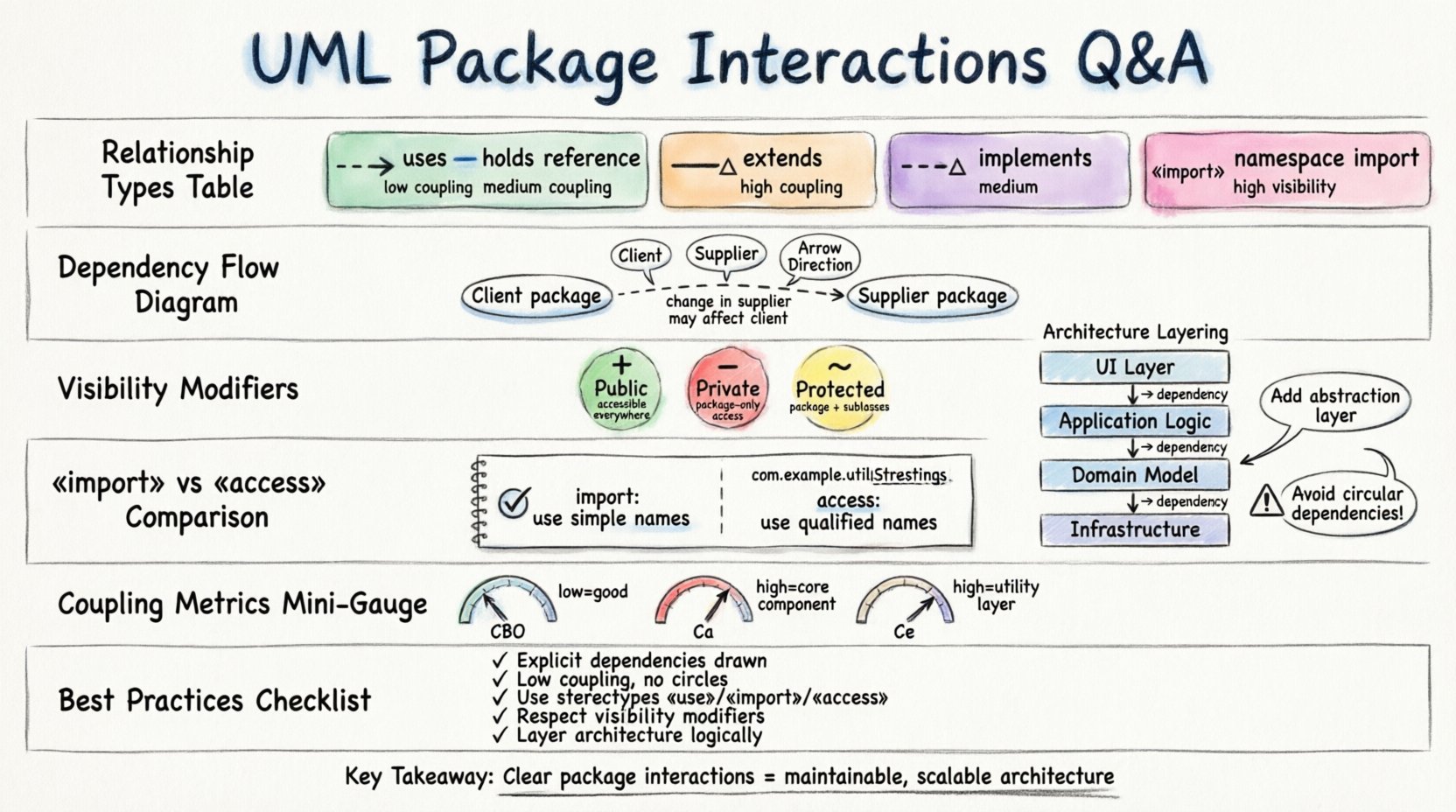
A dependency arrow indicates that a change in the specification of the supplier package may affect the client package. It is a weak relationship, often described as “uses.” Unlike associations, dependencies do not imply a structural link that persists throughout the runtime of the system. They simply indicate a need for access to a definition.
- Client: The package using the element.
- Supplier: The package providing the element.
- Arrow Direction: Points from the client to the supplier.
Q2: How does a dependency differ from an association?
Confusion often arises because both involve connections between elements. The distinction lies in the lifecycle and strength of the link.
- Dependency: Temporary usage. The client needs the supplier to compile or function, but does not hold a reference to it as an attribute. Example: A class in Package A uses a utility function in Package B.
- Association: Structural relationship. The client holds a reference to the supplier as a member variable or attribute. Example: A
Orderpackage contains aCustomerpackage reference.
Q3: When should I use a stereotype for dependencies?
Stereotypes provide semantic clarity to the relationship. Standard UML allows for custom stereotypes to define the nature of the interaction. Common stereotypes include:
- «use»: Indicates a standard dependency relationship.
- «import»: Indicates that elements from the supplier package are visible in the client namespace without qualification.
- «access»: Indicates that elements are visible but not imported into the namespace.
Q4: Can circular dependencies exist in a valid model?
Technically, yes, but they are generally considered a design smell. A circular dependency occurs when Package A depends on Package B, and Package B depends on Package A. This creates a tight coupling that makes refactoring difficult and testing hard. In many build systems, circular dependencies prevent successful compilation.
To resolve this, consider introducing an intermediate package that defines shared interfaces or abstractions. This breaks the cycle by forcing both original packages to depend on the abstraction rather than each other directly.
🔗 Relationship Types and Notation Comparison
Understanding the visual notation is critical for reading and creating accurate diagrams. The following table summarizes the key relationship types used between packages.
| Relationship Type | Notation | Meaning | Strength of Coupling |
|---|---|---|---|
| Dependency | Dashed line with open arrow | Client uses Supplier definition | Low |
| Association | Solid line (often with label) | Structural connection; holds reference | Medium |
| Generalization (Inheritance) | Solid line with hollow triangle | Package extends another package’s structure | High |
| Realization | Dashed line with hollow triangle | Package implements an interface defined elsewhere | Medium |
| Import | Dashed line with hollow triangle or «import» | Brings external names into local namespace | High (Visibility) |
🛡️ Visibility and Access Control Rules
Visibility determines which elements within a package are accessible to other packages. Misunderstanding these rules often leads to “namespace pollution” or unexpected compilation errors.
Public Visibility (+)
Elements marked as public are accessible by any package in the system. This is the default for most modeling tools. While convenient, overusing public visibility reduces encapsulation.
- Any package can reference a public element.
- Recommended for interfaces and API definitions.
Private Visibility (-)
Elements marked as private are only accessible within the package they are defined in. Other packages cannot see or use them directly.
- Prevents external modification of internal logic.
- Used for helper functions or implementation details.
Protected Visibility (~)
Protected elements are accessible within the package and any package that generalizes (extends) the current package. This is less common in package diagrams compared to class diagrams but still applies to package structures.
Q5: What is the difference between «access» and «import»?
This is a frequent source of confusion. Both allow visibility, but the namespace behavior differs.
- «import»: The names from the supplier package are added to the client package’s namespace. You can refer to a class in the supplier package by its simple name without a prefix.
- «access»: The names are visible, but you must use the qualified name (prefix) to access them. The namespace of the client package remains unchanged.
Using import reduces the verbosity of code but increases the risk of name clashes. Using access maintains strict namespace separation.
🏗️ Organizing Large Models
As systems grow, the number of packages increases. Managing these interactions requires a strategy that balances organization with flexibility.
Layering and Separation of Concerns
Organizing packages by architectural layer is a standard practice. This ensures that dependencies flow in one direction, typically from higher layers to lower layers.
- UI Layer: Depends on Application Logic.
- Application Logic: Depends on Domain Model.
- Domain Model: Depends on Infrastructure.
Avoid allowing the Infrastructure layer to depend on the UI layer. This creates a dependency inversion that complicates testing and deployment.
Vertical Slicing
Instead of horizontal layers, some architectures use vertical slices. Each slice contains all the packages necessary to deliver a specific feature.
- Feature Package A: Contains UI, Logic, and Data for Feature A.
- Feature Package B: Contains UI, Logic, and Data for Feature B.
This approach supports independent deployment. However, it can lead to duplicate code if shared functionality is not extracted into a common package.
Q6: How do I handle shared utilities?
Create a dedicated package for common functionality, such as logging, string manipulation, or mathematical calculations. Other packages should depend on this Common package.
- Keep this package minimal and stable.
- Do not add business logic to the Common package.
- Ensure the Common package has no dependencies on other business packages to avoid circularity.
⚠️ Common Errors and Corrections
Even experienced modelers make mistakes. Recognizing these patterns early saves significant rework time.
Error 1: Over-Granularity
Creating too many small packages can lead to a spaghetti diagram where every package depends on almost every other package. If you find yourself creating a package for a single class, reconsider the structure.
- Correction: Merge packages that serve a single cohesive purpose. Group related classes together.
Error 2: Implicit Dependencies
Modelers sometimes omit dependency arrows because they assume the relationship is obvious. UML requires explicit notation to avoid ambiguity.
- Correction: Every usage relationship should be explicitly drawn. If Package A uses an element in Package B, draw the dependency.
Error 3: Mixing Implementation and Interface
It is common to place both the interface definition and the concrete implementation in the same package. This can make it difficult to swap implementations later.
- Correction: Separate interfaces into an API package and implementations into an Impl package. The API package should have no dependencies on the Impl package.
📊 Analyzing Coupling Metrics
Package interactions can be analyzed using metrics to assess the health of the model. High coupling indicates fragility, while high cohesion indicates robustness.
Coupling Between Objects (CBO)
Although often applied to classes, this concept applies to packages. Measure the number of other packages a given package depends on.
- Low CBO: The package is independent and easy to test.
- High CBO: The package is fragile and changes in other packages affect it significantly.
afferent Coupling (Ca)
This measures how many packages depend on the current package. A high afferent coupling indicates that the package is a core component. Changing it requires careful consideration.
efferent Coupling (Ce)
This measures how many packages the current package depends on. A high efferent coupling indicates that the package relies heavily on others. This is often a sign of a utility layer.
🚀 Best Practices for Maintenance
Maintaining a clean model requires discipline. Here are practical steps to ensure package interactions remain clear.
1. Define Naming Conventions
Consistent naming helps developers understand relationships without reading the code. Use prefixes or suffixes to denote package roles.
- core: Fundamental domain logic.
- service: Business logic and orchestration.
- data: Persistence and database access.
2. Document the Intent
Use notes or documentation fields to explain why a dependency exists. Not all dependencies are code-level; some are architectural requirements.
3. Regular Refactoring
As requirements change, dependencies shift. Schedule periodic reviews of the package diagram to identify:
- Unused dependencies.
- Circular references.
- Overlapping responsibilities between packages.
4. Enforce Build Rules
Use build tools to enforce the dependency structure defined in the model. If the model says Package A depends on Package B, the build script should reflect this. If the code violates this, the build should fail. This ensures the documentation matches the reality.
🧩 Advanced Interaction Scenarios
Sometimes, standard relationships do not capture the complexity of the system. Advanced scenarios require careful modeling.
Q7: How do I model a framework integration?
When integrating with an external framework, you often import packages from that framework. You should treat the framework as a supplier package.
- Use the «import» stereotype to bring in necessary classes.
- Keep your business logic isolated from the framework’s internal packages.
- Document the version of the framework to track compatibility.
Q8: What about versioning across packages?
When packages evolve, version numbers become relevant. You can denote versioning in the package name or as a property.
- Version 1: Initial release.
- Version 2: Backward compatible changes.
- Version 3: Breaking changes.
Dependencies should specify the minimum required version. This prevents runtime errors when upgrading packages.
📝 Summary of Key Takeaways
Package interactions form the structural integrity of a UML model. By understanding the nuances between dependencies, associations, and visibility rules, you can create diagrams that accurately reflect the system’s design.
Key points to remember:
- Explicit is better than implicit: Always draw the dependency arrow.
- Keep coupling low: Avoid circular dependencies and excessive cross-package usage.
- Use stereotypes: Clarify the type of interaction with labels like
«import»or«access». - Respect visibility: Use public, private, and protected modifiers to control access.
- Layer your architecture: Ensure dependencies flow logically from UI to Data.
Adhering to these principles leads to a model that is not just a visual aid, but a functional blueprint for development. It reduces ambiguity for the engineering team and supports long-term system evolution without the burden of technical debt.